
1. Pengenalan
This manual provides comprehensive instructions for the FTDI TTL-232R-3V3 USB to UART cable. This cable offers a simple and reliable solution for connecting devices with +3.3V TTL level UART signals to a computer via a USB port. It is designed for engineers, hobbyists, and developers working with embedded systems, microcontrollers, and other serial communication applications.
2. Maklumat Keselamatan
- Pastikan voltage levels (+3.3V) are maintained to prevent damage to connected devices.
- Jangan dedahkan kabel kepada suhu yang melampau, lembapan atau persekitaran yang menghakis.
- Avoid bending or twisting the cable excessively, as this may damage internal wires.
- Disconnect the cable from both the computer and the target device before performing any maintenance or modifications.
3. Kandungan Pakej
Sahkan bahawa semua item terdapat dalam pakej anda:
- 1 x FTDI TTL-232R-3V3 USB to UART Cable
- (Optional: Driver CD or link to driver download, if applicable. Refer to manufacturer's website for latest drivers.)
4. Produk Lebihview
The FTDI TTL-232R-3V3 is a USB to serial UART (Universal Asynchronous Receiver/Transmitter) converter cable. It provides a USB-A connector on one end and a 6-pin SIL (Single In-Line) connector with 0.1" pitch on the other, offering +3.3V TTL level signals. The cable integrates an FT232R IC, handling all USB signaling and protocols.
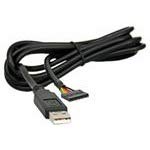
Rajah 1: FTDI TTL-232R-3V3 USB to UART Cable. This image shows the black USB-A connector on one end and the 6-pin header on the other, with the cable coiled.
4.1 Penerangan Pinout
The 6-pin SIL connector provides the following signals:
| Pin | isyarat | Penerangan |
|---|---|---|
| 1 | GND | tanah |
| 2 | CTS | Clear To Send (Input to FT232R) |
| 3 | VCC | +5V power output from USB |
| 4 | TXD | Transmit Data (Output from FT232R) |
| 5 | RXD | Receive Data (Input to FT232R) |
| 6 | RTS | Request To Send (Output from FT232R) |
Note: The VCC pin (Pin 3) provides +5V from the USB port, which can be used to power external circuitry up to 75mA. The data signals (TXD, RXD, CTS, RTS) operate at +3.3V TTL levels.
5. Persediaan
5.1 Pemasangan Pemandu
The FTDI TTL-232R-3V3 cable requires specific drivers to function correctly on your computer. These drivers are often automatically installed by modern operating systems (Windows 10/11, macOS, Linux) when the cable is first connected. If automatic installation fails, or for older operating systems, manual installation may be necessary.
- Muat Turun Pemacu: Visit the official FTDI webtapak (www.ftdichip.com/Drivers/VCP.htm) to download the latest Virtual COM Port (VCP) drivers for your operating system.
- Pasang Pemacu: Follow the instructions provided with the downloaded driver package. This typically involves running an executable file or following on-screen prompts.
- Sambungkan Kabel: Plug the USB-A end of the TTL-223R-3V3 cable into an available USB port on your computer.
- Sahkan Pemasangan:
- Windows: Open Device Manager (search for "Device Manager" in the Start menu). Look under "Ports (COM & LPT)" for an entry like "USB Serial Port (COMx)", where 'x' is a number.
- macOS: Open Terminal and type
ls /dev/tty.usbserial*. You should see an entry corresponding to the cable. - Linux: Open Terminal and type
ls /dev/ttyUSB*. You should see an entry corresponding to the cable.
5.2 Connecting to a Target Device
Connect the 6-pin SIL connector to your target device's UART interface. Ensure correct pin alignment:
- Connect the cable's TXD (Pin 4) to the target device's RXD.
- Connect the cable's RXD (Pin 5) to the target device's TXD.
- Connect the cable's GND (Pin 1) to the target device's GND.
- If hardware flow control is used, connect CTS (Pin 2) to target's RTS dan RTS (Pin 6) to target's CTS.
- If powering the target device from the cable, connect the cable's VCC (Pin 3) to the target device's +5V input (ensure the target device can accept 5V and its current draw does not exceed 75mA).
Awas: Always double-check the pinout of your target device to avoid damage due to incorrect connections.
6. Arahan Operasi
Once the drivers are installed and the cable is connected to your target device, you can use a serial terminal program to communicate.
- Open Terminal Program: Use a serial terminal application such as PuTTY (Windows), CoolTerm (macOS/Windows), or Minicom/screen (Linux).
- Pilih Port COM: In the terminal program settings, select the COM port number identified during driver installation (e.g., COM3, /dev/ttyUSB0).
- Konfigurasikan Tetapan Siri:
- Kadar baud: Set to match your target device's baud rate (e.g., 9600, 115200, up to 3MBaud).
- Bit Data: Biasanya 8
- Pariti: tiada
- Hentikan Bit: Biasanya 1
- Kawalan Aliran: None, or Hardware (RTS/CTS) if enabled on your target device.
- Wujudkan Sambungan: Open the serial connection in your terminal program. You should now be able to send and receive data from your target device.
7. Penyelenggaraan
- Pembersihan: Gunakan kain lembut dan kering untuk membersihkan kabel dan penyambung. Jangan gunakan pembersih cecair atau pelarut.
- Storan: Store the cable in a cool, dry place, away from direct sunlight and extreme temperatures. Avoid tangling the cable.
- Pemeriksaan: Periodically inspect the cable for any signs of damage, such as frayed wires, bent pins, or cracked insulation. Discontinue use if damage is found.
8. Penyelesaian masalah
8.1 Isu dan Penyelesaian Biasa
- No COM Port Detected:
- Ensure drivers are correctly installed (refer to Section 5.1).
- Cuba port USB lain pada komputer anda.
- Mulakan semula komputer anda.
- Check the cable for physical damage.
- Tiada Penghantaran/Penerimaan Data:
- Verify the pinout connections between the cable and your target device (TXD to RXD, RXD to TXD, GND to GND).
- Confirm that the serial settings (baud rate, data bits, parity, stop bits, flow control) in your terminal program match those of your target device.
- Pastikan peranti sasaran dihidupkan dan berfungsi dengan betul.
- Check if the target device's UART is enabled and configured.
- Sambungan Terputus-putus:
- Check for loose connections at both the USB and 6-pin ends.
- Avoid electromagnetic interference from other devices.
- Ensure the cable is not excessively bent or stressed.
9. Spesifikasi
| Nombor Bahagian | TTL-232R-3V3 |
| Kelajuan USB | Kelajuan Penuh (12Mbps) |
| UART Signal Levels | +3.3V TTL |
| Kadar Data | Up to 3 MBaud |
| Penyambung USB | Jenis A |
| Penyambung Tamat | 6 pin SIL, 0.1" pitch |
| Panjang Kabel | 1.8m |
| Butiran Kabel | 6 core, 5mm UL2464 24 AWG |
| I/O Voltage | 3.3V |
| Max Power Output (VCC) | +5V / 75mA |
| Internal IC | FT232R |
| Suhu Operasi | -40°C hingga +85°C |
| Sistem Operasi yang Serasi | Windows, macOS, Linux, Android |
10. Waranti dan Sokongan
For warranty information and technical support, please refer to the official FTDI website or contact your point of purchase. FTDI provides extensive documentation and support resources for their products.
- FTDI Webtapak: www.ftdihip.com
- Sokongan Pemandu: www.ftdichip.com/Drivers/VCP.htm