
1. Pengenalan
This manual provides detailed instructions for the installation, operation, and maintenance of your Active Pixel A9 Triple Lens WiFi Outdoor Security Camera. Please read this manual thoroughly before using the product to ensure proper function and safety. This camera is designed for outdoor surveillance, offering a wide field of view, advanced detection features, and robust weather resistance.
2. Kandungan Pakej
Sahkan bahawa semua item terdapat dalam pakej anda:
- 1x Active Pixel A9 Camera
- 1x Pendirian Pemasangan
- 1x Penyesuai Kuasa
- 1x Manual Pengguna (dokumen ini)
- 1x Screw Kit for installation
3. Ciri-ciri Produk Berakhirview
The Active Pixel A9 camera offers a range of features for comprehensive outdoor security:
- Triple Lens Ultra-Wide 4MP Clarity: Three lenses provide a dramatically wider area coverage with sharper details and expanded angle monitoring.
- Penglihatan Malam Warna Penuh: Equipped with 8 high-power LEDs for clear, full-color video even in complete darkness.
- 360° PTZ Surveillance: Remotely pan, tilt, and zoom the camera to monitor every corner without blind spots.
- Smart Motion Tracking & Human Detection: AI-powered detection identifies human movement accurately and automatically tracks moving subjects.
- WiFi Enabled with Two-Way Audio: Stable 2.4GHz WiFi connectivity with a built-in microphone and speaker for remote communication.
- Waterproof Outdoor Build (IP66): Designed to withstand rain, dust, heat, and harsh outdoor conditions.
- Pilihan Storan Dwi: Supports local SD card storage (up to 128GB) and secure cloud backup.
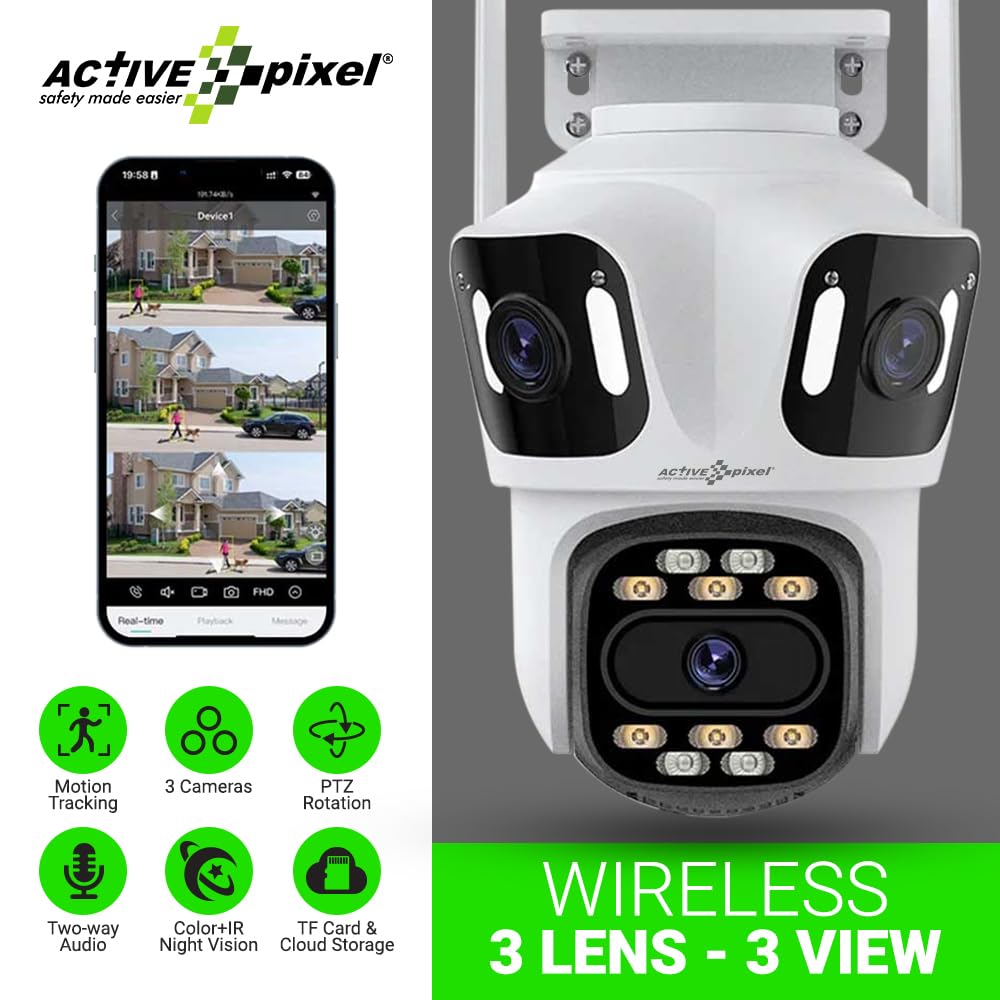
Figure 3.1: Active Pixel A9 Camera highlighting key features and mobile app view.

Figure 3.2: Illustration of the 3-Lens, 3-Screen panoramic viewkeupayaan.

Figure 3.3: The camera's weatherproof design ensures durability in various conditions.
4. Arahan Persediaan
4.1 Pemasangan Fizikal
- Pilih Lokasi: Pilih lokasi luar yang menyediakan yang diingini viewing angle and is within range of your WiFi network. Ensure the camera is mounted securely and has access to a power outlet.
- Lekapkan Kamera: Use the provided screw kit to securely attach the mounting stand to a wall or ceiling. Attach the camera to the stand. Refer to the camera dimensions for proper placement.
- Sambungkan Kuasa: Plug the power adapter into the camera and then into a suitable power outlet. The camera will power on and initiate its startup sequence.

Figure 4.1: Camera dimensions for installation planning.
4.2 Muat Turun Apl dan Pembuatan Akaun
- Muat turun Apl: Cari untuk the recommended mobile application (e.g., "ICSEE" or as specified in the camera packaging) on your smartphone's app store (Google Play Store or Apple App Store).
- Buat Akaun: Open the app and follow the on-screen instructions to register a new account.
4.3 Berpasangan Kamera
The camera supports both wireless (WiFi) and wired connections:
- Sambungan Wayarles:
- Pastikan telefon anda disambungkan ke rangkaian WiFi 2.4GHz.
- In the app, select "Add Device" and choose the wireless connection option.
- Follow the app's prompts to connect the camera to your WiFi network. This usually involves scanning a QR code displayed on your phone with the camera or entering WiFi credentials.
- Sambungan Berwayar (Pilihan):
- Connect an Ethernet cable from your router to the camera's LAN port.
- In the app, select "Add Device" and choose the wired connection option. The camera should be automatically detected.

Figure 4.2: Connection methods for the Active Pixel A9 camera.
5. Arahan Operasi
5.1 Langsung View dan Pemantauan Berbilang Skrin
Setelah disambungkan, buka aplikasi untuk view hidup footage from your camera. The triple-lens design allows for multi-screen viewing within the app, providing a comprehensive panoramic perspective.
Figure 5.1: Multi-screen live view from the triple-lens camera.
5.2 Kawalan PTZ
Use the directional controls within the app to remotely pan (horizontal rotation), tilt (vertical rotation), and zoom the camera to adjust your viewing area. This allows for dynamic monitoring of your surroundings.
5.3 Audio Dua Hala
Tap the microphone icon in the app to speak through the camera's speaker, and listen to audio from the camera's microphone. This feature enables real-time communication with visitors or deterrence of intruders.
5.4 Mod Penglihatan Malam
The camera automatically switches to night vision in low-light conditions. The 8 high-power LEDs provide full-color night vision, ensuring clear visibility after dark.
5.5 Pengesanan dan Penjejakan Gerakan
Enable motion detection in the app settings. The camera will send alerts to your phone when motion is detected. With human detection enabled, the camera can distinguish human shapes from other movements, reducing false alarms. The smart tracking feature will automatically follow detected human subjects.

Figure 5.2: Human detection and automatic tracking in action.
5.6 Rakaman dan Main semula
The camera supports two recording methods:
- Storan Kad SD: Insert a Micro SD card (up to 128GB, not included) into the designated slot on the camera. Recordings will be saved locally.
- Storan Awan: Subscribe to the cloud storage service through the app for secure off-site backup of your recordings.
Akses foo yang dirakamtage via the playback function in the mobile app.

Figure 5.3: Dual storage options: TF card and cloud.
6. Penyelenggaraan
6.1 Membersihkan Kamera
Bersihkan kanta dan perumah kamera secara berkala dengan lembut, damp cloth. Do not use harsh chemicals or abrasive cleaners, as these can damage the lens or finish. Ensure the camera is powered off before cleaning.
6.2 Kemas Kini Perisian Tegar
Check the mobile app regularly for available firmware updates. Keeping your camera's firmware up-to-date ensures optimal performance, security, and access to new features. Follow the in-app instructions for firmware updates.
6.3 Pengurusan Kad SD
If using an SD card, it is recommended to format it periodically through the camera's settings in the app to maintain optimal recording performance. Replace the SD card if it shows signs of corruption or failure.
7. Penyelesaian masalah
- Kamera tidak bersambung ke WiFi:
- Ensure your WiFi network is 2.4GHz. The camera does not support 5GHz networks.
- Periksa kekuatan isyarat WiFi di lokasi kamera.
- Sahkan kata laluan WiFi yang dimasukkan dalam aplikasi adalah betul.
- Mulakan semula penghala anda dan kamera.
- Kualiti imej yang lemah:
- Bersihkan lensa kamera.
- Ensure adequate lighting, especially for night vision.
- Semak kelajuan sambungan internet anda.
- Motion detection not working or too many false alarms:
- Laraskan kepekaan pengesanan gerakan dalam aplikasi.
- Ensure human detection is enabled if you wish to filter out non-human movements.
- Define specific detection zones to exclude areas with constant, irrelevant movement (e.g., busy roads).
- Isu audio dua hala:
- Semak kebenaran mikrofon dan pembesar suara untuk apl pada telefon anda.
- Ensure volume levels are adjusted correctly on both the app and your phone.
- Verify network stability.
8. Spesifikasi
| Ciri | Perincian |
|---|---|
| Jenama | Active Pixel |
| Nama Model | WIFI Triple LENS |
| Nombor Model | A9 |
| Penggunaan yang Disyorkan | Keselamatan Luar |
| Persekitaran Penggunaan | Luar |
| Teknologi Ketersambungan | Tanpa Wayar (Wi-Fi 2.4GHz) |
| Ciri Khas | Triple Lens, Full-Color Night Vision, 360° PTZ, Motion Tracking, Human Detection, Two-Way Audio |
| Jenis Pemasangan | Menonjol |
| Resolusi Tangkapan Video | 1536P |
| Format Tangkapan Video | 4MP |
| Sumber Kuasa | Adapter (No Batteries Required) |
| Dimensi Item (L x W x H) | 15 x 10 x 8 Sentimeter |
| Berat Barang | 400 Gram |
| Kandungan Pakej | 1x Camera, 1x Stand, 1x Adapter, 1x Manual, 1x Screw Kit |
9. Waranti dan Sokongan
9.1 Maklumat Waranti
This product may be eligible for an extended warranty. For details on warranty coverage and terms, please refer to any warranty cards included in your package or contact customer support. An optional 1-Year Extended Warranty by Onsitego may be available for purchase.
9.2 Sokongan Pelanggan
For technical assistance, troubleshooting, or any product-related inquiries, please contact Active Pixel customer care:
- telefon: 9321367328
- Pengilang / Pengimport: Glorious Digital Solution Pvt Ltd, Mumbai, India.