
1. Pengenalan
Thank you for choosing the Sharp 50FQ5EG 50-inch QLED 4K Google TV. This manual provides essential information for setting up, operating, maintaining, and troubleshooting your new television. Please read it thoroughly before use and keep it for future reference.
Ciri-ciri Utama:
- 50-inch QLED 4K Ultra HD Display with 144 Hz Refresh Rate
- Google TV Operating System with Google Assistant and Chromecast built-in
- Harman/Kardon Hybrid Speaker System with Dolby Atmos
- Dolby Vision IQ, HDR10, HLG Support
- Multiple Connectivity Options: 4 x HDMI 2.1, 2 x USB, Bluetooth 5.3, Wi-Fi, Ethernet
- Frameless Aluminum Design
Komponen yang Disertakan:
- Sharp 50FQ5EG Television
- Pedestal Stand
- Alat Kawalan Jauh (memerlukan 2 bateri AAA, disertakan)
- Manual Arahan
- Kabel Kuasa
2. Maklumat Keselamatan
Untuk memastikan operasi yang selamat dan mengelakkan kerosakan, sila patuhi langkah berjaga-jaga keselamatan berikut:
- Bekalan Kuasa: Connect the TV only to an AC 220V, 50Hz power outlet. Do not overload power outlets.
- Pengudaraan: Pastikan pengudaraan yang mencukupi di sekeliling TV. Jangan sekat bukaan pengudaraan.
- Cecair dan Kelembapan: Do not expose the TV to rain, moisture, or dripping/splashing liquids. Do not place objects filled with liquids on the TV.
- Sumber Haba: Jauhkan TV daripada sumber haba seperti radiator, daftar haba, dapur atau peralatan penghasil haba yang lain.
- Pembersihan: Cabut plag TV dari salur keluar dinding sebelum membersihkan. Gunakan kain lembut dan kering. Jangan gunakan pembersih cecair atau pembersih aerosol.
- Servis: Jangan cuba servis produk ini sendiri. Rujuk semua perkhidmatan kepada pegawai perkhidmatan yang berkelayakan.
- Kanak-kanak: Supervise children to ensure they do not play with the TV or remote control.
3. Persediaan
3.1 Membongkar
Carefully remove the TV and all accessories from the packaging. Retain the packaging materials for future transport or servicing.
3.2 Attaching the Pedestal Stand
Jika anda tidak memasang TV di dinding, pasangkan dirian alas yang disertakan:
- Letakkan TV menghadap ke bawah pada permukaan yang lembut dan rata untuk mengelakkan kerosakan skrin.
- Selaraskan komponen pendirian dengan lubang pelekap di bahagian bawah TV.
- Selamatkan dirian menggunakan skru yang disediakan. Pastikan pendirian dipasang dengan kukuh sebelum meletakkan TV tegak.

Imej: Jarak dekat view of the TV's pedestal stand and integrated Harman/Kardon speakers.
3.3 Pemasangan Dinding (Pilihan)
The Sharp 50FQ5EG supports VESA wall mounts with a standard of 200 x 200 mm. Use M6 screws (not included) with a length appropriate for your wall mount bracket. Consult a professional for wall mounting to ensure safety and proper installation.
3.4 Menyambung Peranti
Connect your external devices to the TV's ports. The TV features 4 HDMI 2.1 ports, 2 USB ports, Ethernet, and an optical audio output.
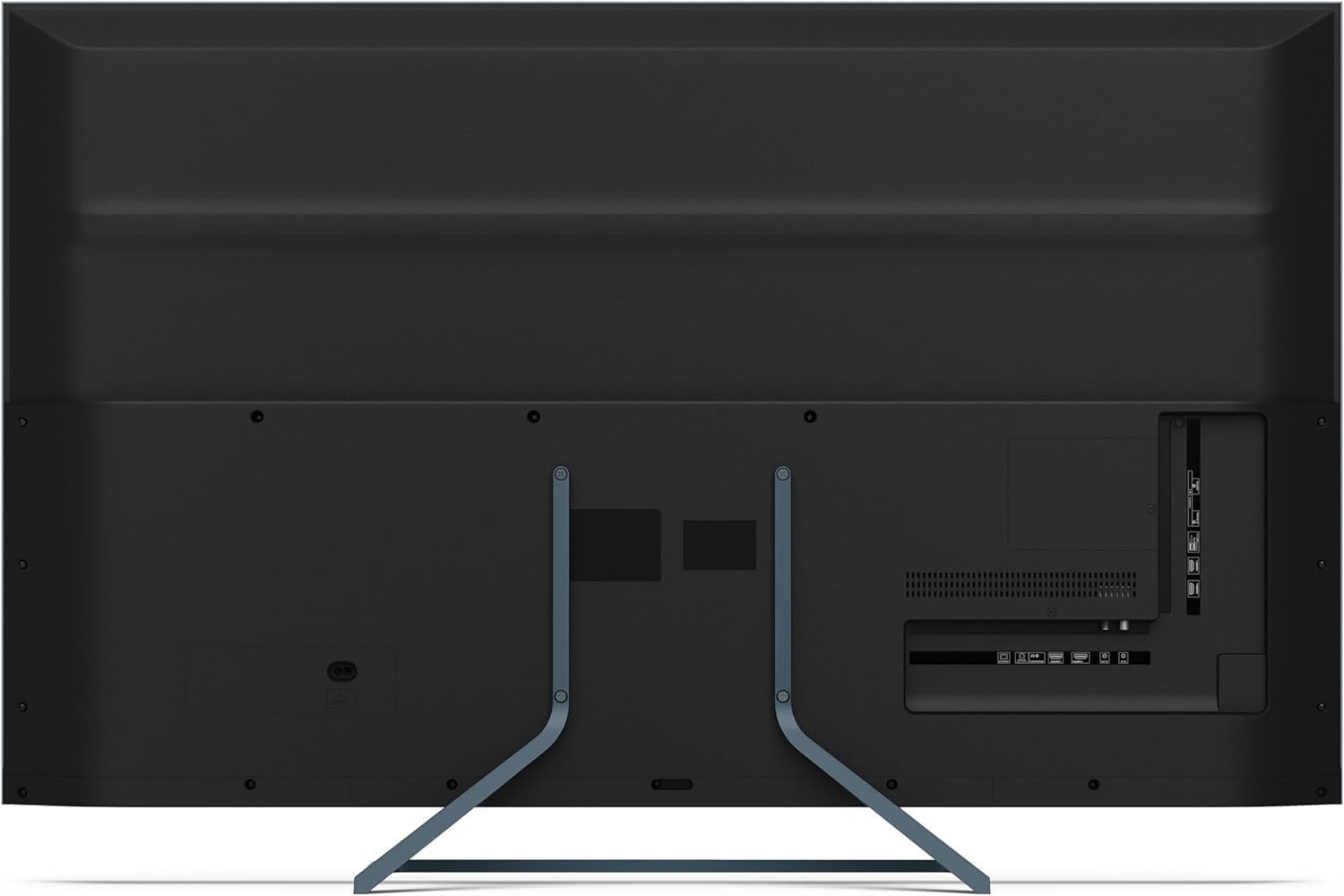
Imej: Belakang view of the television displaying the arrangement of HDMI, USB, and other connectivity ports.
- HDMI: Connect Blu-ray players, game consoles, or set-top boxes. HDMI 2.1 supports eARC and ALLM for enhanced audio and gaming.
- USB: Sambungkan peranti storan USB untuk main balik media.
- Ethernet: Untuk sambungan internet berwayar.
- Kuasa: Sambungkan kabel kuasa ke TV dan kemudian ke saluran keluar dinding.
3.5 Kuasa Hidupkan Permulaan dan Persediaan Google TV
- Palamkan TV ke salur keluar kuasa.
- Tekan butang kuasa pada alat kawalan jauh atau TV.
- The TV will guide you through the initial setup process, including language selection, network connection (Wi-Fi or Ethernet), and Google account sign-in.
- Berpasangan Alat Kawalan Jauh: During initial setup, you may need to pair the Bluetooth remote control. Follow the on-screen instructions, typically involving pressing specific buttons on the remote simultaneously.
4. Mengendalikan TV
4.1 Alat Kawalan Jauh
The included remote control uses Bluetooth for enhanced functionality. It allows navigation, voice control via Google Assistant, and quick access to various features.
4.2 Antara Muka Google TV
The Google TV interface organizes your content from various streaming services and apps. Use the remote's directional pad to navigate through menus, select apps, and browse content.

Image: The television screen showing the Google TV home interface with recommended content and installed applications.
4.3 Tetapan Gambar
Your Sharp 50FQ5EG TV features advanced picture technologies:
- QLED Q-Colour: Provides vibrant and accurate color reproduction.
- 4K Ultra HD: Delivers sharp and detailed images.
- Kadar Segar Semula 144 Hz: Ensures smooth motion, especially beneficial for gaming and fast-paced content.
- Dolby Vision IQ, HDR10, HLG: Supports various High Dynamic Range formats for enhanced contrast and brightness.
- AQUOS Motion: Improves motion clarity by reducing blur.
- Eco Sensor: Melaraskan kecerahan secara automatik berdasarkan keadaan cahaya ambien.
Access picture settings through the TV's menu to customize brightness, contrast, color, and other display options.
4.4 Tetapan Bunyi
The TV is equipped with a Harman/Kardon Hybrid Speaker System and supports Dolby Atmos for immersive audio.
- Harman/Kardon Speakers: Delivers clear sound with powerful bass.
- Dolby Atmos: Provides a three-dimensional audio experience.
Adjust sound modes, equalizer settings, and volume levels via the TV's audio menu.
4.5 Ketersambungan
- Wi-Fi/Ethernet: Sambungkan ke rangkaian rumah anda untuk akses internet dan penstriman.
- Bluetooth 5.3: Sambungkan fon kepala tanpa wayar, bar bunyi atau peranti lain yang didayakan Bluetooth.
- Google Cast: Cast content from your mobile devices or computer directly to the TV.
4.6 Menggunakan Aplikasi
The Google TV platform provides access to a wide range of applications from the Google Play Store, including:
- Netflix, Amazon Prime Video, HBO, Disney+, Movistar+, DAZN, Atresmedia
- KODI, IPTV, Steamlink, Twitch, VLC, YouTube
- Puffin TV Browser, Spotify, Deezer, TuneIn Radio
Navigate to the 'Apps' section on the Google TV home screen to browse, download, and manage your applications.
5. Penyelenggaraan
5.1 Membersihkan TV
- Skrin: Lap skrin perlahan-lahan dengan kain lembut yang tidak berbulu. Untuk tanda degil, sedikit dampbilas kain dengan air atau pembersih skrin khusus (sapukan pada kain, bukan terus pada skrin).
- Badan: Lap bingkai TV dan berdiri dengan kain lembut dan kering.
- Jangan guna: Abrasive cleaners, alcohol, benzene, or thinners, as these can damage the TV's surface.
5.2 Kemas Kini Perisian
Your TV may receive software updates to improve performance and add new features. Ensure your TV is connected to the internet to receive these updates automatically or check for them manually in the settings menu.
6. Penyelesaian masalah
Jika anda menghadapi masalah dengan TV anda, rujuk masalah dan penyelesaian biasa berikut:
| Masalah | Penyelesaian yang Mungkin |
|---|---|
| Tiada Kuasa | Periksa sama ada kabel kuasa disambungkan dengan kukuh ke TV dan soket dinding. Pastikan soket mempunyai kuasa. Cuba soket lain. |
| Tiada Gambar, tetapi Bunyi Hadir | Semak sumber input. Pastikan peranti luaran dihidupkan dan disambungkan dengan betul. Cuba kabel HDMI yang berbeza. |
| Tiada Bunyi, tetapi Gambar Hadir | Check the volume level. Ensure mute is not activated. Check audio output settings (e.g., internal speakers, external soundbar). |
| Alat Kawalan Jauh Tidak Bertindak Balas | Replace the batteries. Ensure there are no obstructions between the remote and the TV. Re-pair the Bluetooth remote if necessary (refer to initial setup). |
| Tidak Dapat Menyambung ke Wi-Fi | Check your router and modem. Ensure the Wi-Fi password is correct. Try restarting the TV and your router. |
| Apps Not Working/Freezing | Ensure the TV has a stable internet connection. Try clearing the app's cache or reinstalling the app. Restart the TV. |
Jika masalah berterusan selepas mencuba penyelesaian ini, sila hubungi sokongan pelanggan.
7. Spesifikasi

Image: Technical drawing illustrating the width, height, and depth of the television with and without its stand.
| Ciri | Spesifikasi |
|---|---|
| Nombor Model | 50FQ5EG |
| Saiz Skrin | 50 Inci |
| Teknologi Paparan | QLED, LED |
| Resolusi | 4K Ultra HD (3840 x 2160) |
| Kadar Segar Semula | 144 Hz |
| Sokongan HDR | Dolby Vision IQ, HDR10, HLG |
| Sistem Operasi | Google TV |
| Output Audio | 2.1 Channel Harman/Kardon Speakers, 15W Max Power, Dolby Atmos |
| Ketersambungan | 4 x HDMI 2.1, 2 x USB 2.0, Bluetooth 5.3, Wi-Fi, Ethernet |
| Piawaian Pemasangan VESA | 200 x 200 mm |
| Dimensi dengan Dirian (W x H x D) | 113.22 x 73.89 x 23.2 cm |
| Dimensi tanpa Stand (W x H x D) | 113.22 x 66.87 x 6.0 cm |
| Berat (tanpa penyangga) | 11.5 kg |
| Penggunaan Kuasa (Operasi) | 84 Watt |
| Penggunaan Tenaga Tahunan | 64 kWj/tahun |
| Kaedah Kawalan | Voice (Google Assistant), Remote Control |
| warna | Anthracite Grey Aluminum |
8. Waranti dan Sokongan
8.1 Maklumat Waranti
This Sharp 50FQ5EG television comes with a Waranti Terhad. Please refer to the warranty card included with your product or visit the official Sharp weblaman web untuk terma dan syarat terperinci mengenai perlindungan, tempoh dan prosedur perkhidmatan.
8.2 Sokongan Pelanggan
For technical assistance, troubleshooting beyond this manual, or warranty claims, please contact Sharp customer support. Contact details can typically be found on the Sharp official webtapak atau dalam dokumentasi yang disediakan bersama TV anda.