
1. Arahan Keselamatan
Please read and understand all safety instructions before operating the Ingco 60W Adjustable Temperature Soldering Iron. Failure to follow these instructions may result in electric shock, fire, or serious injury.
- Keselamatan Elektrik: Ensure the power supply matches the specifications (220-240V ~ 50/60Hz). Do not use the soldering iron in wet conditions or near flammable liquids or gases. Always unplug the tool when not in use or before changing tips.
- Bahaya Haba: The soldering iron tip reaches very high temperatures. Do not touch the tip or heating element. Allow the iron to cool completely before storing. Use the provided stand to prevent accidental contact and damage.
- Pengudaraan: Soldering fumes can be harmful. Always work in a well-ventilated area or use a fume extractor.
- Peralatan Pelindung Diri: Wear safety glasses to protect your eyes from solder splashes. Avoid wearing loose clothing or jewelry that could get caught or come into contact with the hot tip.
- Kanak-kanak dan Penonton: Keep children and unauthorized persons away from the work area. Store the tool out of reach of children.
- Penggunaan yang betul: Use the soldering iron only for its intended purpose. Do not modify the tool. If the power cord is damaged, it must be replaced by a qualified service technician to avoid hazards.
2. Produk Lebihview
The Ingco 60W Adjustable Temperature Soldering Iron, Model SI016923 HT2, is a reliable tool for various soldering applications. It features precise temperature control and a quick heating ceramic element.
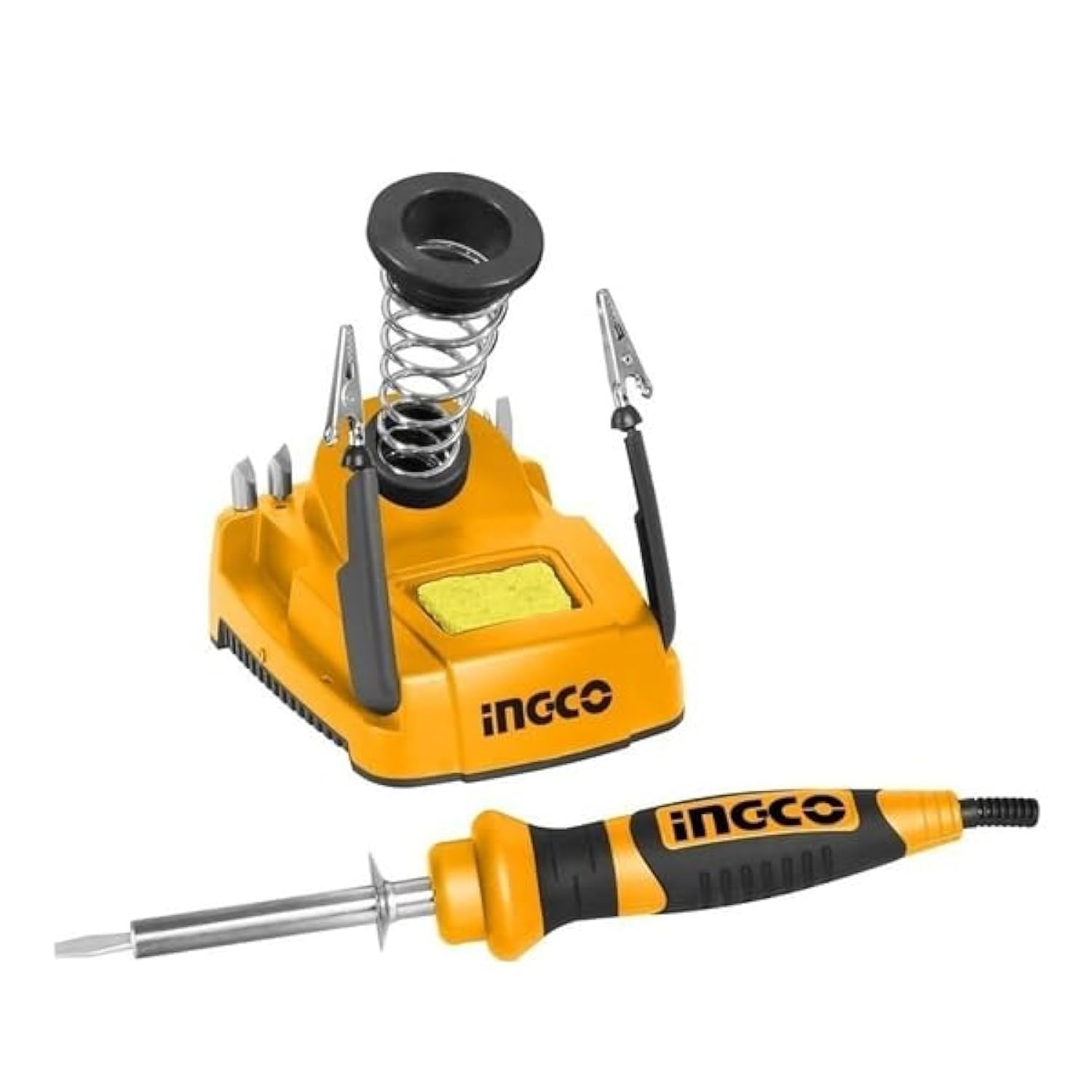
Figure 1: Ingco 60W Adjustable Temperature Soldering Iron with Stand. This image shows the main soldering iron unit, its integrated stand, and the power cord. The iron features a comfortable handle and a fine tip suitable for precision work.
Ciri-ciri Utama:
- Suhu boleh laras: The tip temperature can be precisely adjusted via a rotary thermostat.
- Pemanasan Cepat: Equipped with an integrated ceramic heating element for rapid and stable heat-up.
- Paparan Digital: Provides a clear digital readout for temperature monitoring.
- Petua Tahan Lama: Features a straight-head tip with a replaceable, long-lasting protection cover.
- Convenient Stand: Includes a holder piece for safe placement during and after use.
3. Spesifikasi
| Ciri | Spesifikasi |
|---|---|
| Model | SI016923 HT2 |
| Voltage | 220-240V ~ 50/60Hz |
| Kuasa Input | 60W |
| Masa Prapemanasan | 1-2 minit |
| Jenis Paparan | LED Digital |
| Elemen Pemanas | Integrated Ceramic |
| Jenis Petua | Straight-head, Adjustable Temperature |
| Dimensi Produk | 10 x 20 x 37 cm |
| Berat Barang | 2.38 kg |
| Bilangan Item | 1 |
| Bilangan Saluran | 1 |
4. Persediaan
Follow these steps to set up your Ingco Soldering Iron for first use:
- Bongkar: Carefully remove all components from the packaging. Ensure the soldering iron, stand, and any included accessories are present and undamaged.
- penempatan: Place the soldering iron stand on a stable, heat-resistant, and non-flammable surface. Ensure there is adequate space around your work area for safety and ventilation.
- Sambungan Kuasa: Plug the soldering iron's power cord into a grounded electrical outlet that matches the specified voltage (220-240V).
- Pemanasan Awal: Place the soldering iron securely in its stand. Turn on the power. The digital display will show the current temperature. Allow 1-2 minutes for the iron to reach the desired operating temperature.
- Mewarna Petua: Before first use, or after changing a tip, it is crucial to "tin" the tip. Apply a small amount of solder to the hot tip until it is fully coated. This protects the tip from oxidation and ensures efficient heat transfer.
5. Arahan Operasi
Operating the Ingco Soldering Iron effectively requires proper technique and safety awareness.
Pelarasan Suhu:
- The soldering iron features a rotary thermostat for temperature control. Rotate the dial on the handle to increase or decrease the desired temperature.
- Monitor the digital LED display for the current temperature reading. Allow a few moments for the iron to stabilize at the new setting.
Teknik Pematerian:
- Sediakan Komponen: Ensure the components and PCB pads to be soldered are clean and free of dirt or oxidation.
- Sambungan Haba: Touch the hot soldering iron tip to both the component lead and the PCB pad simultaneously. Ensure good contact for efficient heat transfer.
- Guna Pateri: After a few seconds, when the joint is hot enough, apply solder to the opposite side of the joint from the iron tip. The solder should flow smoothly and quickly around the joint, forming a shiny, conical connection. Do not apply solder directly to the iron tip.
- Keluarkan Pateri dan Seterika: Once the solder has flowed correctly, first remove the solder wire, then remove the soldering iron from the joint.
- Biarkan sejuk: Let the joint cool naturally without disturbing it. A good solder joint will appear shiny and smooth.
During Breaks:
Always place the soldering iron securely in its stand during short breaks to prevent accidental burns or damage to your workspace.
6. Penyelenggaraan
Regular maintenance ensures the longevity and optimal performance of your soldering iron.
- Petua Pembersihan: Bersihkan hujung pematerian secara berkala menggunakan iklanamp sponge or brass wool. This removes excess solder and oxidation, maintaining efficient heat transfer. Always re-tin the tip after cleaning.
- Penggantian Petua: If the tip becomes pitted, corroded, or no longer accepts solder, it should be replaced. Ensure the iron is unplugged and cool before attempting to replace the tip. Refer to the product specifications for compatible replacement tips.
- Pembersihan Am: Keep the body of the soldering iron and the stand clean. Wipe with a dry cloth. Do not use abrasive cleaners or solvents.
- Storan: When not in use, ensure the soldering iron is unplugged and completely cool. Store it in a dry, safe place, away from moisture and out of reach of children.
7. Penyelesaian masalah
If you encounter issues with your Ingco Soldering Iron, refer to the following common problems and solutions:
| Masalah | Kemungkinan Punca | Penyelesaian |
|---|---|---|
| Seterika tidak menjadi panas | Not plugged in; Power outlet fault; Damaged heating element; Loose connection. | Check power connection; Test outlet with another device; Contact customer support if heating element is suspected to be faulty. |
| Solder not melting or flowing poorly | Tip is dirty/oxidized; Incorrect temperature setting; Insufficient contact with joint; Old/poor quality solder. | Clean and re-tin the tip; Increase temperature setting; Ensure good contact with both components; Use fresh, good quality solder. |
| Tip discolors quickly or corrodes | Lack of tinning; Too high temperature; Aggressive flux. | Always tin the tip after cleaning; Reduce temperature if possible; Use appropriate flux for your solder. |
| Paparan digital tidak berfungsi | Kerosakan elektrik dalaman. | Unplug and re-plug the iron. If the issue persists, contact customer support. |
If you experience a problem not listed here, or if the suggested solutions do not resolve the issue, please contact Ingco customer support for further assistance.
8. Waranti dan Sokongan
Ingco products are manufactured to high-quality standards. For information regarding warranty coverage, please refer to the warranty card included with your purchase or visit the official Ingco webtapak. Simpan resit pembelian anda sebagai bukti pembelian untuk sebarang tuntutan waranti.
For technical support, replacement parts, or service inquiries, please contact your local Ingco dealer or authorized service center. You can find contact information on the official Ingco webtapak atau melalui peruncit produk anda.
Pengeluar: Ingco
Tarikh Pertama Tersedia: 19 Februari 2024