
1. Pengenalan
The Aubess Mini Smart Wi-Fi Switch 16A (Model WSM02) is designed to integrate seamlessly into your smart home ecosystem. This device enables remote control of connected appliances via your smartphone or tablet, offering convenience and enhanced energy management. It features an integrated energy monitor that provides real-time consumption data, helping you make informed decisions about your energy usage.
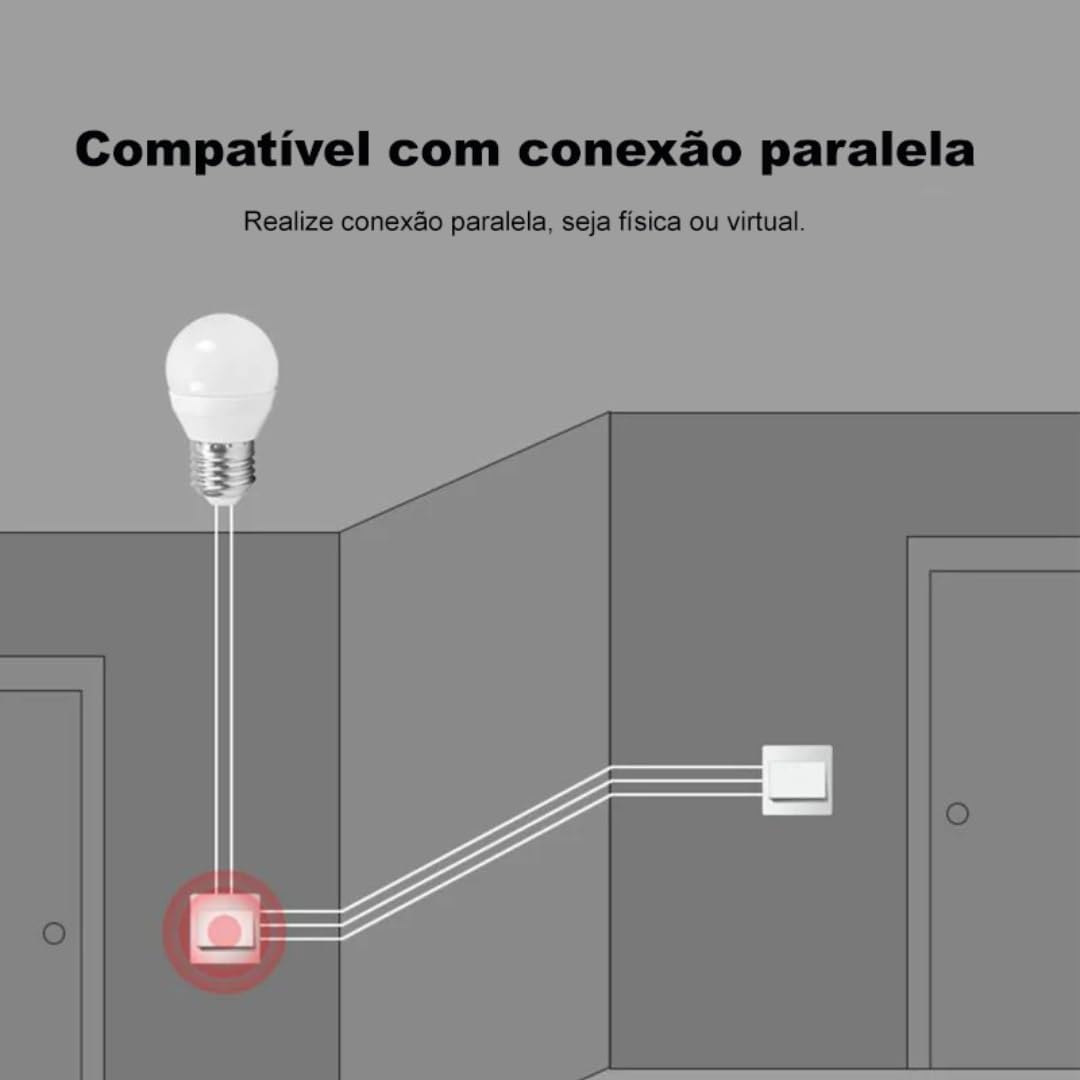
The switch is compatible with popular voice assistants such as Amazon Alexa and Google Home, and works with smart home platforms like Tuya Smart, Smart Life, and Home Assistant. Its compact design allows for simple and quick installation, including parallel installation with existing switches.
2. Maklumat Keselamatan
AMARAN: Electrical installation should only be performed by a qualified electrician to ensure safety and compliance with local electrical codes. Incorrect installation can lead to electric shock, fire, or device damage.
- Sentiasa putuskan sambungan kuasa pada pemutus litar sebelum pemasangan atau penyelenggaraan.
- Pastikan peranti digunakan dalam volum yang ditetapkantage and current ratings (110V, 16A, 1600W).
- Jangan dedahkan peranti kepada kelembapan atau suhu yang melampau.
- Peranti ini direka untuk kegunaan dalaman sahaja.
3. Kandungan Pakej
- 1 x Aubess Mini Smart Wi-Fi Switch
- 1 x Manual Pengguna
4. Ciri-ciri Produk
- Kesambungan Wi-Fi: Operates on 2.4GHz Wi-Fi networks for remote control.
- Pemantauan Tenaga: Provides real-time and historical energy consumption data.
- Kawalan Suara: Sesuai dengan Amazon Alexa dan Google Home untuk operasi bebas tangan.
- Kawalan Apl: Works with Tuya Smart and Smart Life applications for comprehensive management.
- High Power Rating: Menyokong sehingga 16 Amperes and 1600 Watts.
- Pemasangan Selari: Designed to facilitate parallel wiring with existing traditional switches.
- Reka bentuk padat: Small form factor for easy integration into electrical boxes.


5. Spesifikasi
| Spesifikasi | Nilai |
|---|---|
| Mod Operasi | Hidup-Mati |
| Penilaian Semasa | 16 Amperes |
| Vol Operasitage | 110 Volt |
| Jenis Kenalan | Biasanya Ditutup |
| Jenis Penyambung | Clamp |
| Jenis Suis | slaid |
| Terminal | skru |
| Jenis Litar | 1 hala |
| Jenis Pemasangan | Lekap di dinding |
| Bilangan Jawatan | 2 |
| Penilaian Suhu Maksimum | 55 Darjah Celsius |
| Jenis Kawalan | Amazon Alexa, Push Button, Google Assistant |
| Kaedah Kawalan | Application, Remote, Touch, Voice |
| Jenis Kesambungan | Wi-Fi (2.4GHz) |
| kuasa | 1600 Watt |
| warna | putih |
| Dimensi Item | 41 x 20 x 41 milimeter |
| Kiraan Unit | 1 Unit |
| Kuantiti Barang | 1 |
| bahan | plastik |
| Bahan Kenalan | logam |
| Penilaian Perlindungan Antarabangsa | IP00 |
| Compliant Specification | CE, RoHS |
| Pengeluar | Aubess |
| Nombor Bahagian | WSM02 |
6. Persediaan dan Pemasangan
6.1 Arahan Pendawaian
Penting: Ensure power is disconnected at the circuit breaker before proceeding with any wiring. Professional installation is highly recommended.
- Kenal pasti wayar: Locate the Live (L), Neutral (N), and Load (L1, L2, etc.) wires in your electrical box. The Aubess switch requires a Neutral wire for operation.
- Sambung wayar: Connect the Live wire from your power source to the 'L' terminal on the switch. Connect the Neutral wire to the 'N' terminal. Connect the Load wire(s) (to your light fixture or appliance) to the 'L1' (and 'L2' if applicable) terminal(s).
- Sambungan Selamat: Pastikan semua sambungan wayar selamat dan terlindung dengan betul.
- Suis Pemasangan: Carefully place the switch into the electrical box and secure it.
- Pulihkan Kuasa: Setelah pemasangan selesai dan disahkan, pulihkan kuasa pada pemutus litar.
6.2 Pasangan Aplikasi
To control your Aubess Mini Smart Wi-Fi Switch, you need to pair it with the Tuya Smart or Smart Life application.
- Muat turun Aplikasi: Muat turun aplikasi 'Tuya Smart' atau 'Smart Life' daripada gedung aplikasi telefon pintar anda (iOS atau Android).
- Daftar/Log Masuk: Buka aplikasi dan daftar untuk akaun baharu atau log masuk jika anda sudah memilikinya.
- Tambah Peranti: Ketik ikon '+' di penjuru kanan sebelah atas aplikasi untuk menambah peranti baharu.
- Pilih Jenis Peranti: Choose 'Electrical Switch' or 'Switch (Wi-Fi)'.
- Masukkan Butiran Wi-Fi: Pastikan telefon anda disambungkan ke rangkaian Wi-Fi 2.4GHz. Masukkan kata laluan Wi-Fi anda dalam aplikasi.
- Letakkan Peranti dalam Mod Berpasangan: Power on the switch. If the indicator light is not blinking rapidly, press and hold the reset button on the switch for 5-10 seconds until it blinks rapidly.
- Sahkan Berkelip: In the app, confirm that the indicator light is blinking rapidly.
- Sambung: The app will begin searching for the device. Once found, you can rename it and complete the setup.
7. Arahan Operasi
7.1 Kawalan Apl
Once paired, you can control the switch from anywhere using the Tuya Smart or Smart Life app:
- Hidup/Mati: Tap the switch icon in the app to turn the connected appliance on or off.
- Penjadualan: Set schedules or timers for automatic operation.
- Adegan: Create custom scenes to control multiple devices simultaneously.
7.2 Kawalan Suara (Alexa/Google Home)
To enable voice control, link your Tuya Smart/Smart Life account with Amazon Alexa or Google Home:
- Buka apl Alexa atau Google Home.
- Navigasi ke 'Kemahiran & Permainan' (Alexa) atau 'Berfungsi dengan Google' (Laman Utama Google).
- Cari untuk 'Tuya Smart' or 'Smart Life'.
- Enable the skill/service and link your account using your app credentials.
- Discover devices. You can now control your switch using voice commands like: "Alexa, turn on the living room light" or "Hey Google, turn off the fan."
7.3 Pemantauan Tenaga
The integrated energy monitor allows you to track power consumption:
- In the Tuya Smart/Smart Life app, select your Aubess switch.
- Look for the 'Energy Monitoring' or 'Power Statistics' section.
- View real-time power usage (Watts), current (Amperes), and voltage (Volts).
- Access historical data, including daily, weekly, or monthly consumption graphs.

8. Penyelenggaraan
- Pembersihan: Gunakan kain lembut dan kering untuk membersihkan peranti. Jangan gunakan bahan kimia yang keras atau pembersih yang kasar.
- Kemas kini Firmware: Semak aplikasi Tuya Smart/Smart Life secara berkala untuk kemas kini perisian tegar yang tersedia bagi memastikan prestasi dan keselamatan yang optimum.
- Keadaan Persekitaran: Ensure the device is kept within its operating temperature range (max 55°C) and away from excessive humidity.
9. Penyelesaian masalah
- Peranti Tidak Membalas:
- Periksa sama ada peranti mempunyai kuasa.
- Verify your Wi-Fi network is active and stable (2.4GHz).
- Pastikan telefon pintar anda mempunyai sambungan internet.
- Try restarting the switch by cycling its power at the circuit breaker.
- Tidak Dapat Dipasangkan:
- Make sure the switch's indicator light is blinking rapidly (pairing mode). If not, reset it by holding the button for 5-10 seconds.
- Sahkan rangkaian Wi-Fi anda ialah 2.4GHz. Rangkaian 5GHz tidak disokong.
- Pastikan kata laluan Wi-Fi anda dimasukkan dengan betul.
- Move the switch closer to your Wi-Fi router during pairing.
- Kawalan Suara Tidak Berfungsi:
- Verify that the Tuya Smart/Smart Life skill/service is enabled and linked correctly in your Alexa/Google Home app.
- Ensure the device name in the smart home app matches the name you are using in voice commands.
- Cuba temui semula peranti dalam apl Alexa/Google Home anda.
10. Waranti dan Sokongan
For warranty information, technical support, or service inquiries, please contact Aubess customer support through their official website or the contact information provided at the point of purchase. Please have your product model (WSM02) and purchase details ready when contacting support.