
pengenalan
Terima kasih kerana membeliasing the PUREMIC S3 Portable Bluetooth Karaoke Machine. This manual provides detailed instructions for setting up, operating, and maintaining your device. Please read this manual thoroughly before use to ensure proper function and to maximize your enjoyment of the product.
Apa yang ada dalam Kotak
Sahkan bahawa semua item terdapat dalam pakej:
- Pembesar Suara Bluetooth x 1
- UHF Wireless Microphone x 2
- Leather Bag x 1
- Speaker Charger x 1
- Microphone Charger x 1
- Manual Pengguna x 1

Image: All components included in the PUREMIC S3 package.
Produk Selesaiview dan Ciri
The PUREMIC S3 is a portable karaoke system designed for high-quality audio and versatile use. Key features include:
- Bunyi Imersif: Equipped with a 5.25-inch woofer and two 1-inch tweeters for clear, powerful sound.
- Mikrofon tanpa wayar: Two UHF wireless microphones for singing.
- Voice Elimination: One-touch vocal elimination feature on microphones.
- Kesan Bunyi: Eight entertainment sound effects (Children, Monster, K.T.V., etc.).
- Bateri tahan lama: Built-in 10,000 mAh rechargeable battery providing up to 8 hours of playtime for the speaker and 10 hours for microphones.
- Penjimatan Tenaga: Automatic power-down after 15 minutes of inactivity.
- Ketersambungan Serbaguna: Bluetooth 5.0, AUX input, USB port for playback and recording.
- Pencahayaan Dinamik: Six adjustable lighting modes with 128 LED colors that synchronize with music.
- mudah alih: Lightweight, compact design with a swivel handle and included leather carrying bag.
- Tahan Air: IPX4 dinilai untuk rintangan percikan.
- Kesambungan NFC: Quick pairing with Android devices via NFC.
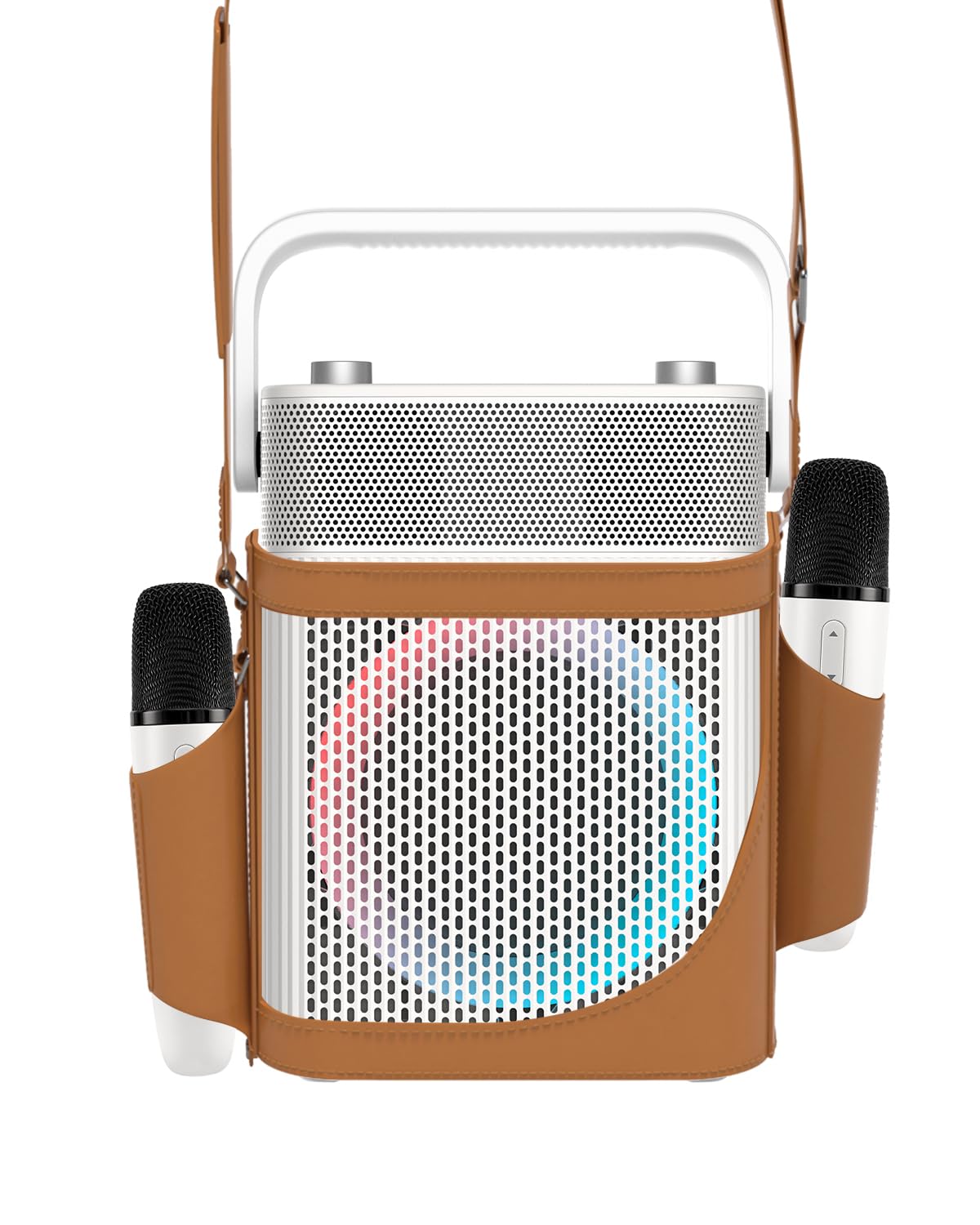
Imej: Depan view of the PUREMIC S3 Karaoke Machine, highlighting its design and LED lights.
Panduan Persediaan
1. Mengecas Peranti
Before first use, fully charge the speaker and microphones.
- Penceramah: Connect the speaker charger to the "Charge Port" on the back of the speaker. The charging indicator will show progress.
- Mikrofon: Place the UHF wireless microphones into their dedicated charging holders on top of the speaker. The microphones will begin charging automatically.

Image: Close-up of the speaker's rear panel, indicating the Charge Port, Aux-in Port, and USB Port.
2. Menghidupkan/Mematikan
- Penceramah: Press and hold the Power On/Off button on the control panel until the device powers on or off.
- Mikrofon: Press and hold the power button on each microphone to turn them on or off. They will automatically pair with the speaker when both are powered on.
Arahan Operasi
1. Sambungan Bluetooth
- Turn on the PUREMIC S3 speaker.
- Tekan ke BT button on the speaker's control panel to enter Bluetooth pairing mode. The Bluetooth indicator will flash.
- On your device (smartphone, tablet, TV, computer), enable Bluetooth and search for "PUREMIC S3".
- Select "PUREMIC S3" from the list of available devices to pair. A confirmation sound will indicate a successful connection.
NFC Pairing (Android devices only): For quick pairing, ensure NFC is enabled on your Android smartphone. Tap your phone gently against the NFC area on the speaker's control panel. Your phone will prompt you to connect to the PUREMIC S3.

Image: Demonstrates NFC pairing with an Android phone on the PUREMIC S3 speaker.
2. Input AUX
To connect devices via AUX cable:
- Connect one end of a 3.5mm AUX cable (not included) to the AUX-in port on the back of the PUREMIC S3.
- Connect the other end to the audio output jack of your device (e.g., TV, MP3 player).
- Pembesar suara secara automatik akan bertukar kepada mod AUX.

Image: PUREMIC S3 connected to a TV via AUX, showing karaoke lyrics on screen.
3. Main Semula dan Rakaman USB
Insert a USB drive into the USB port on the back of the speaker for music playback or to record your performance.
- Main balik: Pembesar suara akan mengesan dan memainkan audio secara automatik files daripada pemacu USB.
- Rakaman: Tekan ke REC button on the control panel to start recording. Press it again to stop recording. Recordings will be saved to the USB drive.
4. Microphone Functions
The wireless microphones offer several features:
- Volume/Echo: Use the dedicated knob on the speaker to adjust microphone volume and echo effect.
- Vocal Elimination: Press the designated button on the microphone for one-touch vocal elimination from music tracks.
- Kesan Bunyi: The microphones feature 8 different sound effects (Children, Monster, Male, Female, Original, Concert, Live, K.T.V.). Cycle through these effects using the microphone's controls.

Image: Visual representation of the 8 sound effects available on the PUREMIC S3 microphones.
5. Kawalan Pembesar Suara
The speaker's control panel includes:
- Hidupkan/Mati Kuasa: Tekan dan tahan untuk menghidupkan/mematikan kuasa.
- Volume/Echo Knob: Rotate to adjust overall volume and microphone echo.
- Butang BT: Mengaktifkan mod gandingan Bluetooth.
- Butang BASS: Toggles bass sound enhancement.
- Butang Jeda: Pauses/resumes playback.
- Butang REC: Initiates/stops recording to USB.
- Butang Kesan Cahaya: Berkitar melalui 6 mod pencahayaan yang berbeza.
- Pre/Next Song Knob: Rotate to skip tracks.

Imej: Terperinci view of the speaker's control panel, showing all buttons and their functions.
6. TWS Pairing (True Wireless Stereo)
If you have two PUREMIC S3 speakers, you can pair them for a true wireless stereo experience:
- Pastikan kedua-dua pembesar suara dihidupkan dan tidak disambungkan ke mana-mana peranti Bluetooth.
- On one speaker, press and hold the Bluetooth button until you hear a pairing tone.
- Ulangi langkah ini pada pembesar suara kedua.
- The speakers will automatically connect to each other. Once paired, connect your device to one of the speakers via Bluetooth.

Image: Two PUREMIC S3 speakers set up for TWS, providing double stereo sound in a room.
Penyelenggaraan
- Pembersihan: Wipe the speaker and microphones with a soft, dry cloth. Do not use abrasive cleaners or solvents.
- Storan: Simpan peranti di tempat yang sejuk dan kering jauh dari cahaya matahari langsung dan suhu yang melampau.
- Penjagaan Bateri: To prolong battery life, fully charge the device before long periods of storage and recharge it every 3 months.
- Tahan Air: The speaker is IPX4 rated, meaning it is resistant to splashes. Do not submerge the device in water. Ensure all ports are securely covered when exposed to moisture.
Menyelesaikan masalah
| Masalah | Kemungkinan Punca | Penyelesaian |
|---|---|---|
| Tiada kuasa | Bateri habis. | Charge the speaker and microphones using the provided chargers. |
| Tidak dapat menyambung melalui Bluetooth | Bluetooth is not enabled on your device or speaker is not in pairing mode. Device is too far. | Ensure Bluetooth is active on your device. Press the BT button on the speaker. Move device closer to the speaker. |
| Tiada suara dari mikrofon | Microphones are off or not paired. Microphone volume is too low. | Turn on microphones. Ensure they are charged. Adjust microphone volume knob on the speaker. |
| Herotan bunyi | Volume is too high. Microphone is too close to the speaker. | Reduce the volume. Increase distance between microphone and speaker. |
| Main balik USB tidak berfungsi | Pemacu USB tidak diformat dengan betul atau tidak disokong file jenis. | Ensure USB drive is formatted to FAT32. Use supported audio formats (e.g., MP3). |
Spesifikasi
| Ciri | Perincian |
|---|---|
| Nombor Model | S3 |
| Berat Barang | 8.82 paun |
| Dimensi Produk | 5.91 x 7.72 x 10.2 inci |
| Jenis Bateri | 1 bateri Litium Ion (diperlukan) |
| Kapasiti Bateri | 10,000 mAh (Speaker) |
| Masa bermain | Up to 8 hours (Speaker), Up to 10 hours (Microphones) |
| Peranti Serasi | Smartphones, Televisions, iPads, Tablets, Computers |
| Jenis Penyambung | 3.5 mm Jack (AUX), USB |
| Kiraan Speaker | 3 (1x 5.25-inch woofer, 2x 1-inch tweeters) |
| Output Wattage | 300 Watt |
| Sumber Kuasa | Dikuasakan Bateri |
| Voltage | 5 Volt (DC) |
| Tahan Air | IPX4 |
| Ciri Khas | Light Up Speaker, NFC |
Waranti dan Sokongan
For warranty information and technical support, please refer to the warranty card included in your package or contact PUREMIC customer service through their official webtapak atau peruncit tempat produk itu dibeli.
Sokongan dalam talian: Visit the PUREMIC Store on Amazon for additional product information and support resources: PUREMIC Store