
pengenalan
The NEWYES SyncPen 4 is an innovative smart digital pen designed to seamlessly transfer your handwritten notes and drawings from a specialized notebook directly to your digital devices. This manual provides essential information for setting up, operating, maintaining, and troubleshooting your SyncPen 4 to ensure optimal performance.
Kandungan Pakej
Sila sahkan bahawa semua item terdapat dalam pakej anda:
- NEWYES SyncPen 4 Smart Digital Pen
- Smart Notebook (unerasable)
- Kabel Pengecas USB
- Ink Refills (3x)
- Panduan Mula Pantas

Produk Selesaiview
The SyncPen 4 combines the tactile experience of traditional writing with the convenience of digital technology. It features an integrated camera that captures every stroke, digitizing your notes in real-time or storing them for later synchronization. The specialized notebook works in conjunction with the pen to enable these advanced functionalities.

Persediaan
1. Pemasangan Apl
- Locate the QR code on the back page of your Smart Notebook.
- Scan the QR code with your smartphone or tablet to download the NEWYES app.
- Pasang apl pada peranti anda.
2. Pen Charging
- Gently flip open the rubber cap at the very end of the SyncPen 4 to reveal the charging port.
- Connect the provided USB charging cable to the pen and a power source.
- The LED indicator on the pen will show charging status.
3. Pen Activation
The SyncPen 4 automatically turns on when you remove the pen cap and turns off when the cap is replaced.
4. Berpasangan Bluetooth
- Pastikan Bluetooth didayakan pada telefon pintar atau tablet anda.
- Open the NEWYES app.
- Remove the pen cap to turn on the SyncPen 4.
- In the app, navigate to the connection settings and select your SyncPen 4 from the list of available devices. The pen's MAC address will be displayed for identification.
- Confirm the connection. The LED indicator on the pen will confirm successful pairing.
Operasi Asas
1. Writing and Synchronization
Once connected, any notes or drawings you create in the Smart Notebook will be simultaneously transmitted and displayed in real-time on the NEWYES app. The pen captures the writing track, allowing you to review the creation process later.
2. Changing Ink Color and Thickness
The Smart Notebook features controls at the bottom of each page that allow you to change the digital ink color (red, green, blue, black) and thickness (thin, thick) directly from the notebook. Simply tap the desired option with your SyncPen 4, and the change will be reflected in the app.
3. Navigasi Halaman
The SyncPen 4 automatically recognizes when you turn a page in the Smart Notebook, and the app will switch to the corresponding digital page, ensuring your notes are always organized correctly.
Ciri Lanjutan
1. OCR Handwriting Recognition
The NEWYES app utilizes Optical Character Recognition (OCR) technology to transcribe your handwritten notes into editable digital text. It supports recognition of 73 languages, as well as text, shapes, math elements, and music with Myscript technology.

2. Voice Recording with Notes
The app allows you to record audio simultaneously while taking notes. This feature is ideal for lectures or meetings, enabling you to revisit your notes and listen to the corresponding audio in real-time for comprehensive review.
3. Notes Classification and Search
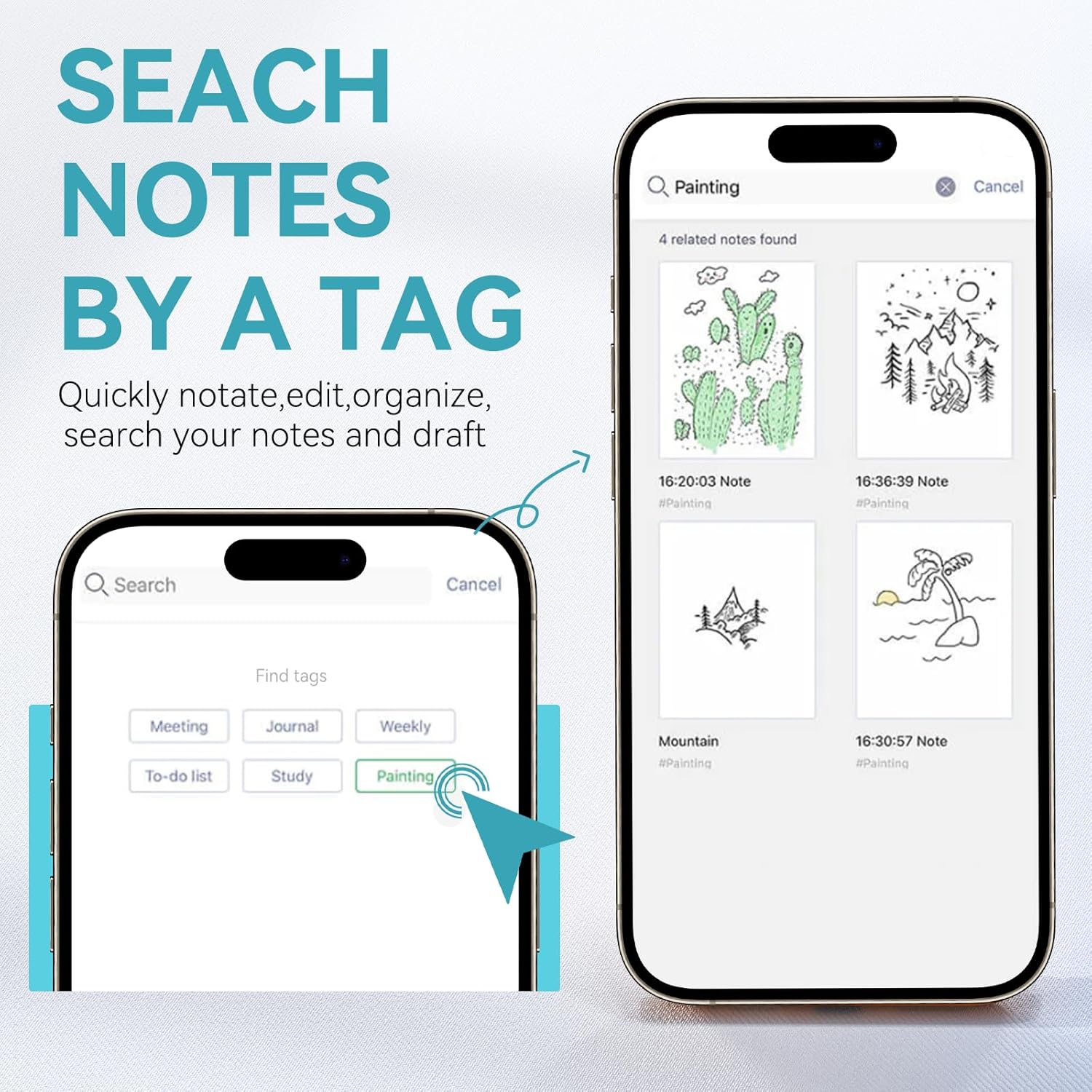
Organize your notes efficiently by adding tags. The app allows for quick notation, editing, and searching of your notes and drafts. Notes can be sorted by modification time or creation time, and you can search them by keywords or tags.
4. Offline Mode
The SyncPen 4 supports both online and offline modes. If the pen is not connected to your device, it will save the content you write internally. Once reconnected, the saved notes will automatically upload to the NEWYES app.
5. Sharing Notes
Convert your notes into various formats such as .doc, PDF, or JPG directly from the app. You can then easily share them with others via email or social media platforms.
Penyelenggaraan
Changing Pen Refills
To replace an ink cartridge, gently pull out the existing refill from the pen tip. Insert a new refill firmly until it clicks into place. Ensure the refill is properly seated to maintain writing accuracy.

Menyelesaikan masalah
- Pen not connecting to app: Ensure Bluetooth is on, the pen is charged, and the pen cap is removed. Try restarting the app and your device.
- Notes not syncing: Check your internet connection if in online mode. If in offline mode, ensure the pen is reconnected to the app to upload saved notes.
- Inaccurate OCR recognition: Ensure your handwriting is clear and legible. The pen performs best with distinct characters.
- Pen not writing: Check if the ink refill needs replacement. Ensure the pen is turned on (cap removed).
Spesifikasi
| Ciri | Perincian |
|---|---|
| Jenama | NEWYES |
| Nombor Model | SyncPen3 (AP1601-1213) |
| warna | Hitam |
| bahan | logam |
| Berat Barang | 1 Kilogram (Pen and Notebook Set) |
| Dimensi Item (L x W x H) | 3.94 x 1.97 x 1.18 inci |
| Bateri | 1 bateri Lithium Ion (termasuk) |
| Peranti Serasi | Telefon pintar (iOS, Android) |
| Minimum Required OS | Android 13.0, iOS 16 |
Waranti dan Sokongan
The NEWYES SyncPen 4 comes with a 1-year limited warranty. For technical support, warranty claims, or further assistance, please visit the official NEWYES website or contact their customer service directly. Refer to the Quick Start Guide for specific contact information.