
TAGLI211156
Lithium-ion Battery Angle Grinder User Manual
model: TAGLI211156 | Brand: Generic
1. Arahan Keselamatan Penting
Always observe basic safety precautions when operating this angle grinder to reduce the risk of fire, electric shock, and personal injury.
- Baca semua arahan: Biasakan diri anda dengan kawalan dan penggunaan alat yang betul.
- Keselamatan kawasan kerja: Pastikan kawasan kerja anda bersih dan terang. Kawasan bersepah atau gelap mengundang kemalangan.
- Keselamatan elektrik: Do not expose power tools to rain or wet conditions. Keep cords away from heat, oil, sharp edges, or moving parts.
- Keselamatan diri: Always wear eye protection, hearing protection, and appropriate respiratory protection. Use safety footwear and work gloves when necessary.
- Penggunaan dan penjagaan alat: Do not force the power tool. Use the correct power tool for your application. Disconnect the battery pack before making any adjustments, changing accessories, or storing the tool.
- Penggunaan dan penjagaan alat bateri: Isi semula hanya dengan pengecas yang ditentukan oleh pengilang. Gunakan alatan kuasa hanya dengan pek bateri yang ditetapkan secara khusus.
2. Produk Lebihview
The Generic TAGLI211156 is a powerful 20V Lithium-ion battery-powered angle grinder designed for various cutting and grinding tasks. It features a brushless motor for enhanced efficiency and durability.
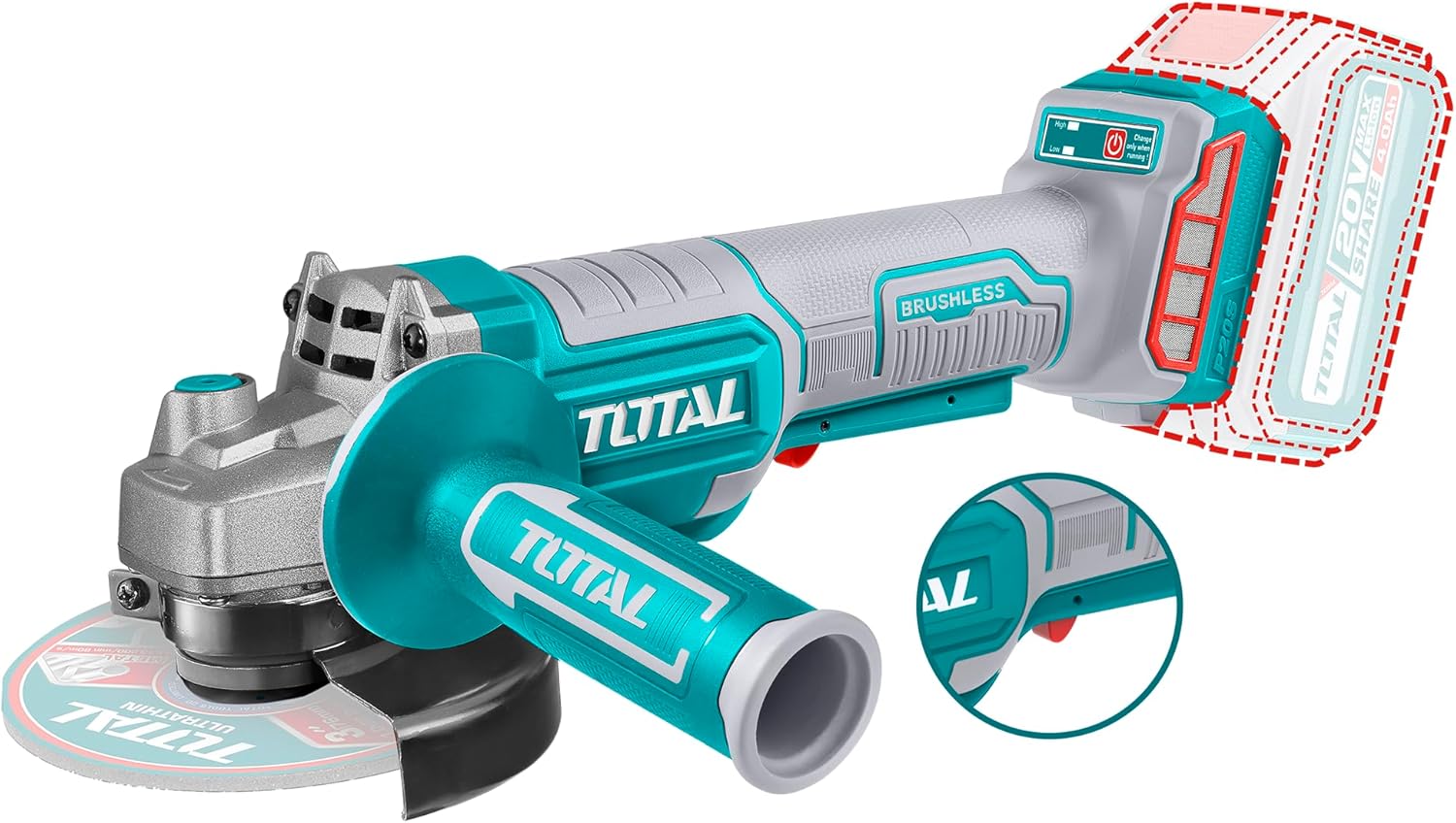
Rajah 2.1: Depan view of the Generic 20V Lithium-ion Angle Grinder, showing the main body, auxiliary handle, and a 115mm disc. Note that the battery, charger, and disc are sold separately.

Rajah 2.2: Sisi view of the Generic 20V Lithium-ion Angle Grinder, highlighting the 115mm (4-1/2 inch) disc diameter and a reminder that the battery and charger are sold separately.
Key features include a 20V brushless motor, offering no-load speeds of 3000/8000 RPM, and a 115mm disc diameter capacity. The spindle thread is M14, equipped with a safety switch for secure operation. The tool is green in color and comes packaged in a colored box. Please note that the battery, charger, and grinding disc are not included with the tool and must be purchased separately.
3. Persediaan
Before initial use, ensure all components are present and undamaged. This angle grinder requires a 20V Lithium-ion battery and a compatible charger, both sold separately.
3.1 Memasang Pemegang Bantu
The auxiliary handle can be screwed into either side of the gear housing for left or right-handed operation. Ensure it is tightened securely before use.
3.2 Installing/Removing the Grinding Disc
- Ensure the battery pack is removed from the tool.
- Tekan dan tahan butang kunci gelendong.
- Letakkan bebibir dalam pada gelendong.
- Letakkan cakera pengisar pada bebibir dalam, pastikan ia duduk rata.
- Screw the outer flange (nut) onto the spindle and tighten it firmly using the provided spanner wrench.
- Untuk mengalih keluar, terbalikkan langkah.
3.3 Memasang Pek Bateri
Align the battery pack with the battery port on the tool and slide it in until it clicks into place. Ensure it is fully seated before operation.
4. Arahan Operasi
Sentiasa pakai peralatan pelindung diri (PPE) yang sesuai termasuk cermin mata keselamatan, pelindung pendengaran dan sarung tangan sebelum mengendalikan pengisar sudut.
4.1 Memulakan dan Menghentikan Alat
- To start the tool, slide the safety switch forward and then press the trigger switch.
- To stop the tool, release the trigger switch. The safety switch will automatically return to the locked position.
4.2 Pelarasan Kelajuan
This model offers two no-load speed settings: 3000 RPM and 8000 RPM. Refer to the tool's controls for adjusting the speed according to the material and task. Lower speeds are generally suitable for polishing or light grinding, while higher speeds are for aggressive cutting and grinding.
4.3 Teknik Mengisar dan Memotong
- Pengisaran: Hold the grinder at a 15-30 degree angle to the workpiece. Apply light, even pressure and move the tool smoothly across the surface.
- Memotong: Hold the grinder perpendicular to the workpiece. Allow the disc to do the work; do not force it. Ensure the workpiece is securely clamped.
- Elakkan daripada membebankan alat dengan lebih berlebihan. Jika motor menjadi perlahan dengan ketara, kurangkan tekanan.
5. Penyelenggaraan
Regular maintenance ensures optimal performance and extends the life of your angle grinder. Always disconnect the battery pack before performing any maintenance.
- Pembersihan: Keep the ventilation openings clear and free of dust and debris. Use a soft brush or compressed air to clean the tool. Do not use water or chemical cleaners.
- Pemeriksaan Cakera: Regularly inspect grinding and cutting discs for cracks, chips, or excessive wear. Replace damaged discs immediately.
- Penjagaan Bateri: Store battery packs in a cool, dry place away from direct sunlight and extreme temperatures. Recharge batteries before they are completely depleted to prolong their lifespan.
- Storan: Simpan alat di tempat yang kering dan selamat dari jangkauan kanak-kanak.
6. Penyelesaian masalah
| Masalah | Kemungkinan Punca | Penyelesaian |
|---|---|---|
| Alat tidak bermula. | Battery not charged or improperly inserted. Safety switch not engaged. | Ensure battery is fully charged and correctly inserted. Engage the safety switch before pressing the trigger. |
| Alat kehilangan kuasa semasa operasi. | Battery low or overloaded. | Cas semula bateri. Kurangkan tekanan pada bahan kerja. |
| Getaran yang berlebihan. | Cakera tidak dipasang atau rosak dengan betul. | Check disc installation. Replace damaged disc. |
| Sparks are excessive. | Incorrect disc for material or improper angle. | Ensure correct disc type. Adjust grinding/cutting angle. |
7. Spesifikasi
| Ciri | Nilai |
|---|---|
| Jenama | Generik |
| Nombor Model | TAGLI211156 |
| Jenis Motor | Tanpa berus |
| Voltage | 20V |
| Kelajuan tanpa beban | 3000 / 8000 RPM |
| Diameter Cakera | 115 mm (4-1/2 inci) |
| Benang gelendong | M14 |
| Sumber Kuasa | Dikuasakan Bateri |
| warna | hijau |
| Berat Barang | 200 gram |
| Dimensi Produk | 10 x 20 x 37 cm |
| Pengeluar | Buatan China |
| Komponen yang Disertakan | Tool only (Battery, charger, and disc sold separately) |
8. Waranti dan Sokongan
For information regarding warranty coverage, please refer to the warranty card included with your purchase or contact the retailer where the product was acquired. Keep your proof of purchase for any warranty claims.
For technical support or service inquiries, please contact the customer service department of the brand or your local distributor. Contact details are typically provided in the product packaging or on the manufacturer's official webtapak.
Ask a question about this manual
Ask about setup, troubleshooting, compatibility, parts, safety, or missing instructions. Manuals+ will review the question and use this page’s manual context to help answer it.