
1. Pengenalan
This manual provides essential instructions for the proper setup, operation, and maintenance of your DIGIQUEST Universal Remote Control, model TLC094. This remote is designed as an original replacement and is compatible with various DIGIQUEST devices, including DGQ700, DGQ800, DGQ790, DGQ890, DGQ960, DGQ990, SH, G, VOICE, and INVISIBLE series. Please read this manual thoroughly before use to ensure optimal performance and longevity of your device.
2. Persediaan
2.1 Pemasangan Bateri
The remote control requires two AAA alkaline batteries (not included). Follow these steps to install them:
- Cari penutup petak bateri di belakang alat kawalan jauh.
- Slide the cover downwards in the direction indicated by the arrow to open the compartment.
- Insert two AAA alkaline batteries, ensuring the positive (+) and negative (-) terminals align correctly with the markings inside the compartment.
- Luncurkan penutup petak bateri kembali ke tempatnya sehingga ia berbunyi dengan selamat.
This image displays the rear of the remote control, highlighting the battery cover. An arrow indicates the direction to slide the cover for battery access. Below it, the crossed-out wheeled bin symbol signifies that the product should not be disposed of with household waste, promoting proper electronic waste recycling. The CE mark confirms compliance with European health, safety, and environmental protection standards.
2.2 Penggunaan Awal
As an original replacement remote for specific DIGIQUEST models, the TLC094 is typically ready for use immediately after battery installation. Point the remote control directly at your DIGIQUEST device (e.g., TV, set-top box) and press the Power button to test functionality. If the device does not respond, ensure the remote has a clear line of sight to the device's infrared receiver.
3. Arahan Operasi
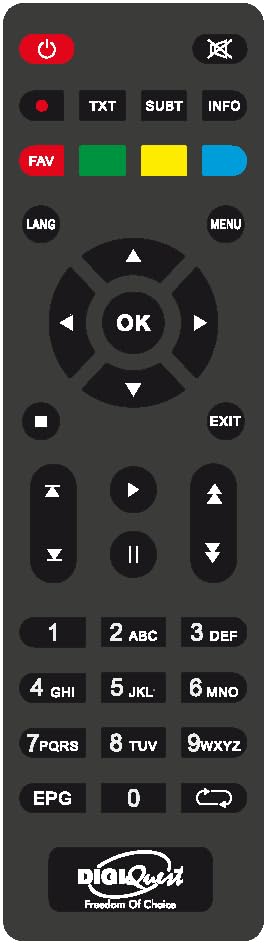
The DIGIQUEST TLC094 remote control features 20 buttons for comprehensive control of your compatible television. Below are the general functions:
- Butang Kuasa: Menghidupkan atau mematikan peranti.
- Butang Nombor (0-9): For direct channel selection or inputting numerical values.
- Saluran Atas/Bawah: Navigates through channels sequentially.
- Kelantangan Naik/Turun: Melaraskan kelantangan audio.
- Butang Bisukan: Menyenyapkan output audio.
- Menu/Settings Button: Accesses the device's main menu or settings.
- Navigation Buttons (Up, Down, Left, Right, OK/Enter): Digunakan untuk menavigasi menu dan mengesahkan pilihan.
- Butang Kembali/Keluar: Kembali ke skrin sebelumnya atau keluar dari menu.
- Butang Sumber/Input: Selects the input source (e.g., HDMI 1, AV).
- Other buttons may vary in function depending on the specific DIGIQUEST device model.
4. Penyelenggaraan
4.1 Pembersihan
Untuk membersihkan alat kawalan jauh anda, gunakan kain lembut dan kering. Untuk kotoran degil, sedikit dampen the cloth with water or a mild, non-abrasive cleaner. Avoid using harsh chemicals, solvents, or abrasive materials, as these can damage the remote's surface or internal components.
4.2 Penggantian Bateri
Replace batteries when the remote's response becomes sluggish or stops working. Always replace both batteries at the same time with new AAA alkaline batteries. Do not mix old and new batteries, or different types of batteries. Dispose of used batteries according to local regulations; do not discard them with household waste.
4.3 Penyimpanan
Store the remote control in a cool, dry place away from direct sunlight, extreme temperatures, and high humidity. If the remote will not be used for an extended period, remove the batteries to prevent leakage and potential damage.
5. Penyelesaian masalah
- Jauh tidak bertindak balas:
- Periksa sama ada bateri dimasukkan dengan betul dengan polariti yang betul.
- Replace the batteries with new AAA alkaline batteries.
- Ensure there is a clear line of sight between the remote's infrared emitter and the device's receiver. Obstructions can block the signal.
- Sahkan bahawa alat kawalan jauh dihalakan terus ke peranti.
- Buttons are unresponsive or sticky:
- Bersihkan alat kawalan jauh seperti yang diterangkan dalam bahagian Penyelenggaraan.
- If cleaning does not resolve the issue, the remote may require replacement.
- Remote controls some functions but not others:
- This remote is designed for specific DIGIQUEST models. Ensure your device is fully compatible.
- Some advanced functions might be specific to the original remote that came with your device.
6. Spesifikasi
| Jenama | DIGIQUEST |
| Nombor Model | TLC094 |
| Pengeluar | Digiquest |
| Ciri Khas | Sejagat |
| warna | Hitam |
| Peranti yang Disokong Maksimum | 1 |
| Peranti Serasi | Televisyen |
| Teknologi Ketersambungan | Inframerah |
| Bilangan Butang | 20 |
| Jenis Pengawal | Kawalan Butang |
| Penerangan Bateri | Alkaline (AAA) |
7. Maklumat Pematuhan
This product bears the CE mark, indicating its conformity with European health, safety, and environmental protection standards. The crossed-out wheeled bin symbol on the product signifies that, at the end of its life, it should be disposed of separately from household waste. Please use designated collection points for electronic waste to ensure proper recycling and minimize environmental impact.
8. Waranti
Specific warranty information for the DIGIQUEST TLC094 remote control may vary by region and retailer. Please refer to the purchase documentation or contact your point of sale for details regarding warranty coverage and terms. Keep your proof of purchase for any warranty claims.
9. Sokongan
For further assistance, technical support, or inquiries regarding your DIGIQUEST Universal Remote Control TLC094, please visit the official DIGIQUEST webtapak atau hubungi bahagian perkhidmatan pelanggan mereka. Maklumat hubungan biasanya boleh didapati pada pengilang webtapak atau pembungkusan produk.