
CLOVER D25-B-TL
CLOVER D25-B-TL Touchless Water Cooler Purifier Dispenser User Manual
Model: D25-B-TL
pengenalan
Thank you for choosing the CLOVER D25-B-TL Touchless Water Cooler Purifier Dispenser. This advanced system provides convenient access to purified cold and ambient water. Featuring a GAC filtration system, UV LED self-cleaning, and touchless dispense technology, it ensures a hygienic and refreshing hydration experience. This manual provides essential information for proper setup, operation, maintenance, and troubleshooting to ensure optimal performance and longevity of your dispenser.

Rajah 1: Depan view of the CLOVER D25-B-TL Water Cooler Dispenser.
Maklumat Keselamatan Penting
Sila baca semua arahan dengan teliti sebelum menggunakan perkakas. Simpan manual ini untuk rujukan masa hadapan.
- Keselamatan Elektrik: Ensure the dispenser is connected to a grounded electrical outlet. Do not use extension cords. Disconnect power before cleaning or servicing.
- Sambungan Air: Connect the dispenser only to a potable water supply. Ensure all connections are secure to prevent leaks.
- penempatan: Place the dispenser on a flat, stable surface. Allow adequate clearance around the unit for ventilation.
- Kanak-kanak dan Haiwan Kesayangan: Keep children and pets away from the dispenser, especially during operation and maintenance.
- Suhu: This unit dispenses cold and ambient water only. It does NOT produce hot water.
- kerosakan: Do not operate the dispenser if it has a damaged cord or plug, or if it has been dropped or damaged in any way. Contact customer support.
Kandungan Pakej
Verify that all items listed below are included in your package.
- CLOVER D25-B-TL Water Cooler Dispenser
- First Filter (GAC Purification System)
- Tiub Air
- Penyambung
- Emergency Shutoff Valve
- Tubing Clips
- Manual Pengguna

Figure 2: Included installation kit components.
Arahan Persediaan
- Membongkar: Carefully remove the dispenser and all components from the packaging. Retain packaging for future transport if needed.
- penempatan: Position the freestanding dispenser on a level, stable surface. Ensure there is adequate space around the unit for proper ventilation, especially at the rear where the cooling coils are located. The dimensions are approximately 13.58"D x 12.2"W x 43.3"H.
- Pemasangan Penapis:
- Locate the filter housing, typically at the rear or bottom access panel of the unit.
- Insert the provided GAC purification filter into the housing as per the arrows indicating water flow.
- Secure the filter firmly.
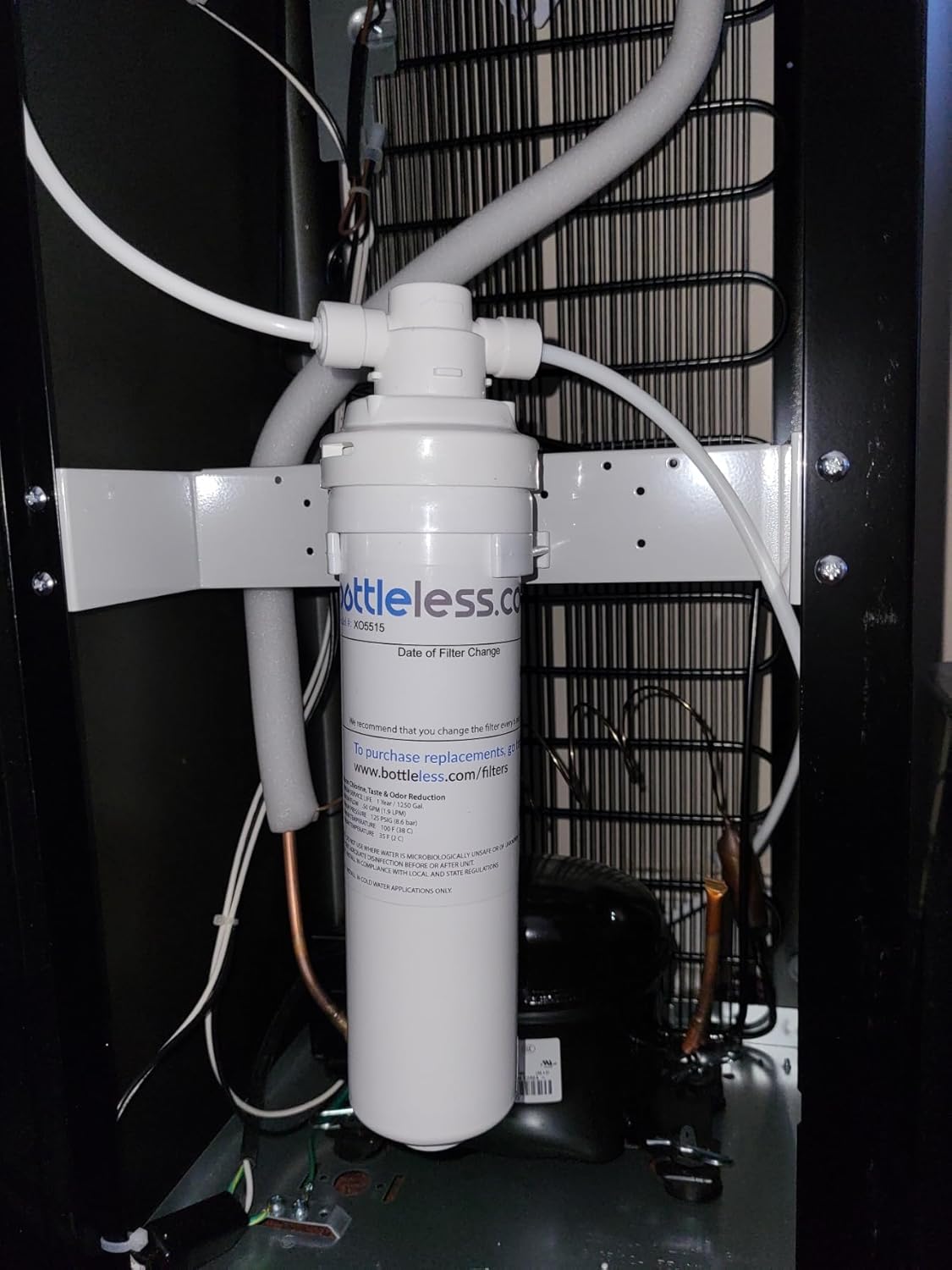
Gambar 3: Dalaman view illustrating filter placement and water tubing.
- Sambungan Bekalan Air:
- Connect the water tubing from your potable water source to the dispenser's inlet using the provided connectors and emergency shutoff valve.
- Ensure all connections are tight to prevent leaks. Use tubing clips to secure the tubing if necessary.
- Slowly open the water supply valve to allow water to fill the dispenser's internal tank. Check for any leaks.
- Sambungan Kuasa: Plug the dispenser into a grounded 120V AC electrical outlet.
- Siram Awal: Before first use, dispense several cups of water from both cold and ambient spouts to flush the system and filter. Discard this water.
Arahan Operasi
The CLOVER D25-B-TL features touchless dispense and UV LED self-cleaning for enhanced hygiene.
- Hidupkan kuasa: Once plugged in, the dispenser will begin to cool the water. Allow approximately 1-2 hours for the water to reach optimal cold temperature (35.6°F).
- Dispensing Water (Touchless):
- Place your cup or container under the desired spout (cold or ambient).
- Wave your hand in front of the sensor located above the spout. The water will begin to dispense.
- Remove your hand to stop the water flow.
Figure 4: Detail of the touchless dispense spouts and sensors.
- UV LED Self-Cleaning: The dispenser is equipped with a UV LED self-cleaning system for enhanced water purification. This system operates automatically to maintain the hygiene of the internal water tanks. Refer to the indicator lights on the top panel for its status.
Penyelenggaraan
Regular maintenance ensures the best performance and water quality from your dispenser.
- Penggantian Penapis:
- The GAC purification filter should be replaced periodically, typically every 6 months or as indicated by the dispenser's filter change indicator (if present).
- Turn off the water supply and unplug the dispenser before replacing the filter.
- Follow the filter installation steps in the Setup section to replace the old filter with a new one.
- Flush the new filter as described in the Initial Flush step.
- Pembersihan Dulang Titisan: The ABS drip tray is easily removed for cleaning.
- Pull the drip tray forward to remove it.
- Empty any collected water and wash the tray with mild soap and water.
- Rinse thoroughly and reinsert the tray.
- Pembersihan Luaran: Lap permukaan luar dengan lembut, damp kain. Jangan gunakan pembersih atau pelarut yang melelas.
- Internal Tank Cleaning: The UV LED self-cleaning system helps maintain internal hygiene. For additional cleaning, consult the manufacturer's website or customer support for specific instructions.
Menyelesaikan masalah
Sebelum menghubungi sokongan pelanggan, sila rujuk isu dan penyelesaian biasa berikut:
| Masalah | Kemungkinan Punca | Penyelesaian |
|---|---|---|
| Tiada bekalan air. | Water supply valve closed; filter clogged; airlock in system; power off. | Ensure water supply valve is open. Check and replace filter if necessary. Disconnect power, wait 5 minutes, then reconnect. Ensure unit is plugged in. |
| Air tidak cukup sejuk. | Insufficient cooling time; poor ventilation; ambient temperature too high. | Allow 1-2 hours for initial cooling. Ensure adequate space around the unit for ventilation. Operate in a room with appropriate ambient temperature. |
| Leakage from unit. | Loose water connections; damaged tubing or filter. | Immediately turn off water supply and unplug the unit. Check all water connections for tightness. Inspect tubing and filter for visible damage. Contact customer support if issue persists. |
| Touchless dispense not working. | Sensor obstructed or dirty; power issue. | Clean the sensor area. Ensure the unit is powered on. |
Spesifikasi
| Ciri | Perincian |
|---|---|
| Jenama | CLOVER |
| Nombor Model | D25-B-TL |
| Dimensi Produk (D x W x H) | 13.58"D x 12.2"W x 43.3"H |
| bahan | Plastik, Keluli Tahan Karat |
| warna | Hitam |
| Kapasiti | 6 Liter |
| Jenis Pemasangan | Freestanding |
| Akses Lokasi | Bawah |
| Sumber Kuasa | Elektrik Bertali |
| Penarafan Suhu Lebih Rendah | 35.6 Darjah Fahrenheit |
| Sistem Pemurnian | GAC Filtration, UV LED Self Cleaning |
| Dispense Type | Tanpa sentuhan |

Rajah 5: Dimensi produk untuk rujukan peletakan.
Waranti dan Sokongan Pelanggan
For warranty information, product registration, or technical assistance, please contact CLOVER customer support.
Pengeluar: Semanggi
Webtapak: CLOVER Official Store (untuk maklumat umum produk)
Sila rujuk kepada dokumentasi pembelian anda untuk terma waranti khusus dan butiran hubungan.
Ask a question about this manual
Ask about setup, troubleshooting, compatibility, parts, safety, or missing instructions. Manuals+ will review the question and use this page’s manual context to help answer it.