
1. Produk Lebihview
The Generic Wireless Bluetooth Headphones AH-806 are designed to provide a high-fidelity audio experience with the convenience of wireless connectivity. Featuring a foldable design for portability and a built-in microphone for calls, these headphones are suitable for various uses including gaming, music, and sports.
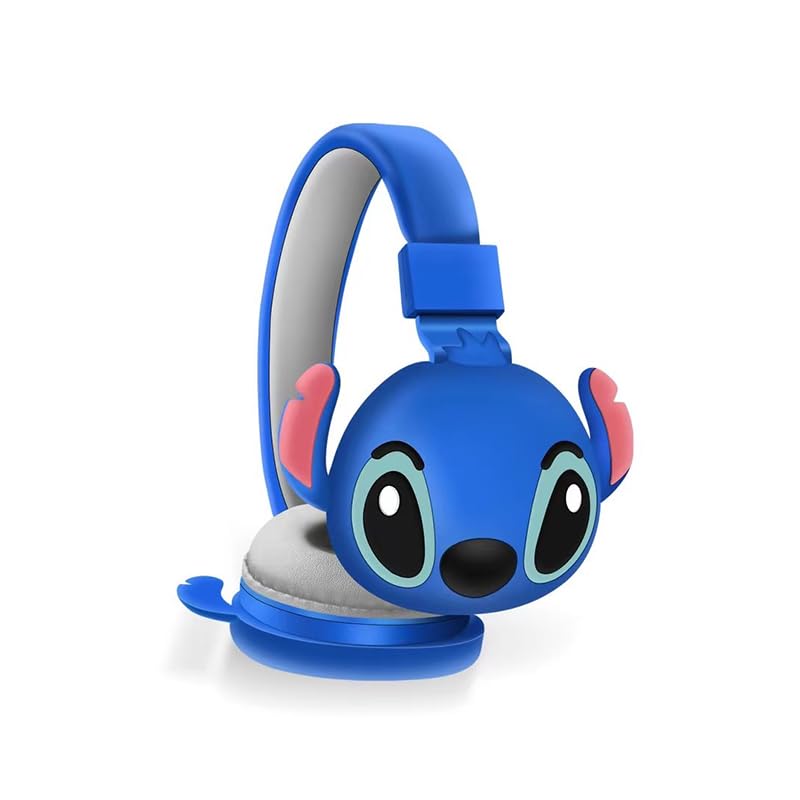
Imej 1.1: Depan view of the AH-806 Wireless Bluetooth Headphones, featuring a blue color and a Stitch character design on the earcups.
Ciri-ciri Utama:
- Reka bentuk lipat: Conveniently folds for easy portability and storage in bags or suitcases, making it an ideal companion for travel.
- HIFI Stereo Sound: Equipped with a 13mm driver diameter for high-fidelity stereo sound, suitable for various audio content.
- Mikrofon terbina dalam: Enables hands-free calling and communication.
- Pembatalan Bunyi Pasif: Oversize earcups provide passive noise reduction for an immersive listening experience.
- Penggunaan Serbaguna: Designed for video games, general audio listening, HiFi audio, and sports activities.
2. Kandungan Pakej
Sila tandai kotak untuk item berikut:
- 1 x Wireless Bluetooth Headphones AH-806
- 1 x Manual Pengguna (dokumen ini)
- 1 x Charging Cover
- 1 x Penyesuai Jenis-C USB

Image 2.1: Packaging of the AH-806 Headphones, illustrating the product and its accessories.
3. Panduan Persediaan
3.1. Mengecas Fon Kepala
- Locate the USB Type-C charging port on the headphones.
- Connect the provided USB Type-C adapter to the charging port.
- Pasangkan hujung kabel USB yang satu lagi ke sumber kuasa USB yang serasi (cth., port USB komputer, penyesuai dinding).
- The LED indicator on the headphones will illuminate to show charging status. It will typically turn off or change color once fully charged.
Note: For optimal battery life, fully charge the headphones before first use.
3.2. Berpasangan Bluetooth
- Pastikan fon kepala dicas sepenuhnya.
- Hidupkan kuasa: Tekan dan tahan butang Kuasa pada fon kepala sehingga penunjuk LED berkelip, menunjukkan mod berpasangan.
- Aktifkan Bluetooth: On your device (smartphone, tablet, laptop), go to the Bluetooth settings and ensure Bluetooth is turned on.
- Cari untuk Peranti: Your device will scan for available Bluetooth devices. Look for "AH-806" or a similar name in the list.
- Sambung: Select "AH-806" from the list to initiate the connection. Once connected, the LED indicator on the headphones may change to a solid light or flash slowly.
- You are now ready to use your headphones.
Jika diminta kata laluan, masukkan "0000" (empat sifar).
4. Arahan Operasi
4.1. Hidupkan/Mati Kuasa
- Hidupkan kuasa: Tekan dan tahan butang Kuasa selama lebih kurang 3 saat sehingga penunjuk LED menyala.
- Matikan: Tekan dan tahan butang Kuasa selama lebih kurang 5 saat sehingga penunjuk LED dimatikan.
4.2. Main balik Muzik
- Main/Jeda: Tekan butang Pelbagai fungsi (selalunya butang Kuasa atau butang Main/Jeda khusus) sekali.
- Lagu Seterusnya: Press and hold the Volume Up button or a dedicated Next Track button.
- Trek Sebelumnya: Press and hold the Volume Down button or a dedicated Previous Track button.
- Kelantangan: Tekan pendek butang Kelantangan Naik.
- Perlahankan suara: Tekan pendek butang Kurangkan Kelantangan.
4.3. Pengurusan Panggilan
- Jawab/Tamatkan Panggilan: Press the Multi-function button once during an incoming call to answer, and once again to end the call.
- Tolak Panggilan: Press and hold the Multi-function button for approximately 2 seconds during an incoming call to reject it.
- Dail Semula Nombor Terakhir: Tekan dua kali butang Berbilang fungsi.
4.4. Folding Design
The headphones feature a foldable design for enhanced portability. Gently fold the earcups inwards towards the headband until they are compact. This reduces the overall size of the headphones, making them easier to store and carry.
5. Penyelenggaraan dan Penjagaan
- Pembersihan: Use a soft, dry, lint-free cloth to clean the headphones. Do not use abrasive cleaners, alcohol, or chemical solvents, as these may damage the surface.
- Storan: When not in use, store the headphones in a cool, dry place, away from direct sunlight and extreme temperatures. Utilize the folding feature to save space.
- Elakkan Air: Fon kepala ini bukan kalis air. Elakkan pendedahan kepada air, lembapan atau kelembapan berlebihan.
- Tangani dengan Berhati-hati: Jangan jatuhkan, buka atau cuba membaiki fon kepala sendiri. Ini boleh membatalkan jaminan dan menyebabkan kerosakan.
6. Penyelesaian masalah
| Masalah | Penyelesaian yang Mungkin |
|---|---|
| Fon kepala tidak dihidupkan. | Ensure the headphones are fully charged. Connect them to a power source using the provided USB Type-C adapter. |
| Tidak boleh berpasangan dengan peranti Bluetooth. |
|
| Tiada bunyi atau kelantangan rendah. |
|
| Bunyi herot atau terputus-putus. |
|
7. Spesifikasi
| Ciri | Perincian |
|---|---|
| Nama Model | AH-806 |
| Teknologi Ketersambungan | Tanpa wayar |
| Teknologi Komunikasi Tanpa Wayar | Bluetooth |
| bahan | Plastik, Fabrik |
| Kegunaan Khusus Untuk Produk | Gaming, Music, Sport |
| Peranti Serasi | Telefon Pintar, Tablet, Komputer Riba, Desktop, Konsol Permainan |
| Ciri Kabel | Tanpa Kabel |
| Kaedah Kawalan | Jauh |
| Bilangan Item | 1 |
| Jenis Pemacu Audio | Pemacu Dinamik (13mm) |
| Bentuk alat dengar | Atas Telinga |
| Pengeluar | MOPIKI |
| Ciri Khas | Noise Cancellation (Passive) |
| warna | r.blue |
| Penempatan Telinga | Atas Telinga |
| Faktor Bentuk | Atas Telinga |
8. Waranti dan Sokongan
This product is manufactured by MOPIKI. For specific warranty information, please refer to the documentation provided at the time of purchase or contact your retailer.
For technical support or inquiries, please contact the retailer or manufacturer directly. Keep your purchase receipt as proof of purchase.
Note: As per the provided product information, specific warranty details are not available in this manual.