
T10M Pro+
Vortex T10M Pro+ Tablet User Manual
Model: T10M Pro+
1. Pengenalan
Thank you for choosing the Vortex T10M Pro+ Tablet. This manual will guide you through the features and functions of your new device, ensuring a smooth and enjoyable user experience. Please read this manual carefully before using your tablet.
Apa yang ada dalam Kotak
Upon unboxing your Vortex T10M Pro+ Tablet, please verify that all the following items are present:
- Vortex T10M Pro+ Tablet
- Pengecas
- Pelindung Skrin
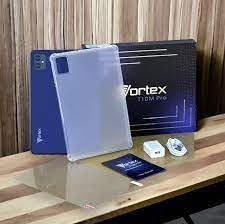
Image: Contents of the Vortex T10M Pro+ Tablet box. This includes the tablet, a clear protective case, the power adapter, and a screen protector, all neatly arranged on a wooden surface.
2. Produk Lebihview
Familiarize yourself with the physical components and key features of your Vortex T10M Pro+ Tablet.
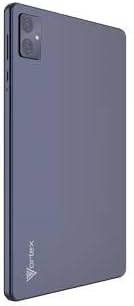
Imej: Belakang view of the Vortex T10M Pro+ Tablet. The tablet has a sleek, dark finish with the 'Vortex' logo subtly placed at the bottom. The camera module is visible in the upper left corner.

Imej: Terperinci view of the back of the Vortex T10M Pro+ Tablet, highlighting its specifications. Printed details include '10.1-inch Brilliant Display', '5MP Front Camera', '8MP Rear Camera', 'MTK6766 Processor', 'Quad-Core, 4GB+64GB', '5000mAh Mega Battery', and 'Android 12'.
3. Persediaan
3.1. Mengecas Peranti
Before first use, fully charge your tablet. Connect the provided charger to the tablet's charging port and plug it into a power outlet. The battery indicator on the screen will show charging progress.
3.2. Inserting SIM/MicroSD Card
The Vortex T10M Pro+ supports 4G LTE connectivity and expandable storage. To insert a SIM card (for mobile data) or a microSD card (for additional storage):
- Locate the SIM/microSD card tray on the side of the tablet.
- Gunakan alat ejektor SIM yang disediakan untuk membuka dulang.
- Carefully place the SIM card(s) and/or microSD card into the designated slots, ensuring correct orientation.
- Tolak dulang kembali ke dalam tablet dengan lembut sehingga ia terpasang dengan klik di tempatnya.
3.3. Kuasa Awal Hidup
Press and hold the Power button located on the side of the tablet until the Vortex logo appears. Follow the on-screen prompts to complete the initial setup, including language selection, Wi-Fi connection, and Google account setup.
4. Arahan Operasi
4.1. Navigasi Asas
Your tablet runs on Android 13.0. Use touch gestures for navigation:
- Ketik: Pilih item atau buka apl.
- Leret: Tatal melalui skrin atau senarai.
- Cubit untuk zum: Zum masuk atau keluar pada foto dan web muka surat.
- Tekan lama: Akses menu kontekstual atau alihkan ikon.
4.2. Menyambung ke Wi-Fi
Untuk menyambung ke rangkaian Wi-Fi:
- Pergi ke tetapan > Rangkaian & internet > Internet.
- Hidupkan Wi-Fi.
- Pilih rangkaian yang anda inginkan daripada senarai dan masukkan kata laluan jika digesa.
4.3. Using Mobile Data (4G LTE)
If you have inserted a valid SIM card with an active data plan:
- Pergi ke tetapan > Rangkaian & internet > SIM.
- Ensure Mobile data is enabled for your SIM.
4.4. Operasi Kamera
Tablet ini mempunyai kamera belakang 8MP dan kamera hadapan 5MP.
- Buka apl Kamera.
- Ketik butang pengatup untuk mengambil foto.
- Bertukar antara kamera hadapan dan belakang menggunakan ikon togol kamera.
4.5. Mengurus Storan
Your tablet comes with 64GB of internal storage. You can expand this using a microSD card up to 128GB. To view storage usage, go to tetapan > Penyimpanan.
5. Penyelenggaraan
5.1. Pembersihan
Gunakan kain lembut dan tidak berbulu untuk membersihkan skrin dan badan tablet. Elakkan menggunakan bahan kimia yang keras atau bahan yang melelas.
5.2. Kemas Kini Perisian
Periodically check for software updates to ensure your tablet has the latest features and security patches. Go to tetapan > Sistem > Kemas kini sistem.
5.3. Penjagaan Bateri
Untuk memanjangkan hayat bateri:
- Elakkan suhu yang melampau.
- Jangan biarkan bateri dicas sepenuhnya dengan kerap.
- Cabut plag pengecas setelah bateri penuh.
6. Penyelesaian masalah
Bahagian ini menangani isu biasa yang mungkin anda hadapi dengan tablet anda.
| Isu | Penyelesaian yang Mungkin |
|---|---|
| Tablet tidak dihidupkan | Pastikan bateri dicas. Tekan dan tahan butang Kuasa selama sekurang-kurangnya 10-15 saat untuk memaksa mulakan semula. |
| Isu sambungan Wi-Fi | Restart the tablet and your Wi-Fi router. Forget the network in settings and reconnect. |
| Apl perlahan atau ranap | Close background apps. Clear app cache (Settings > Apps > [App Name] > Storage > Clear cache). Restart the tablet. |
| Mesej penuh storan | Padam yang tidak perlu files or apps. Move media to a microSD card. |
7. Spesifikasi
Detailed technical specifications for the Vortex T10M Pro+ Tablet.
| Ciri | Spesifikasi |
|---|---|
| Nama Model | T10M Pro+ Tablet (Unlocked) Blue 10.1" 64GB 4GB GSM 4G LTE + Wifi 8MP |
| Saiz Paparan | 10.1 Inci |
| Resolusi Skrin Maks | 1280 x 800 Piksel |
| Kadar Segar Semula | 120 Hz |
| Pemproses | MediaTek, 2 GHz |
| RAM | 4 GB |
| Storan Dalaman | 64 GB |
| Storan Boleh Dikembangkan | MikroSD (sehingga 128GB) |
| Sistem Operasi | Android 13.0 |
| Kamera Belakang | 8 MP |
| Kamera Depan | 5 MP |
| Ketersambungan | 4G LTE, Wi-Fi, Bluetooth, GPS |
| Jenis Bateri | Litium-Ion |
| Purata Hayat Bateri | 18 Jam |
| Dimensi Produk | 10.1 x 5 x 3 inci |
| warna | Hitam |
8. Maklumat Waranti
This product is covered by a manufacturer's warranty. Please refer to the warranty card included with your purchase or visit the manufacturer's official weblaman web untuk terma dan syarat terperinci mengenai perlindungan waranti, tempoh dan proses tuntutan.
9. Sokongan
For further assistance, technical support, or service inquiries, please contact the manufacturer's customer support. Contact information can typically be found on the product packaging, the manufacturer's website, or the warranty documentation.
Ask a question about this manual
Ask about setup, troubleshooting, compatibility, parts, safety, or missing instructions. Manuals+ will review the question and use this page’s manual context to help answer it.