
pengenalan
This manual provides comprehensive instructions for the Hello Kitty Smart Watch (Model: HK4208). Please read this manual carefully before using your device to ensure proper operation and to maximize its features. This smartwatch is designed for interactive use, offering various functions including timekeeping, fitness tracking, entertainment, and communication features.
Apa yang ada dalam Kotak
- Hello Kitty Smart Watch (Model: HK4208)
- Kabel Pengecas USB
- Manual Pengguna (dokumen ini)
Persediaan
1. Mengecas Jam Tangan Pintar
Before first use, fully charge the smartwatch. Connect the provided USB charging cable to the charging port on the back of the watch and to a standard USB power adapter (not included) or a computer's USB port.

Imej: Belakang view of the Hello Kitty Smart Watch, highlighting the charging contacts and sensor area. The watch features a pink and white strap with Hello Kitty patterns.
- A battery icon will appear on the screen indicating charging status.
- Pengecasan biasanya mengambil masa 1-2 jam untuk cas penuh.
- Ensure the charging contacts are clean and dry before connecting.
2. Menghidupkan/Mematikan
- Untuk Menghidupkan: Press and hold the side button until the Hello Kitty logo appears on the screen.
- Untuk Mematikan: Press and hold the side button until a power-off option appears, then confirm on the touchscreen.
Mengendalikan Jam Tangan Pintar
Navigasi skrin sentuh
The Hello Kitty Smart Watch features an interactive touchscreen display. Swipe left, right, up, or down to navigate through different menus and functions. Tap an icon to select an application or option.
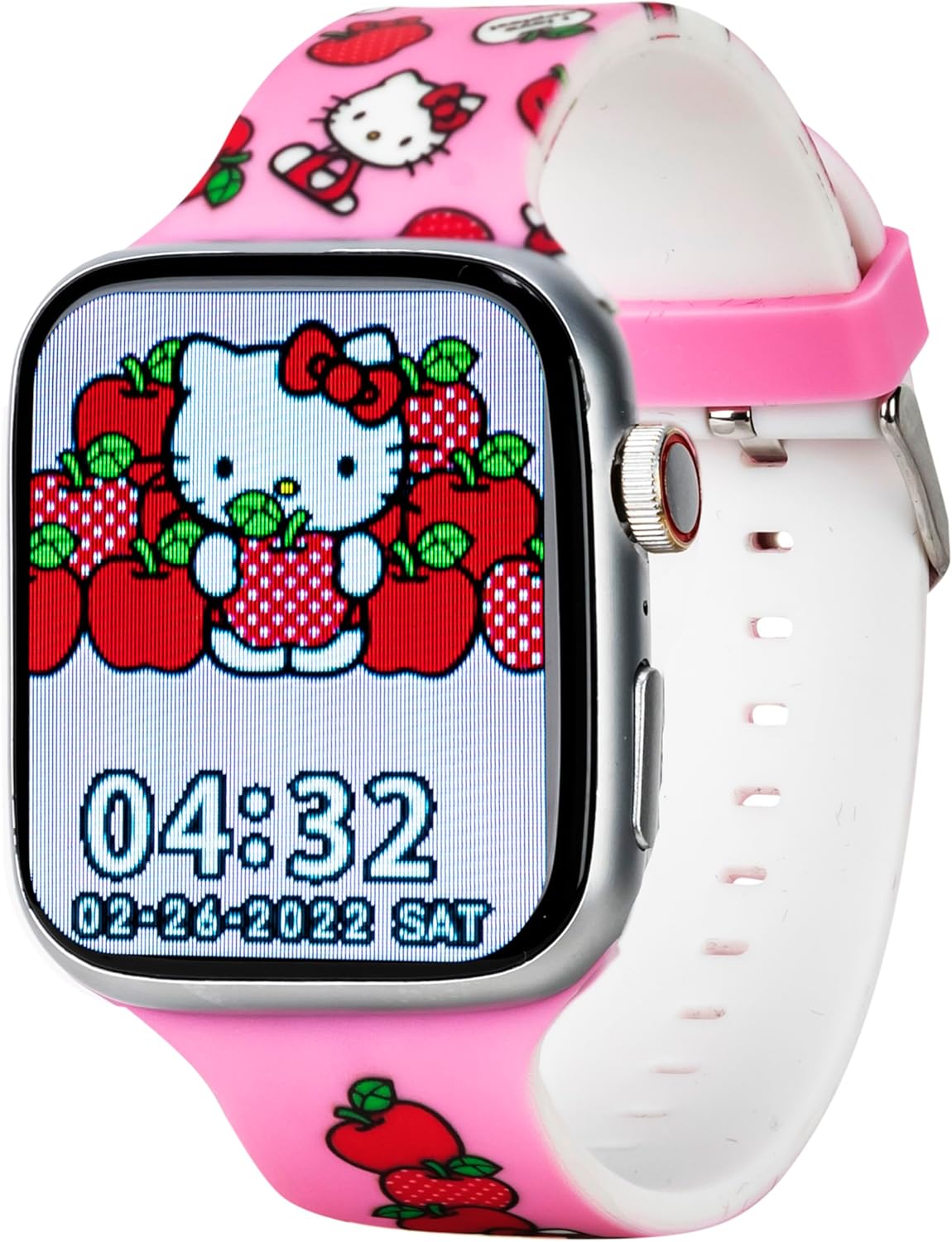
Imej: Depan view of the Hello Kitty Smart Watch, showcasing a vibrant watch face featuring Hello Kitty surrounded by apples. The time 04:32 and date 02-28-2022 SAT are visible.
Ciri dan Fungsi Utama
- Tonton Wajah: The watch offers six unique Hello Kitty-themed watch faces. To change, tap and hold the current watch face, then swipe to select your preferred design.

Image: Close-up of the Hello Kitty Smart Watch screen, showing an alternative watch face with Hello Kitty and strawberries. The time 04:31 and date 02-28-2022 SAT are displayed.
- kamera: Access the built-in camera to capture photos. Tap the camera icon, then tap the screen to take a picture. Photos are stored on the watch.
- Pemain muzik: Play pre-loaded music or transfer compatible audio files to the watch. Use the touchscreen controls to play, pause, skip tracks, and adjust volume.
- Fitness & Activity Tracking:
- Pedometer: Tracks your steps throughout the day.
- Mod Sukan: Select specific modes for various activities to track duration and estimated calories burned.
- Peringatan Sedentari: Memberi amaran kepada anda apabila anda tidak aktif terlalu lama, menggalakkan pergerakan.
- Lampu suluh: Activate the flashlight function for illumination in dark environments.
- Penjejak Tidur: Monitors sleep patterns to help understand rest quality.
- Pemberitahuan Panggilan dan Mesej: While the watch does not have internet access, it can receive notifications for calls and messages from a paired device (e.g., a smartphone via Bluetooth). Ensure Bluetooth is enabled on both devices and they are within range.
- Apl Cuaca: Provides current weather information. (Note: This feature may require a Bluetooth connection to a device with internet access to update weather data).
- Penggera & Jam randik: Set alarms for reminders or use the stopwatch for timing activities.
- Permainan Pendidikan: Engage with pre-installed educational games for fun and learning.
- QR Reader: Scan QR codes for interactive content or information.
- Pilihan Bahasa: Select your preferred language from the watch settings.
Penyelenggaraan
- Pembersihan: Lap skrin dan tali jam tangan dengan kain lembut, kering dan bebas bulu. Untuk kesan degil, lap sedikitampen kain dengan air. Elakkan bahan kimia yang keras atau bahan yang melelas.
- Tahan Air: The watch is designed to be splash-proof. Avoid submerging it in water, showering, or swimming with the watch on.
- Penjagaan Bateri: To prolong battery life, avoid extreme temperatures. Charge the watch regularly and do not let the battery completely drain for extended periods.
- Storan: Apabila tidak digunakan untuk jangka masa yang lama, simpan jam tangan di tempat yang sejuk dan kering.
Menyelesaikan masalah
| Masalah | Penyelesaian yang Mungkin |
|---|---|
| Jam tangan tidak boleh dihidupkan. | Ensure the watch is fully charged. Connect to the charger for at least 30 minutes. If still unresponsive, try a soft reset by holding the side button for 10-15 seconds. |
| Skrin tidak bertindak balas. | Mulakan semula jam tangan. Jika masalah berterusan, pastikan skrin bersih dan kering. |
| Bateri cepat habis. | Reduce screen brightness. Close unused applications. Limit continuous use of power-intensive features like the camera or music player. |
| Tidak boleh menerima pemberitahuan. | Ensure Bluetooth is enabled on both the watch and the paired device. Make sure the devices are within Bluetooth range. Check notification settings on the paired device. |
Spesifikasi
| Ciri | Perincian |
|---|---|
| Nombor Model | HK4208AZ |
| Paparan | Skrin Sentuh Interaktif |
| Ketersambungan | Bluetooth (for notifications) |
| Bateri | 1 bateri Lithium Ion (termasuk) |
| Dimensi | 6.46 x 4.25 x 2.52 inci (Pakej) |
| Berat badan | 0.1 auns (Item) |
| Pengeluar | Accutime Watch Corp. |
| Tahan Air | Splash-proof (not for submersion) |
Waranti dan Sokongan
The Hello Kitty Smart Watch (Model: HK4208) comes with a Waranti 5 tahun from Accutime. This warranty covers manufacturing defects under normal use. Please retain your proof of purchase for warranty claims.
For technical support, troubleshooting assistance beyond this manual, or warranty inquiries, please contact Accutime customer service. Refer to the packaging or Accutime's official webtapak untuk maklumat hubungan terkini.
Nota: Pembaikan atau pengubahsuaian yang tidak dibenarkan boleh membatalkan jaminan anda.