
1. Pengenalan
The SLASH4 is a versatile Hi-Fi Bluetooth Digital-to-Analog Converter (DAC) and Headphone Amplifier designed to upgrade your car or home audio system to high-resolution studio quality. It features an ESS ES9219 Quad DAC, supports advanced Bluetooth codecs like LDAC and aptX Adaptive, and includes optical output for flexible connectivity.

Imej: Depan view of the SLASH4 device.
2. Kandungan Pakej
Sahkan bahawa semua item terdapat dalam pakej:
- SLASH4 Unit
- Premium 3.5mm AUX Cable
- Manual Pengguna (dokumen ini)

Image: The SLASH4 unit and its accompanying premium 3.5mm AUX cable.
3. Ciri-ciri Produk
- ESS Quad DAC (ES9219): Integrates a premium ESS ES9219 Quad DAC to convert standard audio into high-fidelity sound (24-bit/96kHz) with an expanded soundstage and enhanced detail.
- Penghapusan Bunyi: Features a built-in LDO regulator and isolation technology to block power noise, ensuring a clear audio background, especially in car environments.
- Sokongan Audio Resolusi Tinggi: Compatible with Sony LDAC, aptX Adaptive, aptX HD, and AAC codecs for lossless, CD-quality wireless streaming from Android and iOS devices.
- Pilihan Output Serbaguna: The 3.5mm port supports both Analog AUX for car stereos and Digital Optical for home amplifiers. It also functions as a standalone DAC for high-impedance wired headphones.
- Reka bentuk padat: Designed for single-device pairing to maintain signal integrity and prevent connection drops. Its small size allows for easy integration into various setups.
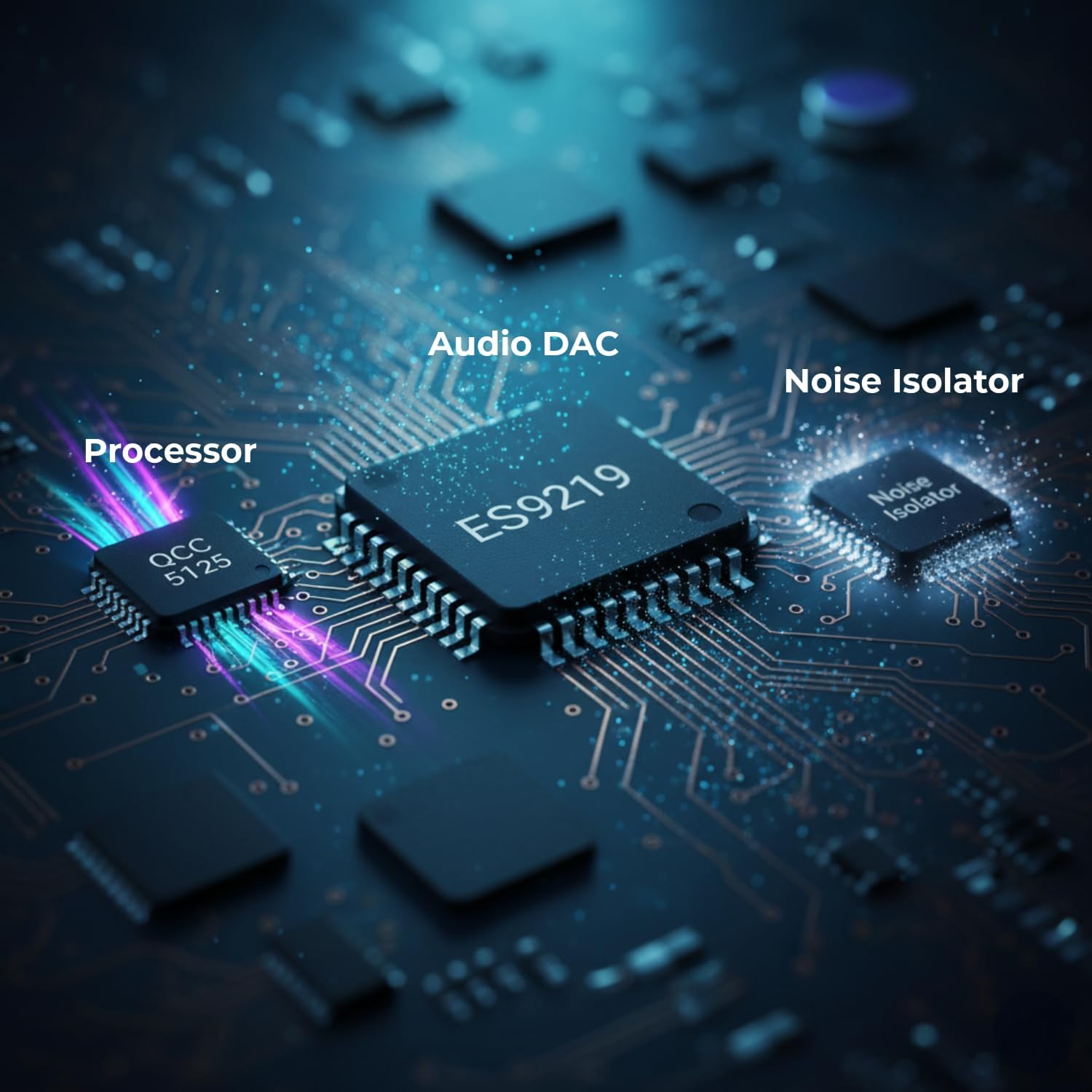
Image: Internal components highlighting the QCC5125 processor, ES9219 audio DAC, and Noise Isolator.
4. Persediaan dan Pemasangan
4.1 Connecting to Car Audio
- Insert the USB-A end of the SLASH4 into a USB port in your car for power. The USB port is for power only; it does not transmit audio.
- Connect one end of the included 3.5mm AUX cable to the 3.5mm port on the SLASH4.
- Connect the other end of the 3.5mm AUX cable to your car's AUX input port. Ensure it clicks into place for a secure connection.
- Pilih input AUX pada sistem audio kereta anda.

Image: SLASH4 connected in a car console, ready for audio playback.
4.2 Connecting to Home Audio (Optical Output)
- Insert the USB-A end of the SLASH4 into a USB power source (e.g., wall adapter, power bank).
- Connect a Mini Toslink to Toslink cable (not included) from the 3.5mm port on the SLASH4 to the optical input of your home ampliifier atau sistem audio.
- Select the optical input on your home audio system.
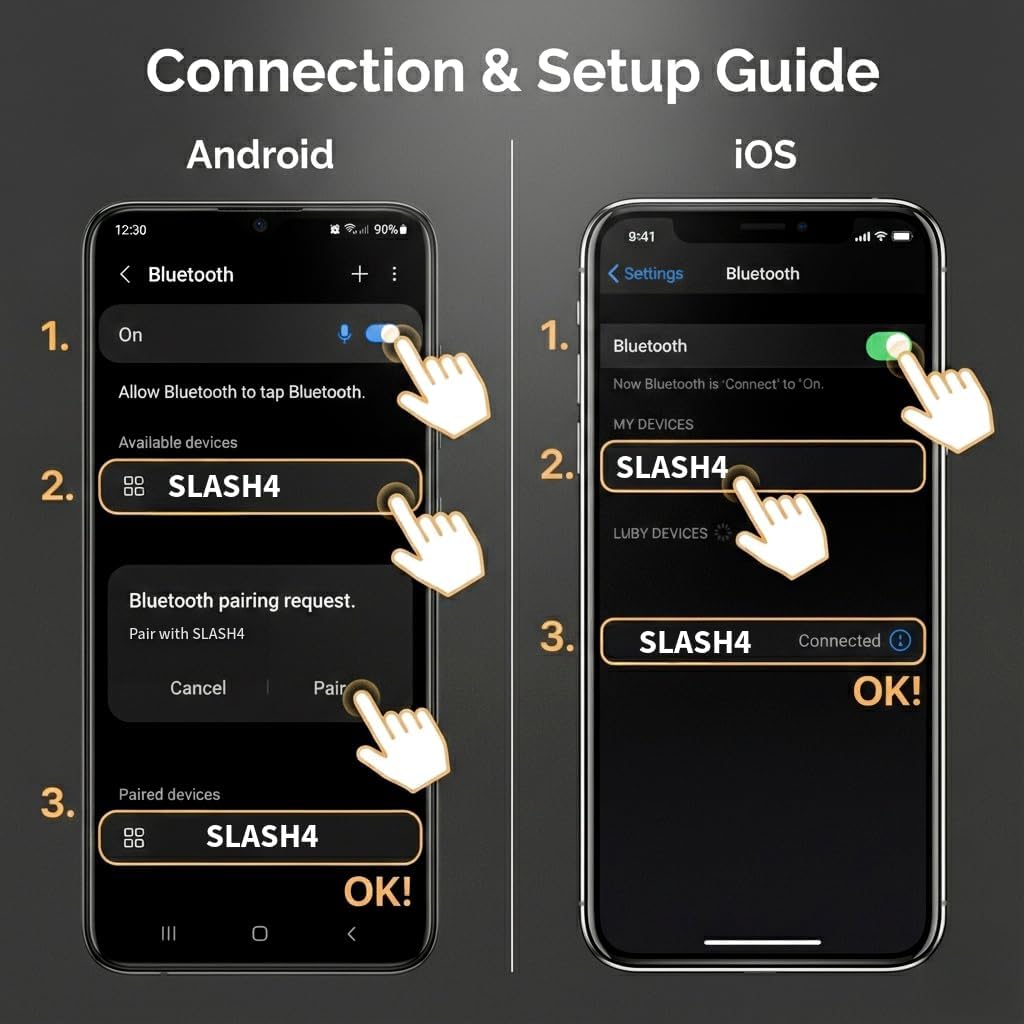
Image: SLASH4 connected to a home audio system using the optical output.
4.3 Berpasangan dengan Peranti Bluetooth
- Ensure the SLASH4 is powered on (LED indicator will light up).
- On your smartphone or other Bluetooth device, go to the Bluetooth settings.
- Cari untuk available devices and select "SLASH4" from the list.
- Confirm pairing if prompted. The LED indicator on the SLASH4 will change to indicate a successful connection (e.g., solid blue).

Image: Bluetooth pairing guide for Android and iOS devices.
4.4 Video Guides for Setup
Video: Demonstrates Hi-Fi wireless sound setup with SLASH4 in a car environment.
Video: A detailed guide on how to connect SLASH4 and achieve easy setup for Hi-Fi playback.
5. Operasi
5.1 Main Balik Audio
Once connected and paired, simply start playing audio from your Bluetooth-enabled device. The audio will be transmitted wirelessly to the SLASH4 and then output through your car's AUX system or home amplebih hidup.
5.2 Penyambungan Semula Automatik
The SLASH4 is designed to automatically reconnect to the last paired device when it is powered on and the device is within range.
5.3 Kawalan Kelantangan
The SLASH4 does not have its own volume controls. Adjust the volume directly from your connected phone, car audio system, or home amplebih hidup.
5.4 Penunjuk LED
The LED indicator on the SLASH4 provides status information, including power and connection status. The color of the LED may also indicate the active audio codec.
6. Penyelesaian masalah
Rujuk isu dan penyelesaian biasa berikut:
- No Sound (LED is On):
- Ensure your phone is not simultaneously connected to your car's built-in Bluetooth Handsfree/Audio. Unpair or disconnect your car's native Bluetooth.
- Verify the AUX cable is fully inserted into the car's AUX port. You should hear a "click."
- To check if the AUX port is faulty, lightly touch the AUX cable tip while SLASH4 is connected. If you hear a buzz, the port is functional. If not, the port may require service.
- LED Power Light Does Not Turn On:
- Check if your USB power source is working correctly.
- If using a car cigarette adapter, try a different USB port or charger.
- Audio Distortion at High Volume:
- Lower your phone's volume to approximately 80%. Distortion may occur if your car amplifier's input level is too high.
- Track Info Not Displayed on Car Monitor:
- The SLASH4 does not currently support track information display on car monitors. This feature may be added in a future firmware update.
- Compatibility with Android Auto or Apple CarPlay:
- For optimal sound quality, it is recommended to use SLASH4 as a standalone Bluetooth device. Android Auto and CarPlay may interfere with audio performance.
- USB Port for Audio Playback:
- The USB port on the SLASH4 is for power supply only. Audio output connects via the 3.5mm AUX or Optical port.
- Sambungan berbilang titik:
- To ensure maximum bandwidth for High-Res LDAC transmission and a stable connection, SLASH4 supports only one-to-one pairing. It does not support connecting multiple devices simultaneously.
- Menetapkan semula Peranti:
- While powered on, briefly press the reset button (no more than one second). Do not hold it down.
7. Spesifikasi
| Nama Model | SLAH4 |
| Jenama | SLASH |
| Teknologi Ketersambungan | 3.5mm Jack, AUX, Bluetooth, Headphones, Optical |
| Ciri Khas | Car Audio Noise Isolator, Headphone Amplifier, LDAC, Aux Input, Optical Output, Quad DAC |
| Sumber Kuasa | Elektrik Berwayar (USB 5V) |
| bahan | logam |
| warna | Blue Navy |
| Jenis Paparan | LED |
| Piawaian yang Disokong | Bluetooth 5.1, LDAC, aptX Adaptive, aptX HD, AAC |
| Jenis Output Audio | 3.5mm AUX, Headphone, Optical Out |
| Dimensi Item (L x W x H) | 2.83" x 0.82" x 0.51" (72mm x 22mm x 13mm) |
| Berat Barang | 0.15 Kilogram |
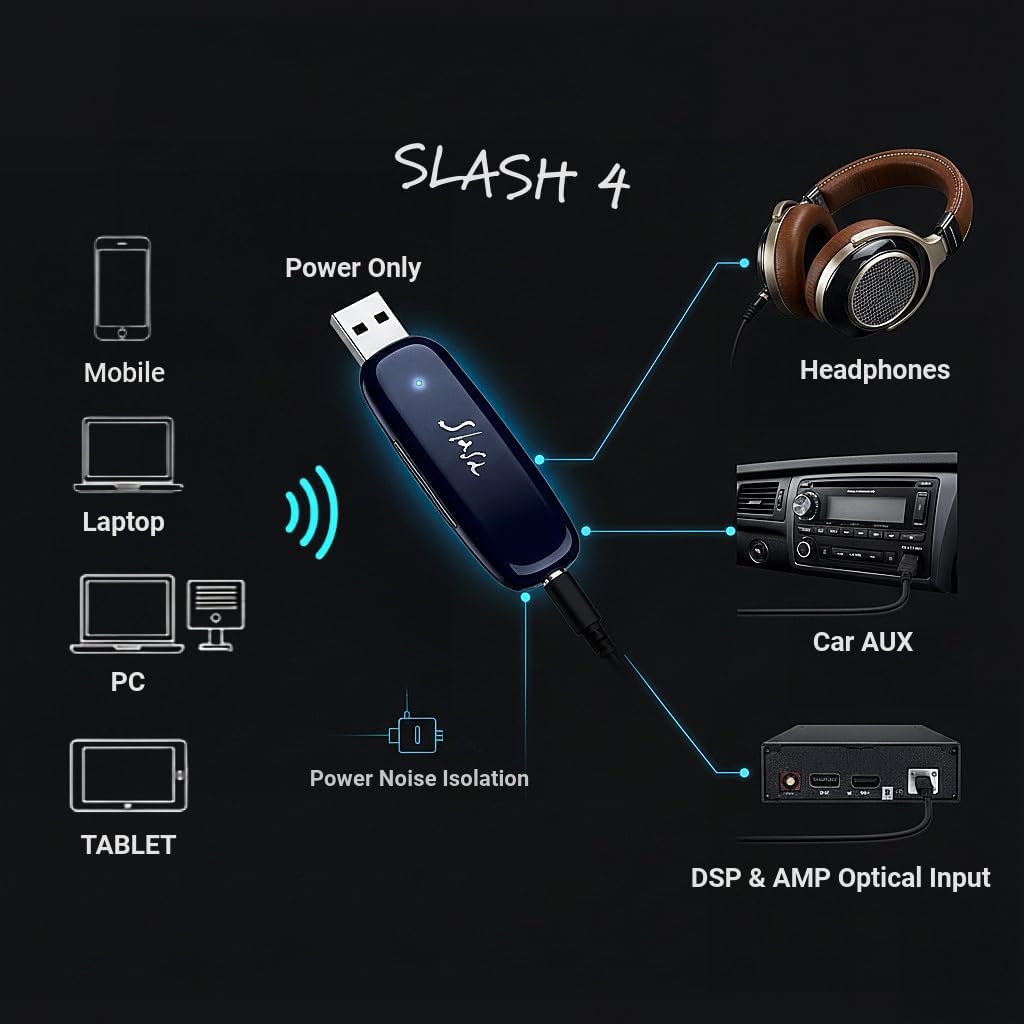
Image: Dimensions of the SLASH4 device.
8. Maklumat Keselamatan
To ensure safe operation and prevent damage to the device or other equipment, please observe the following:
- Jauhkan peranti daripada sumber haba dan kelembapan.
- Use the device in accordance with Bluetooth technology guidelines to avoid interference with other wireless devices.
- Jangan cuba membuka atau mengubah suai peranti. Ini boleh membatalkan jaminan dan menyebabkan kerosakan.
- Use only approved power sources (5V USB) to power the device.
9. Waranti dan Sokongan
The SLASH4 comes with a 1-year limited warranty. For warranty claims or technical support, please contact the manufacturer or your retailer. Ensure you retain your proof of purchase for warranty validation.
For additional assistance or inquiries, please refer to the official SLASH support channels.