
1. Pengenalan
This manual provides essential information for the safe and efficient operation of your Sharp GX-BT190 Portable Bluetooth Speaker. Please read it thoroughly before using the device and retain it for future reference.
2. Maklumat Keselamatan
- Jangan dedahkan pembesar suara kepada suhu yang melampau, cahaya matahari langsung atau kelembapan yang tinggi.
- Jangan buka, baiki atau ubah suai pembesar suara. Ini boleh membatalkan jaminan dan menimbulkan risiko keselamatan.
- Ensure the charging port cover is securely closed when using the speaker near water to maintain its IP67 rating.
- Gunakan hanya kabel pengecasan yang disediakan atau setara yang diperakui.
- Jauhkan pembesar suara daripada kanak-kanak dan haiwan peliharaan.
- Elakkan mendengar pada tahap kelantangan tinggi untuk tempoh yang lama untuk mengelakkan kerosakan pendengaran.
3. Kandungan Pakej
- Sharp GX-BT190 Portable Bluetooth Speaker
- Kabel Pengecas USB
- Lanyard
- Manual Arahan
4. Produk Lebihview

Depan view of the Sharp GX-BT190 speaker, showing the central speaker grille with the Sharp logo and the LED light ring.

sebelah view of the Sharp GX-BT190 speaker, highlighting the textured speaker grille and the integrated lanyard.
belakang view of the Sharp GX-BT190 speaker, showing the control buttons and the sealed charging port cover.
Kawalan dan Penunjuk:
- Butang Kuasa: Tekan dan tahan untuk menghidupkan/mematikan.
- Butang Naikkan Kelantangan / Trek Seterusnya (+): Tekan pendek untuk kelantangan, tekan lama untuk trek seterusnya.
- Butang Kelantangan Kurang / Trek Sebelumnya (-): Tekan pendek untuk kelantangan turun, tekan lama untuk trek sebelumnya.
- Play/Pause / Call Button (►||): Tekan sebentar untuk main/jeda, jawab/tamatkan panggilan. Tekan lama untuk menolak panggilan.
- Mode / Light Button (M): Short press to cycle through LED light modes. Long press to turn off LED lights.
- Port Pengecasan USB-C: For charging the speaker. Ensure the rubber cover is sealed when not charging.
- Penunjuk LED: Memaparkan status pengecasan dan status gandingan Bluetooth.
5. Persediaan
5.1 Mengecas Speaker
- Open the rubber cover on the back of the speaker to access the USB-C charging port.
- Connect the provided USB charging cable to the speaker's USB-C port.
- Sambungkan hujung kabel USB yang satu lagi ke penyesuai kuasa USB (tidak disertakan) atau port USB komputer.
- The LED indicator will illuminate during charging and turn off once fully charged.
- Close the rubber cover securely after charging to maintain the speaker's waterproof rating.
5.2 Menghidupkan/Mematikan
- Untuk Menghidupkan: Press and hold the Power button for approximately 3 seconds. You will hear an audible prompt, and the LED indicator will flash.
- Untuk Mematikan: Tekan dan tahan butang Kuasa selama lebih kurang 3 saat. Anda akan mendengar gesaan yang boleh didengar dan penunjuk LED akan padam.
5.3 Berpasangan Bluetooth
- Ensure the speaker is powered on and the LED indicator is flashing, indicating it is in pairing mode.
- Pada peranti mudah alih anda, dayakan Bluetooth dan cari peranti yang tersedia.
- Select "GX-BT190" from the list of devices.
- Setelah dipasangkan, penunjuk LED akan berhenti berkelip dan kekal pekat, dan anda akan mendengar nada pengesahan.
- Pembesar suara akan menyambung semula secara automatik ke peranti pasangan terakhir apabila dihidupkan, jika peranti berada dalam julat dan Bluetooth didayakan.
5.4 Penggandingan Stereo Tanpa Wayar Sebenar (TWS)
TWS allows you to pair two GX-BT190 speakers together for a stereo audio experience.

Two Sharp GX-BT190 speakers, one red and one blue, positioned together, illustrating the True Wireless Stereo (TWS) pairing feature.
- Ensure both GX-BT190 speakers are powered on and not connected to any Bluetooth device.
- Pada salah satu pembesar suara (ini akan menjadi pembesar suara utama), tekan dua kali butang Kuasa. Pembesar suara akan memasuki mod pasangan TWS.
- Kedua-dua pembesar suara akan mencari dan bersambung secara automatik antara satu sama lain. Anda akan mendengar nada pengesahan sebaik sahaja pasangan TWS berjaya.
- Once TWS paired, connect your mobile device to the primary speaker via Bluetooth as described in section 5.3.
- To disconnect TWS, double-press the Power button on either speaker.
6. Beroperasi
6.1 Memainkan Audio
- Main/Jeda: Tekan sebentar butang Main/Jeda.
- Kelantangan: Tekan sebentar butang '+'.
- Perlahankan suara: Tekan sebentar butang '-'.
- Lagu Seterusnya: Tekan lama butang '+'.
- Trek Sebelumnya: Tekan lama butang '-'.
6.2 Panggilan Bebas Tangan
- Jawab Panggilan: Short press the Play/Pause button when an incoming call rings.
- Tamatkan Panggilan: Tekan sebentar butang Main/Jeda semasa panggilan.
- Tolak Panggilan: Tekan lama butang Main/Jeda apabila panggilan masuk berdering.
6.3 LED Mood Lights
- Short press the 'M' (Mode/Light) button to cycle through the 6 available LED mood light modes.
- Long press the 'M' button to turn off the LED lights.
6.4 Waterproof and Dustproof Usage (IP67)

The Sharp GX-BT190 speaker partially submerged in water, demonstrating its IP67 waterproof and dustproof capabilities.
The GX-BT190 speaker is rated IP67, meaning it is protected from dust ingress and can withstand immersion in water up to 1 meter for 30 minutes. To ensure this protection:
- Always ensure the rubber cover for the charging port is fully and securely sealed before exposing the speaker to water or dust.
- Jangan tenggelamkan pembesar suara dengan sengaja untuk tempoh yang lama atau melebihi kedalaman yang ditentukan.
- After exposure to water, wipe the speaker dry with a soft cloth before charging.
7. Penyelenggaraan
7.1 Pembersihan
- Lap pembesar suara dengan lembut, damp kain.
- Jangan gunakan pembersih yang melelas, alkohol atau pelarut kimia.
- Ensure the speaker is dry before charging or storing.
7.2 Penyimpanan
- Simpan pembesar suara di tempat yang sejuk dan kering jauh dari cahaya matahari langsung dan suhu yang melampau.
- Jika menyimpan untuk tempoh yang lama, cas bateri secara berkala (cth., setiap 3 bulan) untuk mengekalkan kesihatan bateri.
8. Penyelesaian masalah
| Masalah | Penyelesaian |
|---|---|
| Speaker tidak dihidupkan. | Pastikan bateri dicas. Sambungkan pembesar suara ke sumber kuasa menggunakan kabel USB. |
| Tidak boleh berpasangan melalui Bluetooth. | Ensure the speaker is in pairing mode (LED flashing). Turn off and on Bluetooth on your device. Move the speaker closer to your device. Clear previous Bluetooth connections on your device. |
| Tiada bunyi atau kelantangan rendah. | Increase the volume on both the speaker and your connected device. Ensure the speaker is properly paired. |
| Kualiti bunyi yang buruk. | Move the speaker closer to your device. Ensure there are no obstructions between the speaker and your device. Try playing a different audio source. |
| Gandingan TWS gagal. | Ensure both speakers are GX-BT190 models and are not connected to any other Bluetooth device. Try powering both speakers off and on, then re-attempt TWS pairing. |
9. Spesifikasi

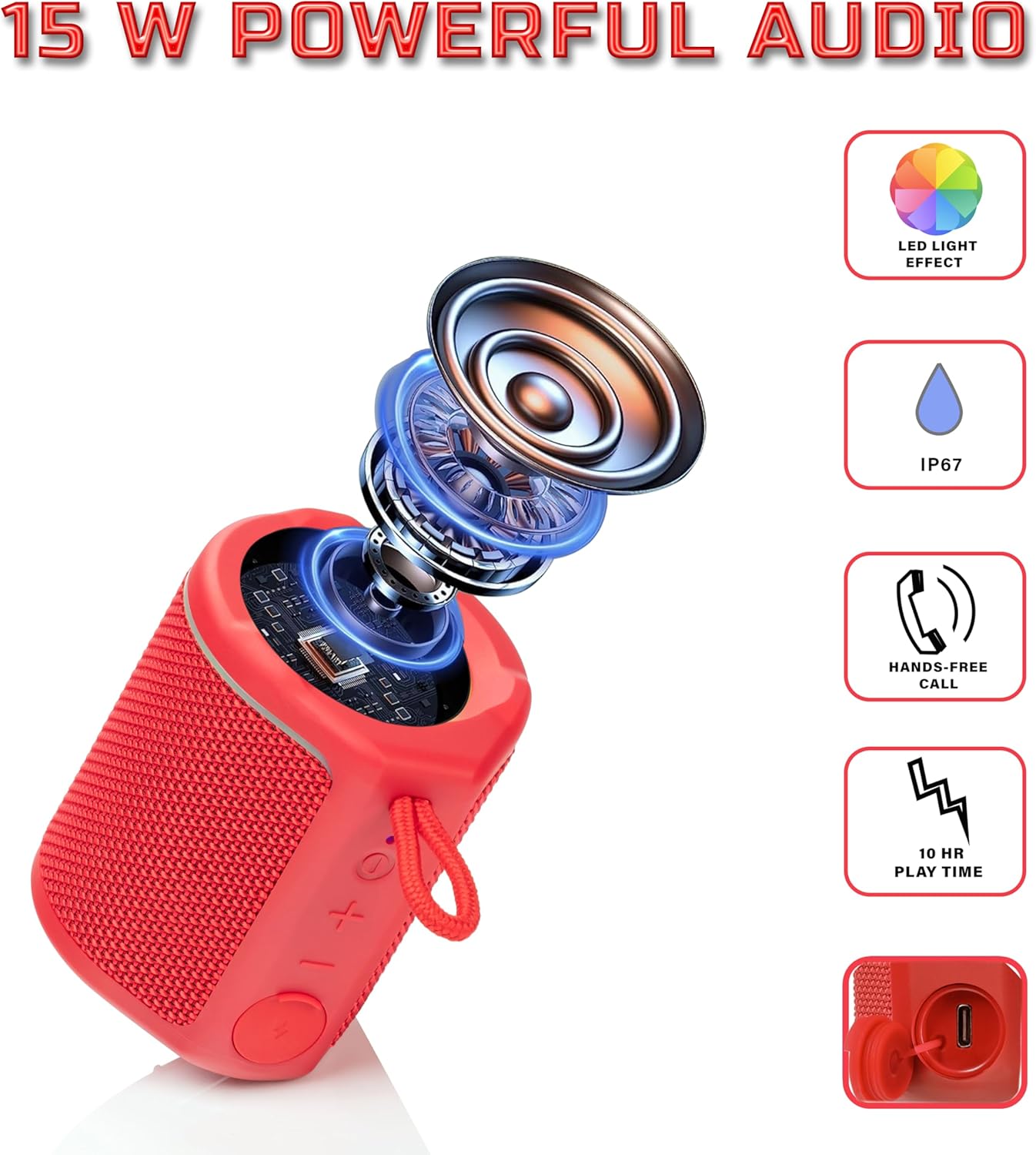
Diagram illustrating the internal components of the Sharp GX-BT190 speaker, including the speaker driver, and highlighting features like LED light effect, IP67 rating, hands-free call function, and battery life.
| Ciri | Perincian |
|---|---|
| Nombor Model | GX-BT190 |
| Teknologi Ketersambungan | Bluetooth |
| Kuasa Output Maksimum Pembesar Suara | 10 Watt |
| Penilaian Kalis Air | IP67 |
| Hayat Bateri | Sehingga 15 Jam |
| Jenis Bateri | 1 Litium Ion (termasuk) |
| Kapasiti Bateri | 1200 mAh |
| Dimensi Produk (D x W x H) | 7.5 x 7.5 x 7.5 cm (lebih kurang) |
| Berat Barang | 226.8 g (8 Auns) |
| Julat Tanpa Wayar | Sehingga 33 Kaki |
| Ciri-ciri Tambahan | LED Light, True Wireless Stereo (TWS), Hands-Free Calling |
10. Waranti
The Sharp GX-BT190 Portable Bluetooth Speaker comes with a 1-Year Limited Warranty from the date of purchase. This warranty covers manufacturing defects under normal use. It does not cover damage caused by misuse, accidents, unauthorized modifications, or normal wear and tear. Please retain your proof of purchase for warranty claims.
11. Sokongan
For technical assistance, warranty inquiries, or further information regarding your Sharp GX-BT190 speaker, please contact Sharp Inc. customer support:
- Hubungan Pengilang: Sharp Inc
- telefon: 1-800-BE-SHARP