
1. Pengenalan
The FeelTech FY3200S series is a high-performance, cost-effective function/arbitrary waveform generator that utilizes Direct Digital Synthesis (DDS) technology. It is capable of generating accurate, stable, and low-distortion signals. This dual-channel device offers independent control over each channel, making it suitable for a wide range of applications in electronics testing, education, and research.
This manual provides essential information for the safe and effective operation of your FY3200S function signal generator. Please read it thoroughly before use.

Rajah 1.1: Depan view of the FeelTech FY3200S Digital DDS Function Signal Generator.
2. Ciri-ciri Produk
- DDS direct digital synthesis technology generates accurate, stable, and low distortion waveforms.
- CH1 and CH2 are two perfectly symmetrical channels; parameters for each channel can be set independently.
- Arbitrary waveform memory depth of 2048*12bits with a 250MSa/s sampkadar ling.
- The bandwidth is up to 12-bit.
- Minimum signal output amplitude up to 10mVpp, with a maximum of 20Vpp.
3. Komponen dan Aksesori Produk
The standard package for the FY3200S includes the following items:
- FY3200S Function Signal Generator Unit
- Kord Kuasa
- USB-B Data Cable
- BNC-Clip Cables (2)
- Kabel BNC-BNC
- Manual Pengguna (dokumen ini)
- Data CD (containing software and drivers)

Figure 3.1: FY3200S unit and standard accessories.
4. Persediaan
4.1 Sambungan Kuasa
- Ensure the power switch on the front panel is in the 'OFF' position.
- Connect the provided power cord to the AC power input port on the rear panel of the device.
- Plug the other end of the power cord into a suitable AC power outlet (AC85V~AC260V).
4.2 Signal Output Connections
- Identify the CH1 (yellow) and CH2 (blue) output BNC connectors on the front panel.
- Connect the BNC-Clip cables or BNC-BNC cables to the desired output channels.
- Connect the other end of the cable to your testing equipment (e.g., oscilloscope, frequency counter).
4.3 Komunikasi Data USB
- Locate the USB port on the rear panel (USB to TTL Series Data Communication Interface).
- Connect the provided USB-B Data Cable from the device to your computer for software control and data transfer.
- Install the necessary drivers and software from the included Data CD or the manufacturer's webtapak.
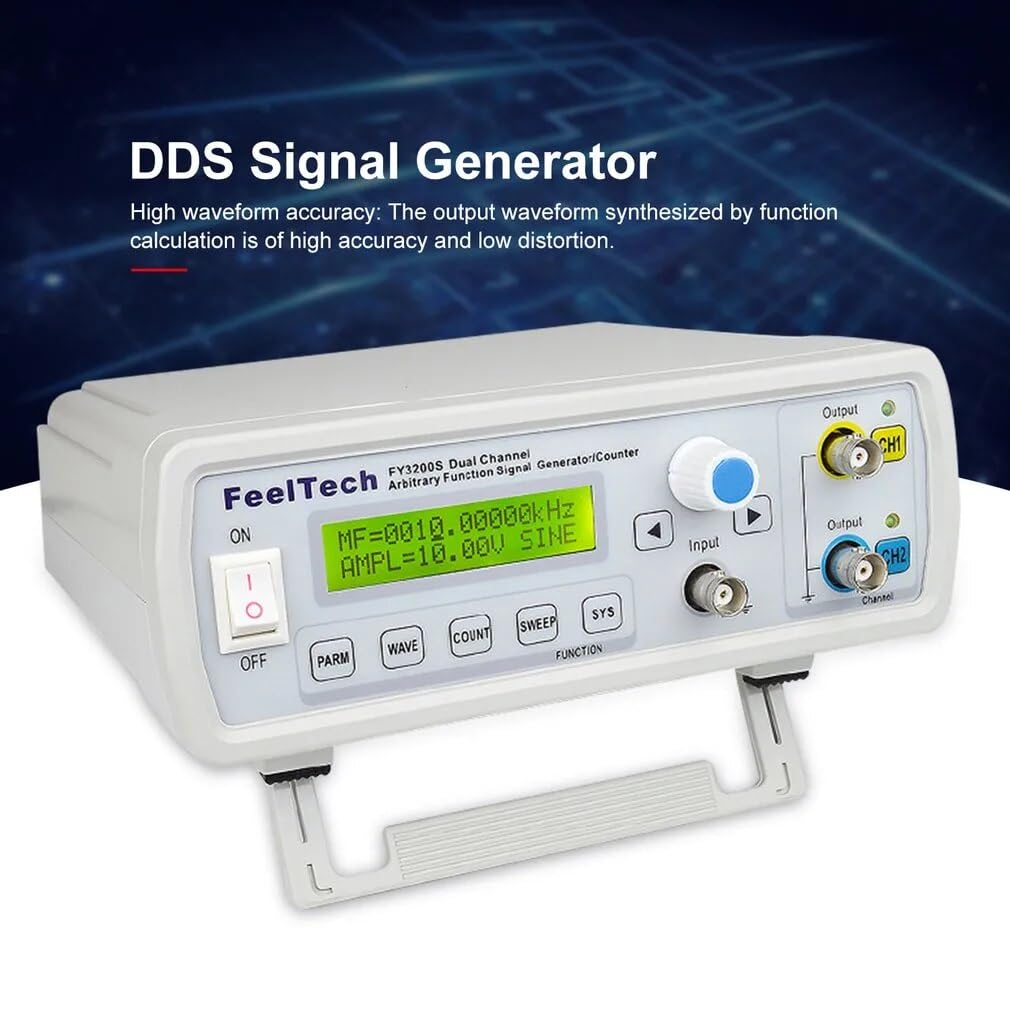
Figure 4.1: Rear panel connections including power, USB, and TTL outputs.
5. Arahan Operasi
5.1 Menghidupkan dan Operasi Asas
- After connecting power and outputs, switch the 'ON/OFF' toggle on the front panel to 'ON'. The LCD display will illuminate.
- The display shows current settings for frequency, amplitude, and waveform type.
- Use the rotary encoder (blue knob) to adjust values and the arrow buttons (< dan >) to navigate between parameters.
5.2 Waveform Generation
- Tekan ke GELOMBANG button to cycle through available waveform types (Sine, Square, Triangle, Arbitrary, Sawtooth, Pulse, Noise, etc.).
- Tekan ke PARM button to select parameters such as frequency (MF), amplitude (AMPL), and DC offset (OFFS).
- Rotate the blue knob to change the selected parameter's value. Press the knob to confirm or switch between coarse/fine adjustment.
- The FY3200S supports dual-channel operation. Use the CH1 and CH2 buttons to select which channel's parameters you are adjusting. Each channel can operate independently.
5.3 Fungsi Lanjutan
- COUNT: Use this button to access the frequency counter function, allowing you to measure external frequencies.
- SAPU: Engage sweep mode for frequency or amplitude sweeps. Configure sweep parameters using the rotary encoder and arrow keys.
- SYS: Access system settings, including display contrast, key tone, and other device configurations.

Rajah 5.1: Kawalan dan paparan panel hadapan.
Video 5.1: Tamatview of the FeelTech FY3200S Digital DDS Function Signal Generator, demonstrating its features and appearance.
6. Penyelenggaraan
6.1 Penjagaan Am
- Pastikan peranti bersih dan bebas daripada habuk. Gunakan kain lembut dan kering untuk membersihkan. Jangan gunakan pembersih cecair atau aerosol.
- Elakkan daripada mendedahkan peranti kepada suhu yang melampau, kelembapan atau cahaya matahari langsung.
- Pastikan pengudaraan yang betul di sekeliling unit untuk mengelakkan terlalu panas.
6.2 Nota Keselamatan
- Before using this instrument, please check if the power supply is normal to ensure the normal use and personal safety.
- This instrument must be grounded.
- Please do not change the instrument circuit arbitrarily, so as to avoid damaging equipment or endangering safety.
7. Penyelesaian masalah
If you encounter issues with your FY3200S, please refer to the following common troubleshooting steps:
- Tiada Kuasa: Ensure the power cord is securely connected to both the device and the power outlet. Check the power switch position.
- Tiada Output Isyarat: Verify that the output cables are correctly connected to the CH1/CH2 BNC ports and to your receiving equipment. Check the amplitude and frequency settings on the device's display. Ensure the output is enabled.
- Bentuk Gelombang Salah: Confirm that the correct waveform type is selected using the WAVE button. Check frequency and amplitude settings for any anomalies.
- Isu Paparan: If the display is dim or unreadable, adjust the contrast in the SYS menu.
Untuk isu berterusan yang tidak dapat diselesaikan melalui langkah-langkah ini, sila hubungi khidmat pelanggan.
8. Spesifikasi
The following tables detail the technical specifications of the FeelTech FY3200S series:
| Parameter | Nilai |
|---|---|
| Dimensi Produk | 9.84 x 7.87 x 5.91 inci |
| Berat badan | 2.2 paun |
| Nombor Model Item | GT-FY3200S 6M |
| Pengeluar | FeelTech/FeelElec |
| Negara Asal | China |
| Ciri | Penerangan/Nilai |
|---|---|
| Bentuk gelombang | Sinus, Segiempat, Segi Tiga (Ramp), Sewenang-wenangnya, Gigi gergaji, Denyutan, Bunyi, dll. |
| Panjang Bentuk Gelombang | 2048 Mata |
| SampKadar ling | 250MSa / s |
| Resolusi menegak | 12 Bit |
| Keluaran Amplilitan | ≤40Vpp (No load) |
| Impedans Keluaran | 50Ω ±10% |
| Kuasa Output Maks | 20W |
| Offset DC | ±10V |
| Resolusi | 0.01Hz (10MHz) |
| Kestabilan Frekuensi | ±5×10⁻⁶ |
| Herotan Gelombang Sinus | ≤0.8% (reference frequency 1kHz) |
| Triangle Linearity | ≥98% (0.01Hz~10kHz) |
| Rise or Fall Time of Square Wave | ≤30ns |
| Square Wave Duty Cycle Range | 0.1%~99.9% |
| Pulse Wave Width Range | 10ns~1S |
| Keluaran TTL | Dual-channel TTL electric level synchronize with CH1 and CH2. Phase differences are adjustable. |
| Electric Level Range | >3.3Vp-p |
| Kipas angin | >20 TTL (Load) |
| Level Rise Fall Time | ≤20ns |
| Model | FY3200S 6M | FY3200S 12M | FY3200S 20M | FY3200S 24M | FY3200S 25M |
|---|---|---|---|---|---|
| Julat frekuensi gelombang sinus | 0Hz ~ 6MHz | 0Hz ~ 12MHz | 0Hz ~ 20MHz | 0Hz ~ 24MHz | 0Hz ~ 25MHz |
| Julat frekuensi gelombang persegi | 0Hz ~ 6MHz | 0Hz ~ 6MHz | 0Hz ~ 6MHz | 0Hz ~ 6MHz | 0Hz ~ 6MHz |
| Ramp/Segi tiga | 0Hz ~ 6MHz | 0Hz ~ 6MHz | 0Hz ~ 6MHz | 0Hz ~ 6MHz | 0Hz ~ 6MHz |
| nadi | 0Hz ~ 6MHz | 0Hz ~ 6MHz | 0Hz ~ 6MHz | 0Hz ~ 6MHz | 0Hz ~ 6MHz |
| TTL/CMOS | 0Hz ~ 6MHz | 0Hz ~ 6MHz | 0Hz ~ 6MHz | 0Hz ~ 6MHz | 0Hz ~ 6MHz |
| Gelombang sewenang-wenangnya | 0Hz ~ 6MHz | 0Hz ~ 6MHz | 0Hz ~ 6MHz | 0Hz ~ 6MHz | 0Hz ~ 6MHz |

Figure 8.1: Detailed frequency ranges for various FY3200S models.
9. Waranti dan Sokongan
Your FeelTech FY3200S Digital DDS Function Signal Generator is covered by a manufacturer's warranty. Please refer to the warranty card included in your package for specific terms and conditions.
For technical assistance, troubleshooting beyond this manual, or warranty claims, please contact FeelTech customer support through the vendor you purchased the product from or directly via the contact information provided on the manufacturer's official webtapak.
Please have your model number (GT-FY3200S 6M) and purchase details ready when contacting support.