
1. Pengenalan
Thank you for choosing the EasySMX T37 Wireless Switch Pro Controller. This manual provides detailed instructions for setting up, operating, maintaining, and troubleshooting your controller. Please read this manual carefully before use to ensure optimal performance and longevity of your device. This controller is compatible with Nintendo Switch, Switch Lite, and Switch OLED consoles.
2. Produk Lebihview
The EasySMX T37 is a wireless gamepad designed for an enhanced gaming experience on Nintendo Switch systems. It features an ergonomic design, dual turbo vibration, and 6-axis gyro motion control.

Imej 2.1: Depan view of the EasySMX T37 Wireless Switch Pro Controller, showcasing its ergonomic shape and button layout.
3. Persediaan
3.1 Berpasangan dengan Nintendo Switch
- Hidupkan konsol Nintendo Switch anda.
- Dari Menu HOME, pilih Pengawal > Tukar Pegangan/Pesanan.
- On the EasySMX T37 controller, press and hold the Butang SYNC (located on the top edge of the controller) for 3 seconds until the LED indicators start flashing rapidly.
- Once the controller is successfully paired, the player LED(s) on the bottom of the controller will light up solid.
3.2 Mengecas Pengawal
Connect the provided USB-C charging cable to the USB-C port on the controller and the other end to a USB power source (e.g., Switch dock, USB wall adapter, computer USB port). The LED indicators will show charging status and turn off when fully charged.
4. Arahan Operasi
4.1 Kawalan Asas
The controller features standard button layouts for Nintendo Switch compatibility:
- Butang A/B/X/Y: Butang tindakan.
- D-Pad: Input arah.
- Kayu Analog Kiri/Kanan: Movement and camera control.
- Butang L/R/ZL/ZR: Shoulder and trigger buttons.
- Butang rumah: Kembali ke Menu Tukar LAMAN UTAMA.
- CAPTURE Button: Mengambil tangkapan skrin.
- PLUS (+) / MINUS (-) Buttons: Start/Select functions.

Image 4.1: A user holding the EasySMX T37 controller, demonstrating the comfortable grip and accessible button placement during gameplay.
4.2 Fungsi Turbo
The Turbo function allows for rapid, automatic pressing of a button, useful in action or arcade games.
- Aktifkan Turbo: Press and hold the desired action button (A/B/X/Y/L/R/ZL/ZR), then press the Butang turbo (T button). The button will now auto-fire.
- Laraskan Kelajuan Turbo: Sambil memegang Butang turbo, gerakkan Right Analog Stick Up or Down to cycle through three speeds: 5 shots/s, 12 shots/s, and 20 shots/s.
- Nyahaktifkan Turbo: Repeat the activation step (hold the action button, then press the Turbo button) or press and hold the Butang turbo for 5 seconds to clear all Turbo settings.
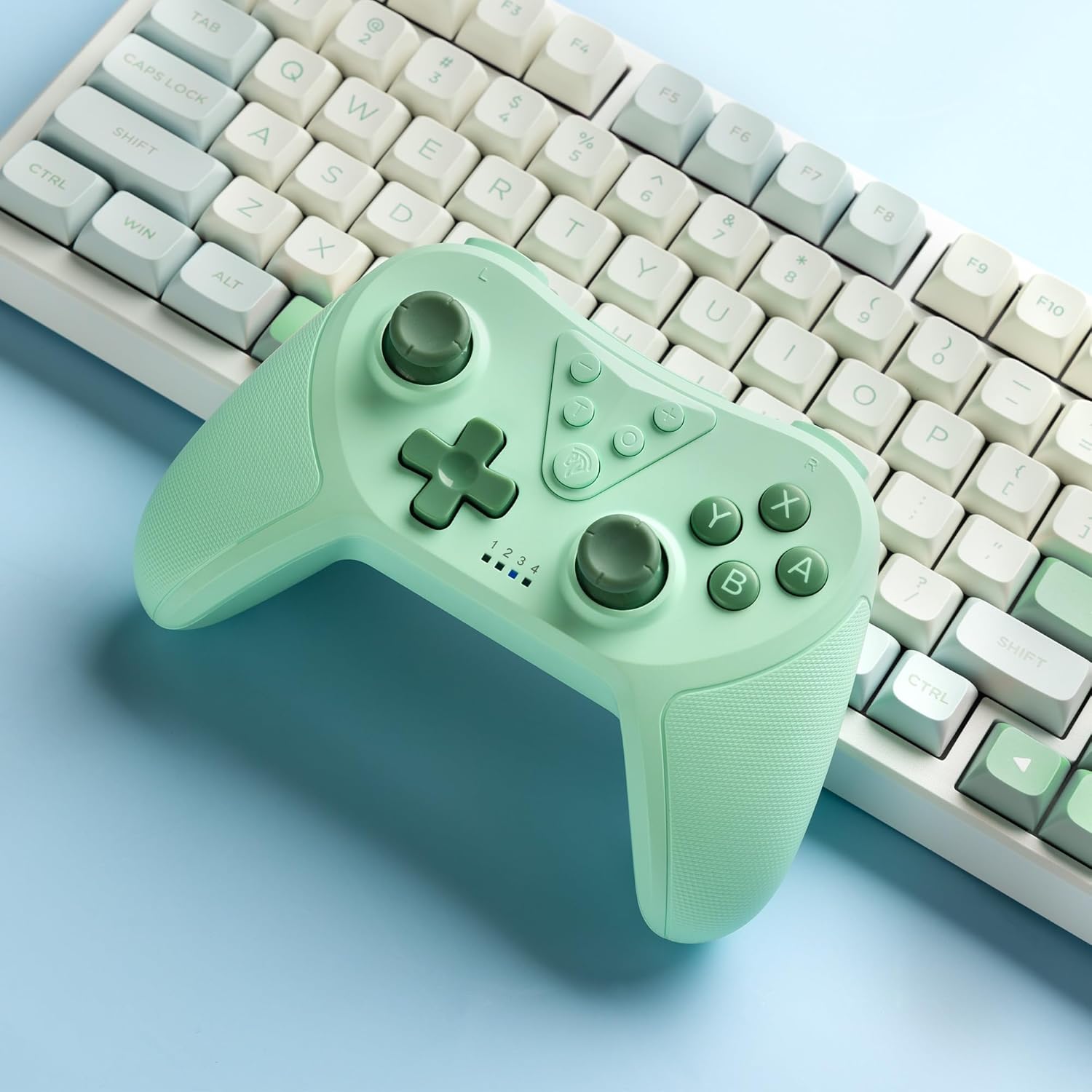
Image 4.2: Illustration of the Turbo function on the EasySMX T37 controller, showing the three adjustable speeds: 5, 12, and 20 shots per second.
4.3 Pelarasan Getaran
The controller features dual motors for adjustable vibration feedback, enhancing immersion in games.
- Laraskan Keamatan Getaran: Tekan dan tahan butang Butang turbo, kemudian gerakkan Left Analog Stick Up or Down to cycle through four vibration levels: 0% (off), 30%, 70%, and 100%.

Image 4.3: Visual representation of the Dual Vibration feature on the EasySMX T37 controller, indicating four intensity levels from 0% to 100%.
4.4 6-Axis Gyro Motion Control
The built-in 6-axis gyroscope provides precise motion sensing, allowing for intuitive control in games that support motion input.

Image 4.4: Illustration depicting the 6-Axis Gyro Motion Control feature of the EasySMX T37 controller, showing how it interacts with a game on the Nintendo Switch screen.
5. Penyelenggaraan
- Pembersihan: Gunakan kain lembut dan kering untuk membersihkan pengawal. Elakkan menggunakan bahan kimia yang keras atau bahan yang melelas.
- Storan: Simpan pengawal di tempat yang sejuk dan kering jauh dari cahaya matahari langsung dan suhu yang melampau.
- Penjagaan Bateri: Untuk memanjangkan hayat bateri, elakkan daripada menyahcas sepenuhnya pengawal dengan kerap. Mengecasnya dengan kerap, walaupun tidak digunakan untuk tempoh yang lama.
- Elakkan Titisan: Lindungi pengawal daripada titisan dan hentaman, yang boleh merosakkan komponen dalaman.
6. Penyelesaian masalah
6.1 Pengawal Tidak Menyambung
- Pastikan pengawal dicas.
- Verify the Switch console is updated to the latest system version.
- Try re-pairing the controller by following the steps in Section 3.1.
- If issues persist, try resetting the controller by inserting a thin object into the small reset hole (if present, usually on the back) for a few seconds.
6.2 Buttons Unresponsive or Lagging
- Pastikan pengawal dicas sepenuhnya.
- Move closer to the Switch console to ensure a strong wireless connection.
- Check for any physical obstructions or debris around the buttons.
- Re-pair the controller.
6.3 Pengawal Tidak Mengecas
- Pastikan kabel USB-C disambungkan dengan selamat pada kedua-dua pengawal dan sumber kuasa.
- Cuba gunakan kabel USB-C atau penyesuai kuasa yang berbeza.
- Pastikan sumber kuasa berfungsi.
7. Spesifikasi
- model: T37
- Ketersambungan: Wayarles (Bluetooth)
- Keserasian: Nintendo Switch, Switch Lite, Switch OLED
- ciri-ciri: Dual Turbo Function, Adjustable Vibration, 6-Axis Gyro Motion Control, Ergonomic Design
- Product Identifier (ASIN): B0CTTWN84L
8. Waranti dan Sokongan
For warranty information, technical support, or further assistance, please refer to the official EasySMX webtapak atau hubungi sokongan pelanggan mereka secara langsung. Simpan resit pembelian anda untuk tuntutan waranti.