
FeelTech FY6300 60M
FeelTech FY6300 Function Arbitrary Waveform Signal Generator User Manual
Model: FY6300 60M
1. Pengenalan
The FeelTech FY6300 series is a dual-channel function arbitrary waveform signal generator designed for various electronic testing and measurement applications. This device offers a maximum output frequency of 60MHz for sine waves and 25MHz for square waves, featuring a real-time sampling rate of 250MSa/s and 14-bit vertical resolution. It supports multiple modulation functions including AM, FM, PM, FSK, PSK, and VCO. This manual provides essential information for the safe and effective operation of your FY6300 signal generator.
2. Maklumat Keselamatan
2.1. Nota Keselamatan
- Before using this instrument, verify that the power supply is within the specified range to ensure normal operation and personal safety.
- This instrument must be operated within its technical index range.
- Do not modify the instrument's internal circuitry arbitrarily, as this may cause damage to the equipment or endanger safety.
2.2. Warning and Personal Injury
Do not use this product in safety protection devices, emergency stop systems, or any other applications where product failure could lead to personal injury or property damage. The manufacturer is not responsible for any injury or property damage resulting from improper use. The manufacturer disclaims responsibility for any claims, including costs, expenses, and attorney fees, that may arise from such use.
3. Kandungan Pakej
Upon unpacking, please verify that all items listed below are present and in good condition. If any items are missing or damaged, contact your supplier immediately.
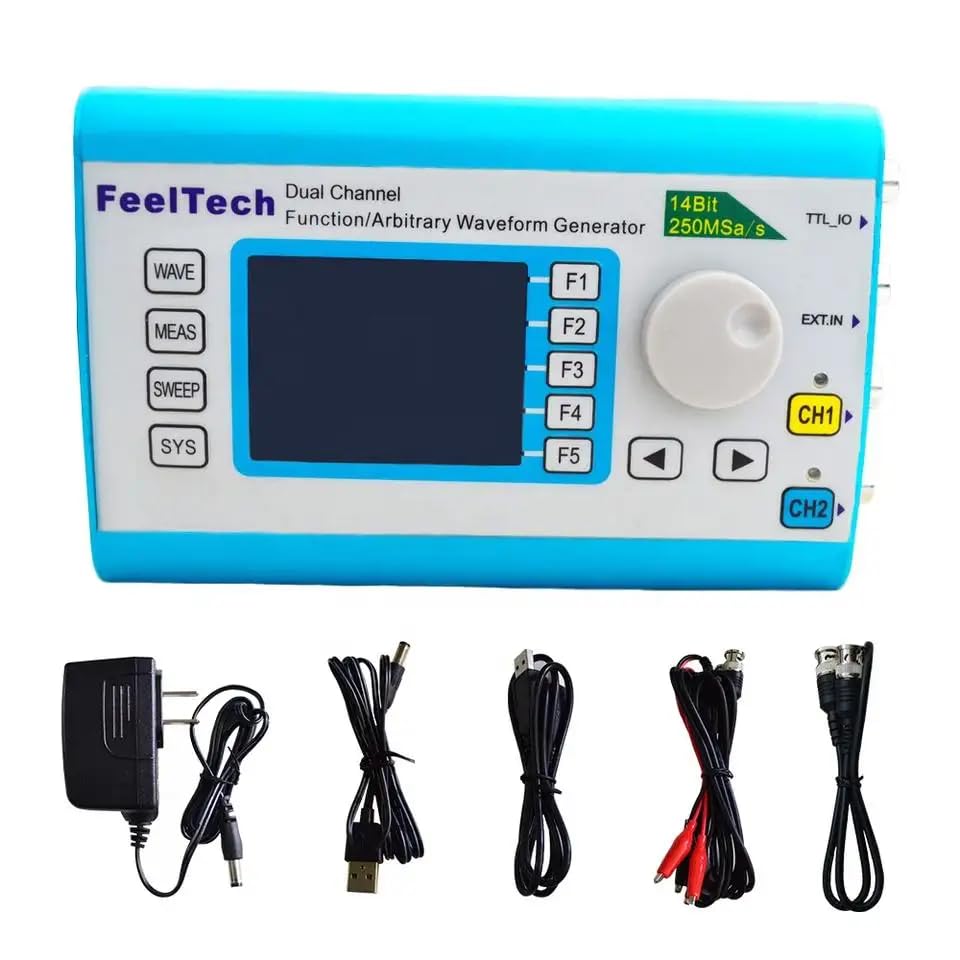
Image: FeelTech FY6300 Signal Generator with included accessories, including power cord, Q9 clip lines, USB data line, certificate, and data CD.
| item | Penerangan | Kuantiti |
|---|---|---|
| Unit utama | FY6300 DDS Signal Generator | 1 |
| Aksesori Standard | Kabel Kuasa | 1 |
| Aksesori Standard | BNC-Q9 Cable | 2 |
| Aksesori Standard | Kabel BNC-BNC | 1 |
| Aksesori Standard | Kad Waranti | 1 |
| Aksesori Pilihan | FYA1000 Series Amplebih hidup | Pilihan |
| Aksesori Pilihan | FYA2000 Series Amplebih hidup | Pilihan |
Note: Optional accessories can be ordered from local FeelTech distributors.
4. Produk Lebihview
The FeelTech FY6300 is a compact and versatile signal generator. It features a clear display and intuitive controls for easy operation.
4.1. Panel hadapan
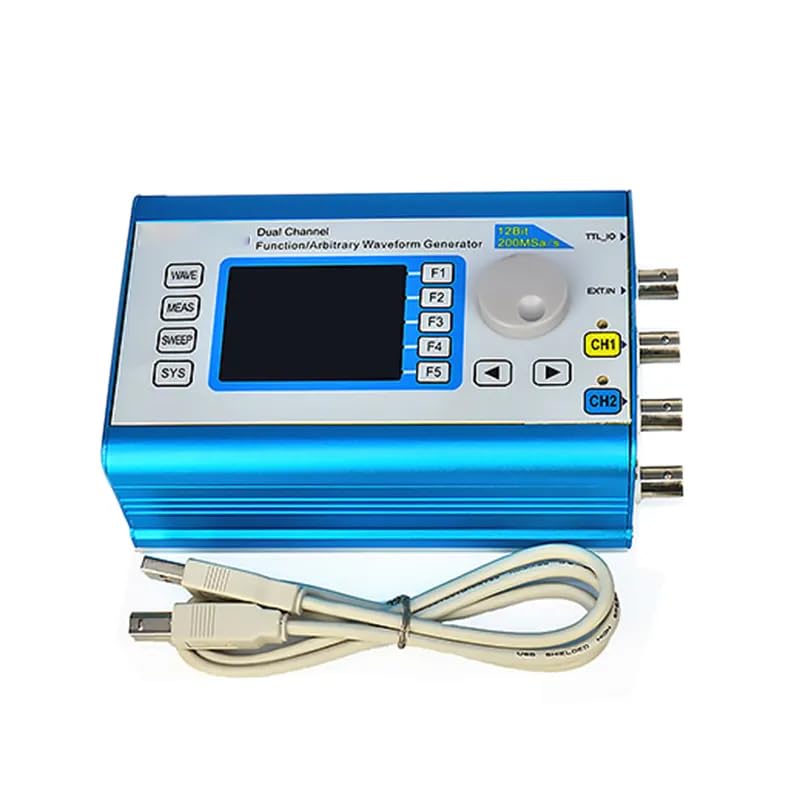
Imej: Depan view of the FeelTech FY6300 Signal Generator, showing the display, control buttons (WAVE, MEAS, SWEEP, SYS, F1-F5), rotary encoder, and output channels CH1 and CH2.
The front panel includes the main display, function buttons (WAVE, MEAS, SWEEP, SYS), five soft keys (F1-F5), a rotary encoder for parameter adjustment, and output connectors for Channel 1 (CH1) and Channel 2 (CH2).
4.2. Panel belakang

Image: Close-up of the rear panel connections of the FeelTech FY6300 Signal Generator, showing CH2, CH1, EXT.IN, and TTL_IO ports.
The rear panel provides additional input/output ports, including EXT.IN for external modulation or synchronization, and TTL_IO for TTL level signals.
4.3. Dimensi

Image: Diagram showing the dimensions of the FeelTech FY6300 Signal Generator: approximately 140mm (5.51in) length, 95mm (3.74in) width, and 54.2mm (2.95in) height.
The compact design of the FY6300 allows for easy integration into various test environments.
5. Persediaan
Follow these steps to set up your FeelTech FY6300 Signal Generator:
- Sambungan Kuasa: Connect the provided power cable to the DC5V input port on the side of the unit and then to a suitable power outlet.
- Hidupkan kuasa: Flip the ON/OFF switch to the 'ON' position. The display should illuminate.
- Sambungan Output: Connect your test equipment (e.g., oscilloscope, circuit under test) to the CH1 or CH2 output ports using the appropriate BNC cables.
- Sambungan USB (Pilihan): For PC control or firmware updates, connect the USB cable from the unit to your computer.
6. Arahan Operasi
The FY6300 offers a wide range of waveform generation and modulation capabilities.
6.1. Basic Waveform Generation

Image: The screen of the FeelTech FY6300 Signal Generator showing parameters for CH1 (Sine wave, 10.000MHz, 2.000V amplitude) and CH2 (Sine wave, 10.000MHz, 10.00V amplitude).
- Pilih Saluran: Use the CH1 or CH2 buttons to select the desired output channel.
- Pilih Bentuk Gelombang: Tekan ke GELOMBANG button to cycle through available waveform types (Sine, Square, Triangle, Pulse, Arbitrary, etc.).
- Laraskan Kekerapan: Use the rotary encoder to adjust the frequency. Press the F1 soft key (labeled FREQ) to enter frequency adjustment mode.
- Laraskan Amplintang: Tekan ke F2 soft key (labeled AMPL) to adjust the amplitude. Use the rotary encoder to change the value.
- Laraskan Ofset: Tekan ke F3 soft key (labeled OFFS) to adjust the DC offset.
- Adjust Duty Cycle (Square Wave): For square waves, press the F4 soft key (labeled DUTY) to adjust the duty cycle. The duty cycle adjustment accuracy can reach 0.01%. You can also switch between duty cycle and rising/falling edge time settings by pressing F4 again.
- Laraskan Fasa: Tekan ke F5 soft key (labeled PHAS) to adjust the phase. The phase resolution can reach 0.01°.
6.2. Modulation Functions
The FY6300 series supports various modulation types including AM, FM, PM, FSK, PSK, and VCO. Refer to the detailed user manual for specific instructions on configuring each modulation type.
6.3. Connecting to an Oscilloscope

Image: The FeelTech FY6300 Signal Generator connected to a Tektronix TDS 2004B oscilloscope, demonstrating the output of waveforms.
To visualize the generated waveforms, connect the output of the FY6300 to the input of an oscilloscope using a BNC cable. Adjust the oscilloscope settings (e.g., vertical scale, time base) to properly display the waveform.
6.4. Video Produk Tamatview
Video: Tamatview of the FeelTech DDS Signal Generator, showcasing its design, features, and basic operation. This video highlights the high waveform accuracy and low distortion capabilities.
7. Spesifikasi
The following table details the technical specifications of the FeelTech FY6300 series, specifically the 60M model.

Image: A table detailing the frequency ranges for various waveforms (Sine, Square, Ramp, Pulse, TTL/CMOS, Arbitrary) across different FY6300 models (15M, 20M, 30M, 60M), along with resolution, accuracy, stability, impedance, phase range, phase resolution, waveform length, sampling rate, vertical resolution, harmonic suppression, total harmonic distortion, rise/fall time, overshoot, duty cycle, and linearity.
| Parameter | Nilai |
|---|---|
| Pengeluar | FeelTech/FeelElec |
| Nombor Model | GT-FY6300 60M |
| Berat Barang | 1 kg |
| Dimensi Produk | 25 x 20 x 15 cm |
| Jenis Sumber Kuasa | Dikuasakan Bateri (termasuk 1 bateri Lithium Metal) |
| Wattage | 15 Watt-jam |
| bahan | Akrilonitril Butadiena Stirena |
| warna | Biru |
| Negara Asal | China |
7.1. Performance Specifications (FY6300-60M)
- Sine Wave Frequency: 0 ~ 60MHz
- Square Wave Frequency: 0 ~ 25MHz
- Ramp/Triangle Wave Frequency: 0 ~ 10MHz
- Pulse Wave Frequency: 0 ~ 10MHz
- TTL/CMOS Frequency: 0 ~ 60MHz
- Arbitrary Waveform Frequency: 0 ~ 10MHz
- Resolusi Kekerapan: 1µHz (0.000001Hz)
- Ketepatan Kekerapan: ± 5 x 10⁻⁶
- Kestabilan Frekuensi: ± 1 x 10⁻⁶ / 3 Jam
- Impedans Keluaran: 50Ω ± 10% (Typical)
- Julat Fasa: 0 ~ 359.9°
- Phase Resolution: 0.1°
- Panjang Bentuk Gelombang: 8192 mata
- SampKadar ling: 250MSa / s
- Resolusi Menegak: 14 bit
- Sine Wave Harmonic Suppression: ≥45dBc (<1MHz); ≥40dBc (1MHz~60MHz)
- Sine Wave Total Harmonic Distortion: <0.8% (20Hz~20KHz, 0dBm)
- Square Wave Rise/Fall Time: ≤10ns (Vpp<5V)
- Square Wave Overshoot: ≤7.5%
- Kitaran Tugas: 0.1% ~ 99.9%
- Sawtooth Wave Linearity: >98% (0.01Hz~10KHz)
8. Penyelenggaraan
To ensure the longevity and optimal performance of your FeelTech FY6300 Signal Generator, follow these maintenance guidelines:
- Pembersihan: Use a soft, dry cloth to clean the exterior of the instrument. Avoid using abrasive cleaners or solvents that could damage the casing atau paparan.
- Storan: Simpan instrumen di tempat yang sejuk dan kering, jauh dari cahaya matahari langsung, suhu ekstrem dan kelembapan yang tinggi.
- Pengudaraan: Ensure that the ventilation slots on the instrument are not obstructed to prevent overheating.
- Matikan: Always power off the instrument and disconnect it from the power supply when not in use for extended periods.
9. Penyelesaian masalah
If you encounter issues with your FY6300, refer to the following common troubleshooting tips:
- Tiada Kuasa: Check the power cable connection and ensure the power switch is in the 'ON' position. Verify the power outlet is functional.
- Tiada Isyarat Output: Ensure the output channels (CH1/CH2) are enabled on the device. Check cable connections to the test equipment. Verify frequency and amplitude settings are not set to zero.
- Bentuk Gelombang Salah: Confirm the correct waveform type is selected. Check all parameter settings (frequency, amplitude, offset, duty cycle) for accuracy.
- Output Tidak Stabil: Ensure the instrument is placed on a stable surface and away from strong electromagnetic interference. Check for proper grounding.
For persistent issues, contact FeelTech customer support.
10. Waranti dan Sokongan
10.1. Maklumat Waranti
FeelTech warrants that its products, including the mainframe and accessories, will be free from defects in materials and workmanship for a period of 1 tahun dari tarikh penghantaran. If a product is found to be defective within this period, FeelTech guarantees free replacement or repair of approved defective products. This warranty does not cover damages caused by misuse, vandalism, improper maintenance, or force majeure. Any disassembly or unauthorized modification of the instrument will void the warranty.
10.2. Sokongan Pelanggan
For technical assistance, warranty claims, or any other inquiries, please contact FeelTech customer support through their official channels or your local distributor. Provide your product model number (FY6300 60M) and a detailed description of the issue for efficient service.
Ask a question about this manual
Ask about setup, troubleshooting, compatibility, parts, safety, or missing instructions. Manuals+ will review the question and use this page’s manual context to help answer it.