
1. Pengenalan
The FeelTech FY6900 series DDS Function Signal Generator is a versatile instrument designed for generating accurate, stable, and low-distortion output signals. It utilizes Direct Digital Synthesis (DDS) technology and features dual-channel output, arbitrary waveform generation, and a frequency counter. This manual provides essential information for safe and effective operation of your FY6900 20M model.
2. Maklumat Keselamatan
Sila baca dan fahami semua arahan keselamatan sebelum mengendalikan peranti ini. Kegagalan mematuhi arahan ini boleh mengakibatkan kecederaan atau kerosakan pada instrumen.
- Bekalan Kuasa: Use only the specified AC 100-240V power supply. Ensure the power cord is in good condition and properly grounded.
- Persekitaran: Operate the device in a dry, well-ventilated area. Avoid exposure to moisture, dust, direct sunlight, or extreme temperatures.
- Pengudaraan: Do not block the ventilation openings on the device. Adequate airflow is necessary to prevent overheating.
- Penyelenggaraan: Jangan cuba membuka atau membaiki peranti sendiri. Rujuk semua servis kepada kakitangan yang berkelayakan.
- Sambungan: Ensure all connections are secure before applying power. Avoid touching exposed terminals when the device is operating.
3. Produk Lebihview
The FeelTech FY6900 features a user-friendly interface with a 2.4-inch color display and clearly labeled controls and ports.
Susun Atur Panel Depan dan Belakang

Imej 3.1: Front and Rear Panel Layout. This image displays the FeelTech FY6900 unit from both the front and rear. The front panel shows the 2.4-inch TFT color LCD, function shortcut keys (WAVE, MOD, SWEEP, COUNTER, VCO, SYSTEM), a knob button, direction keys, menu softkeys, power key, output terminals (CH1, CH2), and input terminals (Counter). The rear panel illustrates the special function port, 4-channel TTL output, USB communication interface, AC power input, and power master switch.
Komponen Utama:
- 2.4 inch TFT color LCD: Displays waveform parameters and settings.
- Function shortcut keys: Dedicated buttons for WAVE, MOD, SWEEP, COUNTER, VCO, and SYSTEM modes.
- Butang tombol: Used for adjusting parameter values.
- Kekunci arah: For navigation and fine-tuning settings.
- Menu softkeys: Butang sensitif konteks untuk pilihan menu.
- Kekunci kuasa: Front panel power control.
- Output terminals (CH1, CH2): BNC connectors for signal output.
- Input terminals (Counter): BNC connector for frequency counting input.
- Special function port: For advanced functionalities.
- 4 channel TTL output: Provides TTL level signals.
- USB communication interface: For PC connectivity and control.
- Input kuasa AC: Menyambung kepada bekalan kuasa utama.
- Power master switch: Main power on/off switch on the rear panel.
4. Persediaan
Follow these steps to set up your FeelTech FY6900 20M for initial use.
- Membongkar: Carefully remove the FY6900 unit and all accessories from its packaging. Inspect for any signs of damage during transit.
- Sambungan Kuasa: Connect the provided AC power cable to the AC power input port on the rear panel of the device. Plug the other end of the power cable into a standard AC 100-240V electrical outlet.
- Kuasa Awal Hidup: Locate the Power Master Switch on the rear panel and press it to the 'ON' position. The 2.4-inch color display on the front panel will illuminate, indicating that the device is powering up.
- Front Panel Power: Press the Power key on the front panel to fully activate the device.
- Ujian Kendiri: The device will perform a brief self-test. Once complete, the main interface showing dual-channel waveform parameters will appear.
5. Arahan Operasi
The FY6900 offers a wide range of functions for signal generation. This section outlines basic operation.
5.1 Penjanaan Bentuk Gelombang Asas
To generate a basic waveform:
- Pilih Saluran: Use the CH1 or CH2 buttons to select the desired output channel.
- Pilih Jenis Bentuk Gelombang: Tekan ke GELOMBANG function shortcut key. Use the direction keys or knob to navigate through waveform types (Sine, Square, Triangle, etc.) and press OK untuk mengesahkan.
- Laraskan Parameter: Use the direction keys to highlight parameters such as Frequency, Amplitude, Offset, and Duty Cycle. Rotate the knob button to adjust the value. Press OK untuk mengesahkan nilai.
- Dayakan Output: Ensure the selected channel's output is enabled (usually indicated on the display).
5.2 Operasi Dwi-Saluran
The FY6900 features fully independent dual-channel output, allowing for synchronous operation with precisely adjustable phase differences.
- Kawalan Bebas: Each channel (CH1 and CH2) can be configured with different waveform types, frequencies, amplitudes, and offsets.
- Penjejakan Saluran: Activate the channel tracking function to synchronize parameters between both channels. When tracking is enabled, changes to one channel's parameters can be applied to the other based on user configuration.
- Pelarasan Fasa: In synchronous mode, the phase difference between CH1 and CH2 can be precisely adjusted.
5.3 Penjanaan Bentuk Gelombang Sewenang-wenangnya
The device supports up to 98 sets of functions/arbitrary waveforms, including 34 preset waveforms and 64 user-defined waveforms. It has 64 sets of arbitrary wave storage bits, each with a storage depth of 8192*14bits.
5.4 Saving Parameters
To quickly save the currently output parameter information, press and hold the OK button. The next time the instrument is turned on, it can automatically load the saved parameters.
5.5 Cthample Waveforms

Imej 5.1: Sine Wave Output. This image shows the FeelTech FY6900 connected to a Tektronix MSO 2024 oscilloscope, displaying a clean sine wave output from the signal generator.
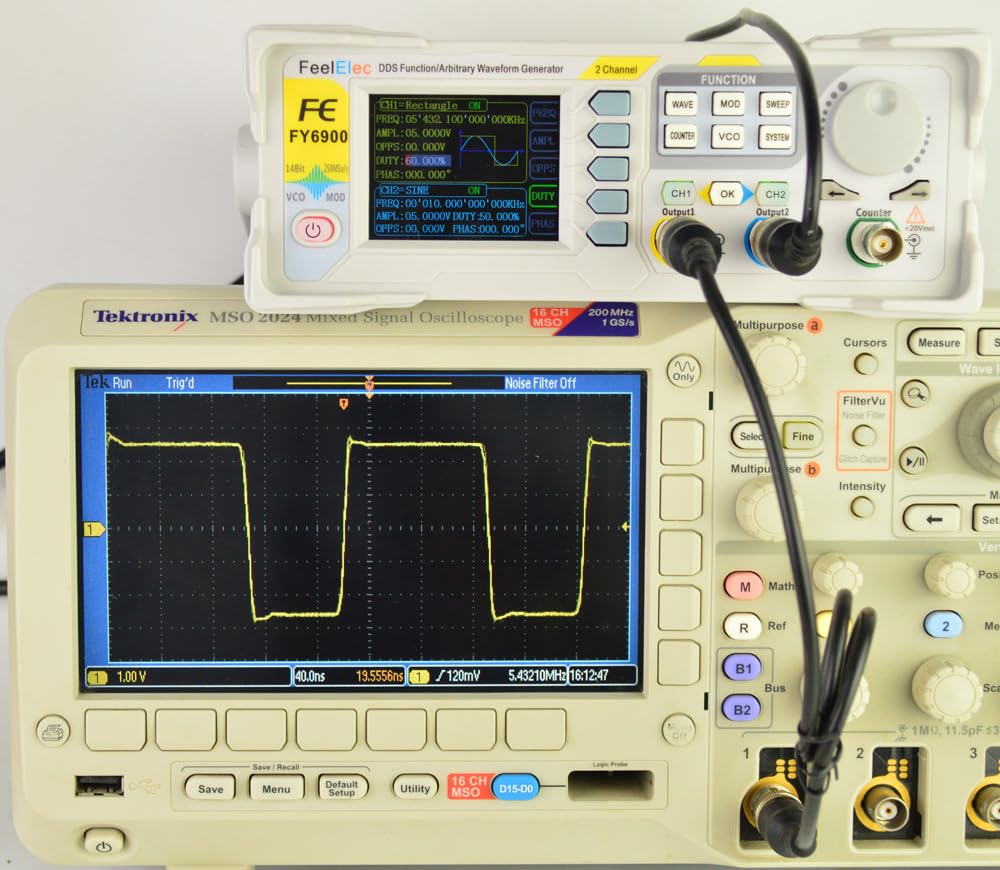
Imej 5.2: Square Wave Output. This image shows the FeelTech FY6900 connected to a Tektronix MSO 2024 oscilloscope, displaying a clear square wave output from the signal generator.

Imej 5.3: 10MHz Sine Wave Output. This image shows the FeelTech FY6900 connected to a Tektronix MSO 2024 oscilloscope, displaying a sine wave with a frequency of 10MHz.

Imej 5.4: 10MHz Sine Wave Output (Amplitude Variation). This image shows the FeelTech FY6900 connected to a Tektronix MSO 2024 oscilloscope, displaying a sine wave at 10MHz, demonstrating amplitude adjustment capabilities.

Imej 5.5: 15MHz Sine Wave Output. This image shows the FeelTech FY6900 connected to a Tektronix MSO 2024 oscilloscope, displaying a sine wave with a frequency of 15MHz.
6. Penyelenggaraan
Proper maintenance ensures the longevity and optimal performance of your FY6900 20M.
- Pembersihan: Keep the device clean and free from dust. Use a soft, dry cloth for cleaning the exterior. Do not use liquid cleaners or solvents.
- Storan: Apabila tidak digunakan untuk tempoh yang lama, simpan peranti di tempat yang sejuk dan kering, jauh dari cahaya matahari langsung dan suhu yang melampau.
- Pengudaraan: Ensure the ventilation openings are not obstructed during operation to prevent overheating.
- Penjagaan Kabel: Handle power and signal cables carefully. Avoid bending or crimping them sharply.
7. Penyelesaian masalah
Bahagian ini menyediakan penyelesaian kepada isu biasa yang mungkin anda hadapi.
- Peranti Tidak Menghidupkan:
- Check if the power cable is securely connected to both the device and the electrical outlet.
- Ensure the Power Master Switch on the rear panel is in the 'ON' position.
- Verify that the front panel Power key has been pressed.
- Tiada Output Isyarat:
- Confirm that the desired output channel (CH1 or CH2) is enabled on the display.
- Semak amplitude setting; ensure it is not set to 0V.
- Verify that the output cable is correctly connected to the output terminal and the receiving device (e.g., oscilloscope).
- Incorrect Waveform or Parameters:
- Review kekerapan, amplitude, offset, and duty cycle settings on the display.
- Ensure the correct waveform type is selected.
- If using arbitrary waveforms, verify the loaded waveform data.
- Isu Paparan:
- If the display is dim or flickering, try restarting the device.
- Pastikan persekitaran operasi berada dalam julat suhu dan kelembapan yang ditetapkan.
Jika masalah berterusan selepas mencuba penyelesaian ini, sila hubungi sokongan pelanggan.
8. Spesifikasi
The following table details the technical specifications for the FeelTech FY6900 20M model.

Imej 8.1: Product Characteristic Table. This image presents a table outlining the key specifications for various FY6900 models, including frequency ranges for sine, square, and other waves, minimum adjustable pulse width, frequency resolution, waveform length, sampling rate, vertical resolution, amplitude range, amplitude resolution, bias adjustment range, bias resolution, phase adjustment range, phase resolution, display type, interface, power supply, and environmental conditions.
| Ciri | Specification (FY6900 20M) |
|---|---|
| Frequency range of Sine wave | 0 ~ 20MHz |
| Frequency range of Square wave | 0 ~ 15MHz |
| Frequency range of other waves | 0 ~ 10MHz |
| Minimum adjustable width of pulse wave | 20ns |
| Minimum Frequency Resolution | 1µHz |
| Panjang Bentuk Gelombang | 8192 points (8K points) * 14Bits |
| Bentuk gelombang sampkadar ling | 250MSa / s |
| Vertical Resolution of Waveform | 14 Bit |
| Amplitude range (peak to peak) | 1mVpp ~ 24Vpp (frequency ≤ 5MHz) 1mVpp ~ 20Vpp (5MHz < frequency ≤ 10MHz) 1mVpp ~ 10Vpp (10MHz < frequency ≤ 20MHz) |
| Ampresolusi litud | 1mV |
| Bias Adjustment Range | ±12V (frequency ≤ 20MHz) |
| Minimum Bias Resolution | 1mV |
| Julat pelarasan fasa | 0 ~ 359.99° |
| Minimum phase resolution | 0.01° |
| Paparan | 2.4 inch TFT color liquid crystal display |
| Antara muka | 115200 bps |
| Bekalan Kuasa | AC100V ~ 240V |
| Environment condition (temperature) | 0 ~ 40°C |
| Environment condition (humidity) | Kurang daripada 80% |
9. Waranti dan Sokongan
The FeelTech FY6900 20M DDS Function Signal Generator is covered by a Waranti 1 tahun from the date of purchase. Spare parts are available for a period of 2 tahun.
For technical support, warranty claims, or service inquiries, please contact your original vendor or FeelTech customer service. Please have your product model number (FY6900 20M) and purchase details ready when contacting support.