
1. Pengenalan
This manual provides detailed instructions for the safe and effective use of your iJoy Disney Winnie The Pooh Wireless Bluetooth Speaker. Please read this manual thoroughly before operating the device and retain it for future reference.
2. Apa yang ada di dalam Kotak
Carefully unpack your speaker and ensure all items are present:
- iJoy Disney Winnie The Pooh Wireless Bluetooth Speaker
- Kabel Pengecas USB
- Kabel AUX Sandaran
- Manual Pemilik (dokumen ini)

Image: The speaker shown next to its retail packaging, illustrating the product and its box.
3. Produk Lebihview
3.1 Butang Kawalan
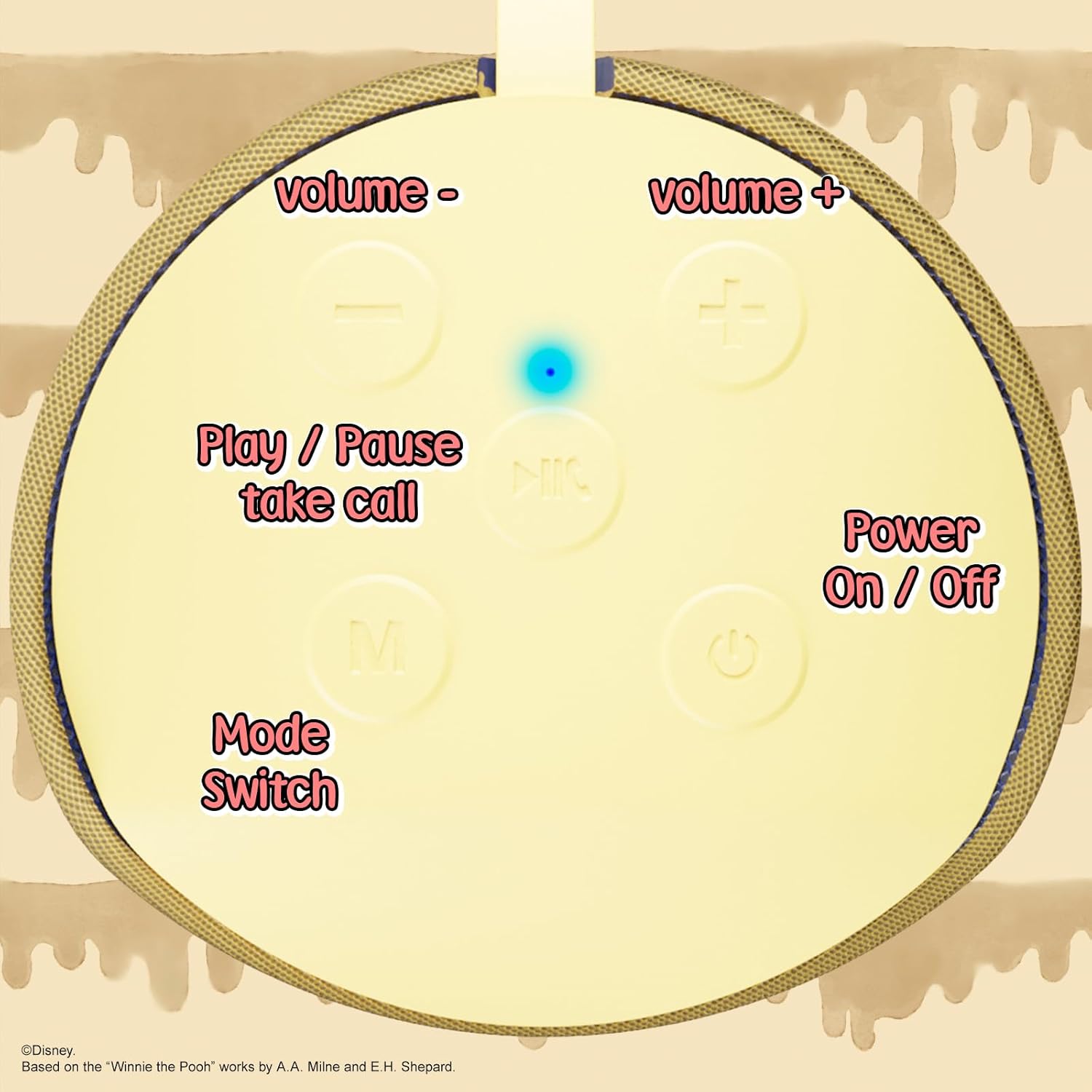
Image: A close-up of the speaker's top panel, displaying the control buttons.
- Butang Hidup / Mati: Tekan dan tahan untuk menghidupkan atau mematikan pembesar suara.
- Butang Main/Jeda: Press to play or pause audio. Also used to answer or end phone calls.
- Butang Naik Kelantangan (+): Tekan untuk meningkatkan kelantangan. Tekan dan tahan untuk melangkau ke trek seterusnya.
- Butang Turun Kelantangan (-): Tekan untuk mengurangkan kelantangan. Tekan dan tahan untuk pergi ke trek sebelumnya.
- Mode Switch (M) Button: Press to switch between Bluetooth, FM Radio, SD Card, and USB modes.
3.2 Pelabuhan dan Penunjuk

Imej: A terperinci view of the speaker's rear panel, highlighting the AUX port, SD card slot, USB port, and Micro USB charging port.
- Pelabuhan AUX: For connecting external audio devices via the provided 3.5mm AUX cable.
- Slot Kad SD: Insert a microSD card for direct audio playback.
- Port USB: Masukkan pemacu kilat USB untuk main balik audio secara langsung.
- Port Pengecasan USB Mikro: Connect the USB charging cable here to charge the speaker.
- Lampu Penunjuk LED: Indicates charging status and Bluetooth pairing status.
4. Persediaan
4.1 Mengecas Speaker
- Connect the Micro USB end of the charging cable to the speaker's Micro USB charging port.
- Sambungkan hujung kabel USB standard kepada penyesuai kuasa USB (tidak disertakan) atau port USB komputer.
- The LED indicator light will illuminate during charging and turn off once fully charged.
- Pengecasan penuh biasanya mengambil masa lebih kurang 2 jam.
4.2 Berpasangan Bluetooth
- Pastikan pembesar suara dicas sepenuhnya.
- Press and hold the Power On/Off button to turn on the speaker. You will hear an audible prompt, and the LED indicator will flash, indicating it's in pairing mode.
- Pada peranti mudah alih anda (telefon pintar, tablet, dll.), dayakan Bluetooth.
- Cari untuk available Bluetooth devices. The speaker will appear as "iJoy Winnie The Pooh Speaker" or similar.
- Select the speaker from the list to pair. Once successfully paired, you will hear a confirmation sound, and the LED indicator will stop flashing and remain solid.
- Pembesar suara akan menyambung semula secara automatik ke peranti gandingan terakhir apabila dihidupkan, jika Bluetooth peranti aktif dan dalam julat.
5. Arahan Operasi
5.1 Mod Bluetooth
After successful pairing, you can stream audio wirelessly from your device to the speaker. Use your device's controls or the speaker's Play/Pause, Volume Up/Down buttons to manage playback.
Mod Radio 5.2 FM
- Press the Mode (M) button to switch to FM Radio mode.
- Tekan butang Main/Jeda untuk mengimbas dan menyimpan stesen FM yang tersedia secara automatik.
- Gunakan butang Naikkan Kelantangan (+) dan Turunkan Kelantangan (-) (tekan sebentar) untuk menavigasi antara stesen yang disimpan.
5.3 Kad SD / Main Semula USB
- Insert a microSD card into the SD card slot or a USB flash drive into the USB port.
- Pembesar suara akan bertukar secara automatik ke mod yang sepadan dan mula memainkan audio files. If not, press the Mode (M) button to select the correct mode.
- Use the speaker's Play/Pause, Volume Up/Down buttons to control playback.
5.4 Mod AUX
- Connect one end of the provided 3.5mm AUX cable to the speaker's AUX port.
- Sambungkan hujung yang lain ke bicu fon kepala peranti audio anda.
- The speaker will automatically switch to AUX mode. If not, press the Mode (M) button.
- Control playback and volume primarily from your connected audio device.
5.5 Panggilan Bebas Tangan
Apabila disambungkan melalui Bluetooth ke telefon pintar:
- Jawab Panggilan: Tekan butang Main/Jeda sekali.
- Tamatkan Panggilan: Tekan butang Main/Jeda sekali semasa panggilan.
- Tolak Panggilan: Tekan dan tahan butang Main/Jeda.
6. Penyelenggaraan
- Bersihkan pembesar suara dengan kain lembut dan kering. Jangan gunakan pembersih atau pelarut yang melelas.
- The speaker is IPX4 splashproof, meaning it can withstand splashes of water. Do not submerge it in water.
- Simpan pembesar suara di tempat yang sejuk dan kering apabila tidak digunakan.
- Elakkan mendedahkan pembesar suara kepada suhu yang melampau, cahaya matahari langsung atau kelembapan yang tinggi.
7. Penyelesaian masalah
| Masalah | Kemungkinan Punca | Penyelesaian |
|---|---|---|
| Speaker tidak dihidupkan | Bateri lemah | Cas pembesar suara sepenuhnya. |
| Tidak boleh berpasangan melalui Bluetooth | Speaker not in pairing mode / Device Bluetooth off / Too far from device | Ensure speaker is in pairing mode (flashing LED). Turn on Bluetooth on your device. Move speaker closer to device (within 30 feet). |
| Tiada bunyi | Volume too low / Incorrect mode / Device not playing audio | Increase speaker and device volume. Press 'M' button to select correct mode. Ensure audio is playing on your connected device. |
| Penerimaan radio FM kurang baik | Weak signal / Interference | Move the speaker to a different location. The AUX cable can act as an antenna; try connecting it. |
8. Spesifikasi

Image: The speaker with visual indicators showing its height of 6.3 inches and width of 2.9 inches.
| Ciri | Perincian |
|---|---|
| Nombor Model | SS-KH7C-FS4O |
| Teknologi Ketersambungan | Bluetooth |
| Julat Komunikasi Tanpa Wayar | Sehingga 30 kaki (10 meter) |
| Jenis Pembesar Suara | Menara |
| Kuasa Output Maksimum Pembesar Suara | 20 Watt |
| Mod Keluaran Audio | Mono |
| Kapasiti Bateri | 800 Miliamp jam |
| Masa Mengecas | Lebih kurang 2 Jam |
| Masa bermain | Up to 3 Hours (depending on volume and usage) |
| Tahap Ketahanan Air | IPX4 (kalis percikan) |
| Dimensi Produk | 3"D x 3"W x 6"H (7.62 cm D x 7.62 cm W x 15.24 cm H) |
| Berat Barang | 8 Auns (226.8 gram) |
| Komponen yang Disertakan | Pembesar Suara Bluetooth, Kabel Pengecas USB, Kabel AUX Sandaran, Manual Pemilik |
| Ciri Khas | Built-in Microphone, LED Indicator Lights, Portable, SD Card Slot, USB Port, FM Radio |
9. Waranti dan Sokongan
9.1 Maklumat Waranti
This iJoy Disney Winnie The Pooh Wireless Bluetooth Speaker comes with a 90-day manufacturer's warranty from the date of purchase. This warranty covers manufacturing defects and workmanship under normal use. It does not cover damage caused by misuse, accidents, unauthorized modifications, or normal wear and tear.
9.2 Sokongan Pelanggan
For technical assistance, warranty claims, or further inquiries, please contact iJoy customer support through their official website or the retailer where the product was purchased. Please have your model number (SS-KH7C-FS4O) and proof of purchase ready.