
1. Produk Lebihview
This manual provides instructions for the installation and care of your Dekelife HD Flexible TPU Screen Protector, designed specifically for the BANLVS G39 1.85" Smartwatch. This screen protector offers robust protection against scratches and minor impacts, ensuring the longevity and clarity of your smartwatch display.

Imej 1.1: The Dekelife screen protector is compatible with the BANLVS G39 Smartwatch. Ensure your smartwatch model matches for proper fit.
2. Panduan Pemasangan
Follow these steps carefully to ensure a bubble-free and secure installation of your screen protector.
2.1. Kandungan Pakej
- 6 x Dekelife HD Flexible TPU Screen Protectors
- Installation Tool Kit (Wet wipe, Dry wipe, Dust absorber, "Scratch card" squeegee)
2.2. Persediaan
- Ensure your smartwatch is powered off.
- Work in a clean, dust-free environment to prevent particles from getting trapped under the protector.
2.3. Langkah Permohonan
- Bersihkan Skrin: Use the included wet wipe to thoroughly clean the smartwatch screen. Follow with the dry wipe to remove any moisture. Use the dust absorber to pick up any remaining dust particles.
- Position the Protector (Label 1): Carefully peel off the protective film labeled "Label 1" from one end of the screen protector. Align the exposed edge of the protector with your smartwatch screen.
- Apply and Squeegee (Scratch Card): Slowly lower the screen protector onto the screen. As you apply it, use the "Scratch card" (squeegee) to gently push out any air bubbles towards the edges. Work from one end to the other, ensuring a smooth application.
- Remove Remaining Film (Label 2): Once the protector is fully adhered and most bubbles are removed, peel off the remaining protective film labeled "Label 2".
- Final Smoothing: Use the "Scratch card" again to gently smooth out any small remaining bubbles.

Imej 2.1: Visual guide for the screen protector application process, showing cleaning, alignment, and smoothing with the provided tools.
Nota: The TPU material has a self-healing function. Small bubbles or minor scratches may disappear automatically within 24-48 hours after installation.
3. Ciri-ciri Produk
- HD Clarity: Maintains the original high-definition display quality of your smartwatch.
- Flexible TPU Material: Made from Thermoplastic Polyurethane, offering flexibility to conform to curved screens and provide edge-to-edge protection.
- Self-Healing Technology: Automatically repairs minor scratches and helps small bubbles disappear within 24 hours.
- Full Coverage Protection: Designed to cover the entire screen, including curved edges, for maximum protection against scratches, scuffs, and daily wear.
- Tahan Air: Provides an additional layer of water resistance to your smartwatch screen.
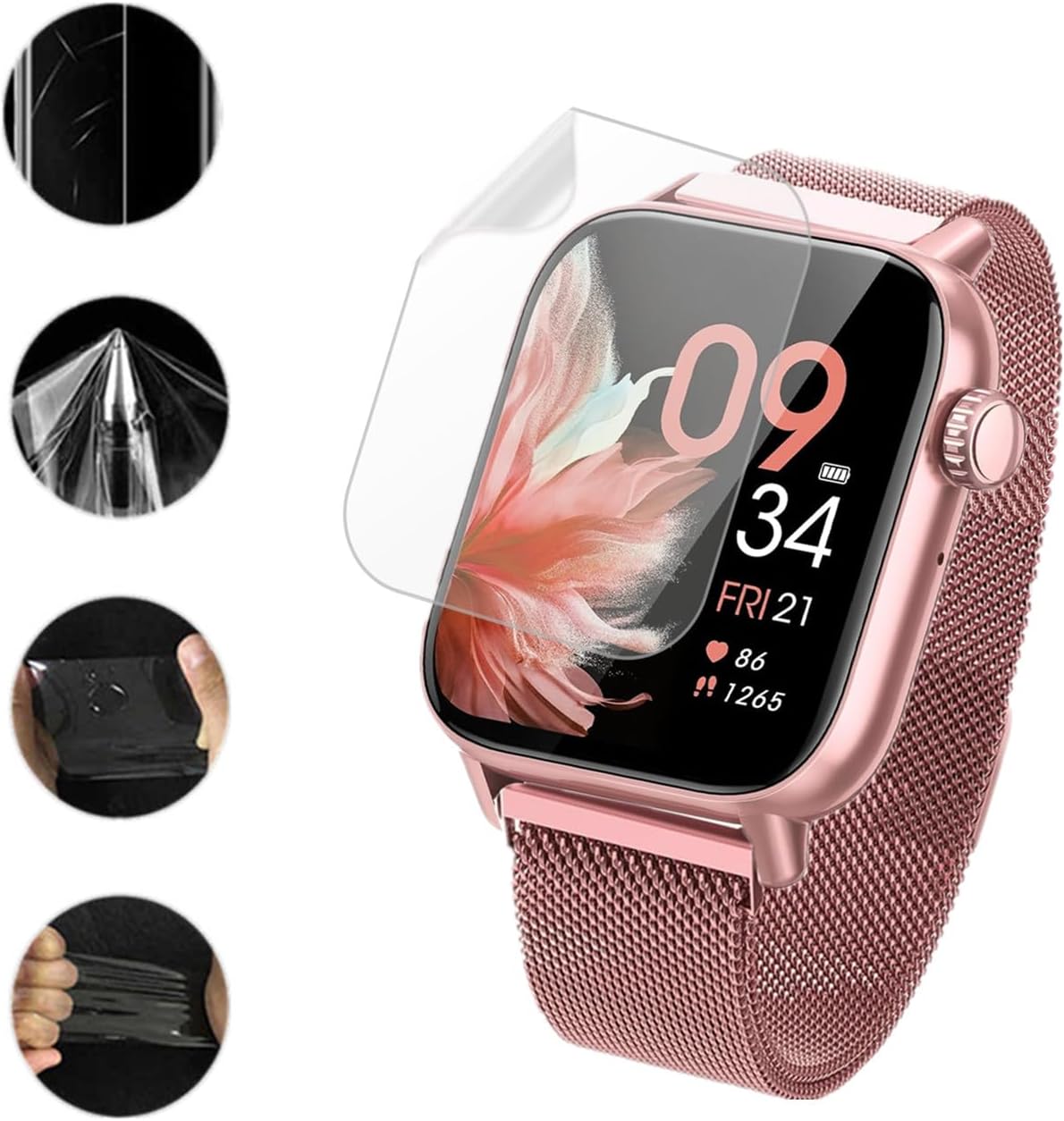
Imej 3.1: Demonstrates the flexibility and protective qualities of the TPU screen protector material.

Imej 3.2: Illustrates the full coverage protection provided by the flexible TPU screen protector, extending to the curved edges of the smartwatch display.
4. Penjagaan dan Penyelenggaraan
To ensure the longevity and effectiveness of your screen protector, follow these simple maintenance guidelines:
- Pembersihan: Gently wipe the screen protector with a soft, lint-free cloth. For stubborn smudges, slightly dampen kain dengan air atau pembersih skrin yang direka untuk elektronik. Elakkan bahan kimia yang keras atau bahan yang melelas.
- Self-Healing: The TPU material is designed to self-heal minor scratches. Allow 24-48 hours for small scratches to disappear naturally.
- Elakkan Objek Tajam: While the protector offers significant resistance, avoid direct contact with sharp objects to prevent deep scratches or punctures.
- Penggantian: If the screen protector becomes heavily damaged or its clarity is compromised, replace it with a new one from the 6-pack provided.

Imej 4.1: Visual representation of the self-healing property, where minor bubbles and scratches on the screen protector disappear over time.
5. Penyelesaian masalah
| Masalah | Kemungkinan Punca | Penyelesaian |
|---|---|---|
| Buih selepas pemasangan | Dust particles trapped, or insufficient squeegeeing. | Small bubbles should disappear within 24-48 hours due to self-healing. For larger bubbles, gently lift the nearest edge of the protector and re-apply while pushing out the air with the "Scratch card". Ensure the screen is dust-free. |
| Protector not adhering properly at edges | Improper alignment, dust on edges, or oil residue. | Ensure the screen is thoroughly cleaned before application. Re-align the protector carefully. If the issue persists, consider using a new protector from the pack. |
| Scratches visible on protector | Minor surface scratches. | Allow 24-48 hours for the self-healing property to work. For deep scratches, the protector may need to be replaced. |
| Reduced touch sensitivity | Rare, but could be due to improper installation or a faulty protector. | Ensure the protector is applied smoothly without air gaps. If the problem persists, remove and re-apply a new protector. |
6. Spesifikasi Produk
- Nama Produk: Dekelife HD Flexible TPU Screen Protector
- Keserasian: BANLVS G39 1.85" Smartwatch (also compatible with AKUMAKA G39 1.83", SWGOTA G39 1.83")
- Bahan: Poliuretana Termoplastik (TPU)
- ciri-ciri: HD Clarity, Flexible, Self-Healing, Full Coverage, Water-Resistant
- Kekerasan: 9H (for scratch resistance)
- Unit setiap Pek: 6
- Nombor Model: 20240125002
- Pengeluar: Frgnie
7. Waranti dan Sokongan
This product is covered by a standard manufacturer's warranty against defects in materials and workmanship. For specific warranty details, please refer to the product packaging or contact your retailer.
7.1. Sokongan Pelanggan
If you encounter any issues or have questions regarding the Dekelife HD Flexible TPU Screen Protector, please contact the seller or manufacturer for assistance. They are committed to providing a satisfactory shopping experience.
For quality problems, do not hesitate to contact us. We will resolve it for you.