
1. Pengenalan
Thank you for choosing the COOLCRAZY N7 4K Dash Cam. This manual provides detailed instructions for setting up, operating, and maintaining your dash cam to ensure optimal performance and safety on the road. Please read this manual thoroughly before use and keep it for future reference.
The COOLCRAZY N7 is designed to capture high-quality video footage of your journeys, offering features such as stunning 4K resolution, a wide 170-degree viewing angle, built-in GPS for accurate location and speed tracking, and Wi-Fi connectivity for easy access via a mobile app. Its advanced night vision and Wide Dynamic Range (WDR) technology ensure clear recordings even in challenging light conditions. With essential safety features like G-sensor activated accident lock and 24-hour parking monitoring, the N7 provides reliable evidence and peace of mind.
2. Apa yang ada di dalam Kotak
Sila sahkan bahawa semua item terdapat dalam pakej anda:
- 1 x COOLCRAZY N7 4K Dash Cam
- 1 x Pengecas Kereta
- 1 x Kad TF 32GB
- 1 x Kabel Kuasa Jenis-C
- 1 x Manual Pengguna
- 1 x Panduan Pemasangan
- 2 x Pad Pelekat 3M
- 3 x Pelekat Elektrostatik
- 1 x Alat Pry Mudah
- 1 x Glasses Cloth

Image: All components included in the COOLCRAZY N7 4K Dash Cam package, neatly laid out.
3. Produk Lebihview
The COOLCRAZY N7 Dash Cam features a compact design with a 3.2-inch IPS screen, providing a clear display for live view and playback. It is equipped with a high-performance image sensor and a 170-degree wide-angle lens to capture comprehensive road coverage.
Ciri-ciri Utama:
- Rakaman 4K UHD: Captures video in stunning 3840x2160P resolution at 30fps, providing exceptional clarity for license plates and road details.
- Kanta Sudut Lebar 170°: Offers an expansive field of view, minimizing blind spots and capturing more of the road.
- Penglihatan Malam Super & WDR: Equipped with an F2.0 aperture and 4-layer lens, along with Wide Dynamic Range technology, for clear recordings in low-light conditions and balanced exposure.
- WiFi & Kawalan Apl terbina dalam: Allows seamless connection to your smartphone via the dedicated app for live viewing, video download, and settings adjustment.
- GPS terbina dalam: Records precise driving routes, locations, and real-time speed, which can be viewed on the LCD or via the app.
- G-Sensor (Accident Lock): Automatically detects sudden shakes or collisions and locks the current video segment to prevent overwriting.
- Rakaman Gelung: Continuously records, automatically overwriting the oldest files apabila kad memori penuh.
- Pemantau Tempat Letak Kereta 24 Jam: Provides continuous surveillance when your vehicle is parked (requires optional hardwire kit, ASIN: B0CJY9NB6Q).

Image: Comparison showing the superior clarity of 4K Ultra HD recording, highlighting details like license plates.

Image: Illustration of the dash cam's night vision capabilities, showing clear capture of vehicles and surroundings in low light.

Image: Diagram illustrating the 170-degree wide-angle coverage, showing how it captures both sides of the car's front.
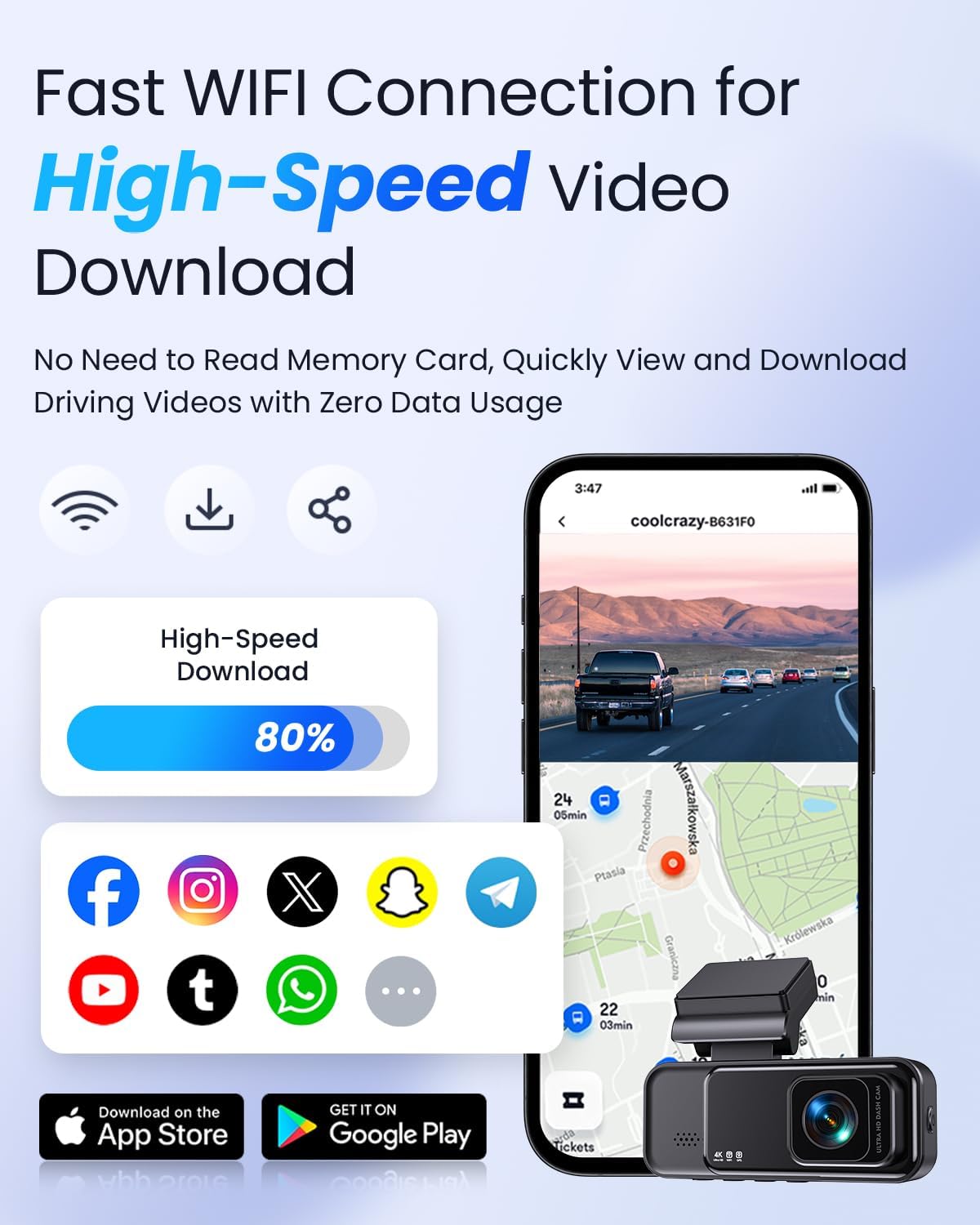
Image: Visual representation of the dash cam's compact size, adjustable bracket, and hidden installation behind the rearview cermin.
4. Persediaan dan Pemasangan
Follow these steps to properly install your COOLCRAZY N7 Dash Cam:
- Sediakan Kad SD Mikro: Insert the provided 32GB TF card (or another U3 Class 10 Micro SD Card, up to 128GB, not included) into the dash cam's SD card slot. Ensure it is inserted correctly until it clicks into place.
- Pilih Lokasi Pemasangan: Pilih lokasi pada cermin depan anda yang tidak menghalang anda view, typically behind the rearview mirror. Clean the area thoroughly with the provided glasses cloth.
- Gunakan Pelekat Elektrostatik: Peel off the backing from one of the electrostatic stickers and apply it to the chosen area on the windshield. This helps in easy removal and re-positioning without leaving residue.
- Pasangkan Pad Pelekat 3M: Peel off the protective film from one side of the 3M adhesive pad and stick it firmly onto the dash cam's mounting bracket.
- Pasangkan Dash Cam: Peel off the remaining protective film from the 3M adhesive pad and firmly press the dash cam (with its bracket) onto the electrostatic sticker on your windshield. Hold for at least 30 seconds to ensure a strong bond. The bracket allows for a 75° flexible rotation angle for optimal camera positioning.
- Sambungkan Kuasa: Connect the Type-C power cable to the dash cam's Type-C port. Route the cable neatly along the windshield edge and down to your car's cigarette lighter socket. Use the easy pry tool to tuck the cable under trim panels for a clean installation.
- Plug in Car Charger: Plug the car charger into your vehicle's cigarette lighter socket. The dash cam will automatically power on and begin recording when your vehicle starts.
For detailed visual instructions, please refer to the included Installation Guide.
5. Arahan Operasi
Hidupkan/Mati Kuasa
- automatik: The dash cam will automatically power on and start recording when connected to your car's power supply and the vehicle ignition is turned on. It will power off automatically when the ignition is turned off.
- Manual: To manually power on/off, press and hold the Power button on the dash cam.
Rakaman Video
- Rakaman Gelung: Cam dash merakam video dalam gelung berterusan (cth, segmen 1, 3 atau 5 minit). Apabila kad memori penuh, yang paling lama dibuka kuncinya files akan ditimpa secara automatik oleh rakaman baharu.
- Rakaman Kecemasan (G-Sensor): The built-in G-sensor detects sudden impacts or rapid acceleration/deceleration. When triggered, it automatically locks the current video segment, preventing it from being overwritten by loop recording. The sensitivity of the G-sensor can be adjusted (High, Medium, Low) in the settings.

Image: Visual explanation of the G-sensor function, showing how it locks important video data during collisions or vibrations.
Penjejakan GPS
The integrated GPS module records your driving trajectory, location, and speed. This data is embedded in the video files dan boleh viewed on the dash cam's screen or through the mobile application.

Image: Illustration showing how the built-in GPS records driving trajectory, location, and speed, displayed on a map interface.
Pemantauan Tempat Letak Kereta 24 Jam
To enable 24-hour parking monitoring, an additional hardwire kit is required (ASIN: B0CJY9NB6Q). Once installed, the dash cam can monitor your vehicle even when parked. It supports time-lapse recording at a low frame rate (1/2/3 fps) to save storage space and capture events efficiently.

Image: Depiction of the 24-hour parking monitoring feature, showing a car protected by continuous surveillance.
6. App Control (Wi-Fi Connectivity)
The COOLCRAZY N7 features built-in 2.4G Wi-Fi, allowing you to connect your dash cam to your smartphone via the dedicated app (compatible with Android & iOS). This enables convenient access to your recordings and settings.
Langkah-langkah untuk Menyambung:
- Muat turun Apl: Cari untuk the official COOLCRAZY dash cam app on the App Store (iOS) or Google Play Store (Android) and install it on your smartphone.
- Dayakan Wi-Fi pada Kamera Pendahulu: Turn on the dash cam. Navigate to the Wi-Fi settings on the dash cam's menu and enable Wi-Fi.
- Sambung ke Rangkaian Wi-Fi: On your smartphone, go to Wi-Fi settings and connect to the dash cam's Wi-Fi network (SSID usually starts with "COOLCRAZY" or similar, password typically provided on the dash cam screen or manual).
- Buka Apl: Launch the COOLCRAZY app on your smartphone. The app should automatically detect and connect to your dash cam.
Fungsi Apl:
- Langsung View: See what your dash cam is recording in real-time.
- Main balik: Layari dan mainkan semula video yang dirakam terus pada telefon anda.
- Muat turun: Muat turun video files directly to your smartphone's gallery without needing to remove the SD card.
- tetapan: Adjust dash cam settings such as video resolution (4K/2K), G-sensor sensitivity, loop recording duration, and more.
- Kongsi: Easily share travel scenery and highlight moments to your social media platforms.

Image: A smartphone screen displaying the dash cam's live view and map, illustrating the fast Wi-Fi connection and video download capabilities.
7. Penyelenggaraan
- Pemformatan Kad SD: It is recommended to format the Micro SD card regularly (e.g., once a month) to ensure optimal performance and prevent data corruption. This can usually be done through the dash cam's settings menu or via the mobile app. Formatting will erase all data on the card, so back up any important files pertama.
- Membersihkan Lensa: Use the provided glasses cloth or a soft, lint-free cloth to gently wipe the camera lens. Avoid using abrasive cleaners or solvents that could damage the lens coating.
- Membersihkan Skrin: Wipe the IPS screen with a soft, dry cloth. If necessary, slightly dampen the cloth with water, but avoid spraying liquid directly onto the screen.
- Suhu Operasi: The dash cam is designed to withstand extreme temperatures, functioning normally between -4°F (-20°C) and 158°F (70°C). However, prolonged exposure to direct sunlight in extreme heat can affect its lifespan.

Image: Visual representation of the dash cam's durability, showing its ability to withstand extreme cold (-4°F) and heat (158°F).
8. Penyelesaian masalah
If you encounter issues with your COOLCRAZY N7 Dash Cam, please refer to the following common problems and solutions:
| Masalah | Kemungkinan Punca | Penyelesaian |
|---|---|---|
| Dash cam tidak dihidupkan. | No power supply; faulty car charger/cable; loose connection. | Check car charger connection and vehicle's cigarette lighter socket. Ensure cable is securely connected to dash cam. Try a different power source if available. |
| Dash cam stops recording or freezes. | SD card error/full; incompatible SD card; firmware issue. | Format the SD card. Ensure you are using a U3 Class 10 Micro SD card. Update firmware if available. Reset the device using the hidden reset button. |
| Isu sambungan Wi-Fi. | Incorrect password; Wi-Fi not enabled on dash cam; app issues. | Verify Wi-Fi password. Ensure Wi-Fi is enabled on the dash cam. Restart both dash cam and smartphone. Reinstall the app. |
| Kualiti video yang teruk. | Kanta kotor; filem pelindung pada kanta; tetapan resolusi yang salah. | Clean the lens. Remove any protective film from the lens. Check video resolution settings (ensure 4K is selected if desired). |
| G-sensor too sensitive/not sensitive enough. | Tetapan kepekaan G-sensor. | Adjust G-sensor sensitivity in the dash cam's settings menu (High, Medium, Low). |
If the problem persists after trying these solutions, please contact COOLCRAZY customer support for further assistance.
9. Spesifikasi
| Ciri | Perincian |
|---|---|
| Nama Model | 4K Wifi Dash Cam (N7) |
| Resolusi Tangkapan Video | 4K (3840x2160P) |
| Saiz Skrin | Skrin IPS 3.2" |
| Sudut Lebar | 170° Depan |
| Teknologi Ketersambungan | Wi-Fi (2.4G) |
| GPS | Built-in GPS Enabled |
| Ciri Khas | Time-lapse Monitoring, 24H Parking Monitor (Hardwire Kit Needed), G-Sensor, Loop Recording, Super Night Vision, HDR, WDR, Accident Lock |
| Kad SD yang disokong | U3 Class 10 Micro SD Card, up to 128GB (32GB included) |
| Jenis Pemasangan | Gunung Cermin Mata |
| Dimensi Produk | 3.3 x 1.3 x 1.3 inci |
| Berat Barang | 14.4 auns |
10. Waranti dan Sokongan
Maklumat Waranti
The COOLCRAZY N7 4K Dash Cam comes with a Waranti Boleh Dipercayai 12 Bulan from the date of purchase. This warranty covers manufacturing defects and ensures the product's quality and performance under normal use. Please retain your proof of purchase for warranty claims.
Sokongan Pelanggan
For any questions, technical assistance, or warranty inquiries, please do not hesitate to contact our customer support team. We offer 24/7 quick response to ensure your issues are resolved promptly.
e-mel: help@coolcrazycam.com
Please provide your product model (N7) and a detailed description of your issue when contacting support to help us assist you more efficiently.