
pengenalan
This manual provides instructions for the proper use and maintenance of your RIVERSONG AirFly M2 Wireless Earbuds. These earbuds are designed for a high-quality audio experience, featuring Bluetooth 5.3 connectivity, True Wireless Stereo (TWS), Active Noise Cancellation (ANC), an integrated microphone for calls, and intuitive touch controls. The portable charging case ensures extended battery life and secure storage.
Produk Selesaiview
The RIVERSONG AirFly M2 system includes two wireless earbuds and a portable charging case. The charging case features a digital display to indicate battery levels and charging status.

Image: The AirFly M2 charging case with its digital battery display and icons representing key features like sound, touch control, and Bluetooth.

Imej: Meletup view illustrating the separate earbuds and the charging case, highlighting their design.
Persediaan
1. Mengecas Fon Telinga dan Sarung
Before first use, fully charge the earbuds and the charging case. The case's digital display will show the current battery percentage.
- Letakkan fon telinga ke dalam bekas pengecasan. Pastikan mereka duduk dengan betul.
- Sambungkan bekas pengecas kepada sumber kuasa menggunakan kabel USB yang serasi.
- The digital display on the case will illuminate, showing the charging status and battery level.

Image: An earbud charging inside the case, with the display indicating 80% battery and a quick charge feature.

Imej: Dibesarkan view of the charging case's digital display, clearly showing the 95% battery level.
2. Berpasangan dengan Peranti Anda
Fon telinga akan memasuki mod berpasangan secara automatik apabila dialih keluar daripada bekas pengecasan.
- Buka bekas pengecasan dan keluarkan kedua-dua fon telinga. Mereka akan dihidupkan secara automatik dan cuba berpasangan antara satu sama lain.
- Pada telefon pintar, tablet anda atau peranti berdaya Bluetooth lain, pergi ke tetapan Bluetooth.
- Enable Bluetooth if it is not already on.
- Cari untuk new devices. Select 'AirFly M2' from the list of available devices to connect.
- Sebaik sahaja disambungkan, anda akan mendengar gesaan audio dan fon telinga akan sedia untuk digunakan.

Image: A smartphone screen showing the Bluetooth device list, with 'AirFly M2' successfully connected, next to the charging case.
Arahan Operasi
The AirFly M2 earbuds feature intuitive touch controls on each earbud for managing various functions.
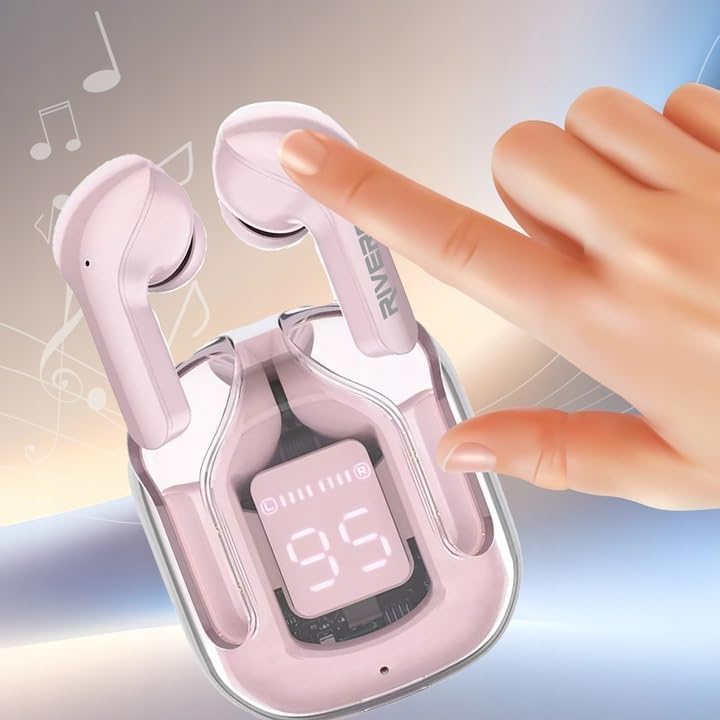
Image: A finger interacting with the touch-sensitive area of an earbud, illustrating how to use the controls.
Basic Touch Controls:
- Main/Jeda: Ketik sekali pada salah satu fon telinga.
- Lagu Seterusnya: Ketik dua kali pada fon telinga kanan.
- Trek Sebelumnya: Ketik dua kali pada fon telinga kiri.
- Jawab/Tamatkan Panggilan: Ketik sekali pada sama ada fon telinga semasa panggilan masuk atau panggilan aktif.
- Tolak Panggilan: Tekan dan tahan pada mana-mana fon telinga selama 2 saat semasa panggilan masuk.
- Aktifkan Pembantu Suara: Ketik tiga kali pada salah satu fon telinga (cth, Siri, Google Assistant).
- Suis Mod ANC/Ketelusan: Press and hold on the left earbud for 2 seconds to cycle through Active Noise Cancellation and Transparency modes.
- Mod Permainan: Press and hold on the right earbud for 2 seconds to activate/deactivate low-latency gaming mode (40ms latency).
Penyelenggaraan
Penyelenggaraan yang betul memastikan jangka hayat dan prestasi optimum fon telinga anda.
- Pembersihan: Bersihkan fon telinga dan bekas pengecas dengan kerap menggunakan kain yang lembut, kering dan tidak berbulu. Jangan gunakan pembersih atau pelarut yang melelas.
- Mengecas Kenalan: Ensure the charging contacts on both the earbuds and inside the case are clean and free of debris to maintain a reliable connection.
- Storan: Apabila tidak digunakan, simpan fon telinga di dalam bekas pengecas untuk melindunginya daripada habuk dan kerosakan. Simpan di tempat yang sejuk dan kering.
- Tahan Air: The earbuds are IPX5 water resistant, meaning they are protected against low-pressure water jets from any direction. They are not designed for submersion in water. Avoid exposing them to excessive moisture or liquids.
Menyelesaikan masalah
If you encounter issues with your AirFly M2 earbuds, refer to the following common solutions:
- Fon telinga tidak berpasangan:
- Pastikan kedua-dua fon telinga dicas.
- Place earbuds back into the case, close it, then open it again to re-initiate pairing mode.
- Matikan dan hidupkan Bluetooth pada peranti anda.
- Forget 'AirFly M2' from your device's Bluetooth list and attempt to pair again.
- No sound from one or both earbuds:
- Check the volume level on your connected device and on the earbuds.
- Pastikan fon telinga disambungkan dengan betul ke peranti anda.
- Pasangkan semula fon telinga dengan peranti anda.
- Isu pengecasan:
- Sahkan bahawa kabel pengecas dan penyesuai kuasa berfungsi dengan betul.
- Bersihkan sesentuh pengecasan pada kedua-dua fon telinga dan dalam sarung.
- Pastikan fon telinga diletakkan dengan betul dalam bekas pengecasan.
- Kualiti panggilan yang lemah:
- Pastikan mikrofon tidak terhalang.
- Bergerak lebih dekat dengan peranti anda yang disambungkan untuk meningkatkan kekuatan isyarat.
- Check for environmental noise that might interfere with the microphone.
Spesifikasi
- Jenama:
- RIVERSONG
- Nama Model:
- AirFly M2
- Nombor Model:
- EA233
- Teknologi Ketersambungan:
- Wayarles (Bluetooth 5.3)
- Faktor Bentuk:
- Dalam Telinga
- Kawalan Bunyi:
- Pembatalan Bunyi Aktif
- Ciri Khas:
- Microphone included, Touch Control, IPX5 Water Resistant, 40ms Gaming Latency
- Komposisi Bateri:
- Litium-ion (3 termasuk)
- Approx. Playtime:
- 300 minutes (5 hours) per charge (earbuds), extended with charging case
- Bahan:
- Silicone Plastic
- Berat Barang:
- 200 Gram
- Peranti Serasi:
- Mobile phones, laptops, tablets, smart speakers
- Komponen yang Disertakan:
- Manual Pengguna
Waranti dan Sokongan
For warranty information and customer support, please refer to the documentation provided with your purchase or visit the official RIVERSONG website. Information regarding spare parts availability and software update guarantees is not available in this manual.