
pengenalan
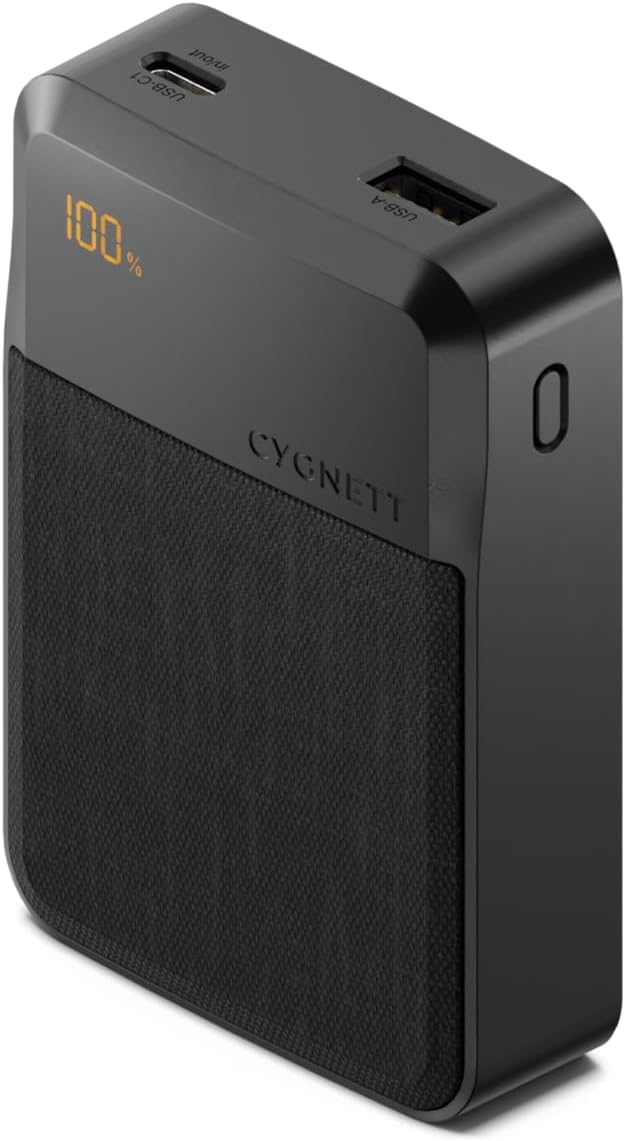
The Cygnett Reserve Fast Charging Power Bank provides reliable and rapid power delivery for your mobile devices. With 20W fast charging capabilities, it can charge your iPhone or Android device from 0-50% in approximately 30 minutes, ensuring you stay connected. This power bank offers enough capacity to fully charge a phone up to 2.6 times, preventing unexpected power loss. Its multiport design allows for simultaneous charging of up to three devices, including Apple and Android phones, tablets, and earbuds, via its USB-C (20W) and USB-A (18W) ports. A discreet digital display keeps you informed of the remaining power and charging progress.
Kandungan Pakej
- Cygnett Reserve Fast Charging Power Bank (10,000 mAh)
- Kabel Pengecasan USB-C ke USB-A
- Manual Arahan

Persediaan
Mengecas Power Bank
- Connect the provided USB-C to USB-A cable to the USB-C input/output port on the power bank.
- Plug the other end of the cable (USB-A) into a compatible USB wall adapter (not included) or a computer's USB port.
- Paparan digital akan menunjukkan kemajuan pengecasan, menunjukkan peratusan bateritage. Charge until it reaches 100% for optimal performance.
Mengecas Peranti Anda
- Connect your device's charging cable to one of the power bank's output ports (USB-C or USB-A).
- Sambungkan hujung kabel yang lain ke peranti anda.
- The power bank will automatically begin charging your device. The digital display will show the power bank's remaining charge.
- To charge multiple devices simultaneously, connect each device to an available output port. The power bank supports charging up to three devices at once.

Arahan Operasi
Pengecasan Cepat
The power bank supports 20W fast charging via its USB-C port, allowing compatible devices to charge rapidly. Ensure your device and charging cable also support fast charging for optimal speeds.
Pengecasan Serentak
You can charge up to three devices concurrently using the available USB-C and USB-A ports. The power bank intelligently distributes power to connected devices.
Paparan Digital
The integrated digital display provides real-time information on the power bank's remaining battery percentage. This helps you monitor its charge level and plan recharges effectively.

Penyelenggaraan
- Storan: Simpan bank kuasa di tempat yang sejuk dan kering jauh dari cahaya matahari langsung dan suhu yang melampau.
- Pembersihan: Gunakan kain lembut dan kering untuk membersihkan bahagian luar power bank. Elakkan menggunakan bahan kimia yang keras atau bahan yang melelas.
- Pendedahan Air: Keep the power bank away from water and other liquids. Do not operate if wet.
- Penjagaan Pelabuhan: Ensure charging ports are free from dust and debris to maintain optimal connection.
- Kesihatan Bateri: For long-term storage, it is recommended to charge the power bank to about 50-70% every three months to preserve battery health.
Menyelesaikan masalah
- Power Bank Tidak Mengecas:
- Ensure the charging cable is securely connected to both the power bank's USB-C input and the power source.
- Verify that the wall adapter or USB port is functional.
- Cuba gunakan kabel pengecasan atau penyesuai kuasa yang berbeza.
- Peranti Tidak Mengecas daripada Power Bank:
- Check that your device's charging cable is properly connected to both the power bank's output port and your device.
- Pastikan bank kuasa mempunyai cas yang mencukupi (periksa paparan digital).
- Try using a different output port or a different charging cable.
- Pengecasan perlahan:
- For fast charging, ensure both your device and the cable support 20W Power Delivery.
- Charging multiple devices simultaneously may reduce individual charging speeds.
- Paparan Digital Tidak Berfungsi:
- Pastikan bank kuasa dicas.
- Jika masalah berterusan, hubungi sokongan pelanggan.
Spesifikasi
| Nombor Model | CY4764PBCHE |
| Kapasiti | 10,000 mAh |
| Dimensi Produk | 10 x 5 x 3 cm |
| Berat Barang | 100 g |
| Teknologi Ketersambungan | USB |
| Ciri Khas | 20W optimal charging for phones & tablets, Compact & lightweight, Up to 2.1 phone charges |
| warna | Hitam |
| bahan | plastik |

Waranti dan Sokongan
Cygnett products are designed and manufactured to the highest quality standards. For information regarding warranty coverage, product support, or to register your product, please visit the official Cygnett webtapak atau hubungi bahagian perkhidmatan pelanggan mereka. Simpan bukti pembelian anda untuk sebarang tuntutan waranti.
Maklumat Keselamatan Penting
- Jangan tanggalkan, buka atau carikkan power bank.
- Jangan dedahkan bank kuasa kepada haba atau api. Elakkan penyimpanan di bawah cahaya matahari langsung.
- Do not short-circuit the power bank. Do not store power banks in a box or drawer where they may short-circuit each other or be short-circuited by other metal objects.
- Jangan biarkan bank kuasa terkena kejutan mekanikal.
- In the event of a power bank leaking, do not allow the liquid to come into contact with the skin or eyes. If contact has been made, wash the affected area with copious amounts of water and seek medical advice.
- Pastikan bank kuasa bersih dan kering.
- Jangan biarkan bank kuasa dicas berpanjangan apabila tidak digunakan.
- Jangan gunakan sebarang pengecas selain daripada yang disediakan khusus untuk digunakan dengan peralatan.
- Do not use any power bank that is not designed for use with the equipment.
- Penggunaan bateri oleh kanak-kanak harus diawasi.
- Consult your device's user manual for specific charging requirements.