
pengenalan
This manual provides detailed instructions for the safe and efficient use of your OttLite Wellness Series Wireless Charging LED Table Lamp. l iniamp features OttLite's exclusive ClearSun LED technology, designed to reduce eyestrain, along with convenient wireless charging and a USB charging port. Please read this manual thoroughly before operating the lamp dan simpan untuk rujukan masa hadapan.
Arahan Keselamatan Penting
Untuk mengurangkan risiko kebakaran, renjatan elektrik atau kecederaan kepada orang ramai, sila patuhi perkara berikut:
- Jangan gunakan dengan kord atau palam yang rosak.
- Jangan kendalikan lamp if it has been dropped or damaged.
- Jangan cuba mengubah suai lamp.
- Gunakan hanya penyesuai kuasa yang disediakan.
- Simpan lamp jauh dari air atau cecair lain.
- l iniamp adalah untuk kegunaan dalaman sahaja.
- Sumber cahaya LED tidak boleh diganti.
Kandungan Pakej
- OttLite Wellness Series Wireless Charging LED Table Lamp
- Penyesuai Kuasa
Persediaan
- Buka bungkusan Lamp: Keluarkan semua komponen dari pembungkusan dengan berhati-hati.
- Sambungkan Kuasa: Insert the power adapter plug into the power input port located on the back of the lamp base. Plug the other end of the adapter into a standard 110V AC wall outlet.
- Letakkan Lamp: Letakkan lamp on a stable, flat surface. Ensure the power cord is not pinched or obstructed.
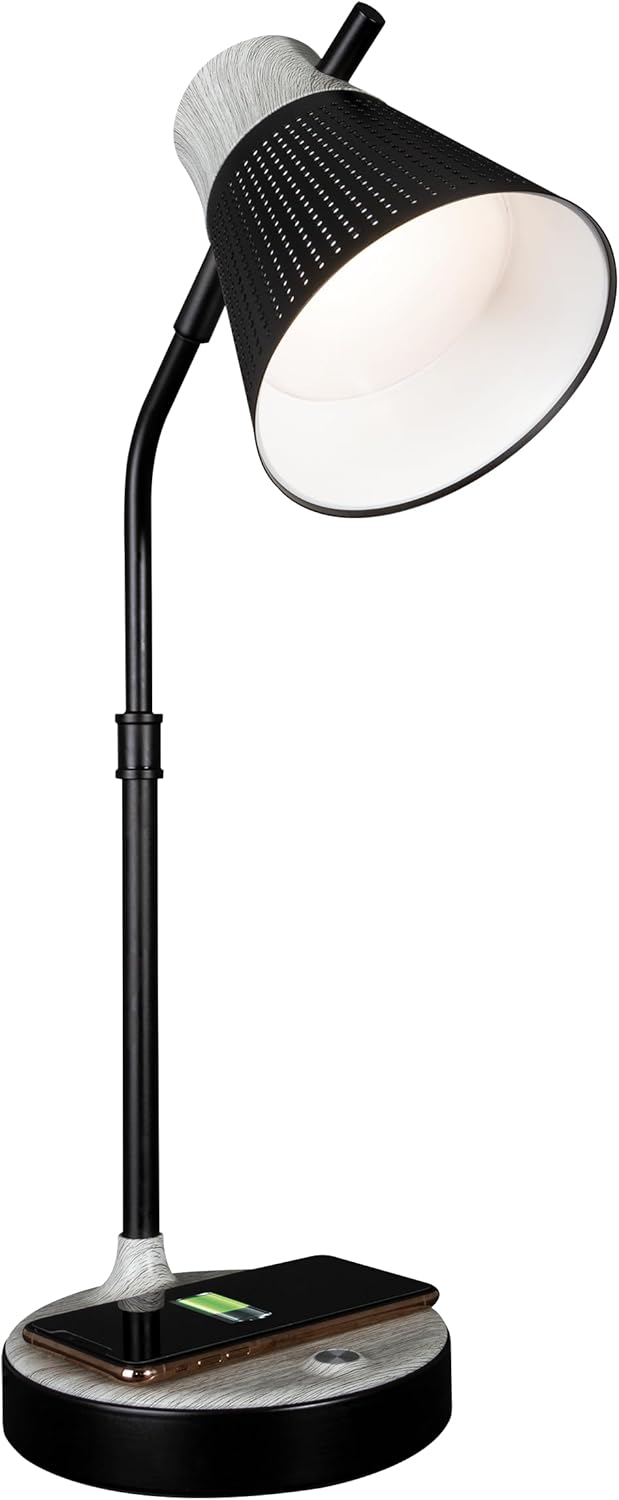
Lamp kini sedia untuk beroperasi.
Arahan Operasi
1. Power On/Off and Brightness Control
Lamp features touch-sensitive controls located on the base.
- Untuk Menghidupkan/Mematikan: Sentuh perlahan ikon kuasa pada lamp asas.
- Untuk Menyelaraskan Kecerahan: Dengan lamp on, repeatedly touch the power icon to cycle through three brightness levels.

2. Color Temperature Settings
Lamp offers three distinct color temperature modes:
- ClearSun Natural Daylight: Provides a balanced spectrum for reduced eyestrain.
- Putih Hangat: A softer, warmer light ideal for relaxation.
- Putih terang: A crisp, clear light suitable for tasks requiring focus.
To switch between color temperatures, touch the mode icon on the lamp base. Cycle through the available options to select your preferred light.

3. Melaraskan Lamp
Lamp features a flexible neck and an adjustable shade for precise light placement.
- Leher Fleksibel: Gently bend the lamp neck to direct light where needed.
- Lorek Boleh Laras: The shade can be moved up, down, and side-to-side to optimize illumination.

4. Pengecasan Tanpa Wayar
Lamp base includes a Qi-compatible wireless charging pad.
- Place your Qi-compatible device (e.g., smartphone) directly onto the charging pad on the lamp asas.
- Pastikan peranti berada di tengah-tengah pad pengecas untuk sambungan yang optimum.
- A charging indicator on your device will confirm that charging has begun.

5. Port Pengecasan USB
A 5V, 2.1A USB charging port is integrated into the lamp tapak untuk mengecas peranti tambahan.
- Connect your device's USB charging cable to the USB port on the back of the lamp asas.
- Connect the other end of the cable to your device (e.g., headphones, smartwatch, tablet).

Penyelenggaraan
- Pembersihan: Putuskan sambungan kuasa sebelum membersihkan. Gunakan kain lembut dan kering untuk mengelapamp. Jangan gunakan pembersih atau pelarut yang melelas.
- Penjagaan LED: The LED light source is designed for long-term use and does not require replacement. Avoid direct contact with the LED panel.
Menyelesaikan masalah
| Masalah | Kemungkinan Punca | Penyelesaian |
|---|---|---|
| Lamp tidak menyala. | Penyesuai kuasa tidak disambungkan atau alur keluar rosak. | Ensure power adapter is securely plugged into the lamp and a working wall outlet. Test the outlet with another device. |
| Pengecasan tanpa wayar tidak berfungsi. | Peranti tidak serasi dengan Qi atau tidak dijajarkan dengan betul. | Verify your device supports Qi wireless charging. Reposition the device on the charging pad, ensuring it is centered. Remove any thick phone cases. |
| Pengecasan USB tidak berfungsi. | USB cable faulty or device not compatible. | Try a different USB cable. Ensure the device is compatible with 5V, 2.1A charging. |
| Cahaya berkelip atau tidak konsisten. | Loose power connection or electrical interference. | Check all power connections. Move the lamp jauh daripada peranti elektronik lain yang mungkin menyebabkan gangguan. |
Spesifikasi
- Nombor Model: CSAQABG9-SHPR
- Jenama: OttLite
- Dimensi Produk: 6.88"D x 6.88"W x 25"H (adjustable height)
- Berat Barang: 4.99 paun
- Sumber Kuasa: Elektrik Bertali arus (110 Volt AC)
- Jenis Sumber Cahaya: LED (ClearSun Technology)
- Wattage: 10 watt
- Kaedah Kawalan: Sentuh
- Ciri Khas: Wireless Charging, USB Charging Port, Flexible Neck, Adjustable Shade, 3 Brightness Settings, 3 Color Temperatures
- Bahan: Logam, Kayu
- Jenis Selesai: Dilukis
- Penggunaan Dalaman/Luar: Dalaman sahaja

Maklumat Waranti
OttLite products are manufactured to high-quality standards. For specific warranty details, including coverage period and terms, please refer to the warranty card included with your purchase or visit the official OttLite webtapak. Simpan bukti pembelian anda untuk tuntutan waranti.
Sokongan Pelanggan
If you have any questions, require assistance, or need to report an issue with your OttLite Wellness Series Wireless Charging LED Table Lamp, please contact OttLite customer support through their official webtapak atau maklumat hubungan yang diberikan dalam pembungkusan produk anda.
Untuk maklumat lanjut, lawati OttLite Store.