
1. Pengenalan
Thank you for choosing the RESTMO 2-Zone Programmable Watering Timer. This device is designed to automate your garden irrigation, providing convenience and efficiency. Featuring durable brass inlet and outlet threads, independent dual zones, and multiple programming options, it ensures reliable and precise watering for your lawn, garden, or greenhouse.
Please read this manual thoroughly before installation and operation to ensure proper use and longevity of your watering timer.
2. Ciri-ciri Utama
- Reliable and Leak-Proof Design: Equipped with pure brass inlet and outlet threads for enhanced durability and resistance to high working pressure (up to 120 psi). The robust, weather-resistant, and UV-resistant casing is ideal for outdoor use.
- Dual Independent Zones: Features two separate outlets, allowing you to manage watering for two distinct areas simultaneously or independently.
- Pelbagai Pilihan Pengaturcaraan: Each zone supports up to 3 distinct watering programs (P1, P2, P3), providing a total of 6 customizable schedules.
- Flexible Watering Frequency and Duration: Set watering frequency from 1 to 23 hours or 1 to 30 days, and duration from 1 minute to 299 minutes.
- Antara Muka Mesra Pengguna: Large 3.2-inch LCD screen for easy readability and an oversized dial for intuitive setting adjustments.
- Manual Watering Function: Allows for immediate, temporary watering without interrupting preset programs.
- Ciri Kelewatan Hujan: Conserve water by pausing scheduled watering for 24, 48, or 72 hours during rainy periods.
- Dikuasakan Bateri: Operates on 2 AA alkaline batteries (not included), providing approximately one year of battery life.
3. Panduan Persediaan
3.1. Pemasangan Bateri
- Cari petak bateri di belakang pemasa.
- Buka penutup bateri.
- Masukkan 2 bateri beralkali AA baharu, memastikan kekutuban (+/-) betul.
- Close the battery cover securely. The LCD screen will light up.
3.2. Connecting the Timer
The RESTMO watering timer features a 3/4" NH Female brass inlet and 3/4" NH Male brass outlets.

Image: The RESTMO watering timer connected to a faucet, illustrating the durable pure brass inlet and outlet threads for leak-proof performance.
- Screw the timer's brass inlet directly onto your outdoor faucet (3/4" NH standard). Ensure a tight, leak-free connection.
- Attach your garden hoses to the two brass outlets at the bottom of the timer. Hand-tighten for a secure fit.
3.3. Initial Clock Setting

Imej: Depan view of the RESTMO watering timer, showing the large LCD display, control dial, and buttons for easy operation.
- Turn the main dial to TETAPKAN JAM.
- Gunakan + dan - buttons to adjust the current time.
- Tekan OK to confirm and move to the next setting (e.g., AM/PM).
- Once the clock is set, turn the dial to the next desired function or to ON untuk mengaktifkan.
4. Arahan Operasi
4.1. Programming Watering Schedules (P1, P2, P3)
The timer allows you to set up to three independent programs (P1, P2, P3) for each of the two zones (Left and Right).

Image: Visual guide for setting up three distinct watering programs (P1, P2, P3), demonstrating options for start time, duration, and frequency.
- Pilih Zon: Tekan sebentar ZN/P button to toggle between Zone Left (L) and Zone Right (R). The selected zone will be indicated on the LCD.
- Pilih Program: Tekan lama ZN/P button to cycle through P1, P2, and P3 for the selected zone. Release the button when your desired program (e.g., P1) is displayed.
- Tetapkan Masa Mula: Turn the main dial to MASA MULA. guna + dan - untuk melaraskan masa mula. Tekan OK untuk mengesahkan.
- Set How Long (Duration): Turn the main dial to BERAPA LAMA. guna + dan - to set the watering duration (1 min to 299 min). Press OK untuk mengesahkan.
- Set How Often (Frequency): Turn the main dial to BERAPA KERAP. guna + dan - to set the watering frequency (1-23 hours or 1-30 days). Press OK untuk mengesahkan.
- Repeat steps 1-5 for P2 and P3 if needed for the current zone, and then for the other zone.
- Once all programs are set, turn the main dial to ON to activate the schedules.
4.2. Penyiraman Manual
The manual watering function allows you to water immediately without affecting your programmed schedules.
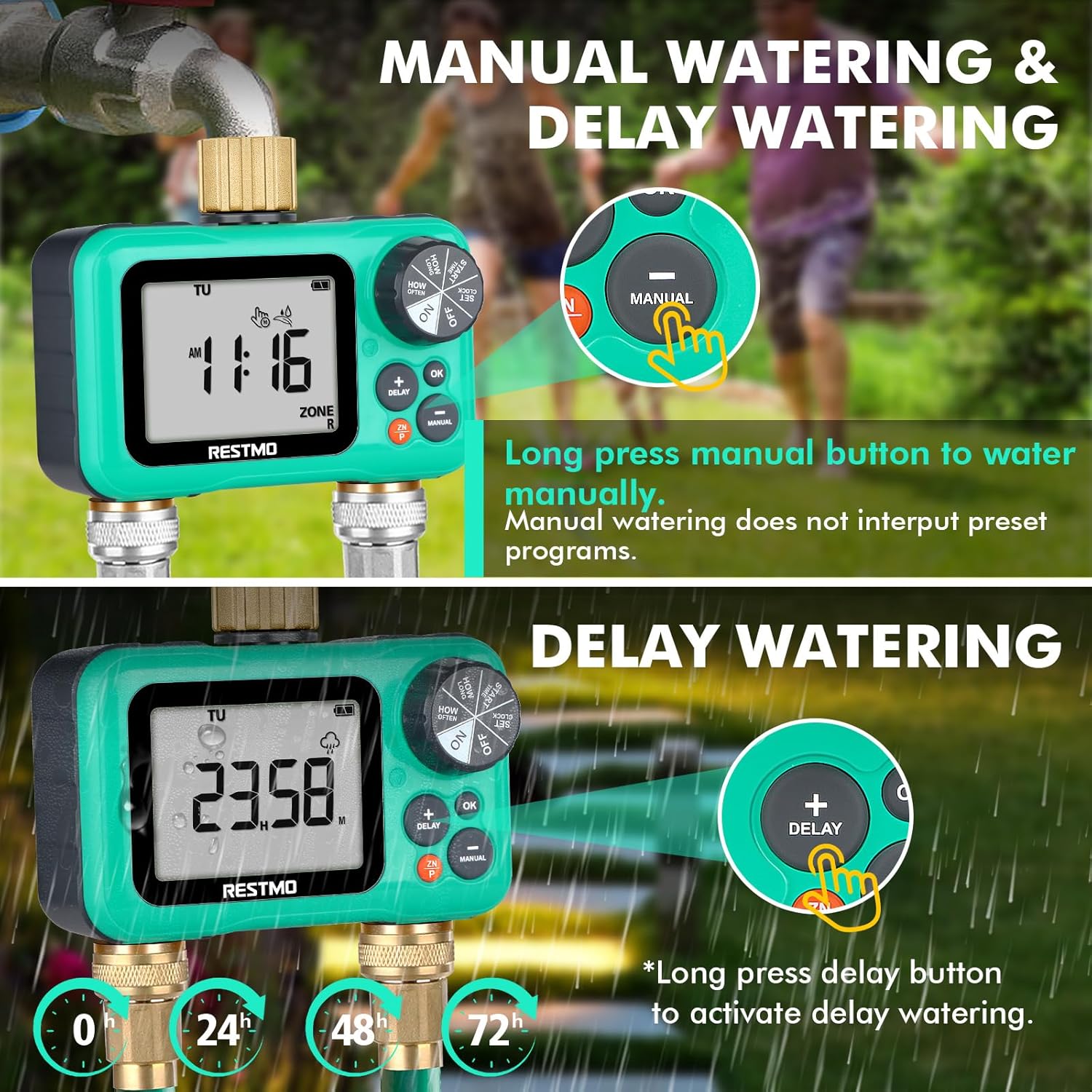
Imej: Terperinci view of the timer's buttons, illustrating how to activate manual watering and rain delay functions.
- Ensure the main dial is set to ON.
- Tekan lama MANUAL button. The display will show the manual watering duration.
- Gunakan + dan - buttons to adjust the desired manual watering duration.
- Tekan OK to start manual watering. The timer will automatically revert to its programmed schedule after the manual watering is complete.
4.3. Fungsi Kelewatan Hujan
Pause your watering schedule for a set period to conserve water during rainfall.
- Ensure the main dial is set to ON.
- Tekan lama KELEWATAN button. The display will show the delay options (24H, 48H, 72H).
- Gunakan + dan - buttons to select the desired delay duration.
- Tekan OK to activate the rain delay. The timer will resume its programmed schedule after the delay period ends.
4.4. Zone Selection
Easily switch between the left and right zones for programming or manual control.
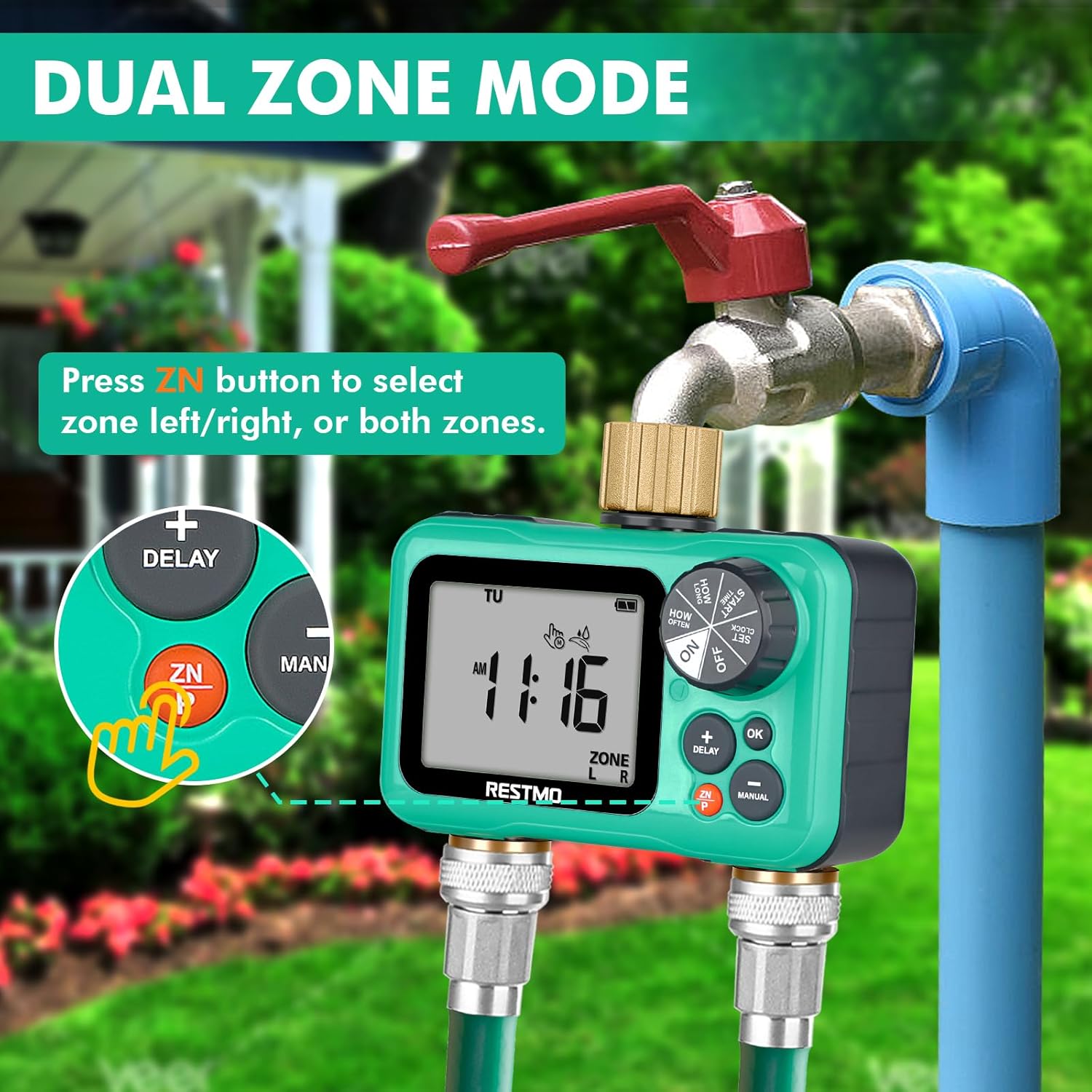
Image: The timer connected to a faucet and hoses, with an emphasis on the 'ZN' button used for selecting between the left and right watering zones.
- Tekan sebentar ZN/P button to switch between Zone Left (L), Zone Right (R), or Both Zones (L+R). The active zone(s) will be displayed on the LCD.
5. Penyelenggaraan
- Penggantian Bateri: Replace batteries annually or when the low battery indicator appears on the LCD. Always use new AA alkaline batteries.
- Pembersihan Penapis: Periodically check the filter washer located in the inlet connection. If debris is present, remove and rinse it under running water. This prevents clogging and ensures proper water flow.
- Musim sejuk: Before the first frost, disconnect the timer from the faucet and hoses. Drain any remaining water from the unit. Store the timer indoors in a dry, frost-free location to prevent damage from freezing water.
- Pembersihan Am: Lap pemasa dengan iklanamp cloth to remove dirt. Do not use abrasive cleaners or immerse the unit in water.
6. Penyelesaian masalah
| Masalah | Kemungkinan Punca | Penyelesaian |
|---|---|---|
| Timer not turning on / LCD blank | Bateri mati atau tidak dipasang dengan betul. | Gantikan dengan bateri alkali AA baharu, memastikan kekutuban yang betul. |
| Tiada aliran air | Faucet is off; low water pressure; clogged filter; program not set correctly; manual override active. | Ensure faucet is fully open. Check water pressure (min 8 psi). Clean inlet filter. Verify program settings (start time, duration, frequency). Check if manual watering is active. |
| Air bocor dari sambungan | Loose connections; worn washer; damaged threads. | Ensure all connections are hand-tight. Check rubber washers for wear and replace if necessary. Inspect brass threads for damage. |
| Program not running at scheduled time | Timer dial not set to ON; incorrect clock time; rain delay active; program OFF. | Turn dial to ON. Verify current time is accurate. Check if rain delay is active. Ensure program (P1/P2/P3) is not set to OFF. |
| One zone not working | Zone not selected; program for that zone is OFF or incorrectly set. | Press ZN/P button to ensure the correct zone (L or R) is selected. Verify the program settings for the affected zone. |
7. Spesifikasi

Image: Technical diagram of the RESTMO watering timer, showing its dimensions, components, and key operational specifications.
| Ciri | Perincian |
|---|---|
| Nombor Model | O-HT-2B-GN |
| Benang Masuk | 3/4" NH Female (Pure Brass) |
| Benang Outlet | 3/4" NH Male (Pure Brass) |
| Independent Zones | 2 |
| Distinct Programs per Zone | Sehingga 3 |
| Kekerapan Penyiraman | 1-23 hours, 1-30 days |
| Tempoh Penyiraman | 1 minute to 299 minutes (4 hours 59 minutes) |
| Tekanan Kerja | 8 - 120 PSI (0.5 - 8 Bar) |
| Kadar Aliran Maksimum | 35 L/min (approx. 10 GPM) |
| Suhu Bekerja | 3 - 50 °C (38 - 120 °F) |
| Sumber Kuasa | 2 x Bateri Beralkali AA (tidak termasuk) |
| Hayat Bateri | Lebih kurang 1 tahun |
| Dimensi (L x W x H) | 7.62 x 12.7 x 7.62 cm (3 x 5 x 3 inci) |
| Berat badan | 472 g (1.04 paun) |
| Saiz Skrin LCD | 3.2 inci |
8. Waranti dan Sokongan
RESTMO stands behind the quality of its products. Your watering timer comes with the following:
- Jaminan Wang Dikembalikan 45 Hari: If you are not completely satisfied with your purchase, you may return it within 45 days for a full refund.
- 18-Month Worry-Free Replacement Service: In the event of a defect or malfunction within 18 months of purchase, RESTMO offers a free replacement.
For technical support, warranty claims, or any questions regarding your RESTMO watering timer, please contact our customer service team. (Contact information not provided in original data, please refer to product packaging or seller's webtapak untuk butiran).