
pengenalan
Thank you for choosing the TECKNET Wireless Rechargeable Silent Mouse. This manual provides detailed instructions to help you get the most out of your new device. Please read it carefully before use and keep it for future reference.
Kandungan Pakej
- TECKNET Wireless Rechargeable Silent Mouse
- Penerima USB
- Kabel Pengecas USB-C
- Manual Pengguna (dokumen ini)
Produk Selesaiview
Familiarize yourself with the mouse components:
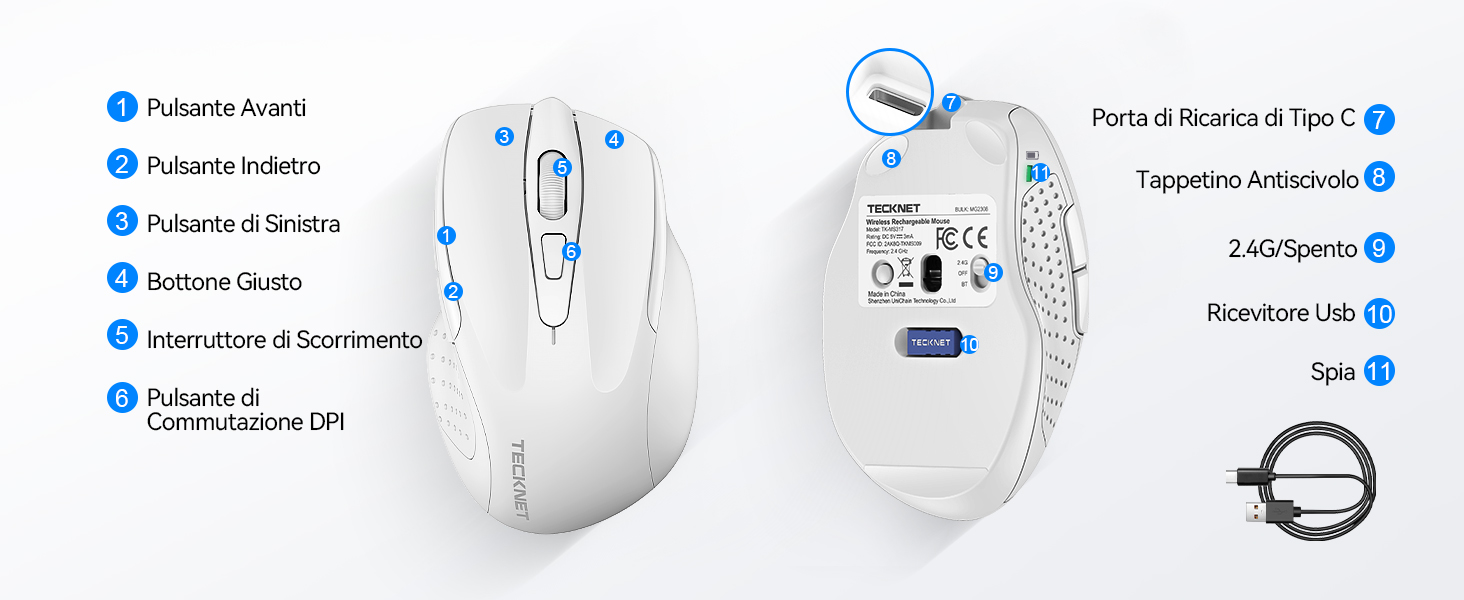
Figure 1: Mouse Components Diagram
- Butang Maju
- Butang ke belakang
- Butang Kiri
- Butang Kanan
- Roda Tatal
- Butang Suis DPI
- Port Pengecasan Jenis-C
- Pad anti-gelincir
- 2.4G/Off Switch
- Storan Penerima USB
- Lampu Penunjuk
Arahan Persediaan
1. Mengecas Tetikus
Before first use, it is recommended to fully charge the mouse. Connect the provided USB-C charging cable to the mouse's Type-C charging port and the other end to a USB power source (e.g., computer USB port, USB wall adapter).

The mouse features a 700mAh built-in battery, providing extended usage on a single charge. The indicator light will show charging status.
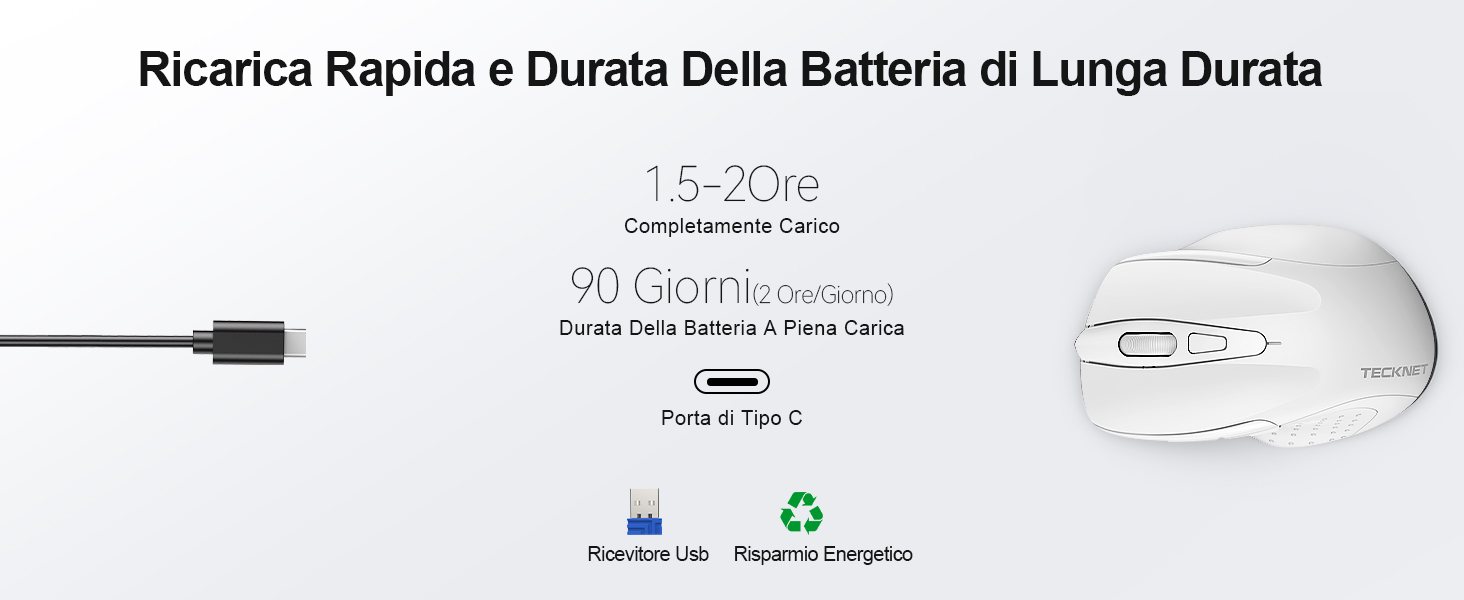
A full charge takes approximately 1.5-2 hours and can last up to 90 days (based on 2 hours/day usage).
2. Menyambungkan Penerima USB
The mouse uses a 2.4GHz wireless connection for reliable data transmission.
- Locate the USB receiver stored in the compartment on the underside of the mouse.
- Plug the USB receiver into an available USB port on your computer (PC, laptop, Chromebook, etc.).
- Turn on the mouse using the 2.4G/Off switch located on the underside.
- Your computer should automatically detect and install the necessary drivers. The mouse is plug-and-play, requiring no additional software.

The effective working distance is up to 15 meters.

Ensure the mouse is switched on after plugging in the receiver.
Arahan Operasi
Pelarasan DPI
The mouse features 6 adjustable DPI levels (800/1200/1600/2400/3200/4800) to suit various tasks, from precise targeting to fast gaming movements. Press the DPI switch button (Component 6 in Figure 1) to cycle through the DPI settings.

Adjust DPI for optimal cursor speed and precision.
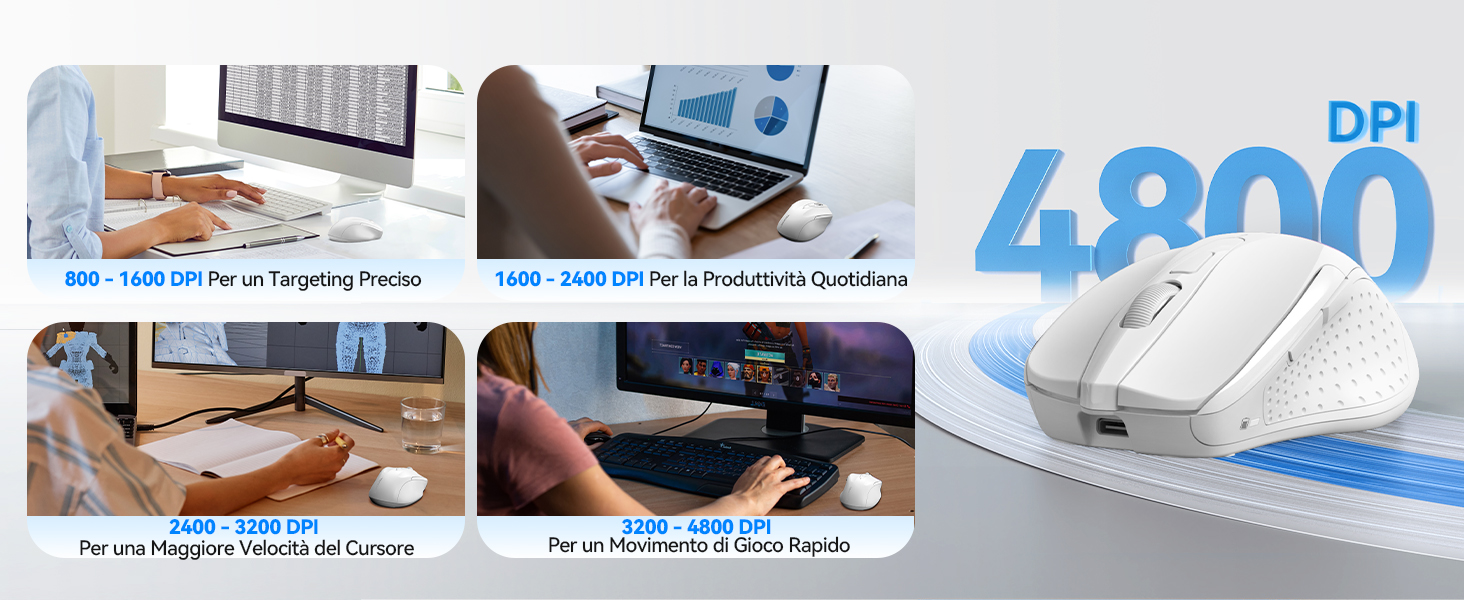
DPI settings for different usage scenarios.
Ciri Klik Senyap
The mouse is designed for silent operation, reducing click noise by up to 90%. This allows for a quiet working environment without disturbing others.

Enjoy a quiet working experience.

Sound level comparison demonstrating reduced click noise.
Reka Bentuk Ergonomik
The mouse is ergonomically designed to fit the natural curvature of your hand, reducing muscle pressure by up to 30% and ensuring comfortable use for extended periods. Soft natural rubber grips on the sides provide a secure and comfortable hold.

Ergonomic shape for comfortable use.
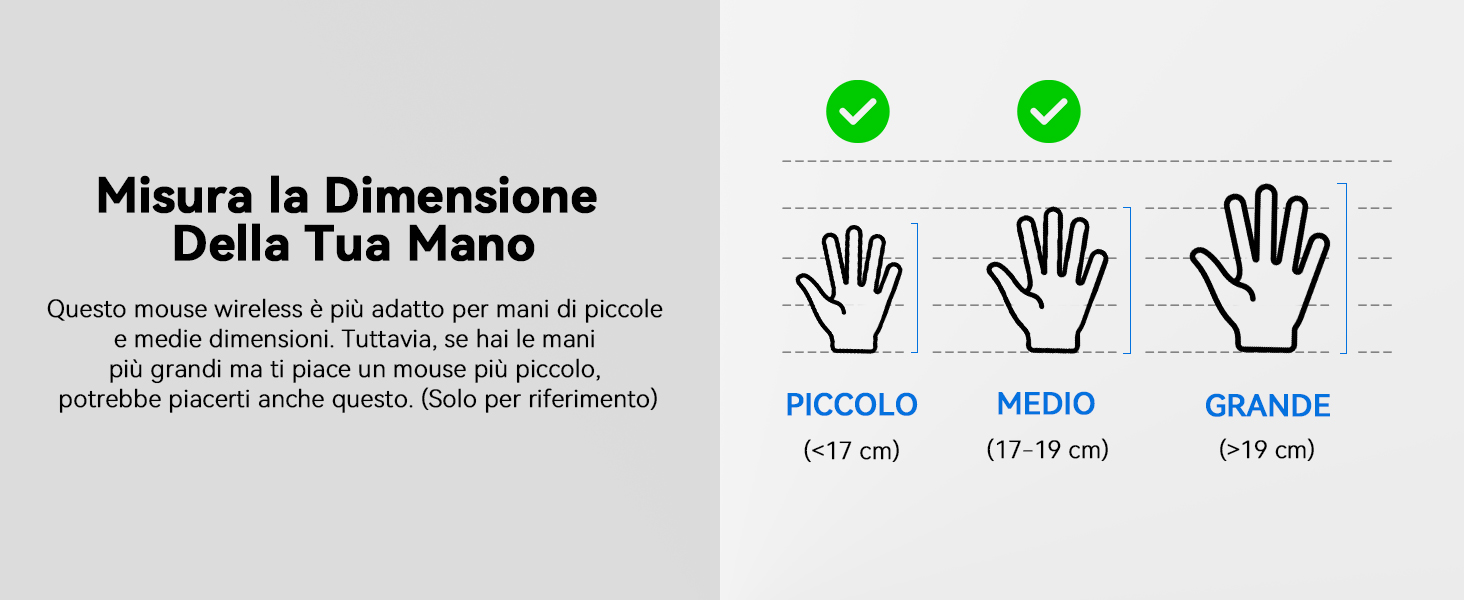
This mouse is suitable for small to medium hand sizes. Refer to the guide for reference.
Ciri Penjimatan Kuasa
The mouse includes intelligent power-saving features:
- Mod Auto Tidur: If inactive for 10 seconds, the mouse enters standby mode. After 10 minutes of inactivity, it enters deep sleep mode to conserve battery.
- Fungsi Bangun Tidur: Tekan sebarang butang untuk mengaktifkan tetikus dari mod tidur.
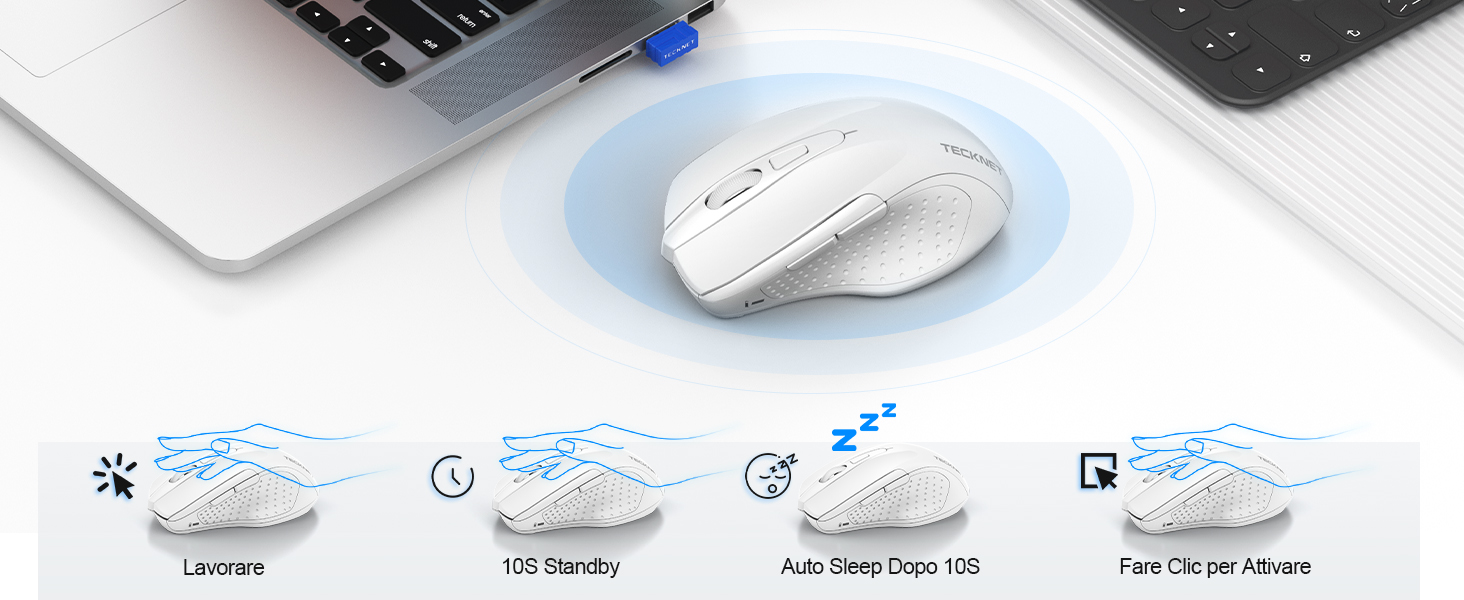
Power saving modes for extended battery life.
Penyelenggaraan
- Pembersihan: Gunakan kain lembut dan kering untuk membersihkan tetikus. Untuk kotoran degil, sedikit damp kain boleh digunakan, memastikan tiada kelembapan memasuki peranti.
- mengecas: Recharge the mouse when the indicator light signals low battery. Avoid completely draining the battery frequently to prolong its lifespan.
- Storan: When not in use for extended periods, turn off the mouse and store the USB receiver in its designated compartment.
Menyelesaikan masalah
| Masalah | Kemungkinan Punca | Penyelesaian |
|---|---|---|
| Tetikus tidak bertindak balas | Low battery; USB receiver not connected; Mouse switched off; Driver issue. | Charge the mouse; Ensure USB receiver is securely plugged in; Turn on the mouse; Try a different USB port; Restart computer. |
| Sambungan atau lag sekejap-sekejap | Interference from other wireless devices; Distance from receiver; Obstructions. | Move closer to the receiver; Remove obstructions; Avoid using near other 2.4GHz devices; Try a different USB port. |
| Cursor movement is erratic or imprecise | Sensor optik kotor; Permukaan yang tidak sesuai; Tetapan DPI yang salah. | Clean the optical sensor; Use a mouse pad or a smooth, non-reflective surface; Adjust DPI settings. |
| Mouse does not charge | Faulty charging cable; Faulty USB port; Mouse issue. | Try a different USB-C cable; Try a different USB power source; Contact customer support if the issue persists. |
Spesifikasi
| Jenama | TEKNET |
| Nombor Model | TK-MS009 |
| warna | putih |
| Teknologi Ketersambungan | Wayarles 2.4GHz (Penerima USB) |
| Ciri Khas | Rechargeable, Long Battery Life, Silent Click, Ergonomic Design |
| Teknologi Pengesanan Pergerakan | Optik |
| Bilangan Butang | 6 |
| Orientasi Tangan | tangan kanan |
| Peranti Serasi | Laptop, PC, Chromebook, Computer |
| Sistem Operasi | Windows 11/10/8.1/8/7/Vista/XP, Linux, Mac OS (side buttons not available on Mac OS) |
| Purata Hayat Bateri | 1050 Hours (approx. 1-2 months on 2-hour charge) |
| Kepekaan Maks | 4800 DPI |
| Julat Tanpa Wayar | 15 meter |
| Dimensi (L x W) | 10.6L x 6.8W cm |
| bahan | plastik |
Waranti dan Sokongan
TECKNET offers a Waranti 36 bulan for registered users. If you encounter any issues during the use of your mouse, please contact our professional customer service team as soon as possible. We are committed to assisting you in resolving any problems.
For support, please visit the official TECKNET webtapak atau rujuk maklumat hubungan yang diberikan bersama pembungkusan produk anda.
Sumber Dalam Talian: