1. Pengenalan
Thank you for choosing the Kitchenwell Digital Precision Kitchen Scale. This manual provides essential information for the safe and efficient operation of your new kitchen scale. Please read it thoroughly before use and retain it for future reference.

Image 1: The Kitchenwell Digital Precision Kitchen Scale, showcasing reka bentuk hitam anggun dan paparan digitalnya.
2. Maklumat Keselamatan
- Jangan rendam penimbang dalam air atau cecair lain.
- Bersihkan skala dengan iklanamp kain; jangan gunakan pembersih yang kasar.
- Letakkan penimbang di atas permukaan yang rata dan stabil untuk pengukuran yang tepat.
- Do not overload the scale beyond its maximum capacity of 15kg.
- Jauhkan daripada kanak-kanak.
- Elakkan suhu yang melampau dan cahaya matahari langsung.
3. Kandungan Pakej
- 1 x Kitchenwell Digital Precision Kitchen Scale
- 2 x CR2032 Batteries (pre-installed or included separately)
- 1 x Manual Pengguna
4. Persediaan
4.1 Pemasangan Bateri
The scale requires 2 CR2032 batteries. If not pre-installed, open the battery compartment on the underside of the scale and insert the batteries, ensuring correct polarity (+/-). Close the compartment securely.
4.2 Penempatan Awal
Place the scale on a hard, flat, and stable surface. Uneven surfaces can affect measurement accuracy.
5. Arahan Operasi
5.1 Hidupkan/Mati Kuasa
- To turn on: Press the "ON/TARE" button. The display will show "0g" when ready.
- To turn off: Press and hold the "ON/TARE" button for a few seconds, or wait for the automatic shut-off.
5.2 Penimbangan Barang
- Ensure the scale is on and displays "0g".
- Place the item to be weighed directly onto the center of the weighing platform.
- Berat akan dipaparkan pada skrin LCD.

Image 2: The Kitchenwell scale displaying the weight of various fruits, demonstrating its use for food preparation.
5.3 Fungsi Tara
Fungsi Tare membolehkan anda menimbang berbilang bahan dalam bekas yang sama atau menolak berat bekas.
- Letakkan bekas kosong pada skala. Paparan akan menunjukkan beratnya.
- Tekan butang "ON/TARE" button. The display will reset to "0g".
- Add the ingredient to be weighed into the container. The display will show only the weight of the ingredient.
- Repeat the Tare function for additional ingredients.
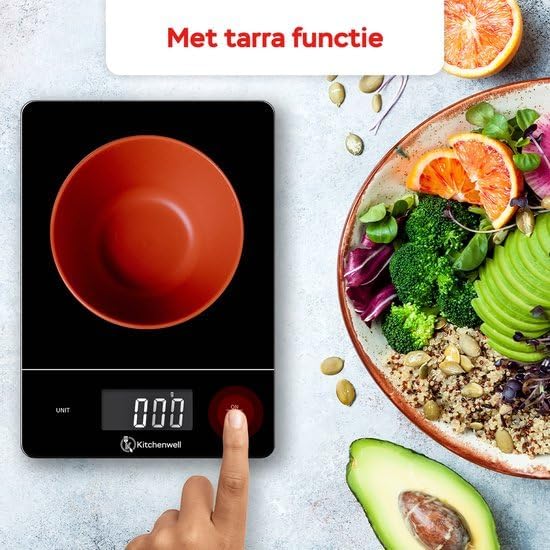
Image 3: A hand pressing the ON/TARE button on the Kitchenwell scale with an empty bowl, illustrating the tare function.
5.4 Penukaran Unit
The scale supports multiple weighing units. To change the unit:
- Tekan butang "UNIT" button to cycle through available units: grams (g), kilograms (kg), milliliters (ml), pounds (lb), and ounces (oz).
- Pilih unit yang dikehendaki untuk ukuran anda.

Image 4: The Kitchenwell scale displaying various unit options (ml, g, oz, lb, lb'oz), highlighting its versatility.
5.5 Pemadaman Automatik
To conserve battery life, the scale will automatically turn off after approximately 1 minute of inactivity.
6. Penyelenggaraan
6.1 Pembersihan
Lap permukaan kerak dengan kain lembut yang sedikitamp cloth. Do not use chemical cleaning agents or immerse the scale in water. The glass weighing platform is water-resistant for easy cleaning of spills.

Image 5: A hand wiping the surface of the Kitchenwell scale with a cloth, demonstrating its easy-to-clean, water-resistant design.
6.2 Penyimpanan
Store the scale in a cool, dry place. Its slim design allows for easy storage in kitchen drawers.
7. Penyelesaian masalah
| Masalah | Kemungkinan Punca | Penyelesaian |
|---|---|---|
| Skala tidak dihidupkan. | Bateri mati atau tidak dipasang dengan betul. | Periksa kekutuban bateri atau gantikan bateri. |
| Bacaan yang tidak tepat. | Scale is on an uneven surface, overloaded, or needs recalibration. | Place on a flat surface. Ensure weight is within 15kg limit. Turn off and on again. |
| "Lo" displayed. | Penunjuk bateri rendah. | Gantikan bateri. |
| "O-Ld" displayed. | Penunjuk beban berlebihan. | Remove item immediately to prevent damage. Do not exceed 15kg. |
8. Spesifikasi
- Jenama: Kitchenwell
- Nombor Model: KN352
- Had Berat: 15 Kilogram
- Minimum Measurement: 1 Gram
- Jenis Paparan: LED
- Ciri Khas: Fungsi Pemadaman Automatik, Tare
- Bahan: Kaca, Plastik
- Berat Barang: 588 Gram
- Bateri: 2 bateri CR2032 (termasuk)
- Tarikh Pertama Tersedia: 14 Januari 2024

Image 6: An infographic highlighting key specifications of the Kitchenwell scale: 1g to 15kg capacity, digital display, auto-off, and tare function.
9. Waranti dan Sokongan
Kitchenwell products are designed for reliability and performance. For warranty information or technical support, please refer to the contact details provided with your purchase or visit the official Kitchenwell website. Please have your model number (KN352) and purchase date ready when contacting support.