pengenalan
Welcome to the user manual for your BOYI GMK104 Barebones Mechanical Keyboard Kit. This guide provides detailed instructions for setting up, operating, and maintaining your keyboard. The GMK104 is a full-size, QMK/VIA programmable, tri-mode (Bluetooth 5.0, 2.4GHz, Type-C wired) keyboard kit featuring a gasket-mounted, hot-swappable PCB, RGB backlighting, and an integrated screen with a multi-functional knob.
Apa yang ada dalam Kotak
- Penarik Kekunci
- Kabel USB
- Penerima 2.4G
- 104 Keyboard Kit
Video demonstrating the unboxing of the GMK104 barebones keyboard kit, showcasing its components.
Persediaan
1. Installing Switches and Keycaps
The GMK104 is a barebones kit, meaning switches and keycaps are not pre-installed. You will need to install your preferred mechanical switches and keycaps.
- Align the pins of your desired mechanical switches with the hot-swap sockets on the PCB.
- Gently press each switch until it clicks into place. Ensure pins are straight to avoid bending.
- Place your chosen keycaps onto the installed switches, pressing firmly until they are seated.

Image shows the GMK104 barebones keyboard kit with hot-swap sockets and RGB lighting, ready for switch and keycap installation.
2. Menyambung Papan Kekunci
The GMK104 supports three connection modes: wired, 2.4GHz wireless, and Bluetooth 5.0 wireless.
Sambungan Berwayar (Jenis-C)
Connect the provided USB Type-C cable to the keyboard's Type-C port and to your computer's USB port. The keyboard will automatically switch to wired mode and begin charging.
Sambungan Tanpa Wayar 2.4GHz
Cari penerima USB 2.4G, biasanya disimpan dalam petak di bahagian bawah papan kekunci.
Palamkan penerima 2.4G ke dalam port USB yang tersedia pada komputer anda.
On the keyboard, switch the mode selector to 2.4GHz mode. The keyboard should connect automatically.

Image showing the underside of the GMK104 keyboard, highlighting the storage slot for the 2.4G USB receiver.
Bluetooth 5.0 Wireless Connection
On the keyboard, switch the mode selector to Bluetooth mode.
Tekan FN+Q, FN + W, atau FN + E to select one of three available Bluetooth channels. The corresponding key will flash, indicating pairing mode.
On your device (computer, tablet, smartphone), enable Bluetooth and search for "GMK104".
Select "GMK104" to pair. The flashing key will become solid once connected.
Untuk bertukar antara peranti Bluetooth yang dipasangkan, tekan FN + Q/W/E for the desired channel.

Image illustrating the GMK104 keyboard connected to a laptop, tablet, and smartphone, demonstrating its tri-mode connectivity.
Arahan Operasi
Smart Display and Knob Functions
The keyboard features a smart display and a multi-functional knob.
The display shows time, date, connection status, and battery level.
The knob controls volume by default. Pressing the knob can mute/unmute.
Two buttons next to the screen control backlight and screen display settings.
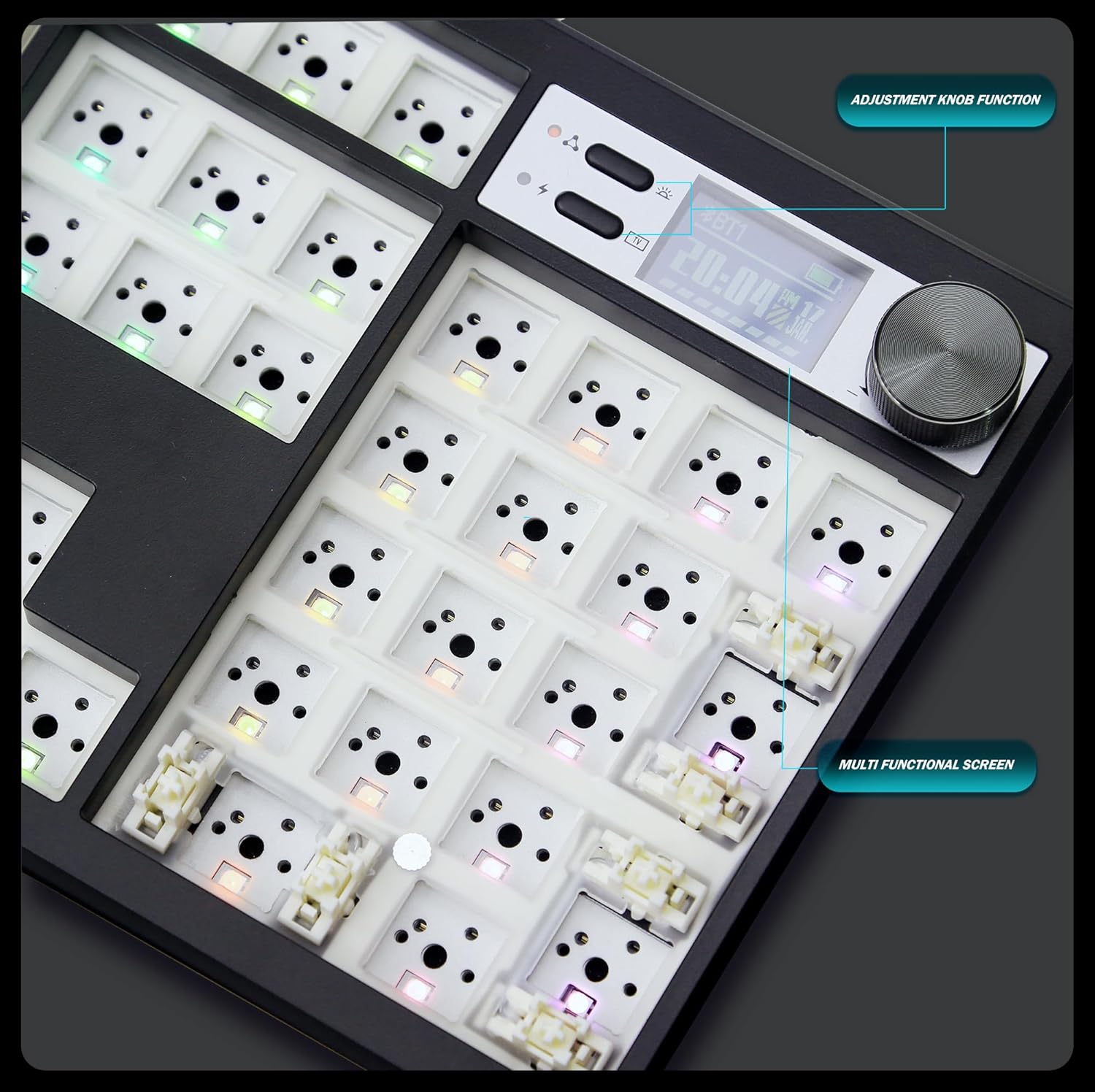
Close-up image of the GMK104 keyboard's smart display and multi-functional knob, showing the screen displaying time and battery status, and the two control buttons.
Video demonstrating the customization options for the smart display on the GMK104 keyboard, including changing images.
Lampu latar RGB
The keyboard features south-facing RGB backlighting with multiple effects.
guna FN + | to cycle through different RGB lighting modes.
Adjust brightness and speed using dedicated function key combinations (refer to the quick guide or VIA software for specific commands).

Tayangan imejcasing the vibrant RGB backlighting of the GMK104 keyboard with various color patterns.
Kebolehprograman QMK/VIA
The GMK104 is fully programmable using QMK/VIA software. This allows for key remapping, macro creation, and advanced lighting customization.
To use VIA, connect the keyboard via USB-C. Download the VIA software from the official webtapak.
The software will automatically detect the keyboard, allowing you to customize key assignments and lighting layers.

Screenshot of the VIA software interface, demonstrating how to remap keys and customize keyboard functions.
Video illustrating the VIA programmability of the GMK104 keyboard kit, showing how users can customize key functions and layouts.
Penyelenggaraan
Pembersihan
Putuskan sambungan papan kekunci daripada semua peranti sebelum membersihkannya.
Use a soft, lint-free cloth to wipe the surface. For deeper cleaning, remove keycaps and switches.
Gunakan udara termampat untuk menghilangkan habuk dan serpihan dari antara kekunci.
Penjagaan Bateri
The keyboard has a built-in 4000mAh rechargeable battery.
Charge the keyboard using the provided USB Type-C cable.
Elakkan menyahcas sepenuhnya bateri dengan kerap untuk memanjangkan jangka hayatnya.
Menyelesaikan masalah
Papan Kekunci Tidak Membalas
- Ensure the keyboard is properly connected (wired, 2.4GHz receiver, or Bluetooth paired).
- Check the battery level. Recharge if necessary.
- Try switching between connection modes.
- Mulakan semula komputer/peranti anda.
Lampu RGB Tidak Berfungsi
- Pastikan papan kekunci dihidupkan.
- Cycle through RGB modes using FN + |.
- Check VIA software for lighting settings.
Kunci Tidak Mendaftar
- For hot-swappable switches, ensure they are fully seated in the PCB sockets.
- Check for bent switch pins.
- Test with different switches if available.
Screen Not Displaying Correctly
- Pastikan papan kekunci dihidupkan.
- Use the screen control buttons next to the display to adjust settings or reset.
- If using custom GIFs, ensure the software is correctly installed and the files adalah serasi.
Spesifikasi
| Ciri | Perincian |
|---|---|
| Model | GMK104 |
| Ketersambungan | Bluetooth 5.0 / 2.4GHz Wireless / USB Type-C Wired |
| Susun atur | Full Size (104 keys) |
| Gaya Pemasangan | Dipasang Gasket |
| Panas-Boleh Tukar | Yes (3-pin/5-pin switches) |
| Pencahayaan latar | RGB Menghadap Selatan |
| Kebolehprograman | QMK/VIA |
| Kapasiti Bateri | 4000mAh |
| Keserasian | Windows, macOS |
| Dimensi | 10 x 4 x 1 inci |
| Berat Barang | 1.5 paun |
Waranti dan Sokongan
For warranty information and technical support, please contact BOYI customer service.
e-mel: boyiservice2020@163.com
You can also visit the official BOYI store on Amazon for additional resources and contact options.

Image showing customer service representatives, indicating available support channels.