1. Pengenalan
This manual provides detailed instructions for the safe and effective operation of your AquilaPro KL02100 Laser Measuring Tool. Please read this manual thoroughly before using the device to ensure proper functionality and to prevent potential hazards. This device is designed for accurate distance measurement in various applications.
2. Maklumat Keselamatan
WARNING: Laser Radiation. Do not stare into beam. Class II Laser Product.
- The AquilaPro KL02100 emits a visible laser beam with a power output of less than 1mW.
- Avoid direct eye exposure to the laser beam. Never point the laser at people or animals.
- Jangan buka atau ubah suai peranti ini. Pengubahsuaian yang tidak dibenarkan boleh mengakibatkan pendedahan radiasi laser yang berbahaya.
- Jauhkan peranti daripada capaian kanak-kanak.
- Gunakan hanya seperti yang diterangkan dalam manual ini.
3. Produk Lebihview
The AquilaPro KL02100 is a compact and versatile laser distance meter. Familiarize yourself with its components and display.
3.1 Komponen Peranti
The device features a durable aluminium casing, an HD display, and intuitive buttons for various functions.

Imej: Depan view of the AquilaPro KL02100 Laser Measuring Tool.
3.2 Susun Atur Paparan dan Butang
The device's display provides measurement readings and status indicators. The buttons control power, measurement functions, unit switching, and reference point selection.

Imej: Terperinci view of the AquilaPro KL02100 display and button functions. Labels indicate 'screen', 'Single measurement / Unit switch', 'Addition / subtraction measurement', 'Funtion / Front/rear reference', 'History / Preset value setting', and 'Power / Backlight button'.
4. Persediaan
4.1 Mengecas Peranti
The AquilaPro KL02100 features a built-in Lithium-Ion battery and is USB rechargeable. Connect the device to a standard USB power source using the provided cable. The battery indicator on the display will show charging status.
4.2 Hidupkan/Mati Kuasa
- Untuk menghidupkan: Tekan butang Butang kuasa/lampu latar (
 ) briefly.
 - Untuk mematikan kuasa: Tekan dan tahan butang Butang kuasa/lampu latar for approximately 3 seconds. The device will also automatically power off after a period of inactivity to conserve battery.
5. Arahan Operasi
5.1 Basic Measurement (Single Measurement)
- Hidupkan peranti.
- Halakan pancaran laser ke permukaan sasaran.
- Tekan ke Single measurement / Unit switch button () once. The measurement will be displayed instantly.
5.2 Pengukuran Berterusan
- Tekan dan tahan butang Single measurement / Unit switch button (
 ) for approximately 2 seconds. The device will enter continuous measurement mode, displaying real-time distance updates as you move.
 - Tekan ke Single measurement / Unit switch button again to exit continuous measurement.
5.3 Penukaran Unit
To change the measurement unit (meters, inches, feet), briefly press the Single measurement / Unit switch button () while the device is idle (not actively measuring). The unit will cycle through m, in, ft.
5.4 Benchmark Switching (Front/Rear Datum)
The device allows you to select the measurement reference point: either from the front edge of the device or the rear edge. This is crucial for accurate measurements depending on your placement of the tool.

Image: Illustration of front and rear datum points for measurement. The device can measure from its front edge or its rear edge.
To switch the benchmark, press the Function / Front/rear reference button () briefly. An icon on the display will indicate the currently selected reference point.
5.5 Pelbagai Mod Pengukuran
The AquilaPro KL02100 supports various measurement functions for different applications.

Image: Visual representation of the different measurement modes available on the device, including single, continuous, area, volume, Pythagorean, and addition/subtraction.
To cycle through measurement modes, press the Function / Front/rear reference button () repeatedly until the desired mode icon appears on the display.
- Pengukuran Panjang: Standard single or continuous measurement.
- Pengukuran Kawasan: Ukur dua sisi (panjang dan lebar) untuk mengira luasnya.
- Pengukuran Isipadu: Ukur tiga sisi (panjang, lebar, tinggi) untuk mengira isipadu.
- Pythagorean Measurement (Indirect Measurement): Used to calculate inaccessible distances (e.g., height of a building) by measuring two or three other distances. Follow the on-screen prompts for each segment measurement.
- Penambahan/Penolakan: Add or subtract measurements.
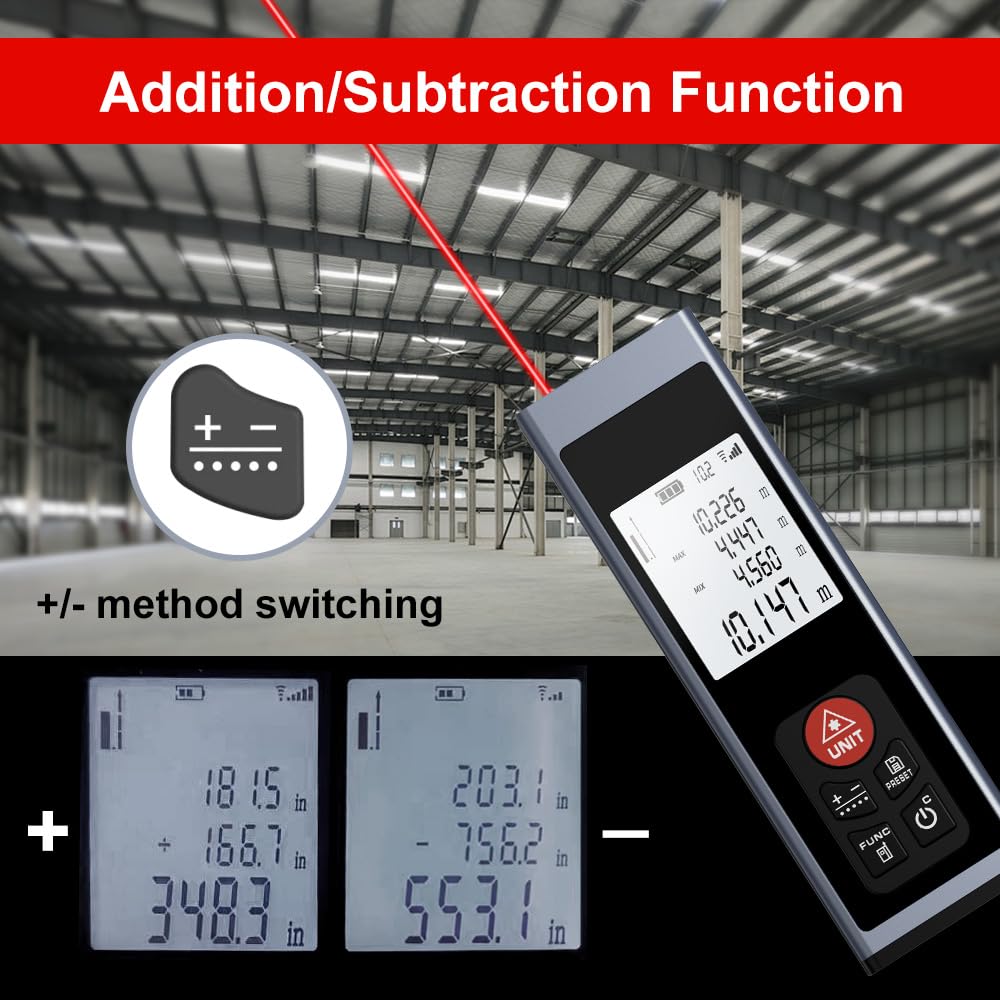
Image: The device display illustrating the addition and subtraction functions, showing how multiple measurements are combined or differentiated.
5.6 Field Measurement
The real-time measurement mode allows for on-the-go calculations from walls and various surfaces as you move, providing dynamic distance updates.

Image: A hand holding the AquilaPro KL02100, demonstrating its use for field measurements with the laser beam active.
6. Penyelenggaraan
- Pembersihan: Gunakan yang lembut, damp cloth to clean the device. Do not use abrasive cleaners or solvents. Pay special attention to keeping the laser lens clean for accurate measurements.
- Storan: Simpan peranti di tempat yang sejuk dan kering, jauh dari cahaya matahari langsung dan suhu yang melampau.
- Bateri: Cas semula bateri secara berkala, walaupun peranti tidak digunakan dengan kerap, untuk mengekalkan kesihatan bateri.
7. Penyelesaian masalah
| Masalah | Kemungkinan Punca | Penyelesaian |
|---|---|---|
| Peranti tidak dihidupkan | Bateri lemah; Kerosakan peranti | Charge the battery; Contact support if issue persists |
| Pengukuran yang tidak tepat | Dirty laser lens; Incorrect benchmark setting; Unstable surface | Clean the laser lens; Verify benchmark (front/rear); Ensure stable measurement surface |
| Pancaran laser tidak kelihatan | Bright ambient light; Device malfunction | Use in lower light conditions; Contact support |
8. Spesifikasi
- Jenama: AquilaPro
- Nombor Model: KL02100
- Julat Pengukuran: 328 kaki (100m)
- Ketepatan: ±0.078 inch (2mm)
- Unit: Meters (m), Inches (in), Feet (ft)
- Kelas Laser: Kelas II, <1mW
- Jenis Bateri: Lithium-Ion (Rechargeable via USB)
- Bahan: aluminium
- Berat Barang: 25 Gram
- Dimensi Produk: 28L x 15W x 86H Millimeters
- Tahap Rintangan Air: IP54
- Komponen yang Disertakan: Lanyard
9. Waranti dan Sokongan
For warranty information and technical support, please refer to the documentation provided at the point of purchase or contact AquilaPro customer service. Keep your purchase receipt as proof of purchase.