AquilaPro Laser Measuring Tool
Manual Pengguna
Model: KL02060
1. Pengenalan
This manual provides comprehensive instructions for the safe and effective use of your AquilaPro Laser Measuring Tool. Designed for precision and ease of use, this compact device offers various measurement modes for both professional and home applications. Please read this manual thoroughly before operation and retain it for future reference.

Figure 1: AquilaPro Laser Measuring Tool
2. Maklumat Keselamatan
WARNING: Laser Radiation
- Jangan merenung terus ke pancaran laser.
- Elakkan pendedahan mata secara langsung kepada pancaran laser.
- Jangan halakan laser kepada orang atau haiwan.
- Gunakan hanya seperti yang diterangkan dalam manual ini.
- Jauhkan daripada kanak-kanak.
- Jangan cuba membuka atau mengubah suai peranti.
This device emits Class 2 laser radiation. Maximum output power is less than 1mW at 635nm.
3. Produk Lebihview
The AquilaPro Laser Measuring Tool features a compact metal fuselage with an HD display for clear readings. Familiarize yourself with the device's components and controls:

Figure 2: Device Components and Controls
- Skrin: Displays measurements, modes, and battery status.
- UNIT/Laser Button: Activates laser for measurement, short press for single measurement, long press to switch units.
- +/- Butang: For addition and subtraction measurements.
- PRESET/History Button: Accesses measurement history and preset values.
- FUNC/Reference Button: Cycles through measurement functions (Area, Volume, Pythagorean, etc.) and switches front/rear reference point.
- Power/Backlight Button: Long press to power on/off, short press to toggle backlight.
4. Persediaan
4.1 Mengecas Peranti
The device is equipped with a rechargeable lithium-ion battery. Before first use, fully charge the device using the provided USB-C cable.
- Connect the USB-C cable to the charging port at the bottom of the device.
- Sambungkan hujung kabel yang satu lagi ke penyesuai kuasa USB (tidak disertakan) atau port USB komputer.
- Penunjuk bateri pada skrin akan menunjukkan status pengecasan.
- A full charge provides approximately 10,000 single measurements.

Rajah 3: Port Pengecasan USB-C
4.2 Hidupkan/Mati Kuasa
- Hidupkan kuasa: Tekan lama kuasa butang () selama 2 saat.
- Matikan: Tekan lama kuasa button for 2 seconds. The device will also automatically power off after 45 seconds of inactivity to conserve battery.
5. Operasi Asas
5.1 Pengukuran Tunggal
- Hidupkan peranti.
- Halakan pancaran laser ke permukaan sasaran.
- Tekan pendek UNIT/Laser button. The measurement will be displayed on the screen.

Figure 4: Taking a Field Measurement
5.2 Penukaran Unit
The device supports switching between meters (m), inches (in), and feet (ft).
- Tekan lama UNIT/Laser button to cycle through the units.
- Lepaskan butang apabila unit yang anda inginkan dipaparkan.

Figure 5: Unit Conversion Display
5.3 Reference Point Switching (Datum)
You can set the measurement reference point to either the front or rear of the device.
- Tekan pendek FUNC/Reference button to toggle between front and rear datum.
- The display will indicate the active reference point.

Figure 6: Front or Rear Measuring Reference
6. Mod Pengukuran Lanjutan
The AquilaPro Laser Measuring Tool offers several advanced modes for complex measurements:

Rajah 7: Mod Pengukuran Berbilang
- Pengukuran Berterusan: Provides real-time distance updates as you move the device. Useful for scanning and finding minimum/maximum distances.
- Pengukuran Kawasan: Measures length and width to calculate the area of a surface.
- Pengukuran Isipadu: Measures length, width, and height to calculate the volume of a space.
- Pengukuran Pythagoras: Mengira jarak tidak langsung menggunakan teorem Pythagoras (cth., ketinggian bangunan).
- Penambahan/Penolakan: Allows you to add or subtract measurements.
To select an advanced mode, short press the FUNC/Reference button repeatedly until the desired mode icon appears on the display. Follow the on-screen prompts to perform the measurements for each mode.
6.1 Addition/Subtraction Function
This function allows you to add or subtract consecutive measurements.
- Selepas mengambil ukuran, tekan butang +/- button to enter addition or subtraction mode.
- Take the next measurement. The device will automatically add or subtract it from the previous value.
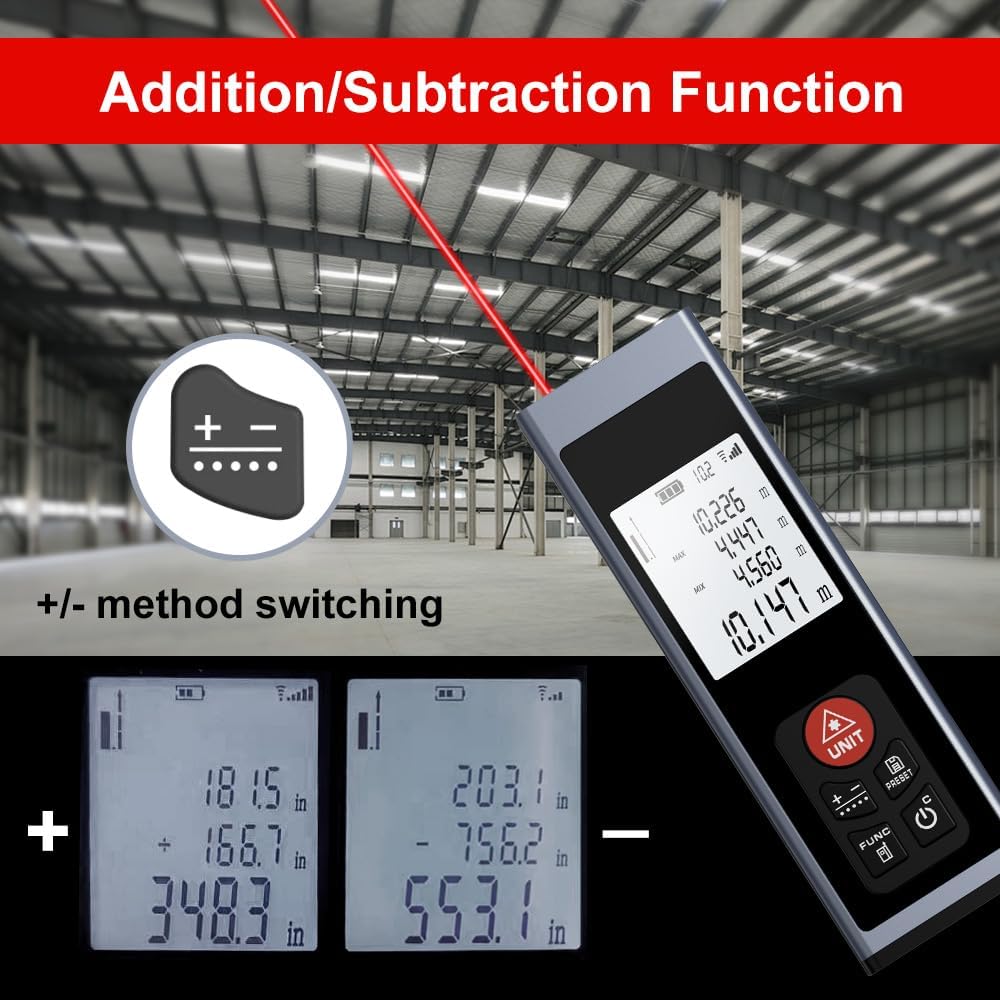
Figure 8: Addition/Subtraction Function
6.2 Memory Storage Function
Peranti boleh menyimpan sehingga 28 set data ukuran.
- Kepada view stored data, short press the PRESET/History butang.
- Use the arrow buttons (if available, or cycle through with PRESET) to navigate through the stored measurements.

Figure 9: Memory Storage Display
7. Video Produk Rasmi
Watch this official video from the seller for a quick introduction to the AquilaPro Laser Measuring Tool.
Video 1: AquilaPro Laser Measuring Tool Introduction (Source: AQUILA OPTICS)
8. Penyelenggaraan
- Pembersihan: Gunakan yang lembut, damp kain untuk membersihkan peranti. Jangan gunakan pembersih atau pelarut yang melelas.
- Storan: Simpan peranti di tempat yang sejuk dan kering, jauh dari cahaya matahari langsung dan suhu yang melampau.
- Penjagaan Bateri: If storing for extended periods, charge the battery every 3 months to prolong its lifespan.
- Tahan Air: The device is rated IP54, meaning it is protected against dust and splashing water. Do not immerse in water.
9. Penyelesaian masalah
| Masalah | Kemungkinan Punca | Penyelesaian |
|---|---|---|
| Peranti tidak dihidupkan. | Low battery; Device is off. | Charge the battery; Long press the Power button. |
| Bacaan yang tidak tepat. | Unstable surface; Obstruction in laser path; Incorrect reference point. | Ensure stable surface; Clear laser path; Check and adjust reference point (front/rear datum). |
| Paparan malap atau tidak boleh dibaca. | Backlight off; Low battery. | Short press Power button to toggle backlight; Charge the battery. |
| Laser tidak kelihatan. | Bright ambient light; Laser not activated. | Use in lower light conditions; Short press UNIT/Laser button. |
10. Spesifikasi
| Ciri | Perincian |
|---|---|
| Jenama | AquilaPro |
| Nama Model | KL02060 |
| Julat Pengukuran | 197 kaki (60m) |
| Ketepatan | ±0.078 inch (2mm) |
| bahan | aluminium |
| warna | Hitam |
| Dimensi Produk (LxWxH) | 1.1"L x 0.6"W x 3.4"H |
| Jenis Bateri | Lithium-ion yang boleh dicas semula |
| Penilaian Perlindungan Antarabangsa | IP54 (Tahan Habuk dan Percikan) |
| Komponen yang Disertakan | Lanyard |
11. Waranti dan Sokongan
This AquilaPro Laser Measuring Tool comes with a Waranti pengilang 1 tahun dari tarikh pembelian. Sila simpan bukti pembelian anda untuk tuntutan waranti.
For technical support or warranty inquiries, please contact AquilaPro customer service through the retailer's platform or visit the official AquilaPro store on Amazon: AquilaPro Amazon Store.