
ThermoPro TP60S
Manual Arahan Termometer dan Higrometer Dalam/Luar Ruang Digital Tanpa Wayar ThermoPro TP60-3
1. Pengenalan
ThermoPro TP60-3 ialah termometer dan higrometer tanpa wayar digital dalaman/luaran yang direka untuk memantau tahap suhu dan kelembapan dalam pelbagai persekitaran. Peranti ini memberikan bacaan yang tepat untuk keadaan dalaman dan luaran, menampilkan julat tanpa wayar yang panjang dan keupayaan untuk berhubung dengan pelbagai sensor jauh. Ia sesuai untuk digunakan di rumah, bilik bayi, taska, bilik bawah tanah, ruang bawah tanah, gudang dan rumah hijau bagi memastikan kawalan persekitaran yang optimum.
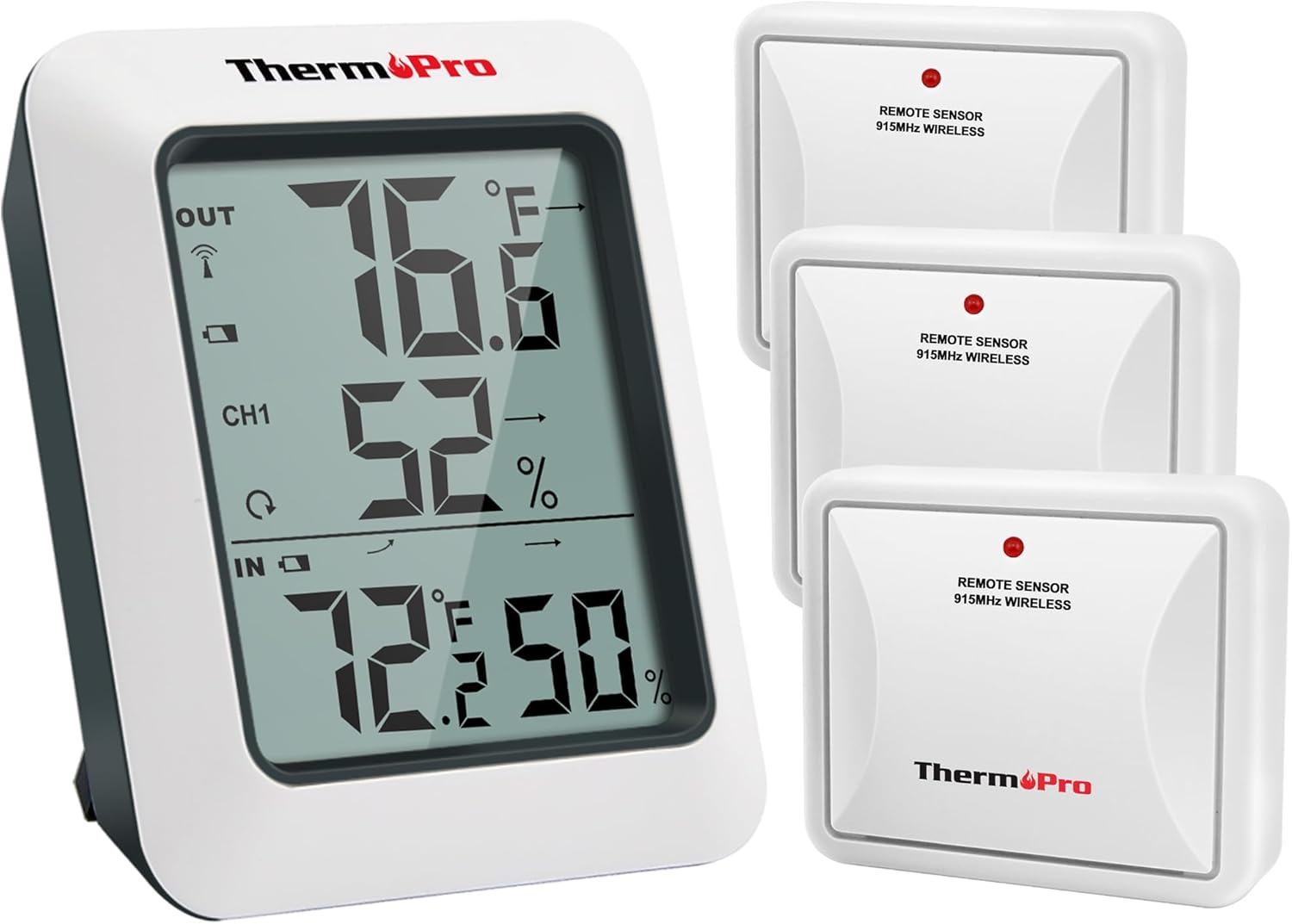
Imej: Unit paparan utama ThermoPro TP60-3 dan tiga sensor tanpa wayar jauh, menggambarkan pakej produk yang lengkap.
2. Apa yang ada di dalam Kotak
- 1 x Unit Penerima Utama
- 3 x Sensor Pemancar Jauh
- 8 x Bateri AAA
3. Produk Lebihview
3.1 Unit Penerima Utama
Unit penerima utama mempunyai skrin LCD yang besar dan mudah dibaca yang memaparkan peratusan suhu dan kelembapan dalaman dan luaran.tages. Ia juga menunjukkan anak panah penunjuk trend suhu dan kelembapan, dan maklumat tinggi/rendah harian. Unit ini direka bentuk untuk penempatan atas meja dengan penyangga terbina dalam atau boleh dipasang di dinding.

Imej: Pandangan dekat unit paparan utama yang menunjukkan suhu dan kelembapan luar, penunjuk saluran dan suhu dan kelembapan dalaman dengan anak panah arah aliran.
3.2 Sensor Pemancar Jauh
Sensor jarak jauh menghantar data suhu dan kelembapan secara wayarles ke unit utama. Setiap sensor direka bentuk untuk kegunaan luar dan harus diletakkan di lokasi yang terlindung daripada cahaya matahari langsung dan hujan. Sistem ini menyokong sehingga tiga sensor jarak jauh, membolehkan pemantauan lokasi yang berbeza secara serentak.

Imej: Gambar rajah menunjukkan unit utama yang menerima data daripada tiga sensor jauh yang diletakkan di bilik tidur, bilik stor dan taman, yang menonjolkan pemantauan berbilang lokasi.
4. Persediaan
4.1 Pemasangan Bateri
- Buka petak bateri di bahagian belakang unit penerima utama dan setiap sensor alat kawalan jauh.
- Masukkan Bateri AAA yang disediakan, pastikan kekutuban (+/-) yang betul.
- Tutup petak bateri dengan selamat.
4.2 Proses Penyegerakan
Selepas memasang bateri, unit utama dan sensor kawalan jauh akan disegerakkan secara automatik. Ikon isyarat RF di bahagian atas kiri paparan unit utama akan berkelip semasa penyegerakan. Jika sambungan terputus atau bateri diganti, ikuti langkah berikut:
- Pastikan bateri dipasang dengan betul di kedua-dua unit.
- Tekan butang TX pada sensor jauh untuk mewujudkan semula sambungan.
4.3 Garis Panduan Penempatan
- Unit Utama: Letakkan unit utama di dalam rumah, di atas meja menggunakan penyangga terbina dalam atau pasangkannya pada dinding.
- Sensor Jauh:
- Letakkan sensor di kawasan terbuka, elakkan halangan dinding.
- Jauhkan sensor daripada penghala dan peranti elektronik lain untuk mengelakkan gangguan isyarat frekuensi tinggi.
- Elakkan pendedahan cahaya matahari langsung, kerana ini boleh menyebabkan bacaan suhu yang tidak tepat.
- Sentiasa letakkan sensor secara tegak untuk mengelakkan hujan daripada masuk melalui lubang pengudaraan.
- Julat tanpa wayar adalah sehingga 500 kaki/150m di kawasan terbuka.

Imej: Unit utama yang ditunjukkan pada permukaan meja dan sensor jauh yang dipasang pada dinding luar, menunjukkan pilihan penempatan fleksibel.
5. Arahan Operasi
5.1 Ciri Paparan
- Suhu & Kelembapan Luaran: Dipaparkan di bahagian atas skrin.
- Petunjuk Saluran: Menunjukkan data sensor jauh yang sedang dipaparkan (CH1, CH2, CH3).
- Suhu & Kelembapan Dalaman: Dipaparkan di bahagian bawah skrin.
- Anak Panah Trend: Nyatakan sama ada suhu dan kelembapan meningkat, menurun atau kekal stabil.
- Rekod MAKSIMUM/MINIT: Menunjukkan bacaan suhu dan kelembapan tertinggi dan terendah yang direkodkan sepanjang 24 jam terakhir atau sepanjang masa sejak tetapan semula terakhir.
5.2 Pemilihan Unit (°F/°C)
Untuk bertukar antara Fahrenheit (°F) dan Celsius (°C), tekan butang °F/°C yang terletak di bahagian belakang unit penerima utama.
5.3 ViewRekod MAX/MIN
Tekan butang MAKSIMUM/MIN di bahagian belakang unit utama untuk melihat rekod suhu dan kelembapan tertinggi dan terendah sepanjang masa dalam tempoh 24 jam dan sepanjang masa. Untuk memadam rekod, tekan dan tahan butang HAPUS.
5.4 Pemilihan Saluran
Jika menggunakan berbilang sensor jauh, tekan butang SALURAN di bahagian belakang unit utama untuk bertukar antara saluran sensor yang berbeza (CH1, CH2, CH3) dan view bacaan luar masing-masing.
6. Penyelenggaraan
- Pembersihan: Lap bersih dengan lembut, damp kain. Jangan rendam dalam air.
- Penggantian Bateri: Gantikan bateri apabila penunjuk bateri rendah muncul pada paparan. Pastikan kekutuban yang betul.
- Storan: Jika menyimpan peranti untuk tempoh yang lama, tanggalkan bateri untuk mengelakkan kebocoran.
7. Penyelesaian masalah
- Tiada Paparan/Bateri Rendah: Periksa pemasangan bateri dan ganti jika perlu.
- Tiada Bacaan Sensor Jauh:
- Pastikan sensor jarak jauh berada dalam julat (500 kaki/150m).
- Tekan butang TX pada sensor jauh untuk menyegerakkan semula.
- Semak gangguan daripada peranti elektronik lain.
- Gantikan bateri sensor alat kawalan jauh.
- Bacaan Tidak Tepat:
- Pastikan sensor alat kawalan jauh tidak berada di bawah cahaya matahari langsung atau terdedah kepada hujan.
- Sahkan penempatan yang betul, jauh daripada sumber haba atau lubang udara.
8. Spesifikasi
| Jenama | ThermoPro |
| Nama Model | TP60S |
| Julat Suhu Dalaman | -4°F hingga 158°F (-20°C hingga 70°C) |
| Julat Suhu Luar | -4°F hingga 158°F (-20°C hingga 70°C) |
| Julat Kelembapan | 10% hingga 99% |
| Julat Tanpa Wayar | Sehingga 500 kaki/150m (di kawasan terbuka) |
| Teknologi Ketersambungan | Frekuensi Radio (RF) - ASK 433Mhz |
| Sumber Kuasa | Dikuasakan Bateri (AAA) |
| Jenis Paparan | LCD Digital |
| bahan | plastik |
9. Waranti dan Sokongan
Untuk maklumat jaminan, sokongan teknikal atau bantuan lanjut, sila lawati laman web rasmi ThermoPro weblaman web atau hubungi khidmat pelanggan mereka. Butiran biasanya boleh didapati dalam pembungkusan produk atau pada pengilang webtapak.
Anda boleh melawat Kedai ThermoPro untuk lebih banyak produk dan maklumat.
Ask a question about this manual
Ask about setup, troubleshooting, compatibility, parts, safety, or missing instructions. Manuals+ will review the question and use this page’s manual context to help answer it.