
pengenalan
Thank you for choosing the Vieta Pro Karaoke Party Microphone. This device combines a high-quality microphone with an integrated speaker, designed for an engaging karaoke experience. It features True Wireless technology, allowing two microphones to connect to a single device, and offers various sound modes and connectivity options.
Kandungan Pakej
- Vieta Pro Karaoke Party Microphone with Integrated Speaker
- Kabel Pengecasan (USB-C)
- Manual Pengguna

Image: The retail box of the Vieta Pro Karaoke Party Microphone, showing the product and its features.
Produk Selesaiview
Familiarize yourself with the main components and controls of your Vieta Pro Karaoke Party Microphone.

Imej: Depan view of the Vieta Pro Karaoke Party Microphone, highlighting the control buttons for power, volume, mode, and Bluetooth.
Kawalan dan Pelabuhan:
- Butang Kuasa: Tekan dan tahan untuk menghidupkan/mematikan. Tekan pendek untuk menukar mod.
- Butang Kelantangan (+/-): Laraskan kelantangan pembesar suara.
- Butang Mod (M): Cycle through sound effects or modes.
- Butang Bluetooth: Initiate Bluetooth pairing.
- Port USB-C: Untuk mengecas peranti.
- 3.5mm Audio Jack (Input): Sambungkan sumber audio luaran.
- 3.5mm Audio Jack (Output): Sambungkan fon kepala atau pembesar suara luaran.
- Butang Mod Cahaya: Change or turn off LED lighting effects.
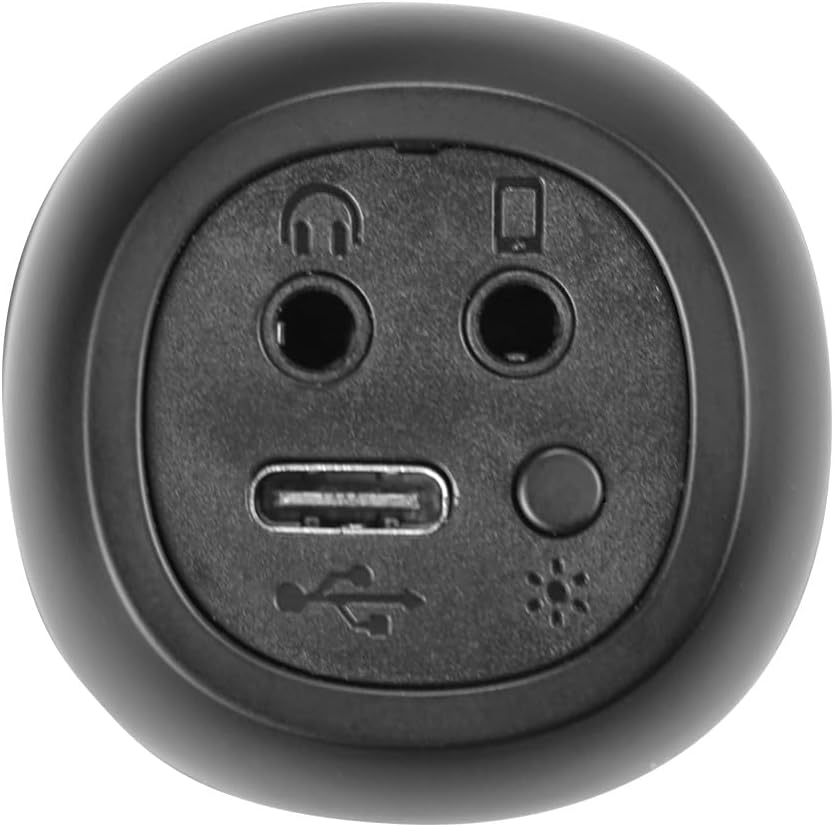
Imej: Jarak dekat view of the bottom of the microphone, showing the USB-C charging port, 3.5mm audio input/output jacks, and the light mode button.
Persediaan dan Sambungan
1. Mengecas Mikrofon
Before first use, fully charge the microphone. Connect the provided USB-C cable to the microphone's USB-C port and the other end to a USB power adapter (not included) or a computer's USB port. The battery indicator light will show charging status.
2. Menghidupkan/Mematikan
Tekan dan tahan butang Butang Kuasa for approximately 3 seconds to turn the microphone on or off. A sound prompt will indicate the power status.
3. Berpasangan Bluetooth
- Turn on the microphone. It will automatically enter Bluetooth pairing mode, indicated by a flashing Bluetooth light.
- Pada telefon pintar, tablet atau komputer anda, dayakan Bluetooth dan cari peranti yang tersedia.
- Select "Vieta Pro Karaoke Party" from the list of devices.
- Once connected, a sound prompt will confirm successful pairing, and the Bluetooth light will stop flashing.
4. True Wireless Connection (Connecting Two Microphones)
To use two Vieta Pro Karaoke Party microphones simultaneously with one device:
- Ensure both microphones are powered on and not connected to any other Bluetooth device.
- On one microphone (this will be the primary), double-press the Butang Bluetooth. It will enter True Wireless pairing mode.
- The primary microphone will search for the second microphone. Once connected, a sound prompt will confirm the True Wireless connection.
- Now, connect the primary microphone to your device via Bluetooth as described in step 3. Both microphones will now output audio from your device.

Image: Two individuals holding and using Vieta Pro Karaoke Party Microphones, demonstrating the True Wireless feature.
5. Sambungan Berwayar (AUX)
Connect an external audio source (e.g., MP3 player) to the microphone using a 3.5mm audio cable (not included) plugged into the 3.5mm audio input jack.
Arahan Operasi
1. Melaraskan Kelantangan
Gunakan Jilid + dan Isipadu - buttons on the microphone to adjust the speaker output volume. You can also control the volume from your connected device.
2. Changing Sound Modes/Effects
Tekan ke Butang Mod (M) repeatedly to cycle through the four available sound configuration modes or voice effects. Experiment to find your preferred sound.
3. Voice Reduction Feature
This feature allows you to reduce the vocal track of a song, making it easier to sing along. To activate or deactivate this feature, refer to the specific instructions in the full manual or experiment with the Butang Mod (M) or a dedicated button if present (not explicitly detailed in provided data, but mentioned as a feature).
4. Rakaman
The microphone supports one-touch recording. Connect the microphone to a compatible recording device (e.g., smartphone with a recording app) via Bluetooth or the 3.5mm output jack. Press the dedicated Butang Rakaman (if available, or refer to the full manual for specific button assignment) to start and stop recording.
5. Kesan Pencahayaan LED
Tekan ke Butang Mod Cahaya (located near the ports at the bottom) to change the LED lighting patterns or turn them off.

Image: Close-up of the Vieta Pro Karaoke Party Microphone's speaker grille, showing the integrated LED lighting effects.
Penyelenggaraan
- Pembersihan: Use a soft, dry cloth to clean the microphone's surface. Do not use abrasive cleaners or solvents.
- Storan: Simpan mikrofon di tempat yang sejuk dan kering jauh dari cahaya matahari langsung dan suhu yang melampau.
- Penjagaan Bateri: Untuk memanjangkan hayat bateri, elakkan daripada menyahcas sepenuhnya bateri dengan kerap. Cas peranti dengan kerap, walaupun tidak digunakan untuk tempoh yang lama.
- Pendedahan Air: Peranti ini tidak kalis air. Elakkan pendedahan kepada air atau kelembapan yang tinggi.
Menyelesaikan masalah
| Masalah | Kemungkinan Punca | Penyelesaian |
|---|---|---|
| Tiada kuasa | Bateri habis. | Cas mikrofon menggunakan kabel USB-C. |
| Tidak dapat menyambung melalui Bluetooth | Bluetooth is off on the device; microphone is already connected to another device; microphone is out of range. | Ensure Bluetooth is enabled on your device. Disconnect from other devices. Move microphone closer to your device (within 10 meters). Restart both devices. |
| Tiada keluaran bunyi | Volume is too low; microphone is muted; incorrect input source. | Increase volume on both the microphone and your connected device. Check if the microphone is in the correct operating mode. |
| True Wireless connection fails | One or both microphones are already paired; microphones are too far apart. | Ensure both microphones are unpaired from other devices. Place them close to each other during True Wireless pairing. Follow True Wireless pairing steps carefully. |
Spesifikasi
| Ciri | Perincian |
|---|---|
| Nama Model | Pesta Karaoke |
| Jenama | Vieta Pro |
| Teknologi Ketersambungan | True Wireless, Bluetooth |
| Jenis Penyambung | USB-C, Bicu 3.5mm |
| Output Kuasa | 18 W |
| Hayat Bateri | Sehingga 10 jam |
| Jenis Bateri | 1 Litium-ion (termasuk) |
| Julat Kekerapan | 50 hingga 15,000 Hz |
| Impedans | 600 ohm |
| Corak Kutub | Satu arah |
| Peranti Serasi | Komputer Peribadi, Telefon Pintar |
| Ciri Khas | Volume Control, 1-Touch Recording, Lighting Modes, Battery Indicator, Radio |
| Berat badan | 337 Gram |
| bahan | plastik |
Waranti dan Sokongan
For warranty information and technical support, please contact the manufacturer, FRAMASON AUDIO SA, or your local retailer. Keep your proof of purchase for any warranty claims.
Manufacturer: FRAMASON AUDIO SA