
1. Pengenalan
Thank you for choosing the Hbada E3 Ergonomic Office Chair. This chair is designed to provide optimal comfort and support for extended periods of sitting, featuring advanced ergonomic adjustments. Please read this manual thoroughly before assembly and use to ensure proper function and longevity of your chair.
2. Maklumat Keselamatan
- Jangan berdiri di atas kerusi.
- Jangan gunakan kerusi itu sebagai bangku langkah.
- Pastikan semua bolt dan skru diketatkan dengan selamat sebelum digunakan. Periksa dan ketatkan semula secara berkala jika perlu.
- Do not exceed the maximum weight capacity (typically 120 kg or 265 lbs, though not specified in provided data, this is a standard safety precaution).
- Pastikan tangan dan jari bebas daripada bahagian yang bergerak semasa pelarasan.
- Gunakan kerusi di atas permukaan yang rata untuk mengelakkannya daripada terbalik.
3. Kandungan Pakej
Sila sahkan bahawa semua komponen hadir sebelum memulakan pemasangan. Jika mana-mana bahagian yang hilang atau rosak, sila hubungi sokongan pelanggan.
- Pemasangan Sandaran
- Perhimpunan Tempat duduk
- Tempat letak kepala
- Tempat Letak Tangan (Kiri dan Kanan)
- Silinder Angkat Gas
- Pangkalan Bintang
- Casters (5 pcs)
- Hardware Kit (Screws, Allen Wrench)
4. Persediaan dan Pemasangan
Follow these general steps for assembly. Refer to the included graphical instructions for detailed diagrams.
- Pasangkan roda pada tapak bintang dengan menolaknya dengan kuat ke dalam lubang.
- Masukkan silinder pengangkat gas ke dalam lubang tengah tapak bintang.
- Attach the armrests to the seat assembly using the provided screws.
- Sambungkan penyandar belakang ke pemasangan tempat duduk.
- Letakkan tempat duduk dan penyandar yang telah dipasang pada silinder pengangkat gas.
- Attach the headrest to the top of the backrest.

Image: Overall dimensions of the Hbada E3 office chair, showing height, width, and depth measurements.
5. Arahan Operasi dan Pelarasan
The Hbada E3 chair offers multiple adjustment options for personalized comfort.
5.1. Pelarasan Ketinggian Kerusi
To adjust the chair height, pull the lever located under the seat upwards while applying or releasing body weight. Release the lever at the desired height.
5.2. Fungsi Berbaring
The chair features a 140-degree recline function. Use the recline lever (usually on the side) to unlock the backrest, lean back to your preferred angle, and then push the lever down to lock it in place.

Image: A person demonstrating the 140-degree recline function of the Hbada E3 chair.
5.3. Pelarasan Sokongan Lumbar
The 3-zone lumbar support system provides comprehensive back protection. It can be adjusted in 8 directions, including inner/outer 40-degree rotation and a 14-degree buffer zone for optimal comfort and pressure relief.
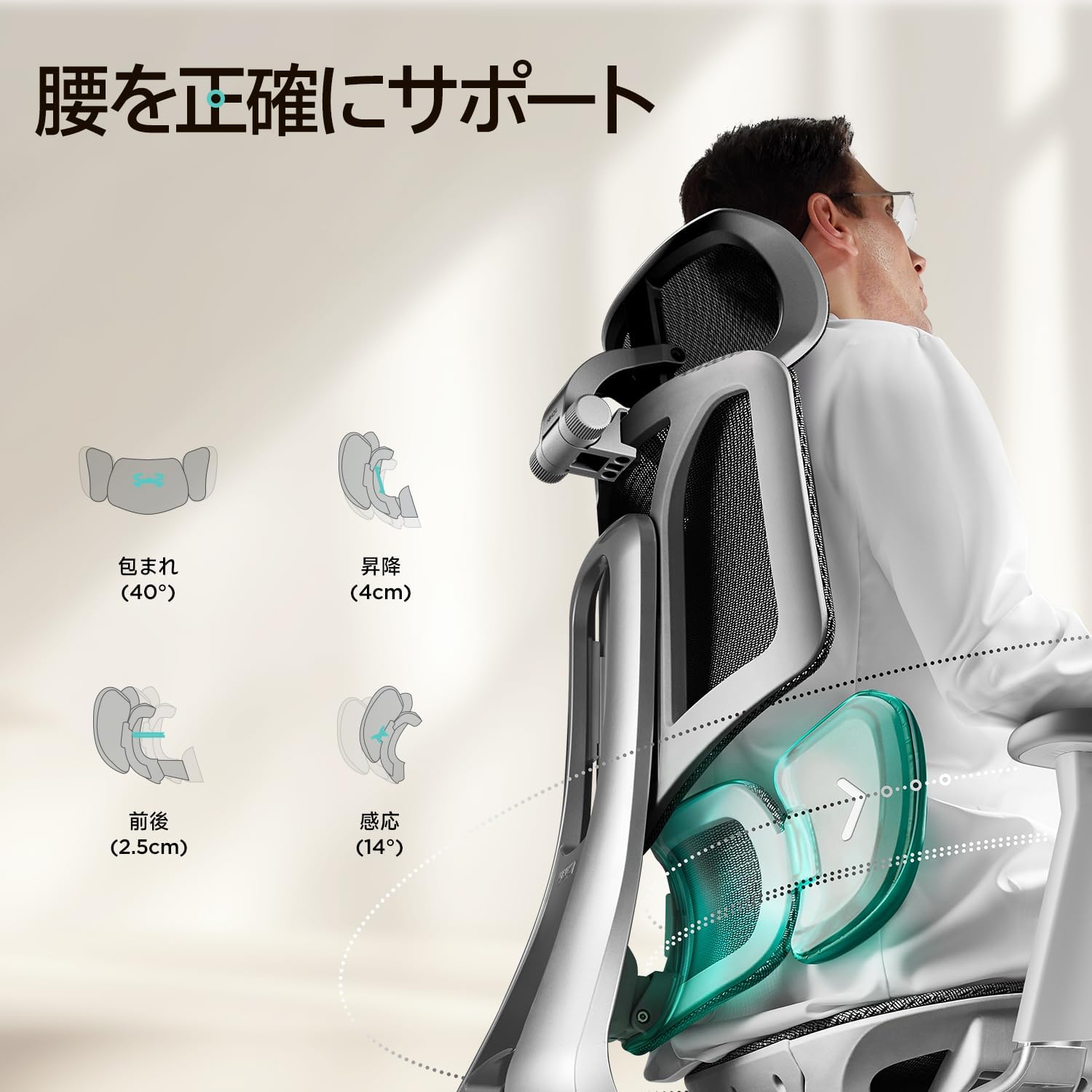
Imej: Terperinci view of the Hbada E3's adjustable 3-zone lumbar support system.
5.4. Pelarasan Tempat Letak Tangan 3D
The 3D armrests offer versatile adjustments to support your arms and shoulders. They can be adjusted:
- Ketinggian: Up to 70mm (2.95 inches) vertically.
- Depan/Belakang: Up to 50mm (1.65 inches) horizontally.
- Putaran: Up to 40 degrees inward or outward.

Image: Diagram illustrating the height, front/back, and rotational adjustments of the 3D armrests.
5.5. Pelarasan Penyandar Kepala 3D
The 3D headrest provides neck and head support and can be adjusted:
- Ketinggian: Up to 4.5cm vertically.
- Putaran: Sehingga 60 darjah.
- Condong: Sehingga 45 darjah.
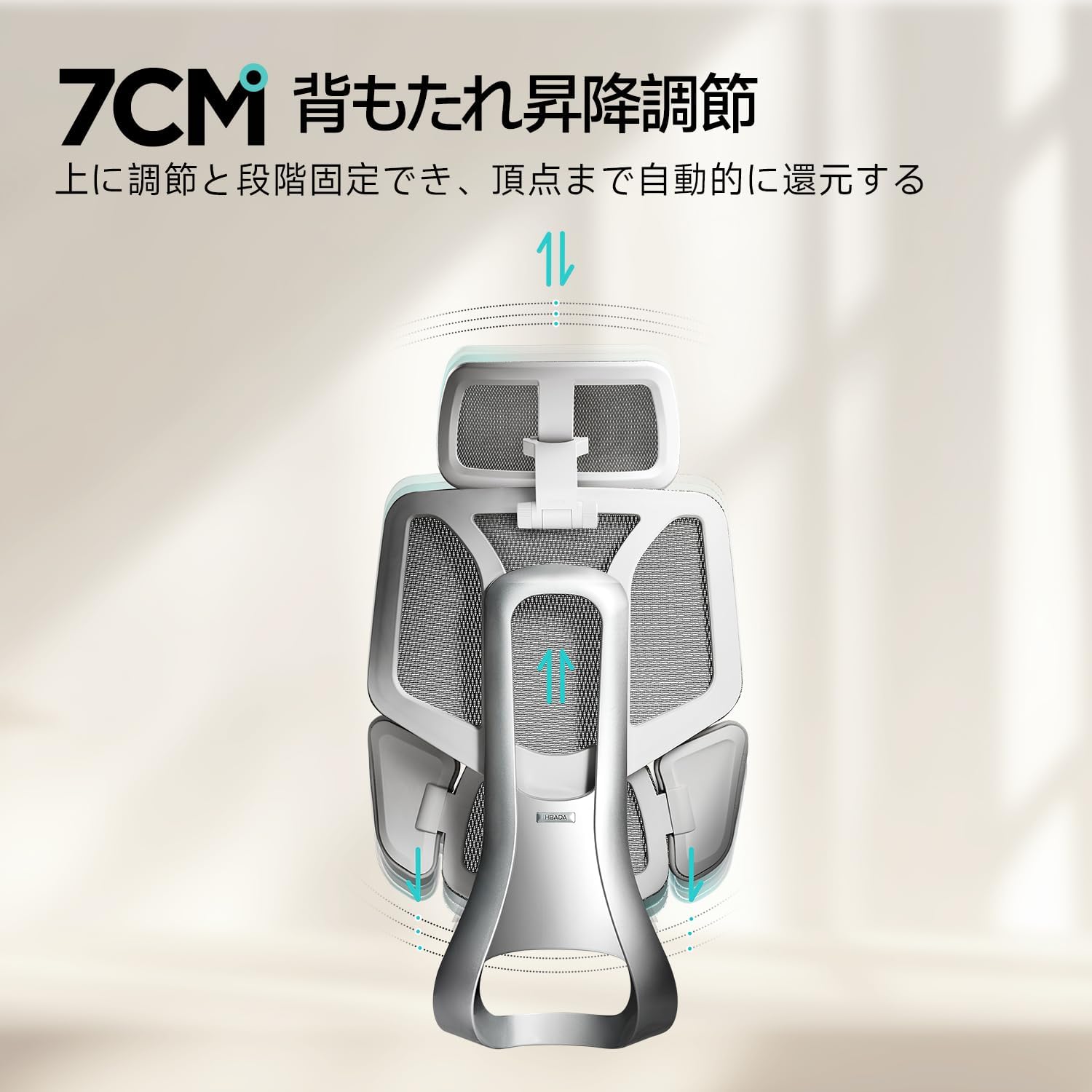
Image: Diagram illustrating the height, rotation, and tilt adjustments of the 3D headrest.
5.6. Pelarasan Kedalaman Tempat Duduk
Adjust the seat depth by up to 5cm to accommodate different leg lengths and ensure proper thigh support.

Image: Illustration of the 5cm seat depth adjustment mechanism.
5.7. Backrest Height Adjustment
The backrest can be adjusted vertically by 7cm to align the lumbar support with your natural spine curvature.

Image: Diagram showing the 7cm vertical adjustment range for the backrest.
6. Penyelenggaraan
Regular maintenance helps prolong the life of your chair.
- Pembersihan: Wipe mesh and plastic surfaces with a damp kain dan detergen lembut. Elakkan bahan kimia yang keras.
- Pemeriksaan: Periodically check all screws and bolts for tightness and re-tighten as needed.
- Kastor: Pastikan roda bebas daripada serpihan (rambut, habuk) bagi memastikan pergerakan yang lancar.
- Lif Gas: Do not attempt to disassemble the gas lift cylinder.
7. Penyelesaian masalah
Jika anda menghadapi sebarang masalah, rujuk masalah dan penyelesaian biasa berikut.
| Masalah | Kemungkinan Punca | Penyelesaian |
|---|---|---|
| Kerusi tidak melaraskan ketinggian | Kepincangan fungsi silinder pengangkat gas atau tuil tidak terpasang. | Pastikan tuil pelarasan ketinggian ditarik sepenuhnya. Jika masalah berterusan, lif gas mungkin memerlukan penggantian. Hubungi sokongan. |
| Bunyi-bunyi berdecit | Sambungan longgar atau geseran antara bahagian. | Check and tighten all screws and bolts. Apply a small amount of silicone lubricant to moving parts if necessary. |
| Kerusi bergoyang | Loose base connections or uneven floor. | Ensure the star base is securely attached and all casters are properly inserted. Check if the floor is level. |
If troubleshooting steps do not resolve the issue, please contact Hbada customer support.
8. Spesifikasi
- model: E3 (E301G-V3)
- Jenama: Hbada
- Gaya Sandaran Belakang: Belakang Jaring
- Jenis Bahan Tempat Duduk: mesh
- Ciri Khas: Ergonomic, Lumbar Adjustment Function
- Penggunaan yang Disyorkan: Pejabat, Permainan
- Jenis Bilik: Pejabat
- Gaya tempat letak tangan: Tempat letak tangan 3D
- Base Style: roda
- Reclining Stages: 2 (Implied by 140-degree recline, usually lockable at upright and reclined)
- warna: White (Note: Product title mentions 'White', but images show grey/silver. Assuming 'White' refers to the frame/accents for this specific model variant.)
9. Waranti dan Sokongan
Hbada is committed to providing high-quality products and excellent customer service.
- Waranti 3 Tahun: The product comes with a 3-year warranty service.
- Polisi Pemulangan 30 Hari: Enjoy a 30-day no-questions-asked return and exchange policy.
- Perkhidmatan Pelanggan: For any initial defects, malfunctions, or inquiries, please contact our customer service center. We will provide free replacement parts.
Untuk sokongan, sila rujuk maklumat hubungan yang diberikan bersama pembelian anda atau lawati laman web rasmi Hbada. webtapak.
10. Video Produk Rasmi
No relevant official product videos with 'Seller' as creator type and m3u8 format were found in the provided data.