
pengenalan
Terima kasih kerana membeliasing the WOOPKER AK45 Pro HiFi Amplifier. This manual provides detailed instructions for the proper setup, operation, and maintenance of your new audio amppenghidrat. Sila baca manual ini dengan teliti sebelum menggunakan produk untuk memastikan prestasi dan keselamatan yang optimum. Simpan manual ini untuk rujukan pada masa hadapan.
Arahan Keselamatan
AMARAN: Untuk mengurangkan risiko kebakaran atau kejutan elektrik, jangan dedahkan perkakas ini kepada hujan atau lembapan.
- Baca semua arahan sebelum mengendalikan amplebih hidup.
- Simpan amplifier away from water, moisture, and direct sunlight.
- Jangan sekat sebarang bukaan pengudaraan. Pasang mengikut arahan pengilang.
- Jangan pasang berhampiran mana-mana sumber haba seperti radiator, daftar haba, dapur, atau radas lain (termasuk amppenghidup) yang menghasilkan haba.
- Lindungi kabel kuasa dari berjalan atau dicubit, terutama pada palam, wadah kemudahan, dan titik di mana mereka keluar dari amplebih hidup.
- Hanya gunakan lampiran/aksesori yang ditentukan oleh pengilang.
- Cabut palam ini amplebih hidup semasa ribut petir atau ketika tidak digunakan untuk jangka masa yang lama.
- Rujuk semua perkhidmatan kepada pegawai perkhidmatan yang berkelayakan. Servis diperlukan apabila amplifier has been damaged in any way, such as power-supply cord or plug is damaged, liquid has been spilled or objects have fallen into the amplebih hidup, yang amplifier telah terdedah kepada hujan atau lembapan, tidak beroperasi seperti biasa, atau telah dijatuhkan.
Kandungan Pakej
Sila tandai kotak untuk item berikut:
- WOOPKER AK45 Pro HiFi Amppenguat x 1
- EU Power Cable x 1
- Kawalan Jauh IR x 1
- Antena FM x 1
- Manual Pengguna x 1

Image: The complete package contents of the AK45 Pro amplifier, showing all included accessories.
Produk Selesaiview
Panel Depan

Imej: Terperinci view of the AK45 Pro amplifier's front panel, highlighting each control and input.
- Suis kuasa: Berpusing amphidup atau mati.
- USB/SD Slot: For playing audio from USB drives or SD cards.
- Paparan led: Menunjukkan mod semasa dan maklumat trek.
- Butang Mod: Switches between input modes (Bluetooth, AUX, FM, USB, SD).
- Butang Lagu Sebelumnya: Melangkau ke trek sebelumnya.
- Butang Main/Jeda: Memainkan atau menjeda main balik audio.
- Butang Laluan Seterusnya: Langkau ke trek seterusnya.
- Butang Ulang: Mengulang trek atau senarai main semasa.
- Kawalan Treble: Adjusts the high-frequency audio level.
- Kawalan Bes: Adjusts the low-frequency audio level.
- MIC/VOL Control: Melaraskan kelantangan mikrofon.
- MIC1/MIC2 Inputs: Bicu 6.35mm untuk menyambung mikrofon.
- Kawalan Kelantangan Induk: Melaraskan volum keluaran keseluruhan.
Panel Belakang

Imej: Terperinci view of the AK45 Pro amplifier's rear panel, showing all connection ports.
- Audio Input Jack (RCA): For connecting external audio devices via RCA cables.
- FM Antenna Jack: Untuk menyambungkan antena FM.
- Terminal Output Pembesar Suara: Untuk menyambungkan pembesar suara pasif.
- DC 12V/5A Power Supply Input: Alternative power input for 12V DC.
- AC 240V Power Supply Input: Main power input for AC 110-240V.
Persediaan
Sambungan Pembesar Suara
The AK45 Pro amplifier supports passive speakers with 4-16 Ohm impedance.

Image: Visual guide for connecting speaker wires to the amplifier's output terminals.
- Before connecting speakers, identify the positive (+) and negative (-) terminals on your speakers. Typically, the positive terminal is red and the negative is black.
- Tekan clamp on the back of the AK45 Pro amplifier and insert the bare speaker wires, ensuring positive matches positive and negative matches negative.
- Avoid inserting or removing USB drives, SD cards, RCA audio cables, or speaker cables while the amppenyambung dihidupkan.
Sambungan Kuasa
Connect the provided power cable to the AC power input on the rear panel of the amplifier and then plug it into a suitable wall outlet (AC 110-240V). Alternatively, you can use a DC 12V/5A power supply (not included) with the DC input.
Menyambungkan Sumber Audio
Sambungan Bluetooth

Image: Illustration of a smartphone wirelessly connected to the AK45 Pro amppenyambung melalui Bluetooth.
- Hidupkan amplebih hidup.
- Press the 'Mode' button on the front panel or remote control until 'BLUE' appears on the LED display.
- Dayakan Bluetooth pada peranti mudah alih anda (telefon, tablet, dll.).
- Cari untuk 'AK45 Pro' in your device's Bluetooth settings and select it to pair.
- Setelah disambungkan, anda boleh memainkan audio daripada peranti anda melalui amplebih hidup.
Note: Maintain a distance of less than 10 meters (30 feet) between your device and the amplifier for stable Bluetooth connection. For TV or PC connections, keep the distance within 5 meters (15 feet).
AUX/RCA Connection
Use an RCA audio cable to connect external audio devices such as CD players, DVD players, TVs, or PCs to the 'Audio Input' jacks on the rear panel. Press the 'Mode' button to select the AUX input.
Main Semula USB/Kad SD
Insert a USB drive or SD card into the corresponding slot on the front panel. The amplifier akan bertukar secara automatik ke mod USB/SD dan mula memainkan audio files. Supported formats include MP3.
Radio FM
Connect the provided FM antenna to the 'FM ANT' jack on the rear panel. Press the 'Mode' button to select FM radio mode. The amplifier will automatically scan and store available radio stations.
Input Mikrofon
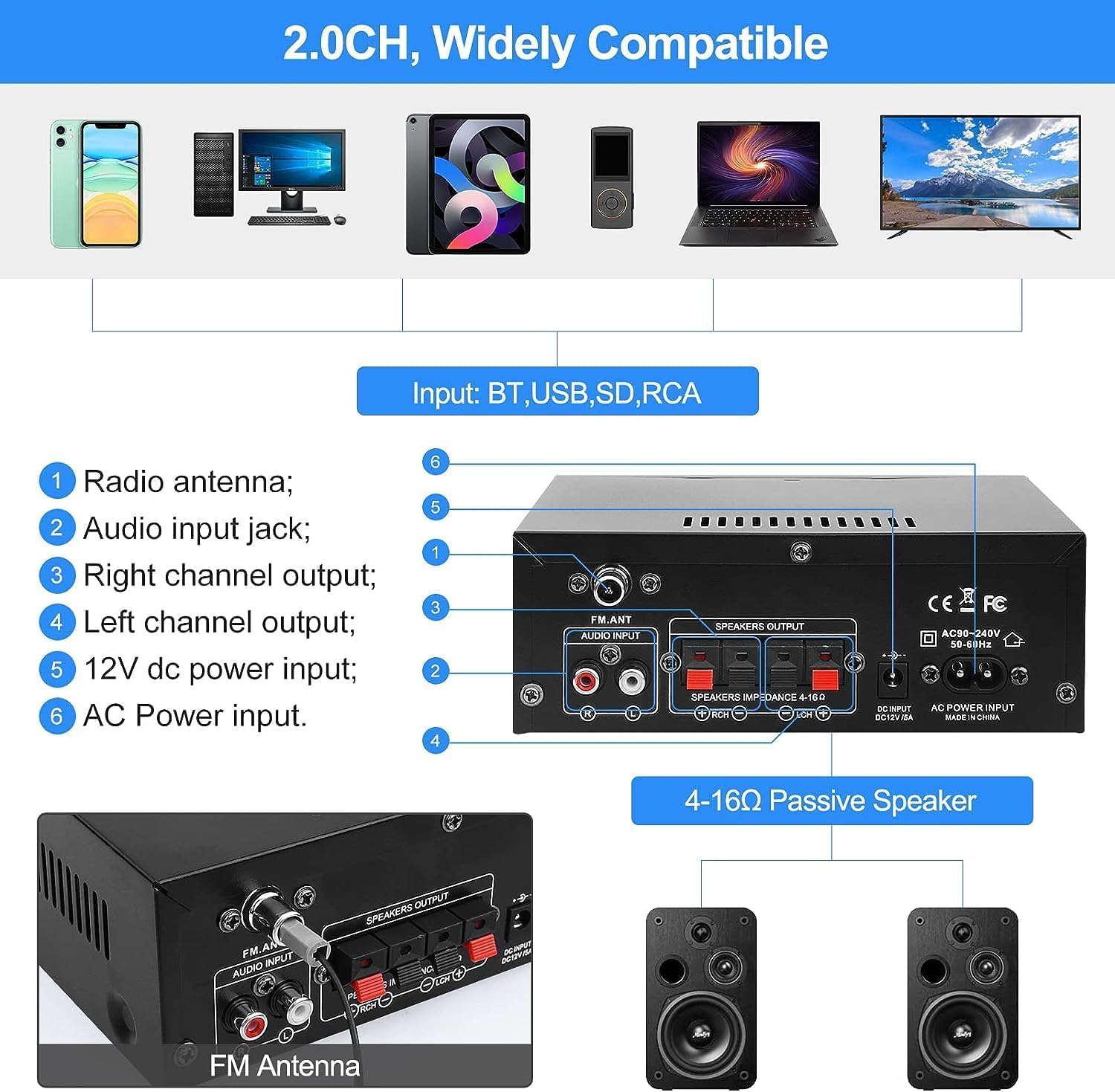
Image: Two individuals enjoying karaoke with microphones connected to the AK45 Pro amplebih hidup.
Connect up to two microphones to the 'MIC1' and 'MIC2' inputs on the front panel. Adjust the microphone volume using the 'MIC/VOL' knob. This feature is ideal for karaoke or public speaking.
Arahan Operasi
Hidupkan/Mati Kuasa
Toggle the 'Power' switch on the front panel to turn the amphidup atau mati.
Kawalan Kelantangan
Rotate the large 'Volume' knob on the front panel clockwise to increase volume and counter-clockwise to decrease it. You can also adjust the volume using the remote control.
Pemilihan Mod
Press the 'Mode' button on the front panel or remote control to cycle through available input sources: Bluetooth, AUX, FM, USB, and SD.
Pelarasan Treble dan Bass
Use the 'Treble' and 'Bass' knobs on the front panel to fine-tune the high and low frequencies of the audio output according to your preference.
Alat Kawalan Jauh

Image: A hand holding the infrared remote control, used for convenient operation of the amppenguat dari jauh.
The included IR remote control allows you to conveniently manage power, volume, mode selection, track skipping, and other functions from a distance.
Penyelenggaraan
- Pembersihan: Gunakan kain lembut dan kering untuk membersihkannya amplifier's exterior. Do not use liquid cleaners or aerosol sprays.
- Storan: Apabila tidak digunakan untuk tempoh yang lama, simpan amppenyangga di tempat yang sejuk dan kering jauh dari cahaya matahari langsung dan suhu yang melampau.
- Pengudaraan: Pastikan pengudaraan yang betul di sekeliling amplifier to prevent overheating. Do not cover the ventilation openings.
Menyelesaikan masalah
| Masalah | Kemungkinan Punca / Penyelesaian |
|---|---|
| Tiada kuasa | Check if the power cable is securely connected. Ensure the power switch is in the 'ON' position. Verify the power outlet is functional. |
| Tiada keluaran bunyi | Check speaker connections (positive/negative). Ensure the correct input mode is selected. Increase the master volume. Check audio source device volume. |
| Bluetooth tidak bersambung | Memastikan amplifier is in Bluetooth mode. Make sure Bluetooth is enabled on your device. Move your device closer to the amplifier. Disconnect from other Bluetooth devices. |
| Isu main balik USB/SD | Ensure the USB drive/SD card is inserted correctly. Check if audio files are in a supported format (e.g., MP3). Try a different USB drive/SD card. |
| Penerimaan radio FM yang lemah | Ensure the FM antenna is properly connected and extended. Try repositioning the antenna for better signal. |
| Mikrofon tidak berfungsi | Ensure microphones are securely plugged in. Adjust the 'MIC/VOL' knob. Check microphone functionality. |
Spesifikasi
| Ciri | Perincian |
|---|---|
| Model | AK45 Pro |
| Output Kuasa Dinilai | Up to 50W x 2 |
| Saluran | Stereo 2.0 Saluran |
| Impedans Pembesar Suara | 4-16 Ohm |
| Input Kuasa | AC 110-240V; DC 12V/5A |
| Versi Bluetooth | Bluetooth 5.0 |
| Input | Bluetooth, AUX (RCA), MIC, SD Card, USB |
| Ciri-ciri Tambahan | FM Radio, Treble/Bass Adjustment, Remote Control |
| Dimensi (Anggaran) | 180mm x 138mm x 65mm (7.09in x 5.44in x 2.56in) |
| Berat (Anggaran) | 880 gram |
Waranti dan Sokongan
WOOPKER is committed to providing high-quality products and excellent customer service. For any inquiries or support needs, please refer to the following:
- 24 Jam: Quick response within 24 hours for customer queries.
- 30 Day Return: Return within 30 days for an exchange or refund.
- Sokongan Teknikal Seumur Hidup: Enjoy lifetime technical customer support for your product.

Image: WOOPKER's commitment to customer service, including response times and support duration.


