
pengenalan
Terima kasih kerana membeliasing the 7artisans AF 50mm F1.8 Full Frame Lens. This manual provides essential information for the safe and effective use of your new lens. Please read it thoroughly before use and keep it for future reference.
This 50mm F1.8 lens is designed for Sony E-Mount full-frame cameras, offering a large aperture, fast autofocus, and support for advanced features like face and eye recognition. Its versatile focal length makes it suitable for a wide range of photographic applications, from portraits to street photography.
Maklumat Keselamatan
- Do not look at the sun or bright light sources through the lens, as this may cause permanent vision impairment.
- Keep the lens away from direct sunlight when not in use to prevent fire hazards or damage to internal components.
- Avoid exposing the lens to extreme temperatures, high humidity, or dust.
- Do not attempt to disassemble or repair the lens yourself. Contact authorized service personnel for assistance.
- Jauhkan daripada kanak-kanak.
Kandungan Pakej
Sahkan bahawa semua item terdapat dalam pakej anda:
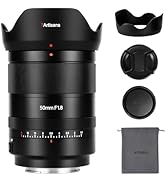
- 7artisans AF 50mm F1.8 Full Frame Lens
- Cap Lensa Depan
- Cap Lensa Belakang
- Tudung Lensa
- Kantung Lensa
- Manual Arahan (dokumen ini)

Image: The 7artisans AF 50mm F1.8 lens shown with its included accessories: front and rear lens caps, lens hood, and a soft pouch.
Produk Selesaiview
The 7artisans AF 50mm F1.8 lens features a robust metal construction with a sleek black finish. Key components include:
- Cincin Fokus: For manual focusing.
- Cincin Apertur: Allows switching between automatic and manual aperture control.
- Suis AF/MF: Toggles between autofocus and manual focus modes.
- Lekapan Lensa: Sony E-Mount compatible.
- Port USB-C: Untuk kemas kini perisian tegar.
Imej: Dari dekat view of the lens barrel, highlighting the AF/MF switch for mode selection.

Imej: A terperinci view of the lens mount, showing the electronic contacts and the integrated USB-C port for firmware updates.
Persediaan
- Memasang Lensa:
- Align the white dot on the lens barrel with the white dot on your camera's lens mount.
- Masukkan kanta dengan lembut ke dalam dudukan kamera.
- Putar kanta mengikut arah jam sehingga ia klik pada tempatnya, menunjukkan ia telah dikunci dengan selamat.
- Mengeluarkan Lensa:
- Press and hold the lens release button on your camera body.
- Rotate the lens counter-clockwise until it detaches from the camera mount.
- Pasang penutup kanta hadapan dan belakang untuk melindungi elemen kanta.
- Memasang Tudung Lensa:
- Sejajarkan hud kanta dengan bahagian hadapan kanta.
- Twist the hood clockwise until it locks securely.
- The lens hood helps reduce flare and provides physical protection to the front element.

Image: The 7artisans AF 50mm F1.8 lens securely mounted on a Sony mirrorless camera, viewed dari sisi.
Mengendalikan Lensa
1. Focus Mode Selection (AF/MF)
Use the AF/MF switch on the lens barrel to select your desired focus mode:
- AF (Autofokus): The camera will automatically focus on the subject. This lens features a high-speed STM stepping motor for quick and accurate autofocus performance.
- MF (Fokus Manual): You can manually adjust the focus by rotating the focus ring on the lens.
Imej: A terperinci view of the AF/MF switch, allowing users to toggle between autofocus and manual focus modes.
2. Aperture Control
The lens features an aperture ring that can be switched between automatic and manual control:
- Automatic Aperture: Set the aperture ring to the 'A' position. The camera will control the aperture settings.
- Manual Aperture: Rotate the aperture ring to select your desired F-stop (F1.8 to F16). This provides precise control over depth of field and exposure.
The large F1.8 aperture allows for excellent low-light performance and the creation of beautiful background blur (bokeh).
3. Face/Eye Recognition Support
This lens supports your camera's face and eye recognition functions. When enabled on your camera, the lens will automatically set accurate focusing points and exposure for human faces or eyes, ensuring sharp portraits.

Image: A photograph illustrating the camera's eye recognition feature actively focusing on a subject's eye.
4. Kemas Kini Perisian Tegar
The integrated USB-C port allows for easy firmware updates. Connect the lens to your computer using a USB-C cable and follow the instructions provided on the 7artisans official website to update the firmware. This ensures optimal performance and compatibility with future camera models.
Imej: A terperinci view of the lens mount, showing the electronic contacts and the integrated USB-C port for firmware updates.
Penyelenggaraan
- Pembersihan: Use a soft, lint-free cloth to clean the lens barrel. For lens elements, use a lens brush to remove dust, then gently wipe with a lens cleaning cloth and lens cleaning solution.
- Storan: When not in use, store the lens with both caps attached in a cool, dry place away from direct sunlight and moisture. Consider using a desiccant to prevent mold growth.
- Pengendalian: Avoid dropping or subjecting the lens to strong impacts, as this can damage internal optical elements.
Menyelesaikan masalah
1. Lens not focusing:
- Ensure the AF/MF switch is set to the desired mode (AF for autofocus).
- Check camera settings to ensure autofocus is enabled and the correct focus area is selected.
- Bersihkan sesentuh kanta pada kedua-dua kanta dan badan kamera.
2. Images are blurry:
- Verify that the lens is properly focused.
- Check shutter speed to avoid camera shake, especially in low light.
- Pastikan elemen kanta bersih dan bebas daripada comot atau habuk.
3. Lens not recognized by camera:
- Remove and reattach the lens, ensuring it clicks securely into place.
- Clean the electronic contacts on both the lens and camera body with a clean, dry cloth.
- Check for available firmware updates for both the lens and your camera.
Spesifikasi
| Ciri | Perincian |
|---|---|
| Jenama | 7tukang |
| Nombor Model | AF5018EB |
| Panjang Fokus | 50mm |
| Apertur Maksimum | F1.8 |
| Aperture minimum | F16 |
| Jenis Kanta | Kanta Perdana Standard |
| Pemasangan yang Serasi | Sony E-Mount |
| Struktur Optik | 11 elemen dalam 9 kumpulan |
| Bilah Diafragma | 11 keping |
| Sudut dari View | D:46.8°, H:39.6°, V:27.0° |
| Jarak Fokus Terdekat | 0.5M - ∞ |
| Saiz Penapis | 58mm |
| Berat Barang | 1.78 paun (lebih kurang 807g) |
| Dimensi Produk | 40.94 x 28.35 x 28.35 inci |
Waranti dan Sokongan
For warranty information, technical support, or service inquiries, please visit the official 7artisans webtapak atau hubungi pengedar sah anda. Simpan bukti pembelian anda untuk tuntutan waranti.
For the latest firmware updates and additional resources, please visit: 7artisans Official Store
Video Produk Rasmi
Watch these official videos for more information on the 7artisans AF 50mm F1.8 lens:
7artisans AF50mm F1.8
Video: Tayangan video produk rasmicasing the features and capabilities of the 7artisans AF 50mm F1.8 lens.
7artisans AutoFocus 50mm F1.8
Video: Another official product video demonstrating the autofocus performance and image quality of the 7artisans 50mm F1.8 lens.