Hikity 9-inch Android 15 Car Radio User Manual
Model: B0CQLNWC4S for Toyota Prius C (2012-2014)
1. Produk Lebihview
This Hikity car radio is an advanced infotainment system designed for Toyota Prius C models from 2012 to 2014. It features a 9-inch Incell touchscreen, Android 15 operating system, 4GB RAM, and 128GB ROM, providing a smooth and responsive user experience. Key functionalities include wireless CarPlay and Android Auto, Bluetooth 5.0, FM/RDS radio, GPS navigation, Wi-Fi connectivity, steering wheel control support, and compatibility with an AHD backup camera.

Image 1.1: The Hikity 9-inch car radio seamlessly integrated into a Toyota Prius C dashboard, displaying navigation and media playback.
2. Apa yang ada di dalam Kotak
Sila sahkan bahawa semua komponen hadir sebelum memulakan pemasangan:
- Android Stereo for Toyota Prius C
- Backup Camera/CAM-IN Cable
- Power Cable/RCA Cable
- Antena GPS
- Mikrofon
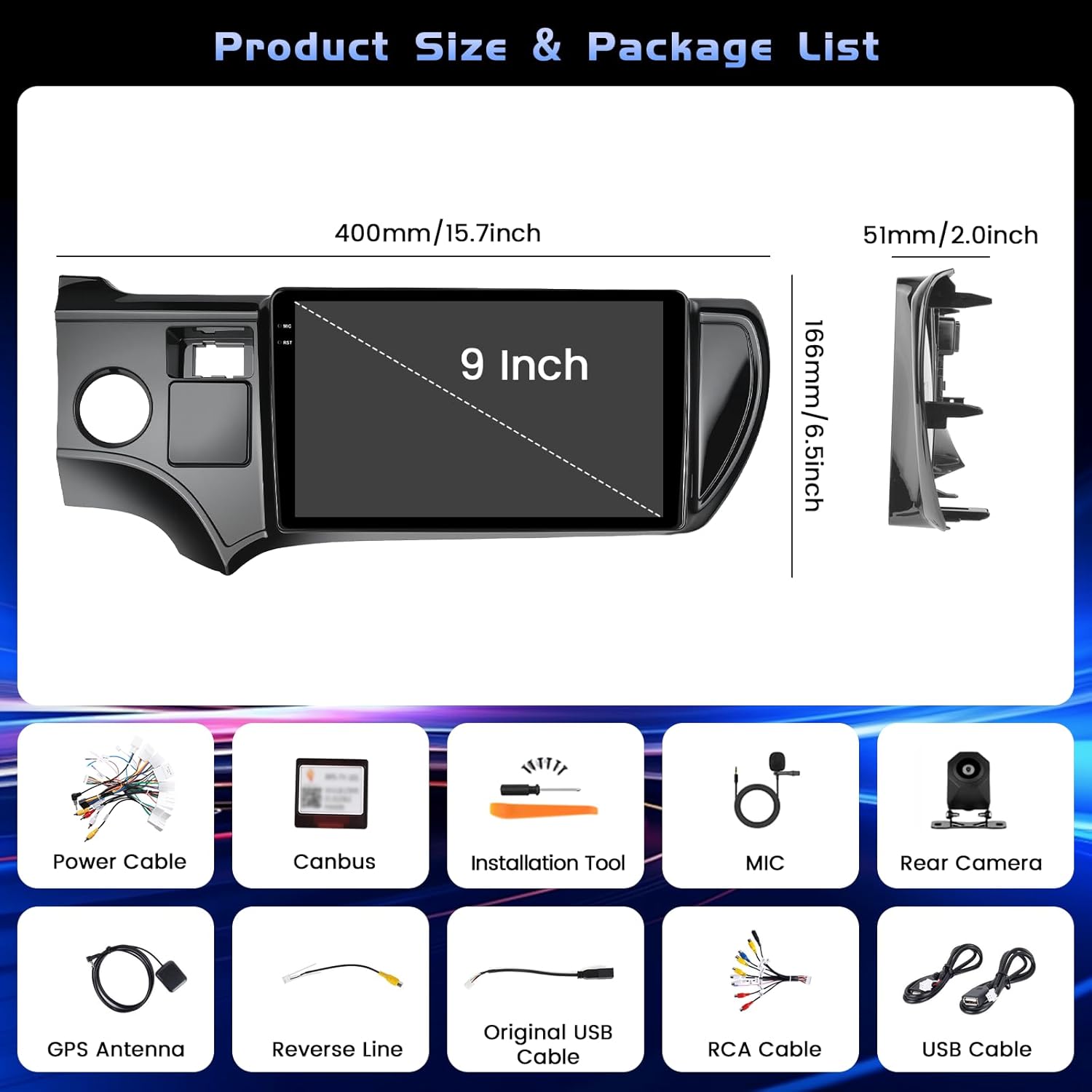
Image 2.1: All included components of the Hikity car radio system.
3. Persediaan dan Pemasangan
Professional installation is recommended for optimal performance and to avoid damage to your vehicle or the unit. Ensure the vehicle's power is disconnected before starting installation.
3.1 Sambungan Pendawaian
Carefully connect all cables according to the provided wiring diagram. Pay close attention to the power and ground connections to prevent electrical issues. The backup camera requires specific wiring to function correctly.
Video 3.1: Detailed instructions on how to connect the backup camera to the car radio system.
For the backup camera, connect the 'BACK' line from the main harness to the positive pole of your car's reversing light. Connect the camera's power cable to the reversing light's positive and negative poles. The video signal cable from the camera connects to the 'CAM-IN' port on the head unit.

Image 3.2: Wiring diagram for the backup camera connection.
3.2 Kuasa Awal Hidup
After all connections are secure, reconnect the vehicle's power. The unit should power on automatically. Follow any on-screen prompts for initial setup, such as language selection and time zone.
4. Arahan Operasi
4.1 Basic UI Navigation
The system features an intuitive touchscreen interface. Swipe left or right to navigate between home screens and access various applications. The top bar displays status icons for Wi-Fi, Bluetooth, GPS, and time.

Imej 4.1: Selesaiview of the user interface with various app icons and customizable themes.
4.2 Sambungan Bluetooth
To connect your smartphone via Bluetooth for hands-free calls and audio streaming:
- Go to the 'Settings' menu on the car radio.
- Select 'Bluetooth' and ensure it is enabled.
- Pada telefon pintar anda, dayakan Bluetooth dan cari peranti yang tersedia.
- Select the car radio's Bluetooth name (e.g., 'BLINK_UNW2652') from your phone's list.
- Sahkan permintaan berpasangan pada kedua-dua peranti.

Image 4.2: Bluetooth dialing screen and connection status.
4.3 CarPlay Wayarles & Android Auto
This unit supports both wireless CarPlay and Android Auto for seamless smartphone integration. Connect your mobile phone to the car infotainment system via Bluetooth first, then launch the 'S-Play' application on the car radio to initiate the connection.
Video 4.3: Guide on how to use CarPlay with the car radio.

Image 4.4: Wireless CarPlay and Android Auto interface.
4.4 Navigasi GPS
The unit features a dual navigation system supporting both online and offline maps. Connect to Wi-Fi to download offline maps or use online navigation for real-time traffic updates.

Image 4.5: GPS navigation interface with online and offline map options.
4.5 Kawalan Roda Stereng (SWC)
The car radio supports your vehicle's original steering wheel controls. To configure them:
- Connect the SWC wires (KEY1/KEY2) from the car radio harness to the corresponding wires in your vehicle's wiring.
- Access the 'Steering Wheel Key Learning' function in the car radio's settings (usually under 'Factory Setup' with password 1234).
- Ikut arahan pada skrin untuk menetapkan fungsi pada setiap butang pada stereng anda.

Image 4.6: Steering Wheel Control learning interface.
4.6 Kefungsian Skrin Pisah
The unit supports split-screen mode, allowing you to run two applications simultaneously. This feature can be enabled or disabled in the 'Factory Setup' settings (password 1234) under 'Split screen function'. Once enabled, you can drag compatible apps to either side of the screen.
4.7 FM/RDS Radio
Access the FM/RDS application to listen to radio stations. The RDS (Radio Data System) feature displays station information where available.
5. Penyelenggaraan
Untuk memastikan jangka hayat dan prestasi optimum radio kereta anda, ikut garis panduan penyelenggaraan ini:
- Pembersihan Skrin: Use a soft, lint-free cloth to gently wipe the touchscreen. Avoid abrasive cleaners or harsh chemicals that could damage the screen coating.
- Kemas Kini Perisian: Periodically check for software updates through the system's settings to ensure you have the latest features and bug fixes.
- Keadaan Persekitaran: Elakkan daripada mendedahkan unit kepada suhu yang melampau, cahaya matahari langsung untuk tempoh yang lama, atau kelembapan yang berlebihan.
- Integriti Kabel: Regularly inspect all visible cables for any signs of wear or damage.
6. Penyelesaian masalah
If you encounter issues with your car radio, refer to the following common solutions:
- Tiada Kuasa: Check all power connections. Ensure the vehicle's fuse for the radio is intact.
- Skrin Kosong: Perform a soft reset by pressing the RST button (if available) or disconnecting and reconnecting the vehicle's battery for a few minutes.
- Backup Camera Not Working: Verify all camera wiring, especially the 'BACK' trigger wire and power connections. Ensure the correct camera input type (AHD, CVBS-N, etc.) is selected in 'Factory Setup' > 'Backcar Source Settings'.
- Kawalan Roda Stereng Tidak Bertindak balas: Re-perform the 'Steering Wheel Key Learning' procedure as described in Section 4.5. Ensure the SWC wires are correctly connected.
- Isu Sambungan Bluetooth/CarPlay/Android Auto: Ensure Bluetooth is enabled on both devices. Forget the device on both the phone and car radio, then attempt to pair again. For CarPlay/Android Auto, ensure the 'S-Play' app is running and your phone is compatible.
- Tiada Bunyi: Check speaker connections and ensure the volume is not muted or set too low. Verify equalizer settings.
7. Spesifikasi
| Ciri | Perincian |
|---|---|
| Jenama | Kembara berjalan kaki |
| Nama Model | Radio Kereta Android |
| Sistem Operasi | Android 15 |
| Ingatan | 4GB RAM + 128GB ROM |
| Saiz Skrin | 9 Inci |
| Jenis Paparan | Incell Full Touchscreen LCD |
| Resolusi | 1280*720 |
| Ketersambungan | Bluetooth 5.0, USB, Wi-Fi (5G), Wireless CarPlay, Android Auto |
| Navigasi | Dual GPS (Online and Offline Maps) |
| Mod Keluaran Audio | Stereo (32-EQ) |
| Kenderaan yang serasi | Toyota Prius C 2012-2014 |
| Dimensi Item (L x W x H) | 15.94" x 10.24" x 2.36" |
| Berat Barang | 1 Kilogram |

Image 7.1: Details of the Incell Full Lamination Screen technology.
8. Waranti dan Sokongan
8.1 Maklumat Waranti
This Hikity car radio comes with a Waranti 1 tahun dari tarikh pembelian. Waranti ini meliputi kecacatan pembuatan dan kerosakan di bawah penggunaan biasa. Sila simpan bukti pembelian anda untuk tuntutan waranti.
8.2 Sokongan Pelanggan
For technical assistance, troubleshooting, or warranty inquiries, please contact Hikity customer support through the retailer where the product was purchased. You may also find additional support resources on the official Hikity webtapak.