
hosabely SK80
Manual Pengguna Antara Muka Audio hosabely SK80
Model: SK80
1. Pengenalan
Thank you for choosing the hosabely SK80 Audio Interface. This device is designed to enhance your audio experience for live streaming, podcasting, recording, and gaming. It features 48V phantom power, noise reduction, customizable sound pads, and various audio effects. Please read this manual carefully to understand the product's functions and ensure proper operation.

Rajah 1: Depan view of the hosabely SK80 Audio Interface.
2. Kandungan Pakej
Sahkan bahawa semua item terdapat dalam pakej anda:
- 1 x hosabely SK80 Live Sound Card (Audio Interface)
- 1 x Kabel Pengecas USB
- 2 x Kabel Audio
- 1 x Manual Pengguna Bahasa Inggeris (dokumen ini)
Note: Microphone is not included. The device is not compatible with USB microphones.
3. Produk Lebihview
3.1. Susun Atur Panel Kawalan

Rajah 2: Terperinci view of the SK80 Audio Interface control panel.
The SK80 features a comprehensive control panel with various knobs and buttons for audio adjustment and effect activation. Key areas include:
- Microphone Volume Controls: Separate knobs for high, middle, and low frequencies, plus overall microphone volume.
- Tone Volume & Recording Controls: Adjust tone and recording levels.
- Line Volume & Instrumental Volume: Controls for line input and instrument input.
- Sound Effects Pads: Buttons for various live sound effects and customizable pads.
- Reverb & Voice Changer Controls: Knobs and buttons for reverb modes and voice modulation.
- Butang Kuasa Hantu 48V: Mengaktifkan kuasa hantu untuk mikrofon kondenser.
- Butang Pengurangan Bunyi: Engages the noise reduction feature.
- Bluetooth (BT) On/Off: Toggles Bluetooth connectivity.
3.2. Pelabuhan Ketersambungan
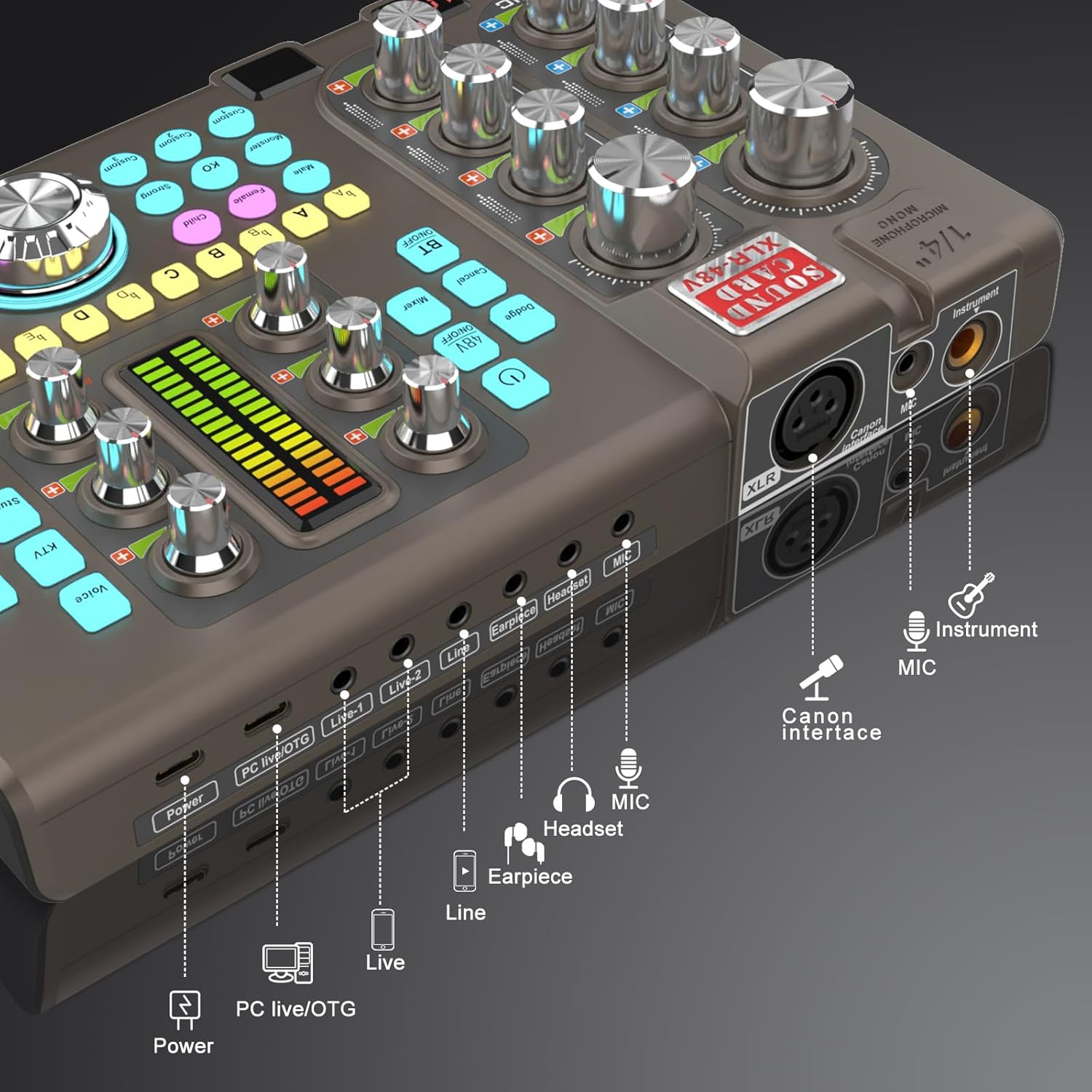
Figure 3: Labeled input and output ports on the SK80 Audio Interface.
The rear panel provides essential connection points:
- Pelabuhan Kuasa: USB-C for power supply.
- PC Live/OTG Port: USB-C for connection to a computer or OTG-compatible smartphone/tablet.
- Live 1, Live 2, Line-1, Line-2 Ports: 3.5mm audio output ports for connecting to streaming devices or other audio equipment.
- Earpiece Port: 3.5mm output for monitoring audio with an earpiece.
- Port Alat dengar: 3.5mm output for connecting a headset.
- Pelabuhan MIC: Input 3.5mm untuk mikrofon.
- XLR-48V Interface: XLR input for condenser microphones requiring 48V phantom power.
- Instrument Port: 1/4" (6.35mm) input for connecting instruments like guitars.
4. Persediaan
4.1. Menghidupkan Peranti
- Connect the USB Charging Cable to the kuasa port on the SK80 and to a USB power adapter (not included) or a computer USB port.
- Press and hold the power button on the control panel to turn on the device.
4.2. Menyambung Mikrofon

Figure 4: XLR-48V and Instrument input ports.
- For Condenser Microphones (requiring 48V Phantom Power): Connect your XLR microphone cable to the XLR-48V Interface port. Press the 48V HIDUP/MATI button on the control panel to activate phantom power. (Note: 48V is off by default to conserve battery. A light indicator will confirm activation.)
- For Dynamic Microphones or Microphones with 3.5mm Jack: Sambungkan mikrofon anda ke MIC port menggunakan kabel audio 3.5mm.
4.3. Connecting Instruments
Sambungkan alat muzik anda (contohnya, gitar) ke Instrumen port using a 1/4" (6.35mm) cable.
4.4. Connecting to a Computer or Smartphone
- Melalui USB: Use the USB Charging Cable to connect the PC Live/OTG port to your computer. The device will be recognized as an audio input/output device.
- Melalui Bluetooth: Tekan ke BT HIDUP/MATI button on the control panel. On your smartphone or tablet, search for and connect to the SK80 via Bluetooth settings.
4.5. Connecting Monitoring Devices
- Sambungkan fon kepala ke Alat dengar port for monitoring your audio.
- Connect an earpiece to the Alat dengar port for discreet monitoring.
5. Arahan Operasi
5.1. Melaraskan Tahap Audio

Figure 5: Audio adjustment knobs.
- Gunakan MIC VOL knobs (High, Middle, Low) to fine-tune your microphone's equalization.
- Laraskan Tone Vol knob for overall microphone tone.
- Control the output level with the Rakaman tombol.
- Laraskan Talian Vol for line input sources and Instrumental Vol for connected instruments.
- The Monitor Vol knob controls the volume of your monitoring headphones/earpiece.
5.2. Using Reverb Effects
The SK80 offers 6 reverb modes: VOICE, KTV, STUDIO, CONCERT, CORRECT, and MC. Select your desired mode using the dedicated buttons. Adjust the reverb depth and width using the corresponding knobs.
5.3. Customizing Sound Pads

Figure 6: Customizable sound pads.
The SK80 features 3 customizable sound pads. Each pad can record up to 30 seconds of audio. To record:
- Tekan dan tahan salah satu daripada Adat buttons (Custom 1, 2, or 3) until it starts blinking.
- Record your desired audio (e.g., from a microphone, connected device, or Bluetooth input).
- Tekan sama Adat button again to stop recording. The button will stop blinking.
- Tekan ke Adat button once to play the recorded sound. You can adjust the volume of each pad.
5.4. Voice Changer Functions
Transform your voice using the Penukar Suara feature. Select from Male, Female, Child, or Monster voices. Adjust the PERUBAHAN SUARA knob to modify the pitch and create various vocal effects.
5.5. Pengurangan Bunyi

Figure 7: Noise reduction display.
Aktifkan Pengurangan Bunyi button to minimize environmental background noise. The device features a 15-level noise reduction system. The display shows the current noise reduction level.
5.6. Live Sound Effects
The SK80 includes 11 dynamic live sound effects (e.g., Dodge, Muffled, Play In, Laughter, Kiss, Gunfire). Press the corresponding buttons to trigger these effects during your live stream or recording. Each effect typically lasts for approximately 4 seconds.
6. Penyelenggaraan
- Keep the device clean by wiping it with a soft, dry cloth. Avoid using liquid cleaners or solvents.
- Simpan peranti di tempat yang sejuk dan kering jauh dari cahaya matahari langsung dan suhu yang melampau.
- Elakkan daripada menjatuhkan atau meletakkan peranti kepada kesan yang kuat.
- The built-in 3000mAh battery provides approximately 3-5 hours of operation. Recharge the device when the battery indicator is low.
7. Penyelesaian masalah
- Tiada Keluaran Bunyi:
- Check all cable connections (microphone, headphones, output to PC/streaming device).
- Ensure volume knobs (MIC VOL, Recording, Monitor Vol) are turned up.
- Verify that the correct audio input/output device is selected on your computer or streaming software.
- Mikrofon Tidak Berfungsi:
- Jika menggunakan mikrofon kondenser, pastikan kuasa hantu 48V diaktifkan.
- Check microphone cable integrity.
- Confirm the microphone is properly connected to the correct input port (XLR or 3.5mm MIC).
- Static or Noise in Audio:
- Activate the Noise Reduction feature.
- Periksa sambungan kabel yang longgar.
- Pastikan tiada sumber gangguan elektromagnet yang kuat berdekatan.
- Adjust input gain levels to avoid clipping.
- Isu Kesambungan Bluetooth:
- Ensure the BT ON/OFF button is activated.
- Make sure the SK80 is discoverable and within range of your device.
- Cuba nyahgandingkan dan pasangkan semula peranti.
8. Spesifikasi
| Nombor Model Item | SK80 |
| Jenama | hosabely |
| Teknologi Ketersambungan | Bluetooth, USB |
| Bilangan Saluran | 4 |
| Berat Barang | 1.67 paun (0.76 kg) |
| Dimensi Pakej | 12.28 x 7.56 x 2.36 inci |
| Jenis Bateri | Polimer Litium (3000mAh) |
| Peranti Serasi | Smartphone, PC, Guitar |
| Sokongan Sistem Pengendalian | Linux, Windows, macOS |
| Perisian yang Disokong | Ableton Live, FL Studio, Pro Tools, Logic Pro, Cubase (and others) |
9. Waranti dan Sokongan
For any questions or issues regarding your hosabely SK80 Audio Interface, please refer to the seller's contact information provided at the point of purchase. Please retain your proof of purchase for warranty claims.
Ask a question about this manual
Ask about setup, troubleshooting, compatibility, parts, safety, or missing instructions. Manuals+ will review the question and use this page’s manual context to help answer it.