
KALOR TECH AC829F
KALOR TECH Wi-Fi Smart Thermostat User Manual
Model: AC829F
1. Produk Lebihview
The KALOR TECH Wi-Fi Smart Thermostat (Model AC829F) is designed for electric baseboard heating systems operating on 120-240V. It features an LCD display, Wi-Fi connectivity, and compatibility with popular smart home platforms like Alexa, Google Home, Smart Life, and Tuya App. This thermostat provides precise temperature control and energy management for your home.

Imej 1.1: Depan view of the KALOR TECH Wi-Fi Smart Thermostat displaying temperature in Fahrenheit.
Ciri-ciri Utama:
- Kawalan Jauh Apl: Manage your heating system from anywhere using the Smart Life or Tuya App.
- Keserasian Pembantu Suara: Control your thermostat with voice commands via Alexa or Google Assistant.
- Tetapan Boleh Aturcara: Schedule heating cycles for optimal comfort and energy savings.
- Paparan LCD: Clear display shows current temperature, target temperature, time, and Wi-Fi connectivity status.
- Paparan Fahrenheit/Celsius: Supports both Fahrenheit (USA) and Celsius (Canada) temperature units.
- Proprietary Wall Plate: Includes a custom-designed wall plate for standard American and Canadian electrical boxes.
- Child-Lock Capable: Menghalang perubahan yang tidak dibenarkan pada tetapan.
2. Maklumat Keselamatan
Please read all safety warnings and installation instructions carefully before installing or operating this thermostat. Failure to follow these instructions may result in electric shock, fire, or property damage.
- Keserasian Elektrik: This thermostat is designed for 120-240V electric baseboard heating systems ONLY. It is NOT compatible with 24V central heating systems or single pole systems.
- Pemasangan Profesional Disyorkan: Jika anda tidak pasti tentang pendawaian elektrik, rujuk juruelektrik yang bertauliah.
- Pemutusan Kuasa: Always turn off power at the circuit breaker before installing or performing any maintenance on the thermostat.
- Rangkaian Wi-Fi: Memerlukan akses kepada a 2.4 MHz Wi-Fi network for installation and smart features. It is not compatible with 5 GHz networks.
- Penggunaan Dalaman Sahaja: Peranti ini bertujuan untuk kegunaan dalaman di lokasi kering.
3. Apa yang ada di dalam Kotak
Sahkan bahawa semua komponen hadir sebelum memulakan pemasangan:
- Digital Wi-Fi Thermostat (Model AC829F)
- Custom Wall Plate
- Installation Wires (Pigtail electrical wires)
- Skru Pemasangan
- Large-Print Instructions (This manual)
4. Persediaan dan Pemasangan
Follow these steps for proper installation of your KALOR TECH Smart Thermostat. Ensure power is OFF at the circuit breaker before proceeding.
- Matikan Kuasa: Locate the circuit breaker controlling your electric baseboard heater and turn off the power. Verify power is off using a voltage penguji.
- Keluarkan Termostat Lama: Carefully remove your existing thermostat from the wall. Disconnect the wires, noting their connections if necessary.
- Pasang Plat Dinding: Secure the custom wall plate to your electrical box using the provided mounting screws. Ensure it is level and flush with the wall.
- Dawaikan Termostat: Connect the pigtail electrical wires from the thermostat to your home's electrical wiring. This thermostat is designed for 120-240V systems. Ensure all connections are secure and insulated.
- Pasangkan Termostat pada Plat Dinding: Align the thermostat with the mounted wall plate and gently push it into place until it clicks securely.
- Pulihkan Kuasa: Turn the power back on at the circuit breaker. The thermostat display should illuminate.
- Persediaan Awal: Follow the on-screen prompts for initial setup, including time and date.
- Sambung ke Wi-Fi:
- Download the "Smart Life" or "Tuya App" from your smartphone's app store.
- Daftar atau log masuk ke akaun anda.
- Add a new device (usually by tapping the "+" icon). Select "Thermostat" or "Heater".
- Follow the in-app instructions to connect your thermostat to your 2.4 MHz Wi-Fi network. This may involve putting the thermostat into pairing mode (refer to the thermostat's display for specific instructions, often indicated by a blinking Wi-Fi icon).
5. Arahan Operasi
5.1. Operasi Manual
The thermostat features a clear LCD display and touch controls for direct operation.
- Butang Kuasa: Located at the top right, press to turn the thermostat On/Off.
- Pelarasan Suhu: Use the "+" and "-" buttons (bottom right) to increase or decrease the target temperature.
- Butang Mod (M): Located at the bottom left, press to cycle through operating modes (e.g., Manual, Program).
- Butang Jam: Located at the bottom left, press to adjust time settings.
- Maklumat Paparan: The LCD shows current room temperature, set target temperature, time, and Wi-Fi status.

Image 5.1: The thermostat displaying temperature in Celsius, indicating its dual unit capability.
5.2. App Control (Smart Life / Tuya App)
Once connected to Wi-Fi, you can control your thermostat remotely via the Smart Life or Tuya App.
- Pelarasan Suhu Jauh: Change the target temperature from anywhere.
- Penjadualan: Cipta jadual pemanasan tersuai untuk hari dan masa yang berbeza bagi mengoptimumkan penggunaan tenaga.
- Pemilihan Mod: Switch between manual and programmed modes.
- Kunci Kanak-kanak: Enable or disable the child lock feature to prevent accidental changes.
- Unit Suhu: Adjust the display unit between Fahrenheit and Celsius within the app settings.
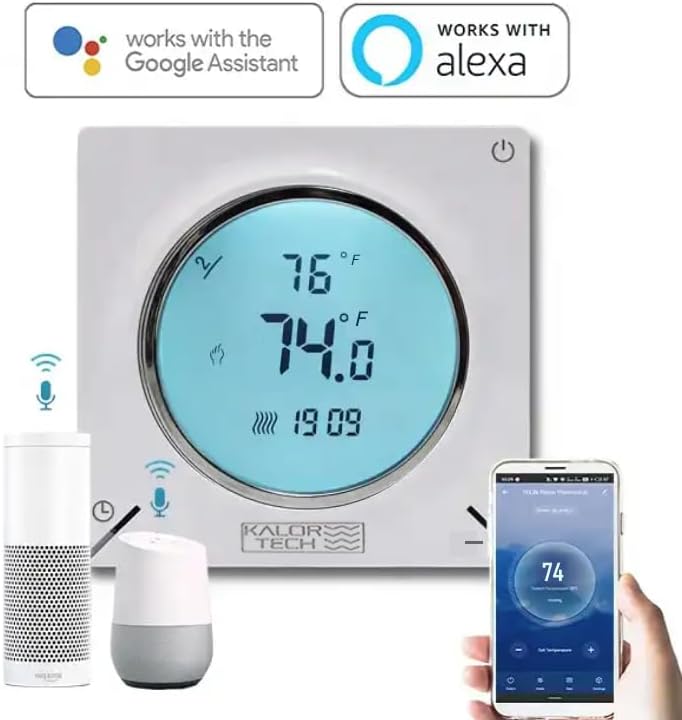
Image 5.2: The thermostat integrated with Google Assistant and Alexa devices, demonstrating app control via a smartphone.
5.3. Kawalan Suara (Alexa / Google Home)
Integrate your thermostat with Amazon Alexa or Google Home for convenient voice control.
- Pautkan Akaun: In your Alexa or Google Home app, enable the "Smart Life" or "Tuya Smart" skill/action. Link your Smart Life/Tuya account to your voice assistant account.
- Cari Peranti: Minta pembantu suara anda untuk "Temui peranti" atau mulakan penemuan secara manual dalam aplikasi.
- Perintah Suara: Once discovered, you can use commands such as:
- "Alexa, tetapkan [Nama Termostat] kepada 72 darjah."
- "Hey Google, what's the temperature in [Room Name]?"
- "Alexa, hidupkan [Nama Termostat]."
- "Hey Google, lower the temperature in [Room Name] by 2 degrees."
6. Penyelenggaraan
The KALOR TECH Smart Thermostat requires minimal maintenance to ensure optimal performance.
- Pembersihan: Lap paparan termostat dan casing dengan lembut, damp cloth. Do not use abrasive cleaners, solvents, or spray cleaners directly on the unit.
- Berhabuk: Periodically dust the vents on the thermostat to prevent accumulation that could affect temperature sensing.
- Kemas Kini Perisian: Ensure your Smart Life/Tuya App is up to date to receive the latest features and performance improvements. Firmware updates for the thermostat may also be pushed through the app.
7. Penyelesaian masalah
Jika anda menghadapi masalah dengan termostat anda, rujuk masalah dan penyelesaian biasa berikut:
| Masalah | Kemungkinan Punca | Penyelesaian |
|---|---|---|
| Termostat tidak dihidupkan. | No power from circuit breaker; incorrect wiring. | Check circuit breaker and ensure it is ON. Verify wiring connections are secure and correct (120-240V). |
| Tidak dapat menyambung ke Wi-Fi. | Incorrect Wi-Fi password; 5 GHz network; thermostat not in pairing mode; weak signal. | Ensure correct 2.4 MHz Wi-Fi network and password. Put thermostat into pairing mode (blinking Wi-Fi icon). Move thermostat closer to router if signal is weak. |
| Bacaan suhu nampaknya tidak tepat. | Sensor obstruction; calibration needed. | Ensure no objects are blocking the thermostat's vents. Check the app for a temperature calibration setting (offset adjustment) and adjust if available. |
| Display goes dark quickly. | Default display timeout setting. | This is a normal power-saving feature. The display will illuminate when touched or interacted with. There may be a setting in the app to adjust display brightness or timeout, if available. |
| Kawalan suara tidak berfungsi. | Account not linked; device not discovered; incorrect commands. | Ensure Smart Life/Tuya skill/action is enabled and linked in your Alexa/Google Home app. Ask voice assistant to "Discover devices." Use correct voice commands as listed in section 5.3. |
8. Spesifikasi
| Jenama | KALOR TECH |
| Nama Model | AC829F |
| Voltage | 120-240V |
| Sumber Kuasa | Elektrik Bertali |
| Teknologi Ketersambungan | Hard-wired, Wireless (Wi-Fi 2.4 MHz) |
| Jenis Pengawal | Hand Control, IFTTT, Google Assistant, Amazon Alexa |
| Jenis Paparan | LCD |
| Jenis Kawalan Suhu | Heating in Fahrenheit/Celsius |
| Jenis Pemasangan | Lekap di dinding |
| Berat Barang | 0.5 paun (lebih kurang 8 auns) |
| warna | putih |
| Pengeluar | Dorado Services, LLC |
9. Waranti dan Sokongan
For warranty information and technical support, please contact the manufacturer, Dorado Services, LLC, or refer to the product's official webtapak. Simpan resit pembelian anda sebagai bukti pembelian.
Nota: Tiada video produk rasmi daripada penjual tersedia untuk dibenamkan dalam manual ini.
Ask a question about this manual
Ask about setup, troubleshooting, compatibility, parts, safety, or missing instructions. Manuals+ will review the question and use this page’s manual context to help answer it.