
1. Pengenalan
Thank you for choosing the Huepar TL25 Digital Level Ruler. This precision instrument is designed for accurate angle and level measurements in various applications. It combines traditional spirit levels with a digital display for enhanced versatility and readability. Please read this manual thoroughly before operating the device to ensure safe and correct usage.
2. Maklumat Keselamatan
- Sentiasa kendalikan peranti dengan berhati-hati bagi mengelakkan kerosakan.
- Jangan dedahkan peranti kepada suhu yang melampau, lembapan atau cahaya matahari langsung untuk tempoh yang lama.
- Keep the device away from strong magnetic fields, which may affect its accuracy.
- Jangan cuba membuka atau mengubah suai peranti. Pembaikan hendaklah hanya dilakukan oleh kakitangan yang diberi kuasa.
- Buang bateri mengikut peraturan tempatan.
3. Produk Lebihview
The Huepar TL25 Digital Level Ruler features a robust design with both digital and traditional bubble levels. Key components include a backlit LED display, control buttons, horizontal and vertical spirit levels, a magnetic base, and a V-groove for measuring cylindrical objects.
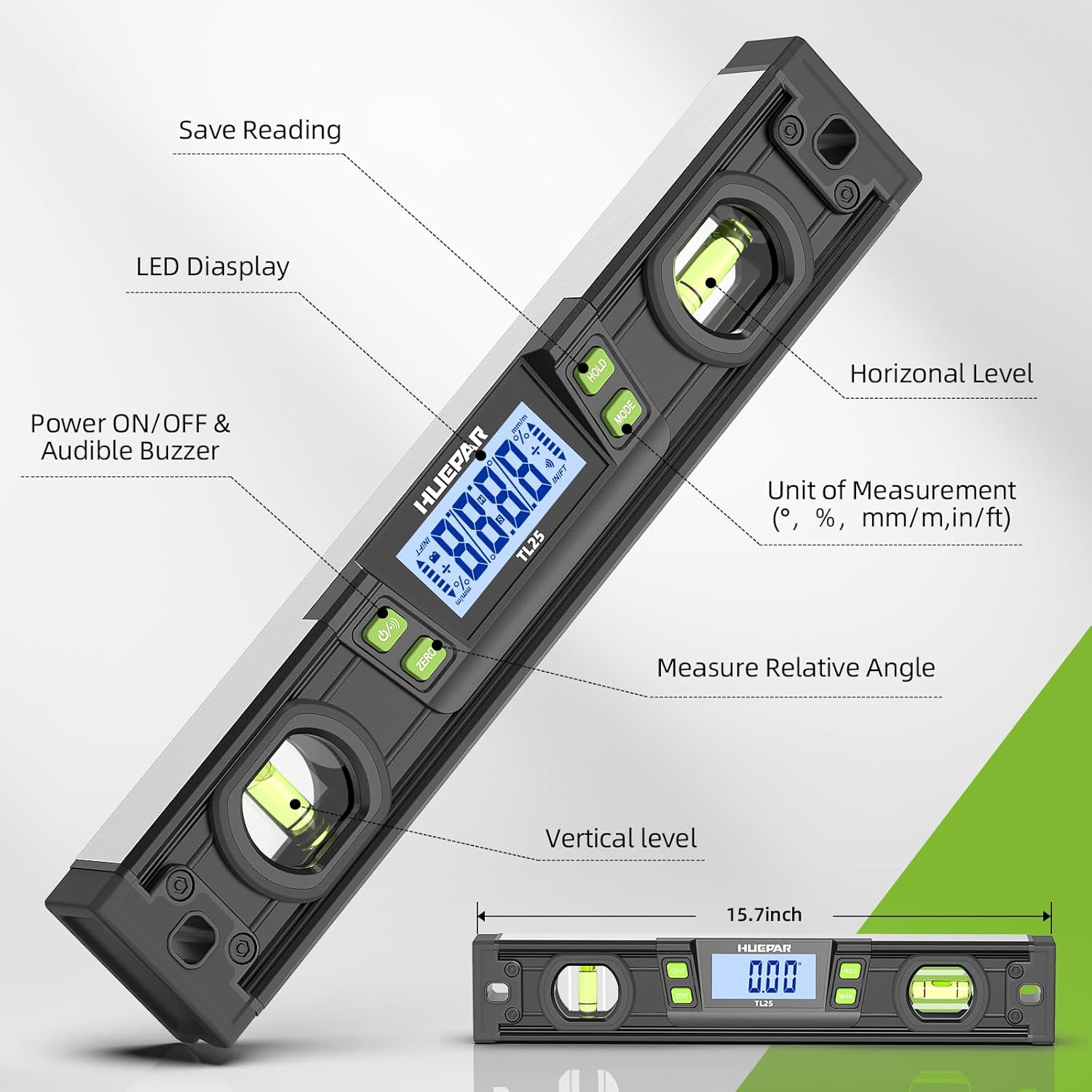
Rajah 3.1: Berakhirview of the Huepar TL25 Digital Level Ruler with labeled components. This image highlights the LED display, power button, audible buzzer, horizontal and vertical spirit levels, unit selection, relative angle measurement button, and the save reading (HOLD) button. The overall length is approximately 15.7 inches.
Ciri-ciri Utama:
- Paparan LED Digital: Provides clear, precise angle readings.
- Dual Spirit Levels: For traditional horizontal and vertical leveling.
- Pangkalan Magnetik: Allows for secure attachment to metal surfaces.
- Alur V: Facilitates stable placement on cylindrical pipes and conduits.
- Unit Pengukuran Berbilang: Darjah (°), Peratustage (%), mm/m, and in/ft.
- Fungsi Tahan: Membekukan bacaan semasa pada paparan.
- Relative Angle Measurement: Allows setting a new zero reference.
- Penunjuk Boleh Didengar: Alerts when the device reaches 0° or 90°.
- Automatic Display Reversal: Display automatically flips when the level is inverted.
4. Persediaan
4.1 Pemasangan Bateri
- Cari penutup petak bateri pada peranti.
- Open the cover and insert the required button cell batteries, ensuring correct polarity (+/-).
- Tutup penutup petak bateri dengan selamat.
4.2 Hidupkan/Mati Kuasa
Tekan ke HIDUP/MATI button to power on the device. Press and hold the HIDUP/MATI button to power off the device. The device may also feature an auto-off function to conserve battery life after a period of inactivity.
5. Operasi
5.1 Ketepatan Pengukuran
The TL25 Digital Level Ruler offers high accuracy for precise measurements. The resolution is accurate to 0.05°.

Rajah 5.1: The digital level ruler displaying its accuracy. It shows an accuracy of ±0.1° at 0° and 90°, and ±0.2° at other angles.
5.2 Unit of Measurement Selection
Tekan ke MODE button to cycle through the available measurement units: Degrees (°), Percentage (%), mm/m, and in/ft.

Rajah 5.2: The digital level ruler demonstrating its four unit measurement selections: Degree (°), Percentage (%), mm/m, and in/ft.
5.3 Relative Angle Measurement (ZERO Function)
To measure a relative angle, place the level on a reference surface and press the SIFAR button. The display will show 0.00°, establishing this as your new reference point. Any subsequent movement will show the angle relative to this set zero.

Rajah 5.3: Illustration of relative angle measurement. The level is first set to 0° on a 30° surface, then moved to a 40° surface, displaying a relative angle of 10°.
5.4 Fungsi Tahan
Tekan ke TAHAN button to freeze the current reading on the display. This is useful for taking measurements in hard-to-see areas. Press TAHAN again to release the reading and resume live measurement.
5.5 Automatic Display Reversal
The digital display automatically reverses its orientation when the level is turned upside down, ensuring readability from any position.

Rajah 5.4: The digital level ruler demonstrating the HOLD function and automatic display reversal when the tool is inverted.
5.6 Bright LED Display & Audible Indicator
The device features a bright LED display for clear visibility in various lighting conditions. An audible indicator will sound when the level reaches a perfectly horizontal (0°) or vertical (90°) position, providing an additional cue for precise alignment.

Rajah 5.5: The digital level ruler showcasing its bright LED display and the icon for the audible indicator.
5.7 Tapak Magnet
The strong magnets integrated into the base of the level allow it to be securely attached to metal surfaces, freeing your hands for other tasks.
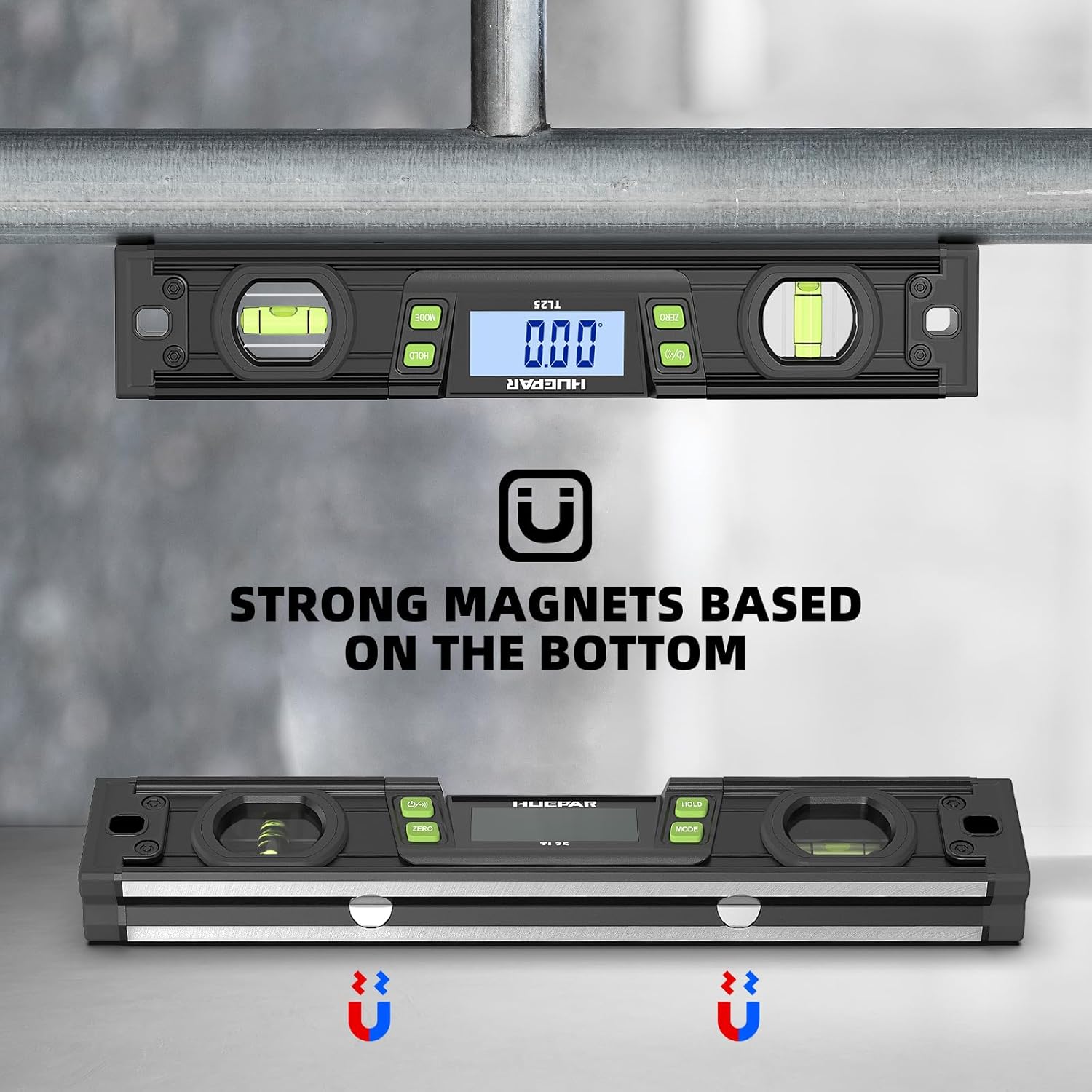
Rajah 5.6: The digital level ruler demonstrating its strong magnetic base, allowing it to adhere to metal structures both horizontally and vertically.
5.8 V-Groove for Cylindrical Objects
The V-groove design on the measuring edge allows for stable placement and accurate measurement on cylindrical objects such as pipes or conduits.

Rajah 5.7: The digital level ruler positioned on a cylindrical object, utilizing its V-groove for stable and accurate measurement.
6. Penyelenggaraan
- Pembersihan: Lap peranti dengan kain lembut dan kering. Jangan gunakan pembersih atau pelarut yang melelas.
- Storan: Store the device in its protective case in a dry, cool place when not in use. Remove batteries if storing for extended periods to prevent leakage.
- Penentukuran: If you suspect accuracy issues, refer to the calibration instructions (if provided separately) or contact customer support.
7. Penyelesaian masalah
7.1 Paparan Tidak Berfungsi
- Periksa sama ada bateri dipasang dengan betul dan mempunyai cas yang mencukupi. Gantikan jika perlu.
- Pastikan peranti dihidupkan.
7.2 Bacaan Tidak Tepat
- Ensure the measuring surface is clean and free of debris.
- Verify the device is placed stably on the surface.
- Avoid strong magnetic fields during measurement.
- Perform a calibration if available (refer to specific calibration instructions if provided with your product).
7.3 Audible Indicator Not Sounding
- Ensure the device is at 0° or 90°.
- Periksa tahap bateri.
8. Spesifikasi
| Ciri | Spesifikasi |
|---|---|
| Jenama | Huepar |
| Model | TL25 |
| bahan | Logam, Plastik |
| warna | Hitam |
| Gaya | Magnet |
| Mod Operasi | Automatik |
| Nama Jenis Item | Tahap |
| Komponen yang Disertakan | TINGKAT |
| Kiraan Unit | 1.0 Kiraan |
9. Waranti dan Sokongan
Huepar products are manufactured to high-quality standards. For warranty information, technical support, or service inquiries, please refer to the warranty card included with your product or visit the official Huepar webtapak. Sila simpan bukti pembelian anda untuk tuntutan waranti.