
1. Pengenalan dan Lebihview
This manual provides essential instructions for the safe and efficient use of your Maxcom MM135L Basic Mobile Phone. The MM135L is designed for straightforward communication, featuring a user-friendly interface, large keys, and a 1.77-inch screen. It supports 2G networks and includes dual SIM capability, an SOS button for emergencies, and convenient USB-C charging. Please read this manual thoroughly before operating the device.
2. Kandungan Pakej
Sahkan bahawa semua item terdapat dalam pakej:
- Maxcom MM135L Mobile Phone
- Battery (Lithium-Ion, 600 mAh)
- Kabel USB
- Ejector Dulang SIM
- Manual Pengguna (dokumen ini)
3. Reka Letak Peranti
Familiarize yourself with the physical components of your Maxcom MM135L phone.
Rajah 3.1: Belakang view of the Maxcom MM135L phone, showing the blue textured back cover, Maxcom logo, and speaker grille at the top.

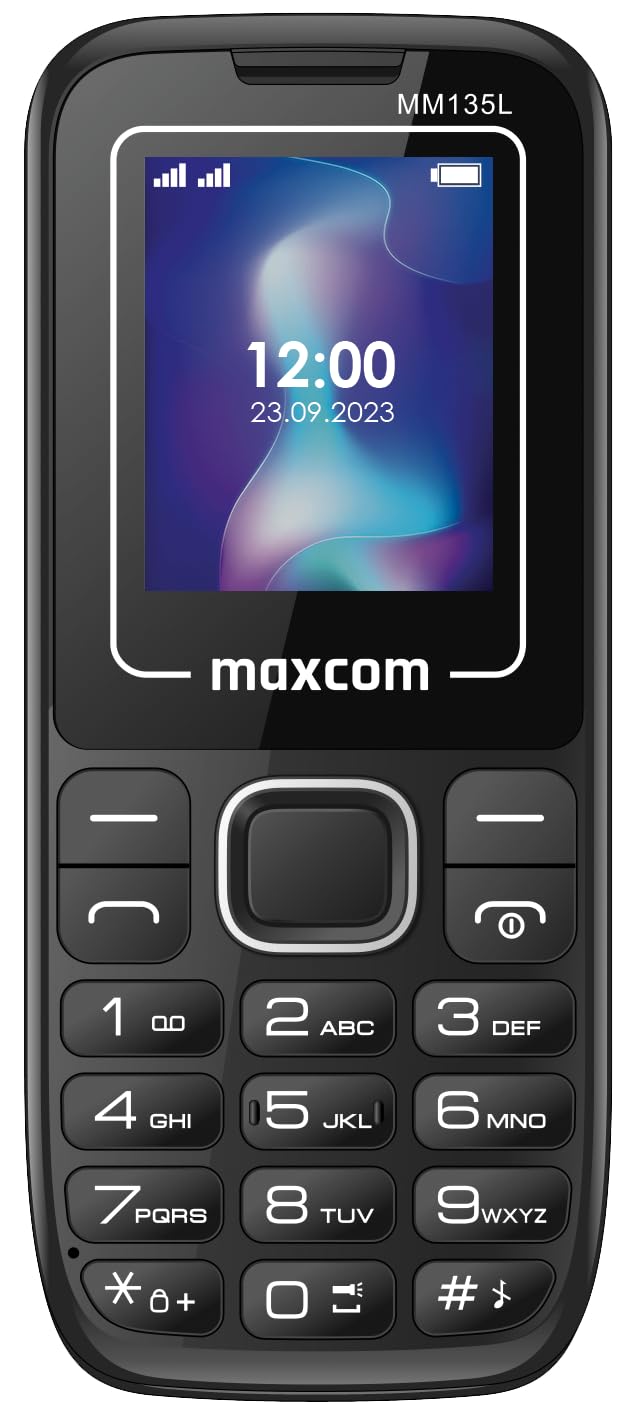
Rajah 3.2: Depan view of the Maxcom MM135L phone, displaying the screen, large numeric keypad, and call/end buttons.

Figure 3.3: Bottom edge of the phone, featuring the USB-C charging port and a 3.5mm headphone jack.

Figure 3.4: Top edge of the phone, highlighting the integrated flashlight.
Komponen Utama:
- Skrin Paparan: 1.77-inch LCD for clear text and call information.
- Papan kekunci angka: Large, tactile buttons for easy dialing and texting.
- Call/End Buttons: Dedicated buttons for managing calls.
- Kekunci Navigasi: Untuk navigasi menu.
- Butang SOS: Located on the rear for emergency calls (refer to Figure 3.1).
- Lampu suluh: Integrated at the top of the device (refer to Figure 3.4).
- Port USB-C: For charging the device (refer to Figure 3.3).
- Jack fon kepala: 3.5mm port for audio accessories (refer to Figure 3.3).
4. Persediaan
4.1 Pemasangan Bateri
- Tanggalkan penutup belakang telefon dengan berhati-hati.
- Sejajarkan sentuhan bateri dengan terminal di dalam petak bateri.
- Tekan bateri dengan lembut ke tempatnya.
- Pasang semula penutup belakang, pastikan ia berbunyi klik dengan selamat.
4.2 Pemasangan Kad SIM
The Maxcom MM135L supports dual SIM cards.
- With the phone powered off and the back cover removed, locate the SIM card slots.
- Insert your SIM card(s) into the designated slot(s) with the gold contacts facing down, following the orientation indicated on the phone.
- Pastikan kad SIM diletakkan sepenuhnya.
- Replace the back cover and battery.
4.3 Mengecas Telefon
The phone uses a USB-C port for charging.
- Connect the USB-C cable to the charging port at the bottom of the phone (refer to Figure 3.3).
- Sambungkan hujung kabel USB yang satu lagi ke penyesuai kuasa USB yang serasi atau port USB komputer.
- Penunjuk bateri pada skrin akan menunjukkan status pengecasan.
- Putuskan sambungan pengecas setelah bateri dicas sepenuhnya.
Nota: For optimal battery life, fully charge the phone before first use.
5. Arahan Operasi
5.1 Hidupkan/Mati Kuasa
- Untuk Menghidupkan: Tekan dan tahan butang Call/Power butang sehingga skrin menyala.
- Untuk Mematikan: Tekan dan tahan butang Tamat/Kuasa button until the power off options appear, then confirm.
5.2 Membuat dan Menerima Panggilan
- Untuk Membuat Panggilan: Masukkan nombor telefon menggunakan pad kekunci dan tekan butang Panggil butang.
- Untuk Menjawab Panggilan: Tekan ke Panggil butang apabila telefon berdering.
- Untuk Menamatkan Panggilan: Tekan ke tamat butang.
5.3 Sending and Receiving Messages
- Navigate to the "Messages" menu using the navigation keys.
- Select "Create New Message" to compose an SMS.
- Masukkan nombor penerima dan mesej anda, kemudian hantar.
- Received messages will appear in the "Inbox".
5.4 Using the SOS Button
The SOS button is located on the rear of the phone. It is designed for emergency situations.
- Untuk Mengaktifkan: Press and hold the SOS button for several seconds.
- The phone will automatically sound an alarm and send emergency SMS messages to pre-set contacts.
- It will then automatically call the saved emergency contacts in a loop until a call is answered.
- Ensure emergency contacts are properly configured in the phone settings.
5.5 Fungsi Lampu Suluh
The built-in flashlight can be activated for convenience.
- Refer to the phone's specific settings or a dedicated side button for flashlight activation. Typically, a long press on a designated key or a side switch controls it.
6. Penyelenggaraan
- Pembersihan: Gunakan kain lembut dan kering untuk membersihkan permukaan telefon. Elakkan pencuci cecair.
- Penjagaan Bateri: Jangan dedahkan bateri kepada suhu yang melampau. Elakkan daripada kerap mencas bateri sepenuhnya.
- Storan: Simpan telefon di tempat yang sejuk dan kering apabila tidak digunakan untuk tempoh yang lama.
- Tahan Air: Telefon ini tidak kalis air. Elakkan pendedahan kepada cecair.
7. Penyelesaian masalah
| Masalah | Penyelesaian yang Mungkin |
|---|---|
| Telefon tidak dihidupkan. | Pastikan bateri dipasang dan dicas dengan betul. Sambungkan pengecas dan cuba lagi. |
| Tidak boleh membuat atau menerima panggilan. | Periksa sama ada kad SIM telah dimasukkan dan diaktifkan dengan betul. Sahkan kekuatan isyarat rangkaian. Hubungi pembekal khidmat anda jika masalah berterusan. |
| Bateri tidak dicas. | Ensure the USB-C cable and charger are securely connected and functional. Try a different charging cable or adapter. |
| Butang SOS tidak berfungsi. | Verify that emergency contacts are saved in the phone's settings. Ensure the phone has network coverage. |
| Kualiti panggilan yang lemah. | Move to an area with better network reception. Check the speaker and microphone for obstructions. |
8. Spesifikasi
| Ciri | Perincian |
|---|---|
| Nama Model | MM135L |
| Saiz Skrin | 1.77 Inci |
| Jenis Paparan | LCD |
| Resolusi | 128 x 160 |
| Teknologi Selular | 2G |
| Sokongan SIM | Dual SIM |
| Jenis Bateri | Litium-Ion |
| Kapasiti Bateri | 600 mAh |
| Port Pengecasan | USB-C |
| Dimensi (L x W x H) | 7 x 14 x 3.5 cm |
| Berat badan | 60 g |
| Ciri Khas | SOS Button, Flashlight, Expandable Memory, Fast Charging Support |
9. Waranti dan Sokongan
For warranty information, technical support, or service inquiries, please refer to the warranty card included with your product or contact Maxcom customer service directly. Keep your proof of purchase for warranty claims.