
1. Pengenalan
This manual provides detailed instructions for the setup, operation, and maintenance of your ZealSound Gaming USB Microphone Bundle, including models a68s-us and k66w-us. These microphones are designed for high-quality audio capture for gaming, streaming, podcasting, and various communication needs on computers, gaming consoles, and mobile devices.
2. Kandungan Pakej
Sila sahkan bahawa semua item yang disenaraikan di bawah disertakan dalam pakej anda:
- 1 x ZealSound a68s-us RGB Streaming Microphone
- 1 x Collapsible Tripod Microphone Stand (for a68s-us)
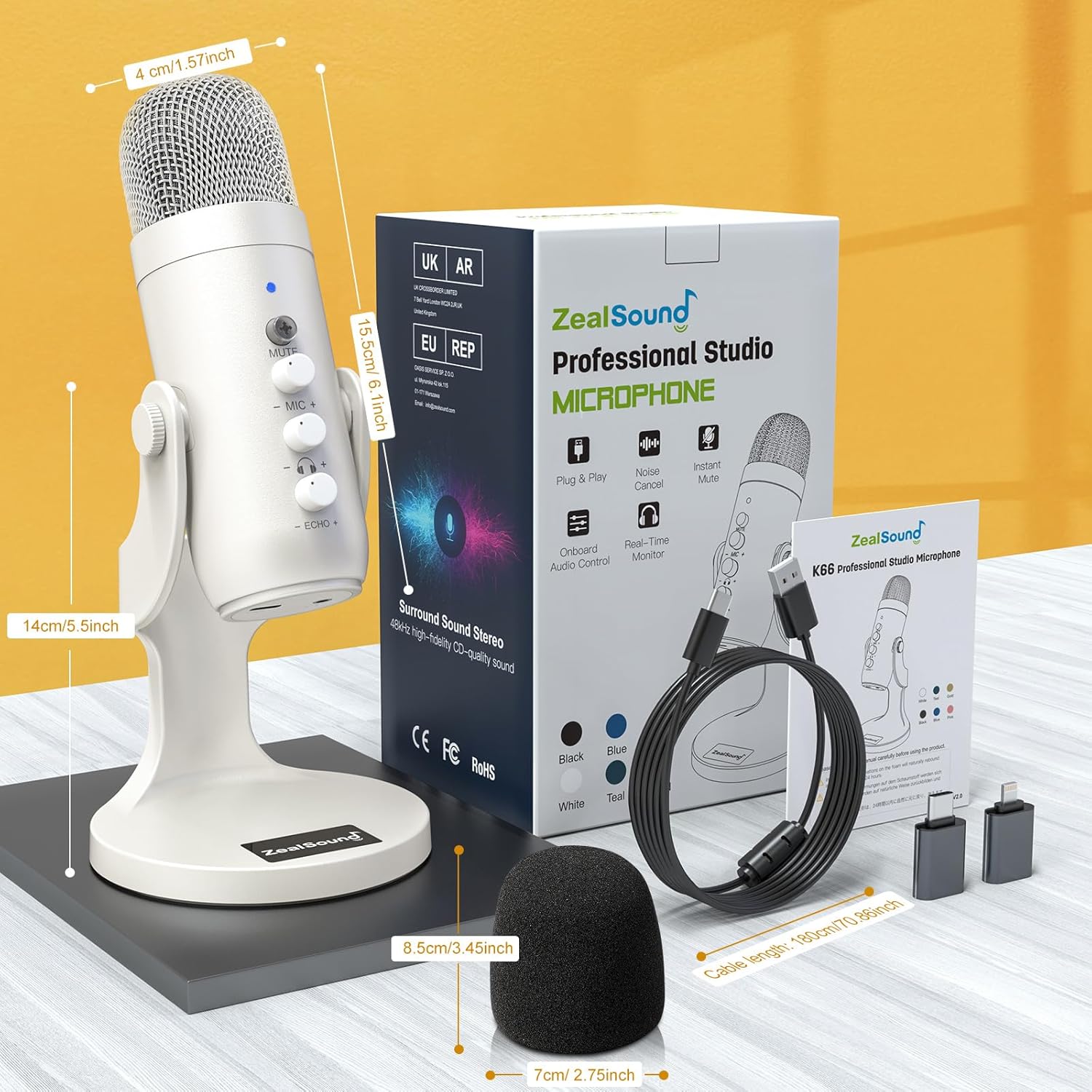
- 1 x ZealSound k66w-us Professional-Grade White Microphone
- 2 x USB Audio Cable (78.7 inches / 2m)
- 2 x USB to Lightning Adapter (for iPhone and iPad)
- 2 x USB to Type-C Adapter (for MacBook and other Type-C devices)
- 2 x Detachable Microphone Pop Shield Screen
- 1 x Mic Clamp (max 1.8 inches)
- 1 x Adjustable Boom Arm Stand (30.8 inches)
- 2 x Manual Pengguna

The a68s-us kit includes the RGB microphone, boom arm, pop filter, USB cable, and various adapters.

The k66w-us kit includes the white microphone, tripod stand, USB cable, and various adapters.
3. Produk Lebihview
3.1 Ciri-ciri Utama
- Dynamic Multi-Color Gradients (a68s-us only): Features dynamic RGB lighting with seven rainbow-inspired colors that transition through automatic gradient modes. Short press mute for red glow, long press to turn off lights.
- Pasang dan Main: Compatible with computers (Windows, Mac OS), laptops, PCs, PS4, PS5, iPhone, Type C phones, iPad, and Android tablets using provided adapters. No additional setup required.
- Kualiti Bunyi Hebat: Delivers crystal-clear, well-balanced audio across a broad frequency response. Handles high sound pressure levels without distortion. Cardioid polar pattern minimizes background noise. Built-in noise-canceling chipset ensures pristine audio capture.
- Pemantauan Langsung: Offers direct, latency-free monitoring via a 3.5mm headphone jack. Adjustable monitoring level for optimal volume and error-free recording.
3.2 Microphone Controls (k66w-us example)

The k66w-us microphone features dedicated controls for easy audio management.
- Butang Bisukan: Press to instantly mute or unmute the microphone. A short press typically toggles mute, while a long press may activate special features like RGB light control (a68s-us) or noise cancellation (k66w-us).
- Mic Gain Knob: Adjusts the microphone's input sensitivity.
- Tombol Monitor: Controls the volume of the headphone output for live monitoring.
- Tombol Gema: Adjusts the echo effect level.
4. Persediaan
4.1 Menyambung ke Peranti
- Connect the provided USB Audio Cable to the USB-C port on the microphone.
- Connect the other end of the USB Audio Cable to an available USB port on your computer, PS4/PS5, or other compatible device.
- For mobile devices (iPhone, iPad, Android phones/tablets), use the appropriate USB to Lightning or USB to Type-C adapter provided.
- The microphone is plug-and-play; your device should automatically recognize it without needing additional drivers.

The a68s-us microphone offers broad compatibility for various platforms.

The k66w-us microphone offers broad compatibility for various platforms.
4.2 Boom Arm Stand Installation (for a68s-us)
- Attach the Table Mount Clamp to the edge of your desk or table, tightening the screw until secure.
- Insert the base of the Adjustable Boom Arm Stand into the clamp.
- Screw the microphone onto the threaded end of the boom arm.
- Attach the Pop Filter to the boom arm or microphone as desired.
- Adjust the boom arm to your preferred height and position.
The boom arm allows for versatile placement and adjustment.
4.3 Tripod Stand Installation (for k66w-us)
- Unfold the legs of the Collapsible Tripod Microphone Stand.
- Screw the k66w-us microphone onto the threaded top of the tripod stand.
- Place the tripod on a stable, flat surface.
4.4 Video Guide: ZealSound K66-S Condenser Podcast Microphone with Boom Arm
Video 4.1: This official ZealSound video demonstrates the setup and features of the K66-S condenser microphone with its boom arm, including installation steps and control functions.
5. Arahan Operasi
5.1 Operasi Asas
- Hidupkan kuasa: The microphone powers on automatically when connected to a powered USB port.
- Redam: Press the Mute button (usually indicated by an LED) to instantly mute or unmute the microphone. A short press typically toggles mute, while a long press may activate special features like RGB light control (a68s-us) or noise cancellation (k66w-us).
- Adjusting Mic Gain: Use the Mic Gain knob to increase or decrease the microphone's sensitivity. Adjust this to prevent audio clipping or to boost a quiet signal.
- Adjusting Monitor Volume: If using the 3.5mm headphone jack for live monitoring, use the Monitor knob to control the volume of your headphones.
- Adding Echo: Use the Echo knob to add or adjust the echo effect level.
5.2 Noise Cancellation (k66w-us)
The k66w-us microphone features a built-in noise-canceling chipset. To activate or deactivate noise cancellation, long press the Mute button until the indicator light changes (e.g., turns blue for noise cancel mode, as shown in product images).
5.3 RGB Lighting Control (a68s-us)
The a68s-us microphone features dynamic RGB lighting. The lights automatically transition through gradient color modes when active. To turn off the lights, long press the Mute button.
6. Penyelenggaraan
- Keep the microphone clean by wiping it with a soft, dry cloth.
- Avoid exposing the microphone to moisture, extreme temperatures, or direct sunlight.
- Simpan mikrofon di tempat yang selamat apabila tidak digunakan untuk mengelakkan kerosakan.
7. Penyelesaian masalah
- Tiada Bunyi/Mikrofon Tidak Dikesan:
- Pastikan kabel USB disambungkan dengan selamat ke mikrofon dan peranti anda.
- Cuba port USB lain pada peranti anda.
- Verify that the microphone is selected as the input device in your operating system's sound settings or your recording/streaming software.
- If using adapters, ensure they are correctly connected and functional.
- Distorted/Low Volume Sound:
- Adjust the Mic Gain knob on the microphone.
- Check the input level settings in your device's sound control panel or software.
- Ensure you are speaking directly into the front of the microphone (where the ZealSound logo is typically located).
- If using a pop filter, ensure it is correctly positioned to reduce plosives without obstructing sound.
- Echo/Feedback:
- Adjust the Echo knob on the microphone.
- Reduce speaker volume or move speakers further away from the microphone.
- Ensure headphones are used for monitoring to prevent feedback loops.
- RGB Lights Not Working (a68s-us):
- Pastikan mikrofon dihidupkan.
- Long press the Mute button to toggle the RGB lights on/off.
8. Spesifikasi
| Ciri | Spesifikasi |
|---|---|
| Jenama | ZealSound |
| Model | a68s-us and k66w-us |
| Platform Perkakasan | PC, Tablet |
| Bilangan Saluran | 1 |
| Penggunaan yang Disyorkan | Gaming, Streaming, Video Recording |
| Teknologi Ketersambungan | USB |
| Jenis Penyambung | Bicu 3.5 mm, USB |
| Ciri Khas | Berdiri, Kawalan Kelantangan |
| Peranti Serasi | Personal Computer, Laptop, Tablet, Gaming Console |
| Corak Kutub | Tidak arah (Cardioid) |
| Faktor Bentuk Mikrofon | pegang tangan |
| Sumber Kuasa | Elektrik Bertali |
9. Waranti dan Sokongan
For warranty information and technical support, please refer to the contact details provided with your product packaging or visit the official ZealSound website. Free technical support is available.