
pengenalan
Thank you for choosing the Hecate G3m Pro Wireless Bluetooth Gaming Mouse. This manual provides detailed instructions for setting up, operating, and maintaining your new gaming mouse. Designed for performance and versatility, the G3m Pro offers three-mode connectivity, a high-precision sensor, and a lightweight, silent design to enhance your gaming experience.
Produk Selesaiview
The Hecate G3m Pro features a robust design with multiple buttons and connectivity options. Familiarize yourself with the mouse components before use.
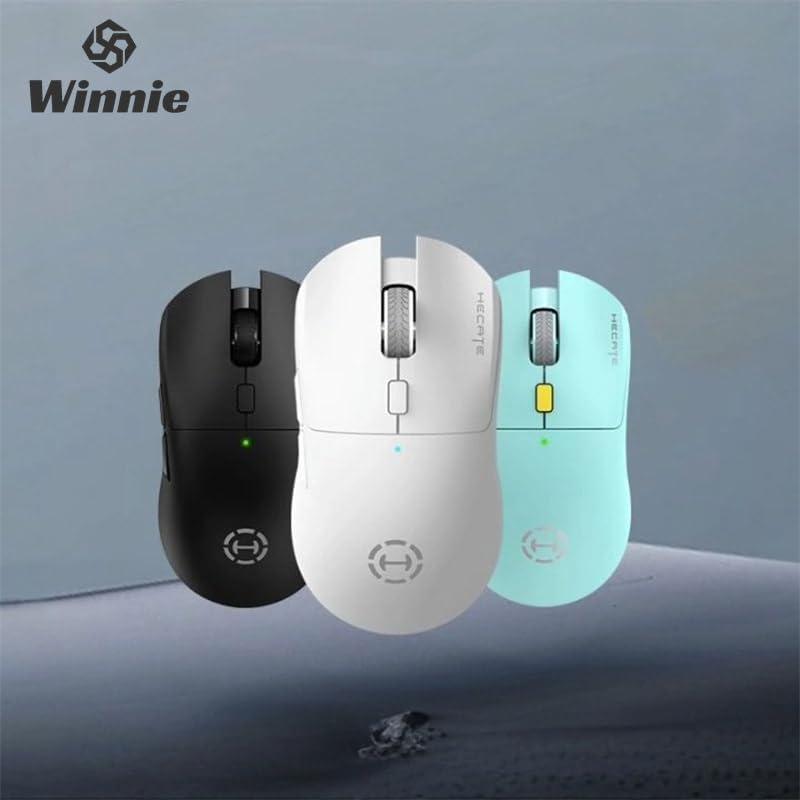
Figure 1: Hecate G3m Pro Wireless Gaming Mouse (Black)
- Butang Klik Kiri/Kanan: Fungsi tetikus standard.
- Roda Tatal: For scrolling and middle-click functionality.
- Butang Kitaran DPI: Adjusts the mouse sensitivity (DPI) on the fly.
- Butang Sisi: Programmable for various in-game actions or navigation.
- Connectivity Mode Switch: Located on the underside, allows switching between 2.4GHz, Bluetooth, and Wired modes.
- Port USB-C: Untuk sambungan berwayar dan pengecasan.
Persediaan
Follow these steps to set up your Hecate G3m Pro mouse.
1. Mengecas Tetikus
Before first use, ensure the mouse is fully charged. Connect the provided USB-C cable to the mouse's USB-C port and the other end to a USB power source (e.g., computer, wall adapter). The LED indicator will show charging status.
2. Connecting via 2.4GHz Wireless (USB Dongle)
- Locate the USB 2.4GHz receiver (dongle) usually stored in a compartment on the underside of the mouse.
- Palamkan penerima USB ke dalam port USB yang tersedia pada komputer anda.
- Switch the connectivity mode selector on the mouse to the '2.4G' position.
- The mouse should automatically connect to your computer. The LED indicator may flash briefly and then become solid to indicate a successful connection.
3. Menyambung melalui Bluetooth
- Switch the connectivity mode selector on the mouse to the 'BT' (Bluetooth) position.
- Pada komputer atau peranti anda, pergi ke tetapan Bluetooth dan dayakan Bluetooth.
- The mouse LED indicator will start flashing, indicating it is in pairing mode.
- Select 'Hecate G3m Pro' from the list of available Bluetooth devices on your computer/device to pair.
- Setelah dipasangkan, penunjuk LED akan menjadi pekat.
4. Menyambung melalui Mod Berwayar
- Connect the provided USB-C cable to the mouse's USB-C port.
- Sambungkan hujung kabel USB-C yang satu lagi ke port USB yang tersedia pada komputer anda.
- Switch the connectivity mode selector on the mouse to the 'Wired' position.
- Tetikus akan berfungsi sebagai tetikus berwayar dan juga akan mengecas bateri dalamannya.
Arahan Operasi
Understand the functions of your mouse for optimal use.
Pelarasan DPI
Press the DPI cycle button (usually located behind the scroll wheel) to cycle through different DPI settings. Each press will change the sensitivity, often indicated by a change in the LED color or a specific number of flashes. The mouse supports up to 26000 DPI.
Penukaran Mod
Use the switch on the underside of the mouse to select your preferred connection mode: 2.4GHz, Bluetooth, or Wired. Switch modes according to your device and usage scenario.
Menyesuaikan Butang
For advanced customization of buttons and macros, it is recommended to download the official Hecate software (if available) from the manufacturer's website. This software allows you to reassign button functions, create profiles, and fine-tune performance settings.
Penyelenggaraan
Penyelenggaraan yang betul memastikan ketahanan dan prestasi tetikus anda.
Pembersihan
- Gunakan kain lembut dan kering untuk mengelap permukaan tetikus.
- Untuk kotoran degil, sedikit dampen kain dengan air atau larutan pembersih lembut. Elakkan bahan kimia yang keras.
- Jangan biarkan cecair memasuki komponen dalaman tetikus.
- Clean the optical sensor on the underside periodically with a cotton swab to ensure accurate tracking.
Penjagaan Bateri
- Elakkan menyahcas sepenuhnya bateri dengan kerap.
- Cas tetikus apabila penunjuk bateri menunjukkan kuasa rendah.
- If storing the mouse for an extended period, charge it to about 50% and store it in a cool, dry place.
Penyimpanan
Store the mouse in a clean, dry environment away from extreme temperatures and direct sunlight. Keep it away from dust and moisture.
Menyelesaikan masalah
If you encounter issues with your Hecate G3m Pro mouse, refer to the following common solutions.
Tetikus Tidak Membalas
- Periksa Bateri: Ensure the mouse is charged. Connect it via USB-C cable to charge.
- Semak Mod Sambungan: Verify that the mode switch on the underside of the mouse is set to the correct mode (2.4G, BT, or Wired) for your connection type.
- Sambungan 2.4GHz: Pastikan penerima USB dipasang dengan kukuh ke port USB yang berfungsi. Cuba port USB yang lain.
- Sambungan Bluetooth: Re-pair the mouse with your device. Go to Bluetooth settings, remove the mouse, and then add it again. Ensure your device's Bluetooth is enabled.
- Sambungan Berwayar: Ensure the USB-C cable is securely connected to both the mouse and the computer. Try a different USB port or cable.
Inconsistent Tracking or Cursor Movement
- Penderia Bersih: Bersihkan sensor optik di bahagian bawah tetikus.
- Mouse Pad: Use the mouse on a clean, uniform surface or a high-quality mouse pad. Avoid reflective or glass surfaces.
- Tetapan DPI: Adjust the DPI setting using the DPI cycle button to find a comfortable sensitivity.
Butang Tidak Berfungsi
- Software Interference: If using custom software, try resetting button assignments to default.
- Uji pada Peranti Lain: Connect the mouse to another computer to determine if the issue is with the mouse or the original device's settings.
Spesifikasi
Detailed technical specifications for the Hecate G3m Pro Wireless Bluetooth Gaming Mouse.
| Ciri | Penerangan |
|---|---|
| Model | G3m Pro |
| Jenama | Hecate |
| Teknologi Ketersambungan | 2.4GHz Wireless, Bluetooth, Wired (USB-C) |
| Pengesanan Pergerakan | Optical (Paw3395 Sensor) |
| DPI (Titik Seinci) | Sehingga 26000 DPI |
| Pecutan | 50G |
| IPS (Inci Sesaat) | 600 |
| Bilangan Butang | 6 |
| Bilangan Penggelek | 1 (Roda Skrol) |
| Orientasi Tangan | Ambidextrous |
| Ciri Khas | Lightweight (Approx. 63g) |
| Jenis Kuasa | Bateri boleh dicas semula |
| Penggunaan yang Disyorkan | Permainan |
| Peranti Serasi | Personal Computer, Laptop, Game Console |
| Sistem Operasi | Linux, Windows XP (dan versi yang lebih baharu) |
Waranti dan Sokongan
Your Hecate G3m Pro Wireless Bluetooth Gaming Mouse comes with a warranty and dedicated support.
Maklumat Waranti
All products are covered by a Waranti 12 bulan dari tarikh pembelian. Waranti ini meliputi kecacatan pembuatan dan isu-isu yang timbul daripada penggunaan biasa.
Sokongan Pelanggan
If you encounter any problems with your product, such as defective or incorrect items, please do not hesitate to contact us. We are committed to providing prompt assistance and will respond to your inquiries within 24 hours. Please refer to your purchase documentation for specific contact details or visit the official Hecate support webtapak.