
SZSINOCAM B0CPXDFVRP
Szsinocam Wi-Fi Camera Outdoor/Indoor User Manual
Model: B0CPXDFVRP | Brand: SZSINOCAM
1. Pengenalan
This manual provides detailed instructions for the installation, operation, and maintenance of your Szsinocam Wi-Fi Camera. Designed for both outdoor and indoor surveillance, this camera offers advanced features to enhance your security and monitoring needs. Please read this manual thoroughly before using the product to ensure proper setup and optimal performance.

Figure 1: Szsinocam Wi-Fi Camera and Mobile Application Interface
2. Ciri-ciri Produk
The Szsinocam Wi-Fi Camera is equipped with a range of features designed for comprehensive surveillance:
- Dual Lens & Dual Screen Monitoring: Features two independent lenses allowing simultaneous monitoring of two different areas.
- Pengimejan Resolusi Tinggi: Merakam gambar yang jelas dan terperincitage with 4-megapixel resolution.
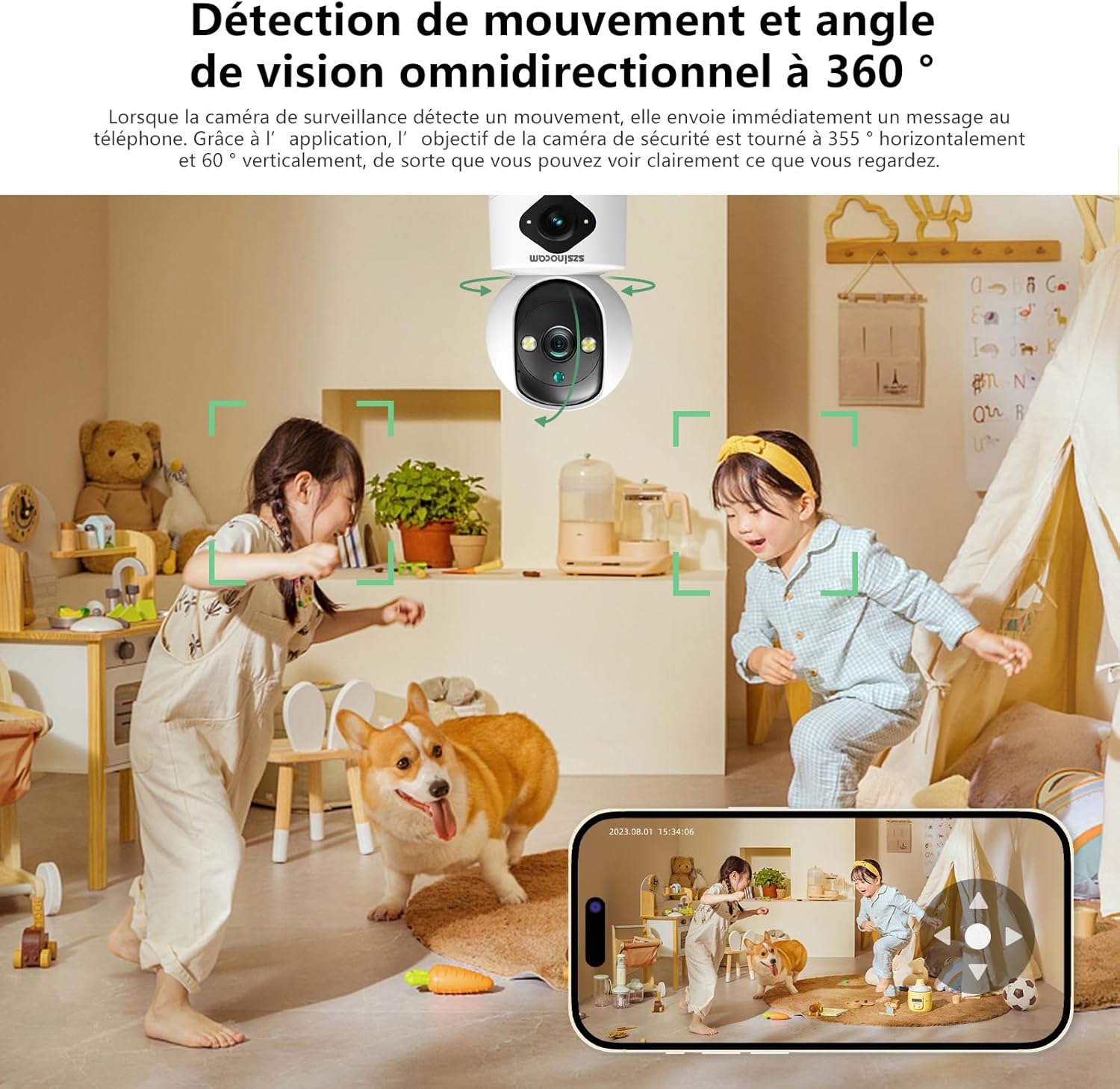
- Flexible Pan & Tilt: Offers a 355° horizontal rotation and 60° vertical tilt for extensive coverage.
- Zum Digital 6x: Allows for closer inspection of details within the monitored area.
- Three Night Vision Modes: Supports infrared, full-color, and intelligent night vision for clear viewdalam keadaan cahaya malap.
- Pengesanan Gerakan & Makluman: Automatically detects movement and sends instant notifications to your connected device.
- Audio Dua hala: Enables real-time communication through the camera's built-in microphone and speaker.
- Pelbagai Pilihan Storan: Supports both cloud storage and local storage via a Micro SD card (up to 256GB, sold separately).
- Pemasangan Serbaguna: Can be mounted on a wall, placed on a flat surface, or installed on the ceiling.

Figure 2: Dual Lens and Dual Screen Capability

Figure 3: High-Resolution 4MP Image Quality
Rajah 4: Tiga Mod Penglihatan Malam
3. Panduan Persediaan
3.1 Kandungan Pakej
Sebelum meneruskan, pastikan semua item terdapat dalam pakej:
- Szsinocam Wi-Fi Camera
- Penyesuai Kuasa
- Kabel USB
- Pendakap dan Skru Pemasangan
- Manual Pengguna (dokumen ini)
3.2 Menghidupkan Kamera
- Connect the USB cable to the camera's power port.
- Pasangkan hujung kabel USB yang satu lagi ke dalam penyesuai kuasa yang disediakan.
- Pasangkan penyesuai kuasa ke soket elektrik standard. Kamera akan dihidupkan dan memulakan urutan permulaannya.
3.3 Pemasangan Aplikasi Mudah Alih
Untuk mengawal dan view your camera, you need to install the dedicated mobile application:
- Scan the QR code provided on the camera packaging or in the quick start guide to download the official application. Alternatively, search for the application name (e.g., "OKAM PRO" or similar) in your device's app store (App Store for iOS, Google Play Store for Android).
- Pasang aplikasi pada telefon pintar atau tablet anda.
- Daftar akaun baharu atau log masuk jika anda sudah mempunyai akaun.
3.4 Berpasangan Kamera
Follow these steps to pair your camera with the mobile application:
- Ensure your mobile device is connected to a 2.4GHz Wi-Fi network. The camera supports both 2.4GHz and 5GHz Wi-Fi.
- Open the mobile application and select "Add Device" or the '+' icon.
- Choose the camera type (e.g., "Wi-Fi Camera" or "Smart Camera").
- Follow the on-screen prompts to enter your Wi-Fi network name (SSID) and password.
- The application will generate a QR code. Position your camera's lens approximately 15-20 cm (6-8 inches) in front of your phone screen, ensuring the QR code is clearly visible to the camera.
- Wait for the camera to emit a confirmation sound or voice prompt indicating successful connection.
- Setelah disambungkan, anda boleh menamakan kamera anda dan mula secara langsung viewing.
4. Arahan Operasi
4.1 Langsung View dan Kawalan
After successful pairing, tap on the camera's name in the application to access the live view. From here, you can:
- Pan & Miring: Use the directional controls on the screen to rotate the camera horizontally (355°) and vertically (60°).
- Zum Digital: Pinch to zoom in or out on the live feed (up to 6x).
- Audio Dua hala: Tap the microphone icon to speak through the camera's speaker, and listen through your phone's speaker.
- Snapshot & Record: Capture still images or record video clips directly to your phone's gallery.
4.2 Rakaman dan Penyimpanan
The camera supports two primary recording methods:
- Storan Kad SD Mikro: Insert a Micro SD card (up to 256GB, Class 10 or higher recommended) into the designated slot on the camera. The camera will automatically begin recording based on your settings (continuous, motion-triggered).
- Storan Awan: Subscribe to the cloud storage service through the mobile application for secure, off-site video backup. This ensures your footage is safe even if the camera is damaged or stolen.

Figure 5: Recording Options: Cloud and Micro SD Card
4.3 Pengesanan Gerakan dan Makluman
Configure motion detection settings in the application:
- Dayakan/Lumpuhkan: Turn motion detection on or off.
- Sensitiviti: Laraskan kepekaan pengesanan untuk meminimumkan penggera palsu.
- Makluman: Receive push notifications on your mobile device when motion is detected.
- Zon Aktiviti: Tentukan kawasan tertentu dalam kamera view untuk pengesanan gerakan.

Figure 6: Motion Detection and Wide Angle View
4.4 Mod Penglihatan Malam
Kamera ini menawarkan tiga mod penglihatan malam untuk optimum viewdalam pelbagai keadaan cahaya malap:
- Mod Inframerah: Memberikan imej hitam putih yang jelas dalam kegelapan sepenuhnya menggunakan LED inframerah.
- Penglihatan Malam Warna Penuh: Utilizes built-in spotlights to provide full-color images even in very low light.
- Mod Pintar: Beralih secara automatik antara mod inframerah dan warna penuh berdasarkan pergerakan atau keadaan cahaya yang dikesan.
5. Pilihan Pemasangan
The Szsinocam Wi-Fi Camera offers flexible installation to suit your needs:
- Pemasangan Dinding: Use the provided mounting bracket and screws to secure the camera to a wall.
- Peletakan Permukaan Rata: Simply place the camera on any flat surface like a table, shelf, or desk.
- Pemasangan siling: Attach the camera to the ceiling using the mounting bracket for an overhead view.

Rajah 7: Pilihan Pemasangan Fleksibel
6. Penyelenggaraan
- Pembersihan: Gunakan kain lembut dan kering untuk membersihkan kanta dan badan kamera. Jangan gunakan pembersih cecair atau bahan kasar.
- Kemas kini Firmware: Regularly check the mobile application for firmware updates. Keeping your camera's firmware updated ensures optimal performance, new features, and security enhancements.
- Keadaan Persekitaran: Ensure the camera is operated within its specified temperature and humidity ranges. Avoid direct exposure to extreme weather conditions if installed outdoors without proper protection.
7. Penyelesaian masalah
| Masalah | Kemungkinan Punca | Penyelesaian |
|---|---|---|
| Kamera tidak dihidupkan. | Power adapter or cable faulty; no power from outlet. | Check power connection. Try a different outlet or USB cable/adapter. |
| Unable to pair camera with app. | Incorrect Wi-Fi password; camera too far from router; 5GHz network used; QR code not scanned properly. | Ensure correct 2.4GHz Wi-Fi password. Move camera closer to router. Ensure QR code is clear and camera lens is clean. Reset camera if necessary. |
| Kualiti gambar yang buruk. | Dirty lens; insufficient lighting; network bandwidth issues. | Clean the camera lens. Ensure adequate lighting or enable appropriate night vision mode. Check Wi-Fi signal strength. |
| Amaran pengesanan gerakan tidak diterima. | Motion detection disabled; app notifications turned off; incorrect sensitivity. | Enable motion detection in app. Check phone notification settings. Adjust sensitivity. |
| Kad SD tidak merakam. | SD card full, faulty, or not formatted; recording settings incorrect. | Format SD card via app. Replace SD card if faulty. Check recording schedule/settings. |
8. Spesifikasi
| Ciri | Perincian |
|---|---|
| Jenama | SZSINOCAM |
| Model | B0CPXDFVRP |
| Resolusi Pegun Berkesan | 3 MP |
| Kelajuan Pengatup Maksimum | 1/30 saat |
| Dimensi Pakej (L x W x H) | 12.8 x 10.6 x 8.7 sentimeter |
| Berat Pakej | 0.36 Kilogram |
| Ketersambungan | Wi-Fi (2.4GHz/5GHz) |
| Penyimpanan | Kad Mikro SD (sehingga 256GB), Storan Awan |
| Tarikh Tersedia Pertama | 16 Dis. 2023 |
Nota: Spesifikasi tertakluk kepada perubahan tanpa notis terlebih dahulu.
9. Waranti dan Sokongan
For warranty information and technical support, please refer to the contact details provided with your purchase or visit the official SZSINOCAM webtapak. Simpan resit pembelian anda sebagai bukti pembelian untuk tuntutan waranti.
Untuk bantuan lanjut, anda juga boleh menghubungi penjual melalui platform tempat produk itu dibeli.
Ask a question about this manual
Ask about setup, troubleshooting, compatibility, parts, safety, or missing instructions. Manuals+ will review the question and use this page’s manual context to help answer it.