
IDEAPLAY J10 (O7-UX63-LC0V)
Manual Pengguna Pemula Jump Starter IDEAPLAY J10
Model: J10
pengenalan
This manual provides detailed instructions for the safe and effective operation, maintenance, and troubleshooting of your IDEAPLAY J10 Jump Starter. Please read this manual thoroughly before using the device to ensure proper function and safety.
The IDEAPLAY J10 is a powerful and portable 12V car battery jump starter designed for vehicles with up to 8.0L gas and 7.0L diesel engines. It also functions as a portable power bank and features an LED flashlight.
Maklumat Keselamatan
Sentiasa patuhi langkah keselamatan berikut untuk mengelakkan kecederaan atau kerosakan pada peranti dan kenderaan:
- Do not short-circuit the jump starter terminals.
- Jangan dedahkan peranti kepada suhu yang melampau atau cahaya matahari langsung.
- Jangan rendam peranti di dalam air.
- Jauhkan daripada kanak-kanak.
- Pastikan pengudaraan yang betul semasa digunakan.
- If the intelligent jumper cables indicate an incorrect connection (buzz sound and blinking red light), disconnect immediately and re-evaluate the connection.
- Jangan cuba melompat memulakan bateri beku.
- Sentiasa memakai pelindung mata semasa bekerja dengan bateri.
Kandungan Pakej
Sahkan bahawa semua item terdapat dalam pakej:
- 1 x IDEAPLAY J10 Portable Battery Jump Starter
- 1 x Intelligent Jumper Cable Clamps
- 1 x Kabel Pengecasan Pantas USB-C
- 1 x Sarung Pembawa
- 1 x Manual Pengguna

Image: The IDEAPLAY J10 Jump Starter unit, intelligent jumper cable clamps, USB-C charging cable, and a carrying case.
Produk Selesaiview dan Spesifikasi

Image: Diagram showing the different parts of the IDEAPLAY J10 Jump Starter, including the indication display, output ports, ECS output, LED flashlight, and power button.
Ciri-ciri Utama:
- Arus Puncak: 2000A
- Kapasiti Bateri: 20000mAh
- Keserasian Enjin: Up to 8.0L Gas, 7.0L Diesel (12V vehicles)
- Output USB: 2 x USB-A 18W Quick Charge, 1 x 30W Two-way USB-C
- Sijil Keselamatan: UL2743 diperakui
- Ciri-ciri perlindungan: Short circuit, over-load, over-current, reverse polarity, etc.
- Mod Lampu Suluh: Lampu suluh, SOS, Strob
Spesifikasi Teknikal:
| Spesifikasi | Nilai |
|---|---|
| Jenama | IDEAPLAY |
| Model | J10 (O7-UX63-LC0V) |
| Dimensi Produk | 3.35"D x 1.47"W x 6.5"H |
| Berat Barang | 1.16 paun |
| Amppemadam | 2000 Amps |
| Arus Keluaran Puncak | 2000 Amps |
| Jenis Bateri | Litium Ion (1 termasuk) |
| Spesifikasi Met | UL |
Mengecas Jump Starter
Before first use, fully charge the IDEAPLAY J10. It is recommended to recharge the unit every 3-6 months to maintain optimal battery health, especially if not used frequently.
- Connect the provided USB-C Fast Charging Cable to the USB-C IN/OUT port on the jump starter.
- Connect the other end of the USB-C cable to a compatible USB wall adapter (not included) or a powered USB port.
- The digital display will show the charging progress. The unit is fully charged when the display shows "100%".
The 30W two-way USB-C port provides a faster charging speed for the J10 Battery Booster Pack.
Arahan Pengendalian: Menghidupkan Kenderaan Secara Langsung
Ikuti langkah-langkah ini dengan teliti untuk menghidupkan kenderaan anda secara automatik:
- Penyediaan:
- Pastikan jump starter dicas secukupnya (sekurang-kurangnya 50% disyorkan).
- Turn off the vehicle's ignition and all accessories (lights, radio, AC).
- Place the vehicle in park (automatic) or neutral (manual) and engage the parking brake.
- Sambungkan Kabel Jumper ke Jump Starter:
Insert the blue plug of the intelligent jumper cable clamps firmly into the ECS Output port on the jump starter. Ensure a secure connection.

Image: A hand inserting the blue plug of the jumper cables into the jump starter unit.
- Sambungkan Clamps kepada Bateri Kenderaan:
- Sambungkan merah (+) clamp kepada positif (+) terminal of the vehicle's battery.
- Sambungkan hitam (-) clamp kepada negatif (-) terminal of the vehicle's battery.
If the intelligent jumper cables emit a buzz sound and a red light blinks, it indicates an incorrect connection (e.g., reverse polarity). Disconnect immediately and re-check the connections.

Image: The red and black clamps connected to a car battery, with the jump starter unit nearby.
- Mulakan Kenderaan:
Sebaik sahaja clamps are correctly connected and the intelligent cable indicator is solid green (or off, depending on model), start the vehicle's engine. If the vehicle does not start on the first attempt, wait at least 30 seconds before trying again.

Image: A hand pressing the engine start button in a car.
- Putuskan Sambungan Kabel:
Once the vehicle has started, disconnect the black (-) clamp pertama, kemudian merah (+) clamp from the vehicle battery. Finally, disconnect the jumper cables from the jump starter unit.
Menggunakan sebagai Bank Kuasa Mudah Alih:
The IDEAPLAY J10 can charge various electronic devices:
- Connect your device's USB charging cable to one of the USB-A (Output 1 or Output 2) or USB-C (IN/OUT) ports on the jump starter.
- Pemula lompat akan mula mengecas peranti anda secara automatik.

Image: The IDEAPLAY J10 unit connected to a smartphone and a tablet for charging, demonstrating its power bank functionality.
Menggunakan Lampu Suluh LED:
Lampu suluh LED terbina dalam mempunyai tiga mod:
- Press the flashlight button once for continuous light mode.
- Press again for SOS strobe mode.
- Press a third time for continuous flash mode.
- Tekan kali keempat untuk mematikan lampu suluh.
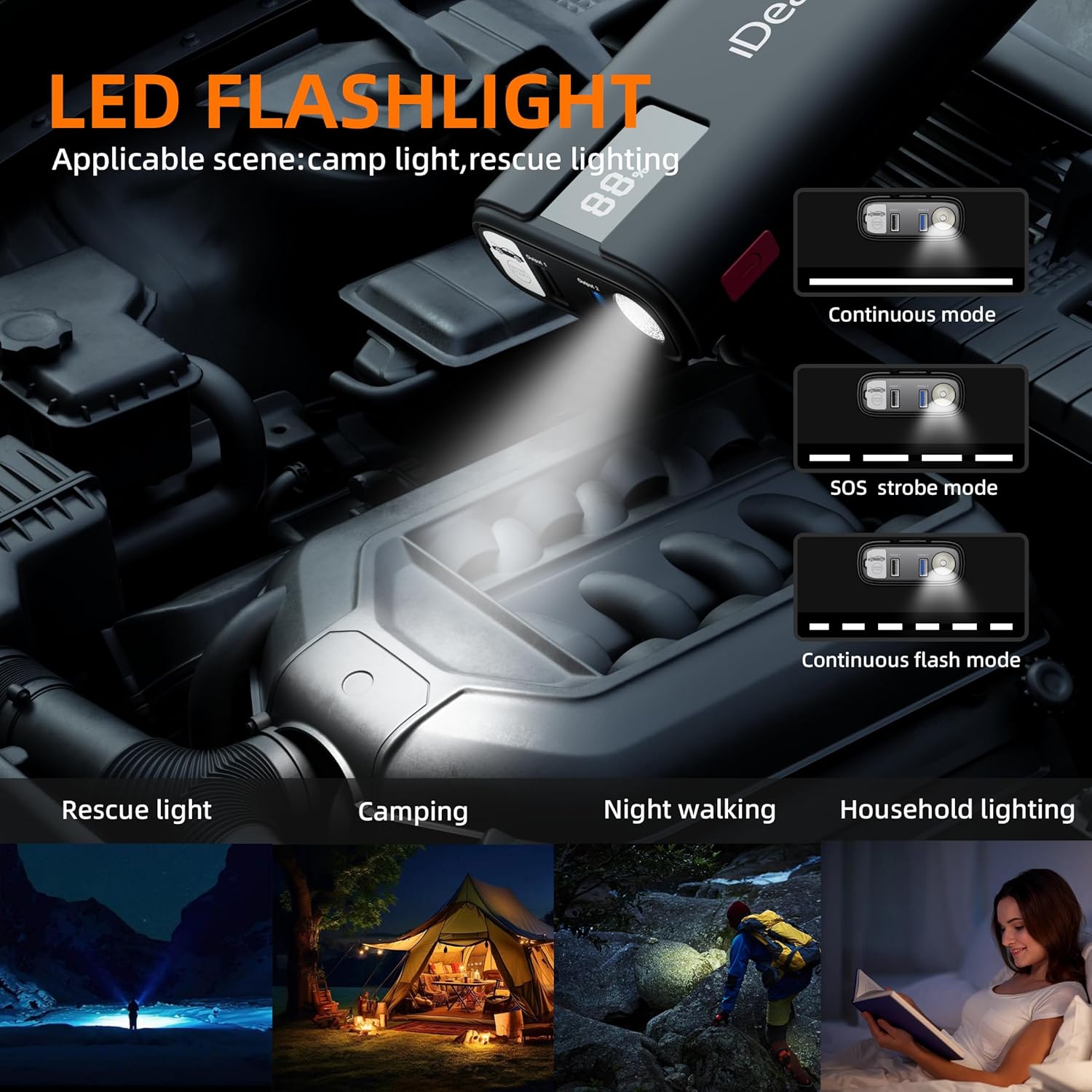
Image: The IDEAPLAY J10's LED flashlight illuminating an engine bay, with illustrations of its continuous, SOS strobe, and continuous flash modes.
Penyelenggaraan dan Penyimpanan
- Bersihkan unit dengan kain kering dan lembut. Jangan gunakan pembersih atau pelarut yang melelas.
- Store the jump starter in its carrying case in a cool, dry place, away from direct sunlight and moisture.
- Recharge the unit every 3-6 months to maintain battery health, even if not used.
- Pastikan clamps are clean and free of corrosion before and after each use.
Menyelesaikan masalah
| Masalah | Kemungkinan Punca | Penyelesaian |
|---|---|---|
| Pemula lompat tidak dihidupkan. | Bateri dinyahcas sepenuhnya. | Caskan penghidup lompat sepenuhnya. |
| Kenderaan tidak bermula. | cl yang salahamp connection; Jump starter battery too low; Vehicle battery severely damaged; Engine too large for jump starter. | Periksa clamp connections (ensure correct polarity); Recharge jump starter; Consult a mechanic for vehicle battery issues; Verify engine displacement compatibility. |
| Pintar clamps buzz/blink red. | Reverse polarity connection; Short circuit; Over-current. | Putuskan sambungan serta-merta dan sambung semula clamps to correct terminals; Check for short circuits; Ensure vehicle engine size is within limits. |
| Penghidup lompat tidak mengecas peranti. | Jump starter battery low; Incorrect cable/port used; Device not compatible. | Charge the jump starter; Ensure correct USB cable and port are used; Try another device to confirm jump starter functionality. |
Waranti dan Sokongan
The IDEAPLAY J10 Jump Starter comes with a Pelan Perlindungan 2 Tahun. For any issues or inquiries, please contact IDEAPLAY customer service. IDEAPLAY brand products are designed in the USA and provide 24/7 service.
You can reach IDEAPLAY customer support through their official webtapak atau maklumat hubungan yang diberikan dalam pembungkusan produk anda.

Image: Graphic indicating 24 months of support and 7x24 customer service availability.
Ask a question about this manual
Ask about setup, troubleshooting, compatibility, parts, safety, or missing instructions. Manuals+ will review the question and use this page’s manual context to help answer it.