
1. Pengenalan
This document provides essential information for the use and maintenance of your replacement remote control for the Fakir Robert II RS 710 Robotic Robot Vacuum Cleaner. This remote is designed to provide core functionalities for operating your vacuum cleaner.

Rajah 1: Depan view alat kawalan jauh, yang menunjukkan paparan dan susun atur butang.
2. Keserasian
This remote control is specifically designed as a replacement for the Fakir Robert II RS 710 Robotic Robot Vacuum Cleaner. To ensure proper functionality, verify that your vacuum cleaner model matches this specification. This remote is an infrared (IR) replacement.
Nota: If your vacuum cleaner's model number is not explicitly listed, please contact the seller for compatibility verification before use.
3. Persediaan: Pemasangan Bateri
The remote control requires batteries for operation. Batteries are tidak termasuk with the remote and must be purchased separately. The remote uses 1 bateri AAA.
- Cari petak bateri di belakang alat kawalan jauh.
- Luncurkan penutup petak bateri ke bawah atau mengikut arah yang ditunjukkan oleh anak panah untuk membukanya.
- Insert 1 AAA battery into the compartment, ensuring the positive (+) and negative (-) terminals align correctly with the markings inside the compartment.
- Gantikan penutup petak bateri dengan menggelongsorkannya semula ke tempatnya sehingga ia berbunyi dengan selamat.
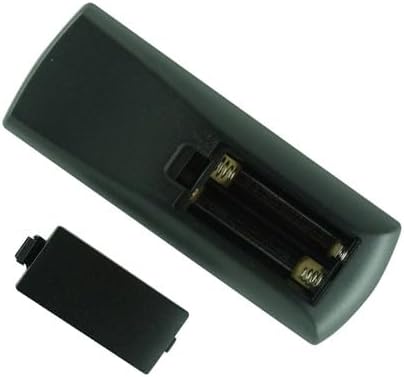
Rajah 2: Belakang view of the remote control with the battery cover removed, illustrating the battery insertion area.
Penting: Always use new, good quality batteries. Remove batteries if the remote will not be used for an extended period to prevent leakage.
4. Arahan Operasi
This replacement remote control provides essential functions for your Fakir Robert II RS 710 Robotic Robot Vacuum Cleaner. The button layout and functions are generally similar to the original remote. Point the remote directly at the vacuum cleaner for optimal signal transmission.
Fungsi Utama:
- Navigation Pad (Center Circle with Arrows): Used for directional control and selection within menus.
- Play/Pause Button (Center of Navigation Pad): Memulakan atau menghentikan kitaran pembersihan.
- Spiral/Spot Clean Button (Bottom Left): Activates a concentrated cleaning mode for specific areas.
- Edge Clean Button (Middle Left): Directs the vacuum to clean along walls and edges.
- Home/Dock Button (Top Right): Sends the vacuum back to its charging dock.
- Schedule Button (Bottom Middle): Likely used for setting or adjusting cleaning schedules.
- Return to Dock Button (Bottom Right): Another button for returning the vacuum to its charging station.
- Time/Clock Button (Middle Right): Likely for setting the current time or scheduling.
For detailed operation of specific cleaning modes or advanced features, please refer to the original user manual of your Fakir Robert II RS 710 Robotic Robot Vacuum Cleaner.
5. Penyelesaian masalah
If your remote control is not functioning as expected, consider the following common issues and solutions:
- Jauh Tidak Menjawab:
- Periksa sama ada bateri dimasukkan dengan betul dengan polariti yang betul (+/-).
- Replace the batteries with new ones. Low battery power is a common cause of unresponsiveness.
- Ensure there are no obstructions between the remote control and the vacuum cleaner's IR receiver.
- Confirm you are within the effective range of the remote control (typically up to 15-20 feet).
- Fungsi Selang-seli:
- This could indicate weak batteries. Try replacing them.
- Ensure the remote's IR emitter is clean and free from dust or debris.
- Remote Does Not Control Vacuum:
- Double-check the compatibility section to ensure this remote is for your specific vacuum cleaner model (Fakir Robert II RS 710).
- Verify that the vacuum cleaner itself is powered on and in a receptive state.
If problems persist after trying these steps, please contact the seller for further assistance.
6. Spesifikasi
| Jenis Produk | Alat kawalan jauh penggantian |
| Jenama | Generik |
| Model Serasi | Fakir Robert II RS 710 Robotic Robot Vacuum Cleaner |
| Sumber Kuasa | 1 x Bateri AAA (tidak termasuk) |
| warna | Hitam |
| Ciri Khas | Infrared (IR) Replacement |
7. Waranti dan Sokongan
Specific warranty information for this replacement remote control is not provided in the product details. For any inquiries regarding warranty, returns, or technical support, please contact the seller directly through the platform where the purchase was made.
It is recommended to retain your purchase receipt or order details for any support requests.