
I-SHUNFA WIFI-E27
I-SHUNFA Wi-Fi Smart E27 LED Bulb User Manual
Model: WIFI-E27
1. Produk Lebihview
The I-SHUNFA Wi-Fi Smart E27 LED Bulb offers advanced lighting control for your smart home. Featuring stepless dimming, adjustable color temperature from warm white (2700K) to cool white (6500K), and compatibility with voice assistants like Amazon Alexa, these bulbs provide versatile illumination. Control your lighting remotely via the Smart Life or Tuya Smart app, set schedules, and create custom scenes to enhance your daily life.

Imej: Selesaiview of the I-SHUNFA Smart LED Bulbs, showing their design, app control interface on a smartphone, and an icon indicating voice control capability.
Ciri-ciri Utama:
- Kesambungan Wi-Fi: Connects directly to your 2.4GHz home Wi-Fi network.
- Boleh dimalapkan: Kecerahan boleh laras dari 1% hingga 100%.
- Putih boleh merdu: Color temperature adjustable from 2700K (warm white) to 6500K (cool white).
- Kawalan Suara: Serasi dengan Amazon Alexa dan Google Assistant.
- Kawalan Apl: Remote control via Smart Life or Tuya Smart app.
- Scheduling & Scenes: Set timers, schedules, and pre-defined lighting scenes.
2. Panduan Persediaan
2.1. Pemasangan
- Pastikan kuasa pada lampu dimatikan sebelum pemasangan.
- Carefully screw the I-SHUNFA Smart E27 LED Bulb into a standard E27 light socket.
- Turn on the power to the light fixture. The bulb should flash rapidly, indicating it's in pairing mode. If not, turn the bulb off and on 3-5 times until it flashes.
2.2. Muat Turun & Pemasangan Aplikasi
To control your smart bulb, you need to download the "Smart Life" or "Tuya Smart" app on your smartphone.
- Download the "Smart Life" or "Tuya Smart" app from the App Store (iOS) or Google Play Store (Android).
- Daftar atau log masuk ke akaun anda.
- Ensure your smartphone is connected to a 2.4GHz Wi-Fi network. The smart bulb only supports 2.4GHz Wi-Fi.
- In the app, tap the "+" icon (usually in the top right corner) to add a device.
- Pilih "Pencahayaan" atau "Sumber Cahaya (Wi-Fi)" daripada senarai peranti.
- Confirm that the bulb is flashing rapidly. If it's not, reset it by turning it off and on 3-5 times until it flashes.
- Enter your 2.4GHz Wi-Fi network password when prompted.
- The app will begin pairing with the bulb. Once connected, you can rename the bulb for easier control.

Image: Visual guide to the bulb's features and compatibility, including app logos and Wi-Fi requirements.
3. Arahan Operasi
3.1. Kawalan Apl
Once paired, you can control your I-SHUNFA Smart LED Bulb using the Smart Life or Tuya Smart app from anywhere with an internet connection.
- Hidup/Mati: Tap the power icon next to the bulb's name to turn it on or off.
- Pelarasan Kecerahan: Slide the brightness bar (1%-100%) to adjust the light intensity.
- Pelarasan Suhu Warna: Slide the color temperature bar to switch between warm white (2700K) and cool white (6500K).
- Adegan: Select from pre-defined scenes like "Reading," "Working," "Good Night," or "Relax," or create your own custom scenes.
- Pemasa & Jadual: Set specific times for the bulb to turn on or off, or to activate certain scenes.

Image: The app interface for adjusting brightness and color temperature, illustrating the range from warm to cool white light.

Image: Setting timers and schedules through the app, allowing automated lighting control for convenience and security.
3.2. Kawalan Suara
The I-SHUNFA Smart LED Bulb is compatible with Amazon Alexa and Google Assistant. To enable voice control, link your Smart Life/Tuya Smart account to your voice assistant app (e.g., Alexa app).
- Memautkan Akaun: Open your Alexa or Google Home app, navigate to "Skills" or "Works with Google," search for "Smart Life" or "Tuya Smart," and enable the skill. Log in with your app account credentials.
- Cari Peranti: After linking, ask your voice assistant to "Discover devices" or manually discover them in the app.
- Perintah Suara Cthamples:
- "Alexa, bukak lampu ruang tamu."
- "Hei Google, malapkan lampu bilik tidur kepada 50%."
- "Alexa, tetapkan lampu dapur kepada putih suam."
- "Hey Google, change the office light to cool white."

Image: Demonstrating voice control functionality with Amazon Alexa, allowing hands-free operation of the smart bulbs.
4. Penyelenggaraan
The I-SHUNFA Smart E27 LED Bulbs are designed for long-term use with minimal maintenance.
- Pembersihan: Before cleaning, ensure the bulb is off and cool. Wipe the bulb with a soft, dry cloth. Do not use liquid cleaners or abrasive materials.
- Storan: If storing the bulbs, keep them in a cool, dry place away from direct sunlight and extreme temperatures.
- Penggantian: These LED bulbs have an average lifespan of 30,000 hours. Replacement is only necessary at the end of their operational life.
5. Penyelesaian masalah
If you encounter issues with your I-SHUNFA Smart E27 LED Bulb, please refer to the following common solutions:
| Masalah | Kemungkinan Punca | Penyelesaian |
|---|---|---|
| Bulb not pairing/flashing. | Not in pairing mode; power cycle issue. | Turn the bulb off and on 3-5 times until it flashes rapidly. Ensure your Wi-Fi is 2.4GHz. |
| Tidak dapat menyambung ke Wi-Fi. | Incorrect Wi-Fi band; weak signal; wrong password. | Ensure your router is broadcasting a 2.4GHz signal. Move the bulb closer to the router. Double-check your Wi-Fi password. |
| Kawalan suara tidak berfungsi. | Account not linked; device not discovered. | Ensure your Smart Life/Tuya Smart account is correctly linked to Alexa/Google Assistant. Ask your voice assistant to "Discover devices." |
| Bulb unresponsive in app. | Loss of Wi-Fi connection; app glitch. | Check your Wi-Fi connection. Restart the app. Power cycle the bulb. |
| Bulb not dimming or changing color. | Not compatible with external dimmer switches. | These bulbs are controlled via the app or voice assistant. Do not use with traditional dimmer switches. |
6. Spesifikasi
| Ciri | Perincian |
|---|---|
| Nombor Model | WIFI-E27 |
| Jenis Asas | E27 |
| Penggunaan Kuasa | 7 Watt (bersamaan dengan pijar 70W) |
| Fluks Bercahaya | 800 lm |
| Suhu Warna | 2700K - 6500K (Putih Hangat ke Putih Sejuk) |
| Kebolehmalapan | 1% - 100% (via app/voice control only) |
| Voltage | AC 220-240V |
| Wi-Fi Standard | 2.4GHz (IEEE 802.11 b/g/n) |
| Jangka hayat | 30,000 Jam |
| Sudut Rasuk | 360 Darjah |
| Dimensi (L x W x H) | 3 x 3 x 8.45 cm |
| Berat badan | 64 gram |
| Pensijilan | Cekap Tenaga |
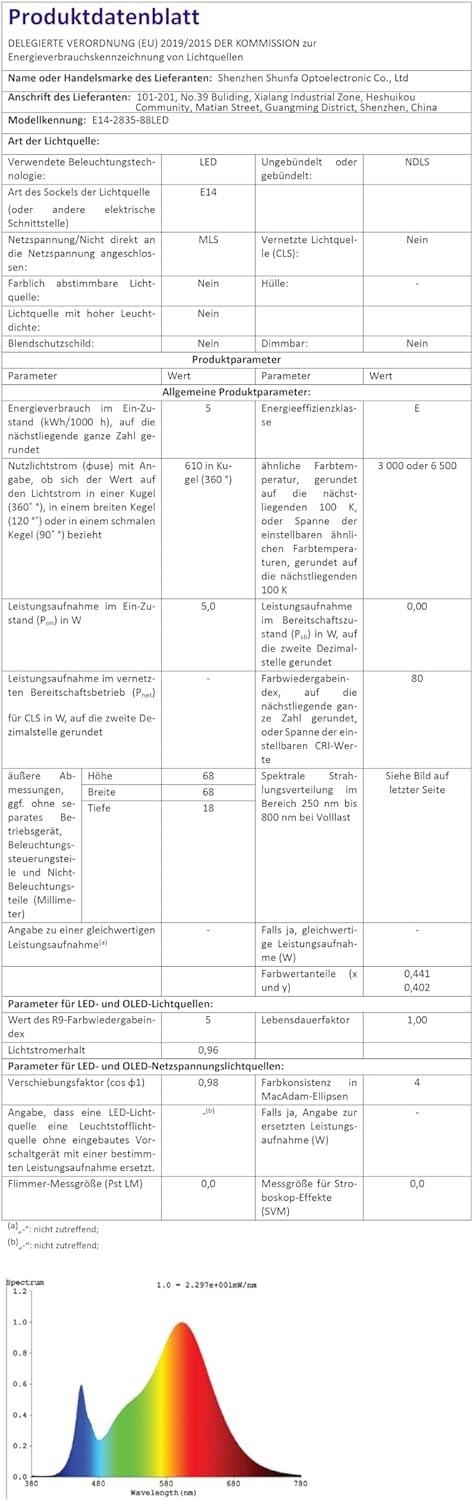
Image: Official product data sheet providing comprehensive technical specifications.
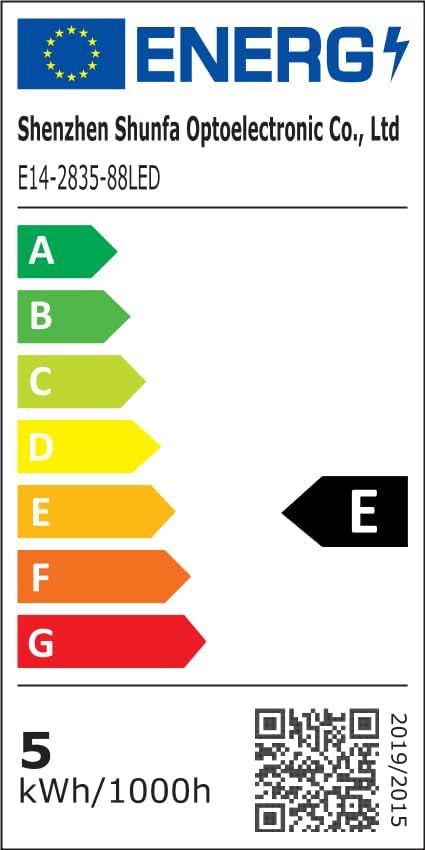
Image: EU Energy Label indicating the bulb's energy efficiency class and consumption. More details can be found via the QR code or by visiting eprel.ec.europa.eu/qr/1250502.
7. Waranti dan Sokongan
I-SHUNFA is committed to providing high-quality products. For any issues or inquiries regarding your smart LED bulbs, please refer to your purchase documentation or contact our customer support.
- Waranti: Please refer to your purchase documentation or the retailer's policy for specific warranty details.
- Sokongan Pelanggan: For technical assistance or product support, please visit the I-SHUNFA brand store on Amazon or contact the seller directly.
- Alat Ganti: Maklumat mengenai ketersediaan alat ganti tidak disediakan.

Image: The official I-SHUNFA brand logo.
Dokumen Berkaitan - WIFI-E27
 |
I-SHUNFA Wi-Fi Smart Dimmable E27 LED Bulbs: User Guide and Setup This guide details the setup and operation of I-SHUNFA Wi-Fi Smart Dimmable E27 LED Bulbs, covering app integration, voice assistant compatibility with Amazon Alexa and Google Assistant, and troubleshooting. |
 |
Déclaration de transparence des données - Ampoule LED intelligente WiFi G9 I-SHUNFA Déclaration de transparence concernant le droit européen sur les données pour l'ampoule LED intelligente WiFi G9 de I-SHUNFA, détaillant la collecte, l'utilisation et la protection des données personnelles conformément au RGPD. |
 |
Shelly DUO Smart LED White Bulb User Guide - Setup, Features, and Control Comprehensive user guide for the Shelly DUO Smart LED White Bulb. Learn about installation, Shelly Cloud app setup, device inclusion, web interface control, scheduling, and warranty information. |
 |
LUCDD WiFi Smart Bulb Instruction Manual - Smart LED Control Comprehensive instruction manual for the LUCDD WiFi Smart Bulb (Model 02342). Learn how to install, connect, and control your smart LED bulb via the LUCDD app, with support for Amazon Alexa and Google Home. |
 |
Manual Pengguna Lampu Siling Pintar BQ.1382 - Panduan Pemasangan, Apl & Kawalan Suara User manual for the BQ.1382 Smart Ceiling Light (BL-B model) by Minpory. This guide provides installation instructions, specifications, and setup procedures for connecting the light to the Smart Life app, Amazon Alexa, and Google Assistant for voice and app control. Features include adjustable color temperature and RGBCW color options. |
 |
Informační list výrobku Hama 00176679 - Energetické štítky světelných zdrojů Detailní informační list výrobku pro Hama 00176679, včetně energetické účinnosti, spotřeby energie, světelného toku a dalších technických parametrů podle nařízení EU. |
Ask a question about this manual
Ask about setup, troubleshooting, compatibility, parts, safety, or missing instructions. Manuals+ will review the question and use this page’s manual context to help answer it.