
1. Pengenalan
Thank you for choosing the Maxcom Smartwatch FW53 Nitro. This manual provides essential information for the safe and efficient use of your device. Please read it carefully before using the smartwatch and keep it for future reference.
The Maxcom FW53 Nitro is a versatile smartwatch designed to enhance your daily activities, offering features such as activity tracking, notification alerts, and health monitoring when connected to a compatible smartphone.
2. Maklumat Keselamatan
- Jangan cuba membuka, membaiki atau mengubah suai peranti. Ini boleh membatalkan jaminan dan menyebabkan kerosakan.
- Jauhkan peranti daripada suhu yang melampau, cahaya matahari langsung dan kelembapan.
- Elakkan mendedahkan peranti kepada hentaman atau getaran yang kuat.
- Use only the charger provided or recommended by the manufacturer.
- Consult a medical professional before starting any new exercise regimen or if you have a medical condition that could be affected by using the smartwatch.
- This device is not a medical device and should not be used for diagnosing or treating any medical condition.
3. Kandungan Pakej
Sila semak kandungan bungkusan semasa dibuka. Jika ada barang yang hilang atau rosak, hubungi peruncit anda.
- Maxcom Smartwatch FW53 Nitro
- Kabel Pengecasan
- Manual Pengguna (dokumen ini)
4. Peranti Lebihview
The Maxcom FW53 Nitro features a rectangular display and a single physical button for navigation and control. The back of the device houses the charging contacts and health sensors.
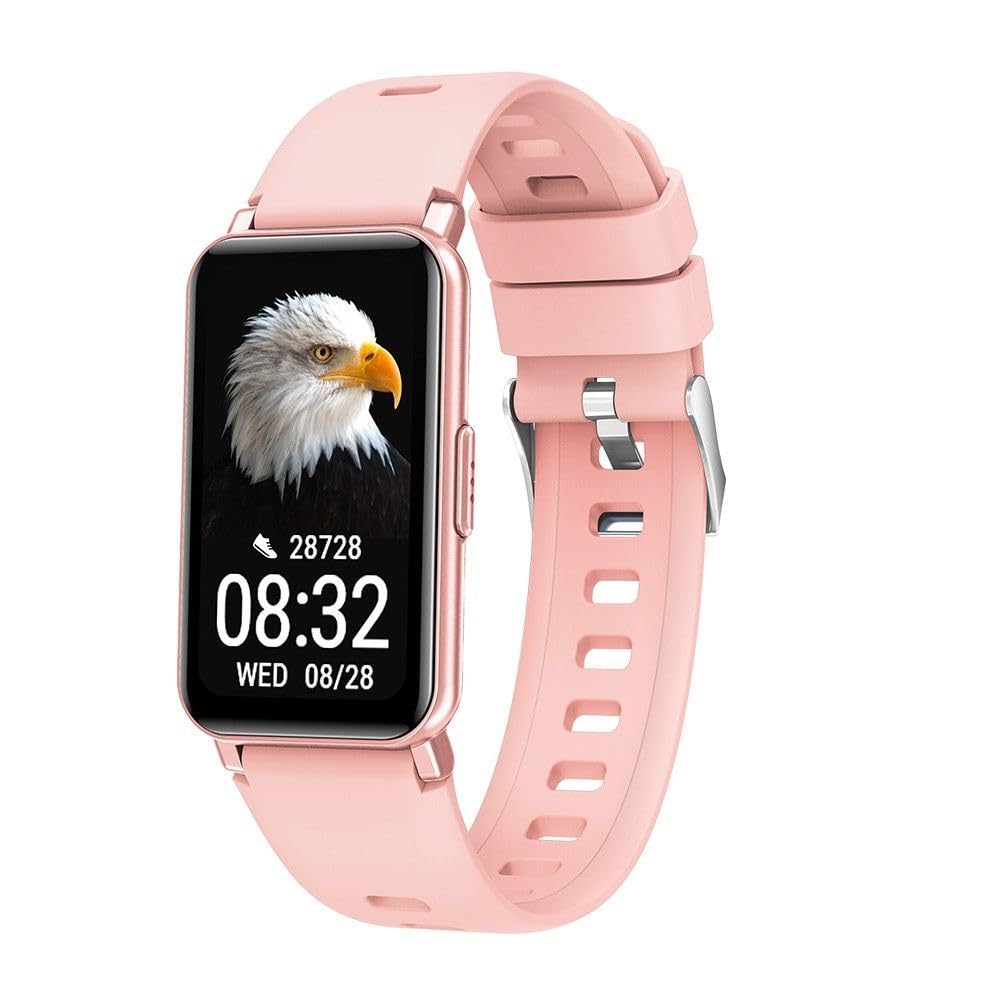
Image 1: Maxcom Smartwatch FW53 Nitro Gold. This image displays the front view of the smartwatch, highlighting its rectangular screen and overall design.
Note: No additional product images or official seller videos were available in the provided data for embedding.
4.1. Komponen
- Paparan skrin sentuh: For interacting with the user interface.
- Butang Sisi: Typically used for powering on/off, returning to the home screen, or accessing the menu.
- Penderia Kadar Jantung: Located on the back of the watch, for monitoring heart rate.
- Mengecas Kenalan: Located on the back of the watch, for connecting the charging cable.
5. Persediaan
5.1. Mengecas Jam Pintar
- Sambungkan kabel pengecas kepada penyesuai kuasa USB (tidak disertakan) atau port USB komputer.
- Align the magnetic charging pins of the cable with the charging contacts on the back of the smartwatch. The cable will snap into place.
- The watch display will show a charging indicator. Allow the device to charge fully before first use. A full charge typically takes 1-2 hours.
5.2. Menghidupkan/Mematikan
- Untuk Menghidupkan: Press and hold the side button for a few seconds until the Maxcom logo appears.
- Untuk Mematikan: From the home screen, swipe down or navigate to the settings menu, then select the 'Power Off' option. Alternatively, press and hold the side button and select 'Power Off' when prompted.
5.3. Berpasangan dengan Telefon Pintar Anda
The Maxcom FW53 Nitro connects to your smartphone via Bluetooth using a dedicated companion application.
- Muat turun Apl: Cari untuk the official Maxcom smartwatch companion app (refer to the packaging or quick start guide for the exact app name) on the App Store (iOS) or Google Play Store (Android) and install it on your smartphone.
- Dayakan Bluetooth: Pastikan Bluetooth didayakan pada telefon pintar anda.
- Buka Apl: Launch the companion app on your smartphone and follow the on-screen instructions to create an account or log in.
- Tambah Peranti: Within the app, navigate to the 'Add Device' or 'Pair Device' section. The app will search for available smartwatches.
- Select Your Smartwatch: Select 'FW53 Nitro' from the list of discovered devices.
- Sahkan Gandingan: A pairing request may appear on both your smartphone and the smartwatch. Confirm the pairing on both devices.
- Persediaan Lengkap: Follow any remaining prompts in the app to complete the setup, including granting necessary permissions for notifications, location, etc.
6. Mengendalikan Jam Pintar
6.1. Navigasi Asas
- Leret ke atas/bawah: To scroll through menus or notifications.
- Leret Kiri/Kanan: To switch between different watch faces or quick access widgets.
- Ketik: Untuk memilih item atau membuka aplikasi.
- Side Button Press: A short press usually returns to the home screen or acts as a back button. A long press may access power options or a specific function.
6.2. Ciri-ciri Utama
- Pemberitahuan: Terima makluman untuk panggilan, mesej dan pemberitahuan aplikasi daripada telefon pintar anda yang dipasangkan.
- Penjejakan Aktiviti: Monitors steps taken, distance covered, and calories burned.
- Pemantauan Denyut Jantung: Measures your heart rate throughout the day or on demand.
- Pemantauan Tidur: Tracks your sleep patterns, including deep and light sleep stages.
- Mod Sukan: Offers various modes for tracking specific exercises (e.g., running, walking).
- Kawalan Muzik: Kawal main balik muzik pada telefon pintar anda terus dari jam tangan.
- Jauh Kamera: Gunakan jam tangan sebagai pengatup jauh untuk kamera telefon pintar anda.
- Cuaca: Displays current weather information when connected to your smartphone.
6.3. Menggunakan Aplikasi Pendamping
The companion app on your smartphone is crucial for unlocking the full potential of your Maxcom FW53 Nitro. It allows you to:
- View detailed activity and health data.
- Customize watch faces.
- Tetapkan penggera dan peringatan.
- Manage notification settings.
- Update the smartwatch firmware.
- Configure personal profile maklumat.
7. Penyelenggaraan
7.1. Pembersihan
- Wipe the smartwatch and strap regularly with a soft, damp, kain tidak berbulu.
- Jangan gunakan bahan kimia yang keras, pembersih yang kasar atau pelarut.
- Pastikan peranti kering sebelum mengecas.
7.2. Penjagaan Bateri
- Elakkan menyahcas sepenuhnya bateri dengan kerap.
- Cas peranti secara berkala, walaupun tidak digunakan, untuk mengekalkan kesihatan bateri.
- Simpan peranti di tempat yang sejuk dan kering jika tidak digunakan untuk tempoh yang lama.
7.3. Kemas Kini Perisian
Periodically check the companion app for available software updates. Updates can improve performance, add new features, and fix bugs. Ensure your watch is sufficiently charged before starting an update.
8. Penyelesaian masalah
| Isu | Penyelesaian yang Mungkin |
|---|---|
| Smartwatch does not power on | Pastikan peranti dicas sepenuhnya. Tekan dan tahan butang sisi selama sekurang-kurangnya 10 saat. |
| Tidak boleh berpasangan dengan telefon pintar | Ensure Bluetooth is enabled on your phone. Restart both the smartwatch and smartphone. Make sure the companion app is installed and running. Forget the device in your phone's Bluetooth settings and try pairing again. |
| Notifications are not received | Check notification permissions in your phone's settings for the companion app. Ensure the app is running in the background. Verify notification settings within the companion app. |
| Data kesihatan yang tidak tepat | Ensure the watch is worn snugly on your wrist, not too tight or too loose. Clean the sensor area on the back of the watch. Ensure your personal information (age, height, weight) is accurate in the companion app. |
| Bateri cepat habis | Reduce screen brightness. Limit background app refresh. Turn off features like continuous heart rate monitoring if not needed. Ensure no apps are constantly running in the background on the watch. |
8.1. Tetapan Semula Kilang
If you encounter persistent issues, a factory reset may resolve them. This will erase all data on your smartwatch and restore it to its original factory settings.
- Navigate to the 'Settings' menu on your smartwatch.
- Look for an option like 'System', 'Reset', or 'Factory Reset'.
- Sahkan tetapan semula apabila digesa.
9. Spesifikasi
| Ciri | Perincian |
|---|---|
| Nama Model | FW53 Nitro |
| Jenama | Maxcom |
| Ketersambungan | Bluetooth |
| Peranti Serasi | Telefon pintar |
| Komposisi Bateri | Litium-polimer |
| GPS | Via smartphone (uses phone's GPS) |
| bentuk | segi empat tepat |
| Saiz Skrin | 0.634 inches (Please note this value is as provided in product data and may refer to a specific measurement unit or be a typo. Actual display size may vary.) |
| Khalayak Sasaran | Adult Mixed |
10. Sokongan
For further assistance, technical support, or warranty information, please refer to the contact details provided with your purchase or visit the official Maxcom webtapak. Simpan resit pembelian anda sebagai bukti pembelian.