
1. Pengenalan
The Sygonix SY-5044422 Digital Timer Switch is designed for easy programming and operation, helping to manage power consumption for various appliances. This device features 20 ON/OFF programs, 3 random settings, and a countdown function, with switching intervals as short as 1 minute. Programs can be set for specific days, combinations of days, or daily. Its IP44 splash-proof rating allows for outdoor use, and an integrated battery retains settings during power outages. The timer supports a maximum switching capacity of 1800 W and includes enhanced touch protection.
2. Arahan Keselamatan
- Baca semua arahan dengan teliti sebelum digunakan.
- This device is rated IP44, making it splash-proof for outdoor use. However, do not immerse it in water or expose it to direct jets of water.
- Ensure the total load of connected appliances does not exceed 1800 W.
- Do not open the device housing. Repairs should only be performed by qualified personnel.
- Keep out of reach of children. The device features enhanced touch protection.
- Sentiasa cabut palam pemasa dari soket kuasa sebelum membersihkan.
3. Kandungan Pakej
- Sygonix SY-5044422 Digital Timer Switch
- Manual Arahan
- Maklumat Waranti
4. Produk Lebihview
Familiarize yourself with the components and controls of your digital timer switch.
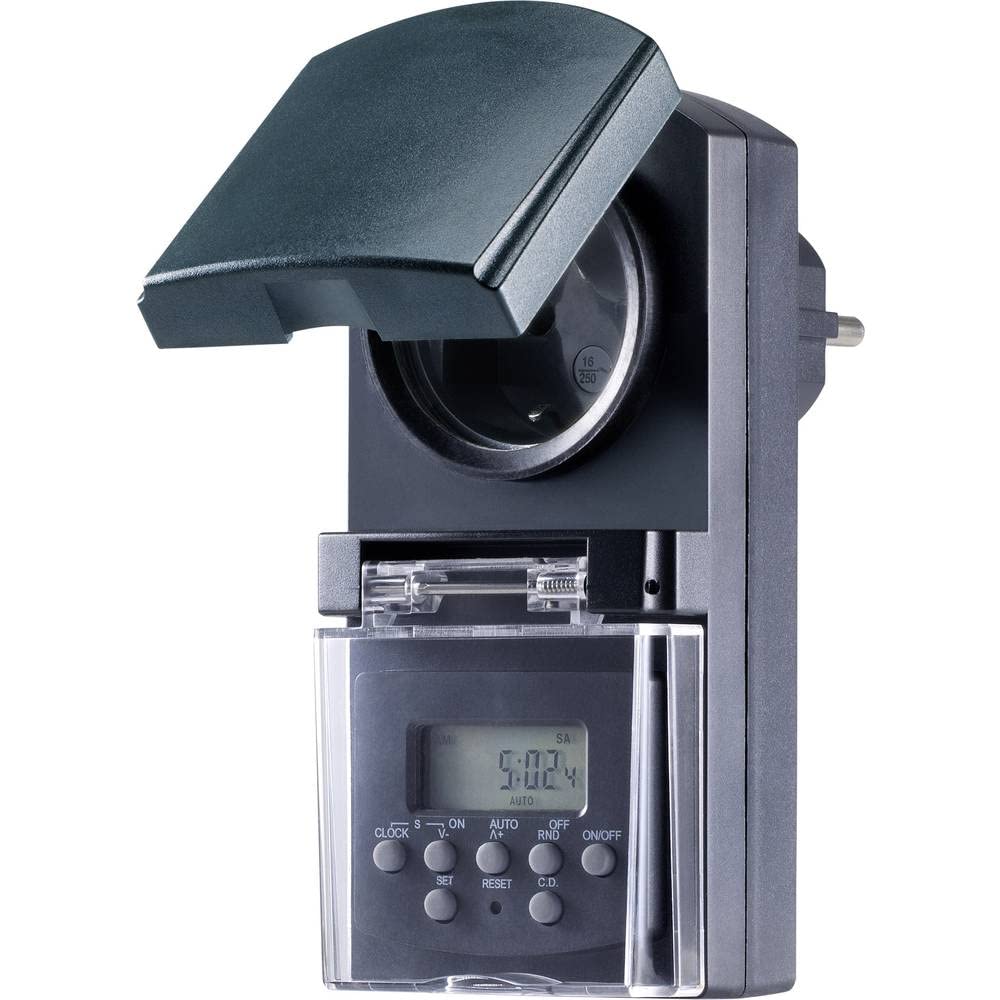
Rajah 1: Depan view of the Sygonix SY-5044422 Digital Timer Switch. This image displays the LCD screen, which shows the current time and day, along with various control buttons including CLOCK, ON/OFF, SET, RESET, AUTO/A+, OFF/RND, and C.D. (Countdown).

Rajah 2: Depan view of the timer with the protective cover opened, showing the integrated power socket. The display and control buttons are visible below the socket.
Butang Kawalan:
- JAM: Digunakan untuk menetapkan waktu dan hari semasa.
- HIDUP/MATI: Manually switches the timer output ON or OFF.
- SET: Enters programming mode and confirms settings.
- TETAP SEMULA: Mengosongkan semua tetapan dan menetapkan semula pemasa kepada tetapan lalai kilang.
- AUTO/A+: Cycles through automatic mode, program settings, and adjusts values.
- OFF/RND: Activates or deactivates the Random function.
- C.D. (Countdown): Activates or deactivates the Countdown function.
5. Persediaan
5.1 Pengecasan Awal
Before first use, plug the timer into a power outlet for approximately 30 minutes to charge the internal battery. This ensures the display is active and settings are retained during power outages or when unplugged.
5.2 Menetapkan Waktu dan Hari Semasa
- Tekan dan tahan butang JAM butang.
- Sambil pegang JAM, tekan AUTO/A+ repeatedly to set the current day (MO, TU, WE, TH, FR, SA, SU).
- Sambil pegang JAM, tekan SET repeatedly to set the current hour.
- Sambil pegang JAM, tekan OFF/RND berulang kali untuk menetapkan minit semasa.
- Lepaskan JAM butang untuk menyimpan tetapan.
5.3 Summer Time Adjustment
The timer supports a summer time function. To activate or deactivate:
- Tekan dan tahan butang JAM butang dan HIDUP/MATI button simultaneously for 3 seconds. The display will show "SUMMER" or "WINTER" to indicate the mode.
6. Arahan Operasi
6.1 Programming ON/OFF Times (Weekly Program)
The timer allows for up to 20 ON/OFF programs. Each program can be set for specific days or combinations of days.
- Tekan ke SET button once to enter program mode. The display will show "1 ON".
- Tekan AUTO/A+ to select the desired day(s) for the program (e.g., MO, TU, WE, TH, FR, SA, SU, MO-FR, SA-SU, MO-SA, etc.).
- Tekan SET to confirm the day selection.
- Tekan AUTO/A+ untuk menetapkan jam ON yang diingini.
- Tekan OFF/RND untuk menetapkan minit ON yang diingini.
- Tekan SET again. The display will now show "1 OFF".
- Repeat steps 2-5 to set the OFF time for the same program.
- Teruskan menekan SET to cycle through all 20 ON/OFF programs. To exit program mode at any time, press the JAM butang.
Nota: After programming, ensure the timer is in AUTO mode for the programs to execute. Press HIDUP/MATI repeatedly until "AUTO" is displayed.
6.2 Fungsi Undur
The countdown function allows you to switch the connected appliance ON or OFF after a set duration.
- Tekan ke CD button once. The display will show "CD ON" or "CD OFF".
- Tekan AUTO/A+ to set the desired countdown hour.
- Tekan OFF/RND to set the desired countdown minute.
- Tekan CD again to start the countdown. The display will show the remaining time.
- To cancel the countdown, press CD sekali lagi.
6.3 Random Function (Presence Simulation)
The random function simulates presence by randomly switching the connected appliance ON and OFF within a set time window, deterring potential intruders.
- Pastikan pemasa berada dalam keadaan AUTO mod.
- Tekan ke OFF/RND button. The display will show "RND" to indicate the random function is active.
- The timer will now randomly switch the output ON and OFF for short periods within the programmed ON/OFF times.
- To deactivate the random function, press OFF/RND again. "RND" will disappear from the display.
6.4 Manual ON/OFF Override
You can manually override the programmed settings at any time.
- Tekan ke HIDUP/MATI button repeatedly to cycle through "ON", "OFF", and "AUTO" modes.
- "ON" means the output is continuously ON.
- "OFF" means the output is continuously OFF.
- "AUTO" means the timer will follow the programmed settings.
7. Penyelenggaraan
- Before cleaning, always unplug the timer from the power outlet.
- Lap peranti dengan kain lembut dan kering. Jangan gunakan pembersih atau pelarut yang melelas.
- Ensure no liquids enter the device.
8. Penyelesaian masalah
| Masalah | Kemungkinan Punca | Penyelesaian |
|---|---|---|
| Paparan kosong atau malap. | Bateri dalaman dinyahcas. | Pasangkan pemasa ke soket kuasa hidup selama sekurang-kurangnya 30 minit untuk mengecas bateri. |
| Programs are not executing. | Timer is not in AUTO mode. | Tekan ke HIDUP/MATI button repeatedly until "AUTO" is displayed. |
| Incorrect time or day displayed. | Time/day was not set correctly or reset. | Refer to Section 5.2 "Setting Current Time and Day" to re-set. |
| All settings lost after power outage. | Internal battery not charged or faulty. | Ensure the timer is regularly plugged in to keep the internal battery charged. If the issue persists, contact support. |
9. Spesifikasi
| Nombor Model: | SY-5044422 |
| Max. Switching Capacity: | 1800 W |
| Kelas Perlindungan: | IP44 (kalis percikan) |
| Jenis Paparan: | digital |
| Program: | 20 program HIDUP/MATI |
| Minimum Switching Interval: | 1 minit |
| Ciri Khas: | Countdown function, Random function (presence simulation), Summer time, Integrated battery for settings retention, Enhanced touch protection. |
| Dimensi Produk: | 14 x 10 x 6 cm |
| Pengeluar: | Sygonix |
| Negara Asal: | China |
10. Waranti dan Sokongan
This product comes with a minimum 2-year warranty from the date of purchase. In case of any issues or defects, please contact your retailer or Sygonix customer support for assistance. Keep your proof of purchase for warranty claims.