
1. Pengenalan
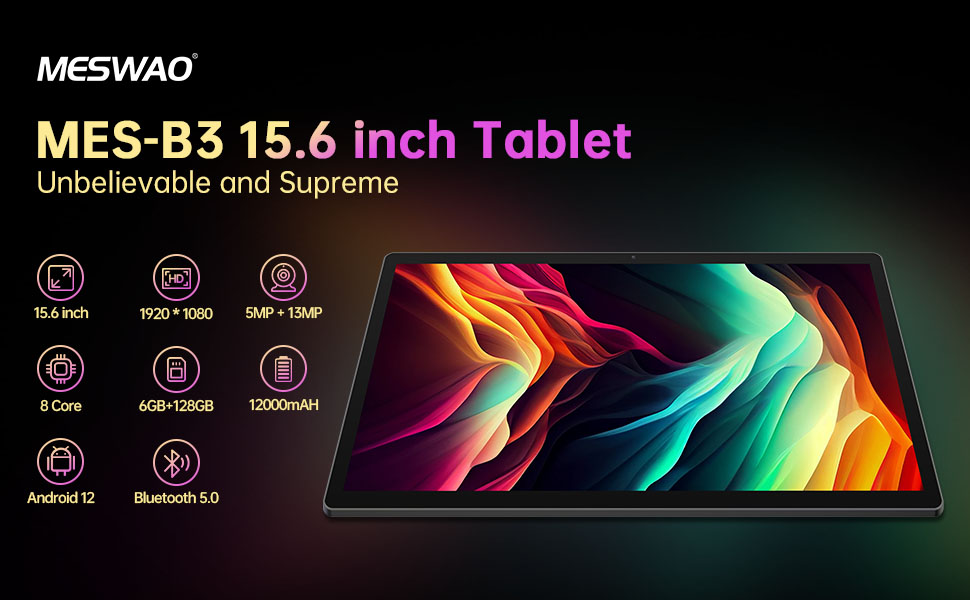
Welcome to the user manual for your MESWAO MES-B3 15.6-inch Android 13 Tablet. This document provides essential information for setting up, operating, maintaining, and troubleshooting your device. The MES-B3 tablet features a large 15.6-inch IPS HD display, an Octa-Core processor, 6GB RAM, 128GB internal storage (expandable), and a 12000mAh battery, designed for a versatile user experience.

Figure 1: MESWAO MES-B3 Tablet Overview
2. Maklumat Keselamatan
Please read all safety instructions carefully before using your tablet to prevent injury or damage to the device. Keep this manual for future reference.
- Keselamatan Bateri: Do not attempt to replace the battery yourself. Do not expose the tablet to extreme temperatures, direct sunlight, or fire. Do not puncture, drop, or disassemble the battery.
- Air dan Kelembapan: This tablet is not waterproof. Avoid exposing it to water, rain, or high humidity.
- Pembersihan: Use a soft, dry cloth to clean the tablet. Do not use liquid cleaners or aerosols.
- Pengendalian: Avoid dropping the tablet or subjecting it to strong impacts.
- Perlindungan Pendengaran: When using headphones, set the volume to a moderate level to avoid hearing damage.
3. Kandungan Pakej
Sahkan bahawa semua item terdapat dalam pakej:
- MESWAO MES-B3 15.6-inch Android 13 Tablet
- Penyesuai Kuasa
- Kabel USB-C
- Manual Pengguna (dokumen ini)
4. Peranti Lebihview
Familiarize yourself with the physical components of your MESWAO MES-B3 tablet.

Figure 2: Buttons and Connectors
- Butang Kuasa: Press and hold to turn the tablet on or off. Press briefly to turn the screen on or off.
- Butang Kelantangan: Laraskan kelantangan audio.
- Kamera Depan: Untuk panggilan video dan swafoto (5MP).
- Rear Camera with Flashlight: Untuk mengambil foto dan video (13MP).
- Pelabuhan Jenis-C: For charging the tablet and connecting to a computer.
- Slot Kad TF: Insert a MicroSD card to expand storage.
- Pembesar Suara Stereo: Menyediakan output audio.
5. Persediaan
5.1 Mengecas Tablet
Before first use, fully charge your tablet. Connect the USB-C cable to the tablet's Type-C port and the other end to the power adapter. Plug the adapter into a wall outlet. The battery indicator on the screen will show charging status.
5.2 Menghidupkan/Mematikan
- Untuk Menghidupkan: Press and hold the Power Button until the MESWAO logo appears.
- Untuk Mematikan: Press and hold the Power Button until the power options appear, then select 'Power off'.
- Untuk Mulakan Semula: Press and hold the Power Button until the power options appear, then select 'Restart'.
5.3 Wizard Persediaan Awal
Upon first power-on, the tablet will guide you through an initial setup process:
- Pilih bahasa pilihan anda.
- Sambung ke rangkaian Wi-Fi.
- Log masuk dengan akaun Google anda atau buat yang baharu.
- Review dan terima terma dan syarat.
- Sediakan kunci skrin (PIN, corak, kata laluan).
5.4 Memasukkan Kad MicroSD
To expand the tablet's storage, you can insert a MicroSD card (up to 256GB, as per some product information, though 1TB is also mentioned in images, please verify with product packaging for exact maximum). Locate the TF card slot on the side of the tablet. Gently insert the MicroSD card with the gold contacts facing down until it clicks into place.

Figure 3: Storage Expansion with MicroSD Card
6. Mengendalikan Tablet Anda
6.1 Navigasi Asas
The MESWAO MES-B3 runs on Android 13, offering an intuitive touch interface.
- Ketik: Pilih item atau buka apl.
- Leret: Navigasi melalui skrin, tatal senarai atau tutup pemberitahuan.
- Cubit-untuk-Zum: Besarkan atau kecilkan kandungan pada skrin.
- Skrin Utama: Access your apps and widgets. Swipe down from the top for notifications and quick settings.
Rajah 4: Antara Muka Android 13
6.2 Sambungan Wi-Fi
- Pergi ke tetapan > Rangkaian & internet > Internet.
- Hidupkan Wi-Fi.
- Pilih rangkaian yang anda inginkan daripada senarai dan masukkan kata laluan jika digesa.
6.3 Berpasangan Bluetooth
The tablet supports Bluetooth 5.0 for connecting wireless accessories.
- Pergi ke tetapan > Peranti yang disambungkan > Keutamaan sambungan > Bluetooth.
- Hidupkan Bluetooth.
- Pastikan peranti Bluetooth anda berada dalam mod berpasangan.
- Select your device from the 'Available devices' list and follow on-screen prompts to pair.
6.4 Pengurusan Apl
- Pasang Apl: Open the Google Play Store app, search for your desired app, and tap 'Install'.
- Nyahpasang Apl: Tekan dan tahan ikon apl pada skrin utama atau laci apl, kemudian seret ke 'Nyahpasang' atau pilih 'Maklumat apl' dan pilih 'Nyahpasang'.
- Manage Apps: Pergi ke tetapan > Apl kepada view, force stop, or clear data for installed applications.
6.5 Tetapan Paparan
Sesuaikan anda viewpengalaman:
- Pergi ke tetapan > Paparan.
- Laraskan Tahap kecerahan.
- Tetapkan Tamat masa skrin (sleep duration).
- Berubah Saiz fon dan Saiz paparan.
- Dayakan Tema gelap for reduced eye strain.
6.6 Pengurusan Bateri
The MES-B3 features a 12000mAh battery for extended use.

Rajah 5: Melanjutkan Hayat Bateri
- Pergi ke tetapan > Bateri kepada view usage and optimize settings.
- Dayakan Penjimat Bateri mode to extend battery life when needed.
- Tutup apl yang tidak digunakan yang berjalan di latar belakang.
- Kurangkan kecerahan skrin.
7. Penyelenggaraan
7.1 Pembersihan
- Gunakan kain lembut yang tidak berbulu untuk mengelap skrin dan badan dengan lembut.
- Untuk calitan degil, sedikit dampen kain dengan air atau pembersih skrin yang direka khusus untuk elektronik.
- Avoid using abrasive materials, alcohol, or chemical solvents.
7.2 Penyimpanan
- Simpan tablet di tempat yang sejuk dan kering jauh dari cahaya matahari langsung dan suhu yang melampau.
- If storing for an extended period, ensure the battery is charged to about 50% to prolong its lifespan.
7.3 Kemas Kini Perisian
Semak kemas kini perisian secara kerap untuk memastikan prestasi dan keselamatan yang optimum.
- Pergi ke tetapan > Sistem > Kemas kini sistem.
- The tablet will check for available updates. Follow the on-screen instructions to download and install any updates.
8. Penyelesaian masalah
Berikut ialah penyelesaian kepada isu biasa yang mungkin anda hadapi:
| Masalah | Penyelesaian |
|---|---|
| Tablet tidak dapat dihidupkan | Ensure the tablet is charged. Connect it to the charger for at least 30 minutes, then try powering it on again. |
| Isu sambungan Wi-Fi | Restart your Wi-Fi router and the tablet. Go to Settings > Network & internet > Internet, forget the network, and reconnect. |
| Prestasi perlahan | Close unused apps. Clear cache for frequently used apps (Settings > Apps > [App Name] > Storage & cache > Clear cache). Restart the tablet. |
| Bateri cepat habis | Reduce screen brightness. Disable Wi-Fi/Bluetooth when not in use. Close background apps. Check battery usage in Settings > Battery to identify power-hungry apps. |
| Apl ranap atau beku | Force stop the app (Settings > Apps > [App Name] > Force stop). Clear the app's cache. If the problem persists, uninstall and reinstall the app. |
9. Spesifikasi
Detailed technical specifications for the MESWAO MES-B3 tablet:

Figure 6: Key Features and Specifications
| Ciri | Spesifikasi |
|---|---|
| Jenama | MESWAO |
| Nombor Model | MES-B3 |
| Sistem Operasi | Android 13 |
| Pemproses | MediaTek Octa-Core (MTK6789) |
| RAM | 6 GB |
| Storan Dalaman | 128 GB |
| Storan Boleh Dikembangkan | Up to 256 GB (via TF/MicroSD card) |
| Saiz Skrin | 15.6 Inci |
| Resolusi Skrin | 1920 x 1080 Pixels (IPS HD) |
| Kamera Depan | 5 MP |
| Kamera Belakang | 13 MP |
| Kapasiti Bateri | 12000 mAh |
| Hayat Bateri | Approximately 10 hours (usage dependent) |
| Ketersambungan | Bluetooth 5.0, Wi-Fi (802.11ac, 2.4G/5G) |
| Pelabuhan | USB Type-C, TF Card Slot |
| warna | Kelabu |
| Dimensi (L x W x H) | 36.85 x 22.25 x 0.93 cm |
| Berat badan | 1.1 Kilogram |
10. Waranti dan Sokongan
Your MESWAO MES-B3 tablet is covered by a standard manufacturer's warranty. Please refer to the warranty card included in your package for specific terms and conditions, including warranty duration and coverage details.
For technical support, troubleshooting assistance beyond this manual, or warranty claims, please contact MESWAO customer service through the retailer where you purchased the product or visit the official MESWAO webtapak untuk maklumat hubungan.